00196376-0102_UM S-Feeder_EN.pdf - 第41页
Tape Feeder Modules Setting the Step Size Details for 3x8 mm S Feeders User Manual SIPLACE S-Feeder 41 2.2.3 Setting the Step Size The 3x8 mm S feeder s can be used wit h a step size of 2 mm, 4 mm or 8 mm (only for 3x 8 …
Tape Feeder Modules
Details for 3x8 mm S Feeders Inserting the Tape
40 User Manual SIPLACE S-Feeder
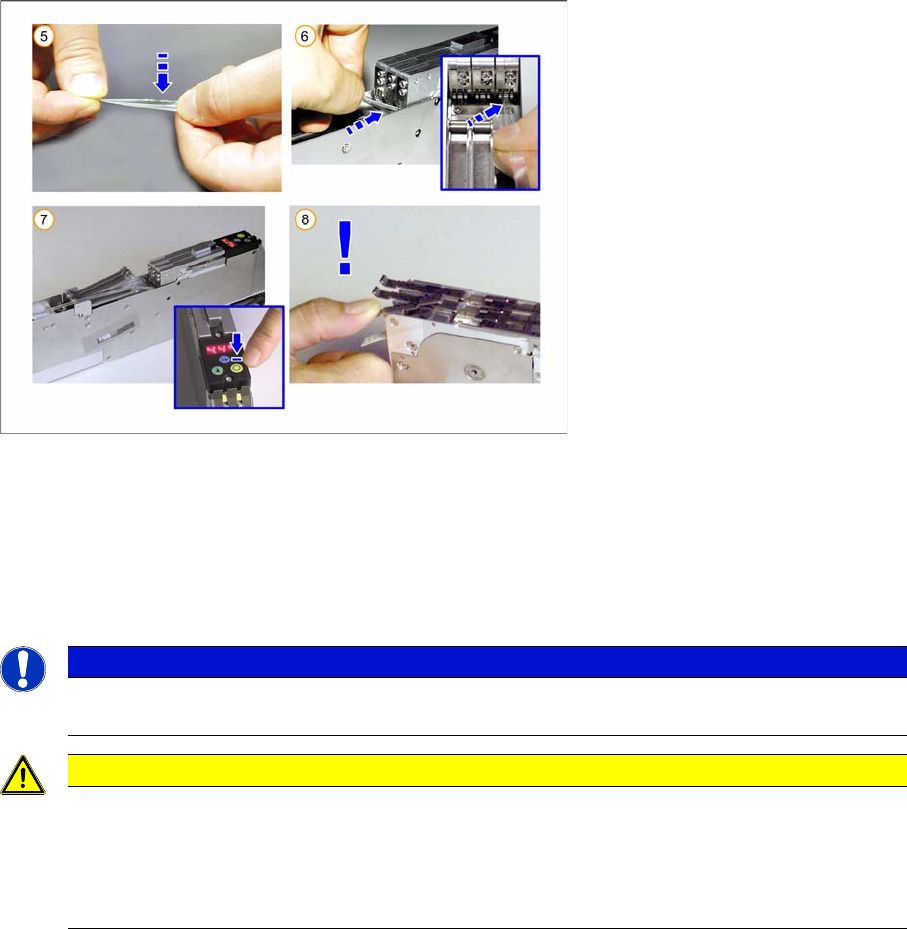
►(5) Fold the tape together in a V shape - with the adhesive side pointing inwards.
►(6) Hold the beginning of the foil from above, over the foil rocker, under the toothed wheel of the foil
removal point.
►(7) Press the yellow "Foil” button on the control unit.
The motor will run while you are pressing the button and while the foil rocker is not tensioned and
will draw the foil in. Hold the button pressed until the motor switches off automatically.
NOTICE
Make sure that the foil lies flat between the toothed wheels, that it has no folds and that it is not
pulled away to the sides of the toothed wheels.
CAUTION
(8) Once the tape and the cover tape are inserted, the holddown for the cover flap may not be
opened without first folding out the foil tensioner. Nonobservance of this will cause the tape to
be torn out of its perforations by the tension applied to the foil and it to be moved forward by
several pockets.
The result: component losses and possible malfunctions from loose components.
Tape Feeder Modules
Setting the Step Size Details for 3x8 mm S Feeders
User Manual SIPLACE S-Feeder 41
2.2.3 Setting the Step Size
The 3x8 mm S feeders can be used with a step size of 2 mm, 4 mm or 8 mm (only for 3x8 mm S and
3x8 mm SL).
To set the step size, proceed as follows:
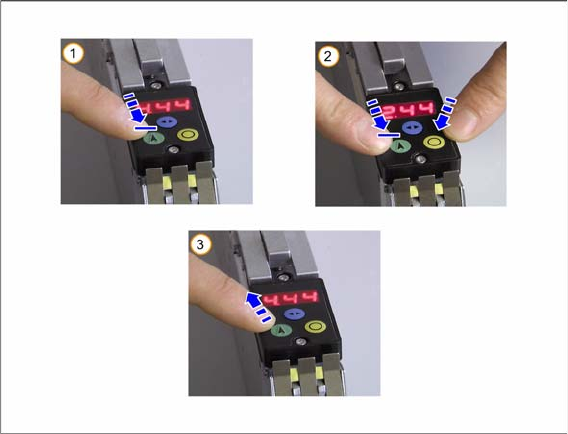
►Use the blue "Select" button to select the track for which you want to set the step size.
The selected track will be marked by a dot in the control unit display.
►(1) Press the green "Index" button and hold until the display begins to flash.
►(2) Hold the green "Index" button and, at the same time, press the yellow "Foil" button.
The step size will change each time you press the yellow button and will flash on the control unit
display.
►(3) Release the green "Index" button. The set step size will be shown permanently.
Tape Feeder Modules
Details for 3x8 mm S Feeders Inserting the Tape Reel Holder
42 User Manual SIPLACE S-Feeder
2.2.4 Inserting the Tape Reel Holder
When using 3x8 mm S feeders, the tapes to be processed are so close together that it is better not to
place the corresponding tape reels next to one another but instead in a staggered or offset arrangement.
The middle tape reel for each feeder is positioned slightly higher than the others, on a tape reel holder.
Each of these tape reel holders can accommodate one tape reel on the left and one on the right i.e. a
maximum of two tape reels. A deflection pulley keeps the tapes tensioned.
Example
You want to use four 3x8 mm S feeders next to one another.
In this case you will need 2 tape reel holders with deflection pulley.
▪ Tape reel holder A accommodates the middle tape from feeder 1 on its left and the middle tape from
feeder 2 on its right.
▪ Tape reel holder B accommodates the middle tape from feeder 3 on its left and the middle tape from
feeder 4 on its right.
2.2.4.1 Preparing the Middle Tape Reels
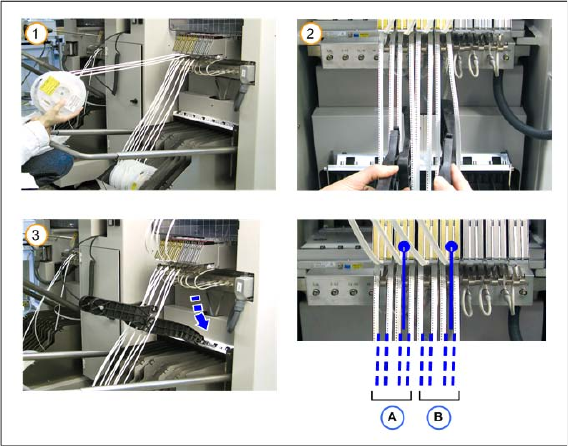
►(1) Take the middle tape reel of each feeder and place it higher up.
►(2) Insert the tape reel holder in each second space e.g. as shown on the photo at feeders 2 and 4
(A and B).
►(3) Make sure that the tape reel holder engages correctly into the rail.
►Now place the middle tape reels onto the sides of the tape reel holders.
Example:
Place the middle tape of feeder 1 onto the left of tape reel holder A and the middle tape of feeder 2
onto the right side of the same holder.
Place the middle tape of feeder 3 onto the left of tape reel holder B and the middle tape of feeder 4
onto the right side of this holder.