00196376-0102_UM S-Feeder_EN.pdf - 第49页
Tape Feeder Modules Inserting the Tape Details for 24/32, 44, 56, 72 and 88 mm S or S DP User Manual SIPLACE S-Feeder 49 2.4.2 Inserting the Tape ► Only for tapes with foil overhang at th e beginnin g of the ta pe: Wrap …
Tape Feeder Modules
Details for 24/32, 44, 56, 72 and 88 mm S or S DP Converting the Tape Width for 24/32 mm S Feeders
48 User Manual SIPLACE S-Feeder
2.4 Details for 24/32, 44, 56, 72 and 88 mm S or S DP
2.4.1 Converting the Tape Width for 24/32 mm S Feeders
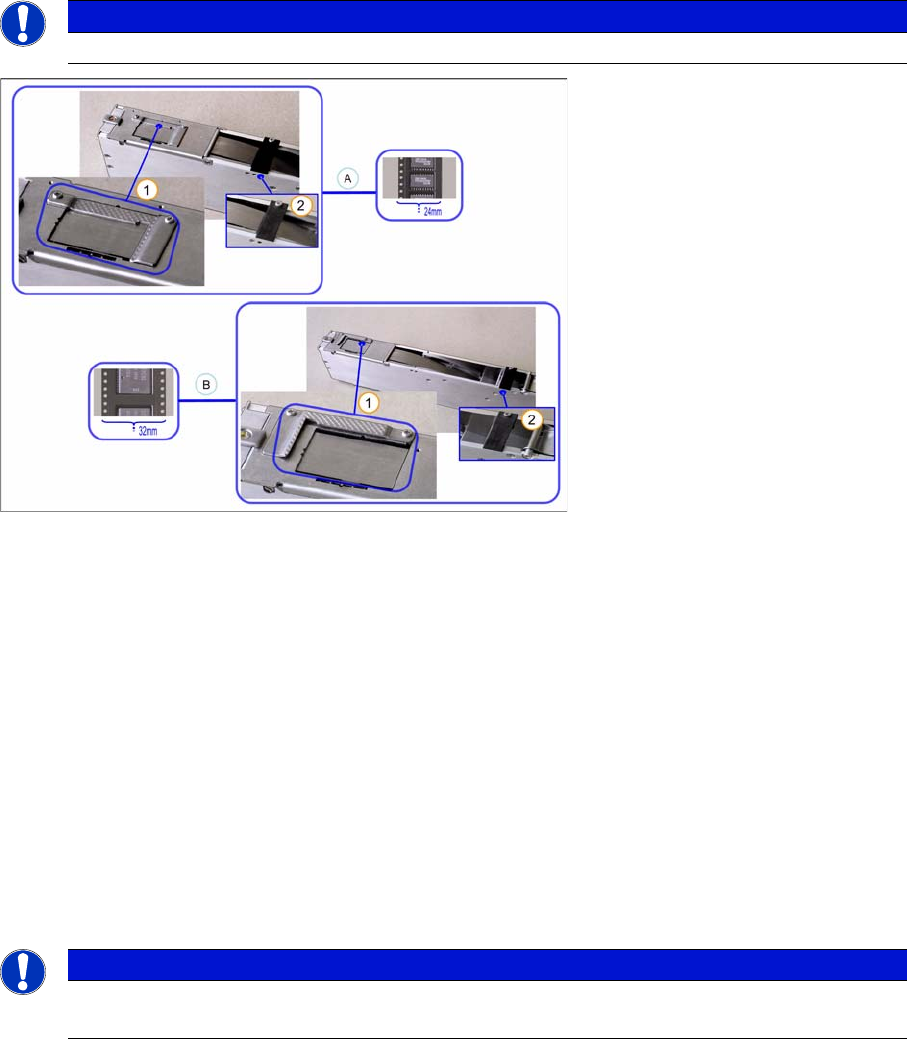
To convert the feeder from a width of 24 mm to 32 mm (or vice versa), turn the filler piece at the pickup
window to the respective position.
To process 24 mm tapes, you need to use the tape clip as a guidance help. When processing 32 mm
tapes you do not need the tape clip, which can be stored at the park position.
►Loosen the two screws fastening the filler piece to the feeder.
►Turn the filler piece by 180 degrees.
►Fix the filler piece into place with the two screws.
►Loosen the screw on the tape clip.
► Fasten the tape clip in the required position with the same screw.
NOTICE
This description applies only to 24/32 mm S feeders.
Legend:
A Structure for 24 mm tapes 1 Filler piece
B Structure for 32 mm tapes 2 Tape clip
NOTICE
The filler piece must always be fitted at both tape setups, as the protruding "nose" of the clip
keeps the removal edge pressed down.
Tape Feeder Modules
Inserting the Tape Details for 24/32, 44, 56, 72 and 88 mm S or S DP
User Manual SIPLACE S-Feeder 49
2.4.2 Inserting the Tape
►
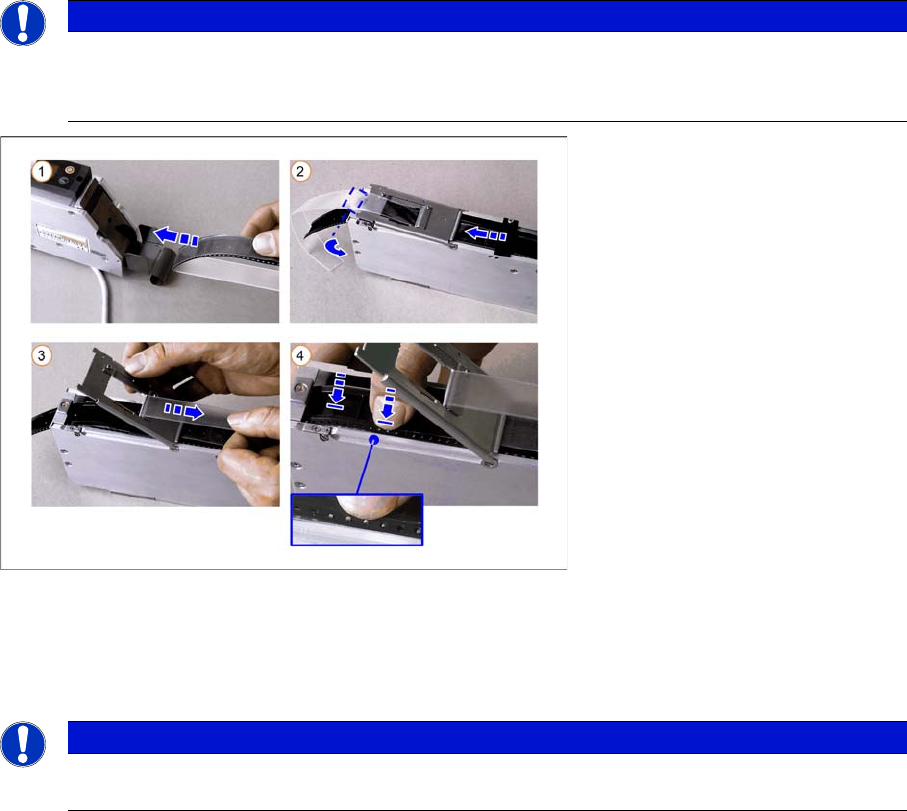
Only for tapes with foil overhang at the beginning of the tape:
Wrap the foil overhang (for threading in) around the beginning of the tape material, tension the foil
along the underside of the tape and hold in place.
►(1) Thread the tape from behind into the feeder track.
► (2) Open the pickup window:
To do this, press the pickup window down slightly and the turn the latch by 90°, until this engages
audibly.
Now push the tape under the pickup window.
Only for tapes with no overhang at the beginning of the tape:
Free up approx. 2-3 cm of the foil and fold the foil back.
►(3) Lift the pickup window and pull the cover tape backwards, over the removal edge.
Now press the removal edge down.
►(4) Make sure that the tape perforations are in the transport wheel before you close the removal edge.
NOTICE
Before inserting a new tape, check that the step size is set correctly.
Before you insert the tape, remove any loose components from the feeder. Pay particular
attention to the areas below the removal edge and the pickup window.
NOTICE
For 24/32 mm S feeders when processing tapes with a width of 24 mm:
Make sure that the tape is threaded through the tape clip when you feed it in.
Tape Feeder Modules
Details for 24/32, 44, 56, 72 and 88 mm S or S DP Inserting the Tape
50 User Manual SIPLACE S-Feeder
2.4.2.1 Inserting the Cover Tape in the Foil Removal
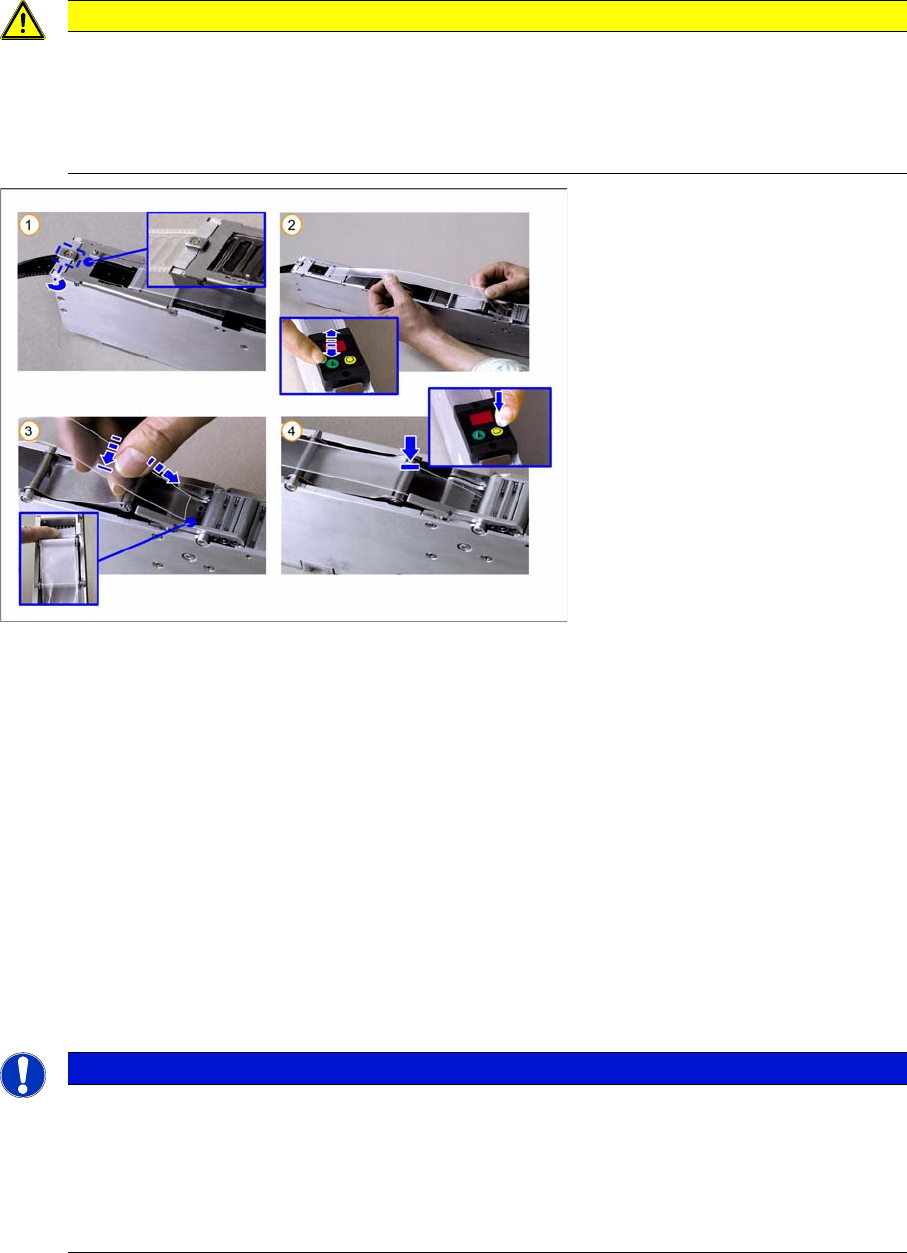
►(1) Close the pickup window, press it slightly downwards and hold.
Rotate the latch by 90° into its central position, so that it engages audibly. The pickup window is now
locked in place.
►(2) Press the green "Index" button until the tape comes out of the front of the feeder and then pull the
foil approx. 30 cm back.
►(3) Place the beginning of the foil over the foil rocker and then hold it between the two combing
toothed wheels of the foil removal device.
►(4) Press the yellow "Foil" button on the control unit and hold until the motor is switched off auto-
matically.
While you hold the button pressed and as long as the foil rocker is not tensioned, the motor will con-
tinue to draw in the foil. As the motor is not operated with full power in this case, you can adjust the
drawing in speed by gently tugging on the foil.
Make sure that the foil lies flat between the toothed wheels, that it has no folds and that it is not pulled
away to the sides of the toothed wheels.
CAUTION
Make sure that you remove the adhesive strip at the beginning of the cover tape overhang on
the new tapes. The adhesive strip could otherwise damage the foil removal. The same applies
to torn splice points. Remove any remaining adhesive strips here, before you feed the foil into
the foil container.
Do not tear the foil as a stretched foil could lead to malfunctions at the foil removal point.
NOTICE
Once the tape has been inserted and the cover tape tensioned, the pickup window may no long-
er be unlocked without first relieving the tension on the foil (by pressing rocker 2 and then wait-
ing until the foil motor has switched off). Nonobservance of this will cause the tape to be torn
out of its perforations by the tension applied to the foil and it to be moved forward by several
pockets.
The result: component losses and possible malfunctions from loose components.