00196376-0102_UM S-Feeder_EN.pdf - 第55页
Bulkcase Feeders Function User Manual SIPLACE S-Feeder 55 3 Bulkcase Feeders 3.1 Function The bulkcase feeder is a bulk goods fee der for processing SM D c omponents from t he Murata bulkcase cassette (D IN IEC 28 6/6). …
Tape Feeder Modules
Error Messages Error Messages for 12/16, 24/32, 44, 56, 72, 88 mm S / S DP
54 User Manual SIPLACE S-Feeder
CoE communication error
The feeder is unable to access data in the EEPROM. After reconnection, a step size of 4 mm is always
shown since the system is unable to save the step size last set. The tape width is no longer known and
the max. step size setting is no longer limited. The step size can now be set up to 56 mm (from firmware
V1.6 to 96 mm).
Measure:
The feeder is defective and needs to be repaired.
- - Supply voltage too low
The feeder is no longer ready for operation.
Measure:
Check whether this error message is caused by the FCU or by the feeder.
If multiple feeders on the same changeover table show this same error message, the FCU is probably
defective or the voltage supply to the FCU is faulty.
If only one feeder shows the above mentioned error message and if this message is also shown when
the feeder is connected to another changeover table, the feeder is defective and needs to be repaired.
Bulkcase Feeders
Function
User Manual SIPLACE S-Feeder 55
3 Bulkcase Feeders
3.1 Function
The bulkcase feeder is a bulk goods feeder for processing SMD components from the Murata bulkcase
cassette (DIN IEC 286/6).
A dual track feeder consists of 3 components:
▪ 1 body
▪ 2 optional, exchangeable component size-specific feeding rails
The components are fed via compressed air in the funnel via the feeding rails to the pickup position.
A light barrier in the feeding rail monitors the component level. If the level is undershot and not reached
again within 1 minute, it can be assumed that the components have been used up or that components
are jammed.
An unsuccessful pickup run (pickup error 43) leads to a reduction in the placement performance of the
machine. The 3rd pickup error in a specific track causes a machine standstill, if there is no substitute
track available.
Measure:
Check the feeder, clean the feeding rail and fill it up again if required.
3.2 Installation
Place the body on the selected track of the changeover table. A ball calotte and a pin center the body
on the table, while a permanent magnet and a quick-fit closure on the compressed air distributor hold
the feeder on the changeover table. The feeders are supplied with compressed air via the automatic con-
tact on the compressed air distributor. If there is no compressed air distributor installed, the supply of
compressed air for each feeder will be via individual connections. To connect the feeder to the power
supply, plug it into the communication unit on the changeover table. for a detailed description of the
installation procedure, refer to the Bulkcase Feeder Retrofitting Guide, Item No.: 00190702-xx.
The feeding rails are centered on the body with a pin and are fixed to the front and back of the rail with
quick-fit closure. The rails are automatically connected to the pneumatic and electrical supplies on the
body. From line computer software version 401.002 onwards, the bulkcase feeder is defined as
S_B_AIR, track type 153.
Bulkcase Feeders
Operating the Bulkcase Feeder Selecting Feeding Rails
56 User Manual SIPLACE S-Feeder
3.3 Operating the Bulkcase Feeder
3.3.1 Selecting Feeding Rails
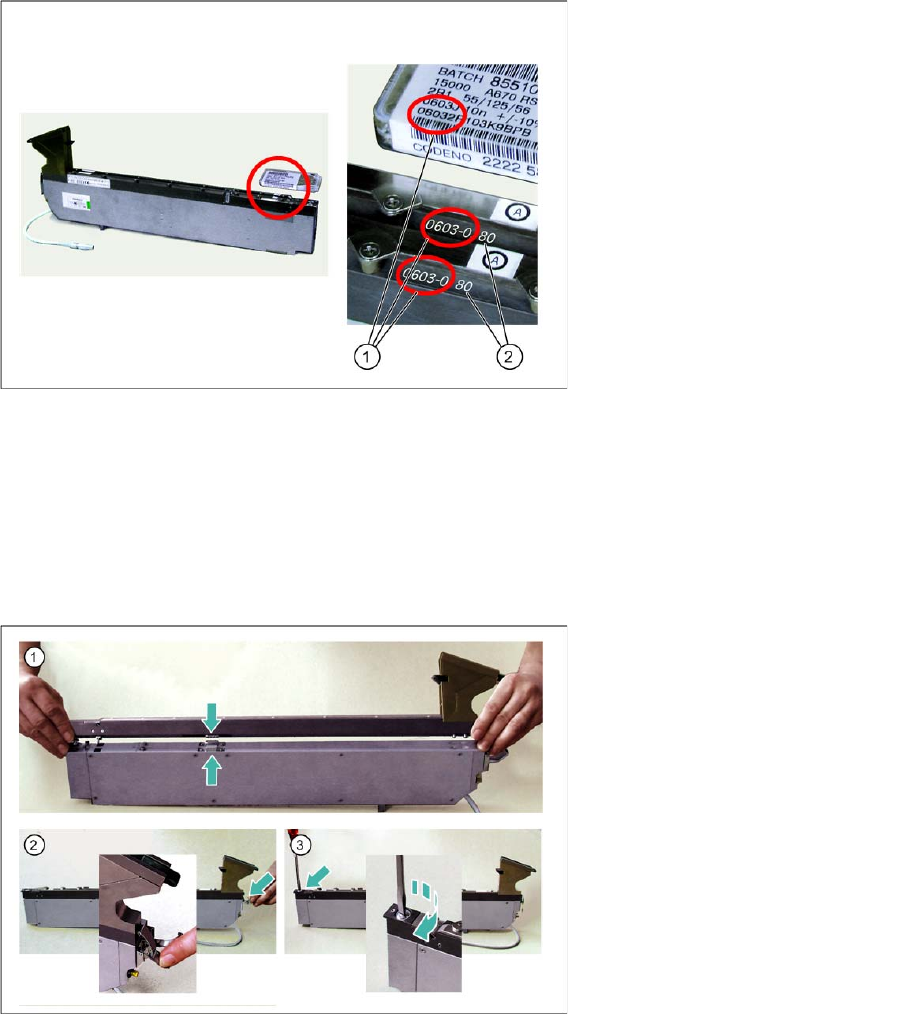
►Select the appropriate feeding rail for the component base and height.
3.3.2 Placing the Feeding Rails on the Body
►(1) Place the feeding rail down on the body so that the contacts are above one another.
►(2) Hook the quick-fit closure onto the fixture pin of the feeding rail.
►Close the quick-fit closure by pressing the lever down.
►(3) Fix the front end of the feeding rail by turning the locking screws 90° in a clockwise direction.
Legend:
1 Base of component
2 Height of component