00196376-0102_UM S-Feeder_EN.pdf - 第59页
Bulkcase Feeders Replacing the Feeding Rail at Component C hangeover Operating the Bulkcase Feeder User Manual SIPLACE S-Feeder 59 3.3.5 Replacing the Feeding Rail at Compon ent Changeov er If you want to use the bulkcas…
Bulkcase Feeders
Operating the Bulkcase Feeder Replacing the Empty Murata Cassette
58 User Manual SIPLACE S-Feeder
3.3.4 Replacing the Empty Murata Cassette
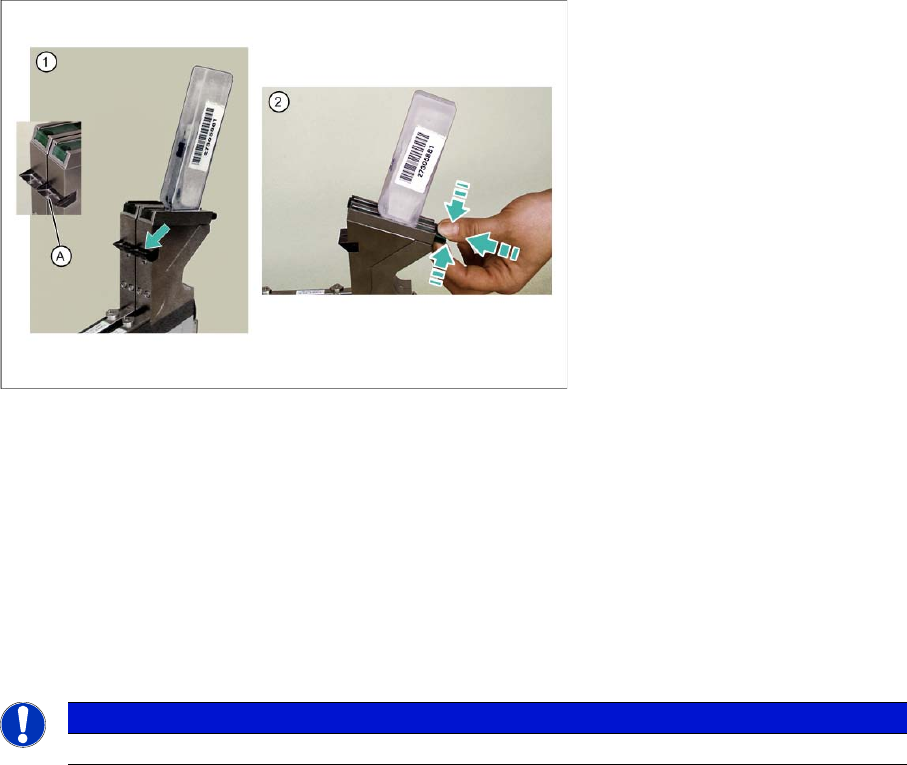
►(1) Check the prism (A), to make sure that there are no components in the transition area between
the funnel and the Murata cassette.
►(2) Press the lock together, push upwards and remove the empty Murata cassette.
Perform the further steps as described in "3.3.3 Inserting the Murata Cassette" [ ➙ 57]:
►Place the new, closed Murata cassette onto the funnel, with the opening facing downwards, and push
the lock down again.
►Open the Murata cassette, by pushing the slide upwards.
►Press the button at the back of the feeder 1x. The components will be moved forwards to the pickup
position.
See also
3.3.3 Inserting the Murata Cassette [ ➙ 57]
NOTICE
Empty Murata cassettes can be replaced without the need for a machine standstill.
Bulkcase Feeders
Replacing the Feeding Rail at Component Changeover Operating the Bulkcase Feeder
User Manual SIPLACE S-Feeder 59
3.3.5 Replacing the Feeding Rail at Component Changeover
If you want to use the bulkcase feeder for components of a different size, you need to replace the feeding
rail fitted with one which is suitable for the new components.
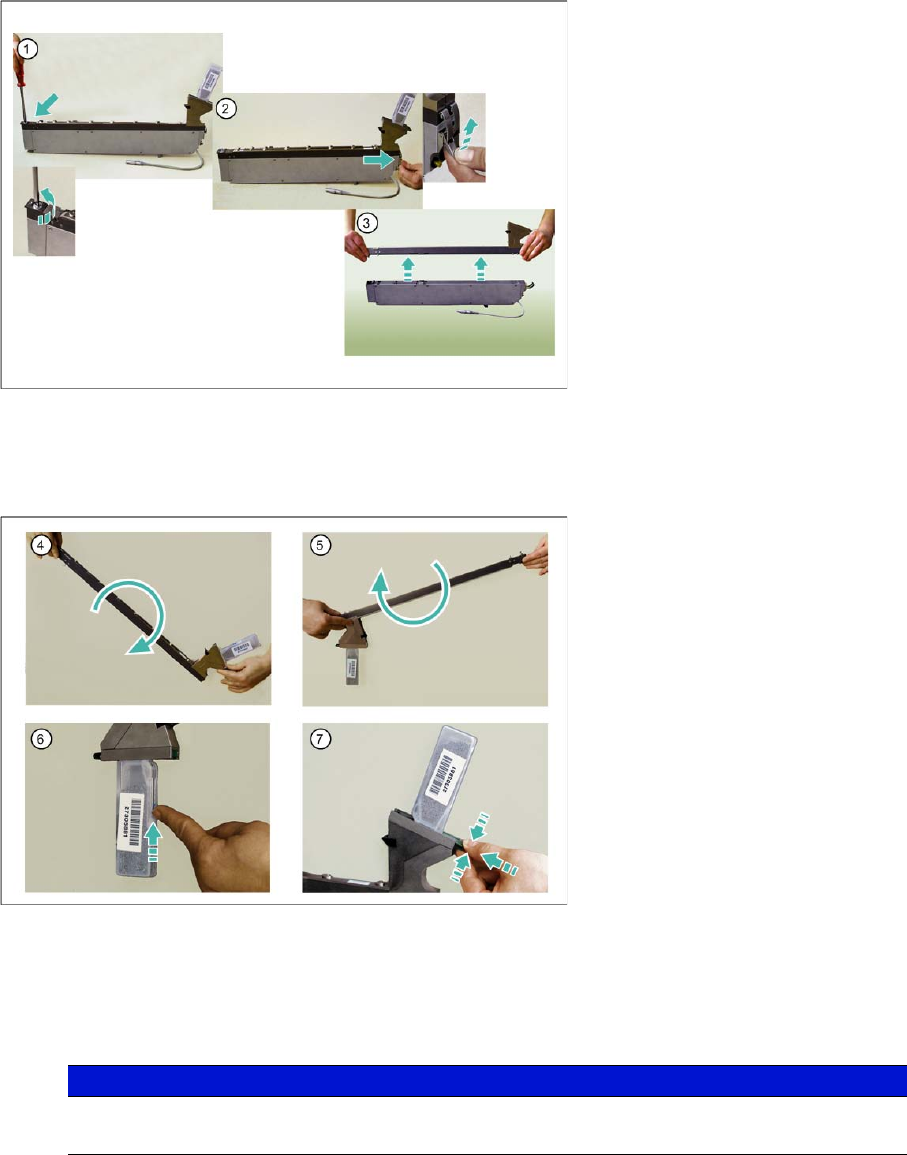
►(1) Loosen the front end of the feeding rail by turning the fixture screw 90° in a clockwise direction.
►(2) Open the quick-fit closure at the back of the feeding rail.
►(3) Lift the feeding rail off the body.
►(4) Tilt the feeding rail towards the back, so that the remaining components slide towards the Murata
cassette.
►(5) Turn and shake the feeding rail until all the remaining components are in the Murata cassette.
►(6) Close the Murata cassette, by pushing the slide up.
►(7) Open the lock and remove the Murata cassette.
To fit another feeding rail and fasten the Murata cassette, proceed as described in "3.3.2 Placing the
Feeding Rails on the Body" [ ➙ 56] and "3.3.3 Inserting the Murata Cassette" [ ➙ 57].
NOTICE
The slide may not be closed while the components are still in the transition area between the
cassette and the funnel.
Bulkcase Feeders
Operating the Bulkcase Feeder "Refill" Button - Function
60 User Manual SIPLACE S-Feeder
3.3.6 "Refill" Button - Function
Press the button
▪ Refill procedure is not enabled:
The component cover is opened.
If you press the button for longer than 2.5 seconds, the component cover will be automatically
closed.
▪ Refill procedure is enabled:
No action
Release the button
▪ Refill procedure is not enabled:
If you release the button within 2.5 seconds, the refill procedure will be enabled.
If you release the button after > 2.5 seconds, no action will occur.
▪ Refill procedure is enabled:
The refill procedure will be stopped.
3.3.7 Error Messages
"Feeding rail missing"
If the machine tries to address a missing feeding rail, this will be signalized by a flashing light on the feed-
er button. The error text will be shown on the screen of the station computer. The machine will remain
in the pickup position. The Z axis will not move downwards.
Measure:
The setup is faulty and needs to be corrected.
After correcting the error, you need to acknowledge the error with the appropriate button.
"Level not reached" (components consumed or feeder blocked)
This error will be signalized by a flashing light on the feeder button.
Measure:
Check the feeder, clean the feeding rail and fill it up again with components, if required.
The error will be automatically deleted as soon as the component level reaches the light barrier again.
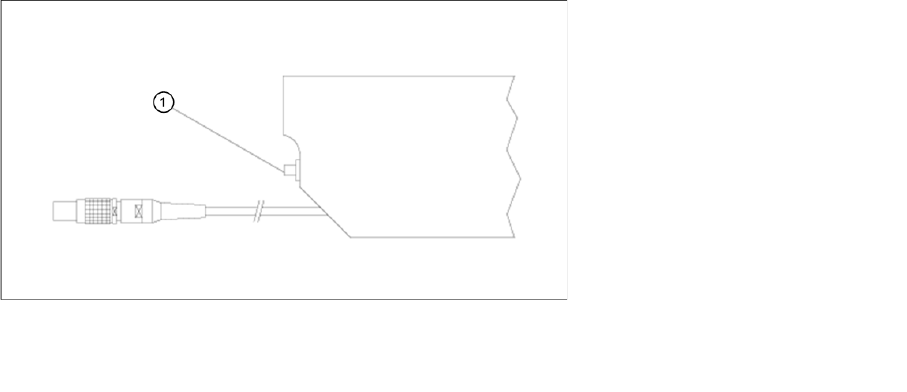
Legend:
1 "Refill" button