00196376-0102_UM S-Feeder_EN.pdf - 第85页
Dip Module Configuring the DIP Module Software Version 4xx (Platform 1) User Manual SIPLACE S-Feeder 85 5.9.4 Configuring the DIP Module The DIP module is only configured on the station computer. The following data is re…
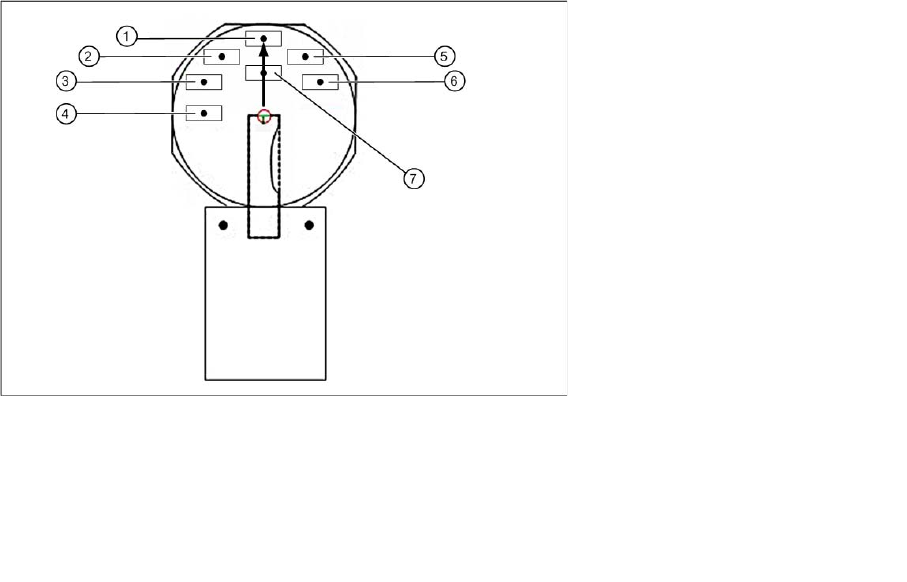
Dip Module
Software Version 4xx (Platform 1) Integration in the Overall System
84 User Manual SIPLACE S-Feeder
5.9.3 Integration in the Overall System
SIPLACE Pro
Component Editor:
Entries in the Component Editor are not transmitted to the station with software version 4xx.
Component Shape Editor:
Entries in the Component Shape Editor are not transmitted to the station with software version 4xx.
Setup:
Only one DIP module can be set up per placement machine.
▪ In station software versions up to 407 the programmer must keep the location (18 tracks) manually
free for a DIP module.
▪ From station software versions 408 (SIPLACE Pro 3.2) the DIP module can be programmed on a
specific table, to ensure that this location is not blocked by other feeders.
Station computer
The GUI provides the following user interfaces which are relevant for the DIP module:
▪ New display view, programming and operation of the DIP module
▪ Error messages relating to the DIP module in the error line and in the "Error display" view
Hardware
The layer height is set at the DIP module with the help of a metal disk. The medium is applied manually
be the operator. The DIP module has a lockable potentiometer for setting the rotation speed and a button
for starting plate rotation.
Legend:
1 Position S1 5 Position S5
2 Position S2 6 Position S6
3 Position S3 7 Position IC
4 Position S4
Dip Module
Configuring the DIP Module Software Version 4xx (Platform 1)
User Manual SIPLACE S-Feeder 85
5.9.4 Configuring the DIP Module
The DIP module is only configured on the station computer. The following data is required:
Location and track: only one DIP module can be set up per machine.
The possible location is from track 7 to 111 (inclusive), whereby the specified track must correspond to
the electrical connection and be in the center of the module.
Coordinates for plate center in the machine coordinate system (X direction is PCB direction of transport,
Y direction is vertical to this and to the left, positive).
Z position of plate base. The zero point is the upper edge of the input conveyor, higher (positive) values
progress upwards. The plate base is lower than the conveyor, meaning that negative values need to be
entered.
5.9.4.1 Recording the X/Y Position
►Start SITEST from V 404.01.
►Determine the X and Y coordinates by moving the DIP module in SITEST.
Use the "LP-Kamera teachen" function to establish the X/Y coordinates in SITEST.
►To do this, position the camera on the center of the rotary plate. Make a note of the values so that
they can be entered in the station software.
NOTICE
Default = 0: with safety buffer of approx. 4000 mm
If the default value of 0 is kept, the path of 4000 mm will be travelled in slow Z axis mode. This
leads to minor loss of performance.
CAUTION
Type and source of the danger
SITEST may only be implemented by persons who have been trained to do so by ASM
Assembly Systems and who are therefore authorized to use the program.
NOTICE
Type and source of the danger
There are no single functions and SITEST functions available for the DIP module.
Dip Module
Software Version 4xx (Platform 1) Configuring the DIP Module
86 User Manual SIPLACE S-Feeder
5.9.4.2 Recording the Z Position
►Determine the Z position by measuring the height difference from the input conveyor upper edge to
the plate base with the axis test box e.g. with a C&P 6 or C&P 12 head:
Determining the Z axis position
►Open the SITEST menu C&P - Head Axes.
►Position the gantry manually over the DIP module.
►Release the Z axis.
►Move Z axis onto DIP plate.
►Read out axis position with axis test box or SITEST software and note.
►Switch Z axis on again.
►Position gantry manually over the conveyor (height measurement position).
►Release the Z axis.
►Move Z axis to conveyor edge.
►Read out axis position with axis test box or SITEST software and note.
►Switch Z axis on again.
Calculating the DIP module height
CP 6 / 12 placement head
(conveyor upper edge [digits] – plate base [digits])/ 44.42 = Z position [mm].
CAUTION
The following task may only be performed by persons who have been thoroughly trained to use
the
axis test box. Incorrect, negative Z values can cause damage to the components.
NOTICE
If the surface of the DIP plate is lower than the conveyor surface, you need to specify a negative
DIP height!