00196376-0102_UM S-Feeder_EN.pdf - 第90页
Dip M odule Software Version 4xx (Platform 1) Data Input at Statio n Computer 90 User Manual SIPLACE S-Feeder 5.9.6.2 Editing the DIP Module Parameters ► Select: "Options" -> "Fluxing" -> "…
Dip Module
Data Input at Station Computer Software Version 4xx (Platform 1)
User Manual SIPLACE S-Feeder 89
The following data needs to be entered:
CS Number:
The component shape number for the respective component
A component shape number between 1 and 32767 can be entered.
Dwell Time:
The time that the component is held on the board, in 1/10 seconds.
Values of 0 to 30 possible, for 0-3 s (typical: "10" for 1 sec.).
Acceleration for upwards travel
When the value is 0, the preset values from the line computer are used.
In this case, the Z axis moves up with the same acceleration used for lowering (downwards travel).
Enter a different value (other than 0) if you require slower upwards travel than that preset by the line
computer or SIPLACE Pro computer.
Valid values are those between 1 and 100.
When the value is not 0, the Z axis will move upwards from the DIP module plate with the specified per-
centage of the maximum Z axis acceleration.
Comments
You can enter a comment about the component concerned (e.g. PLCC).
Confirm you entry with OK.
Save the edited component shape list with Accept.
NOTICE
A change in the acceleration can be necessary, for example, if the component remains stuck
to the plate after dipping - as a result of low flux/conductive adhesive viscosity. a reduction in
the speed of upwards movement has a negative influence on placement performance.
NOTICE
Up to 25 component shapes can be entered for dipping in the station computer.
Dip Module
Software Version 4xx (Platform 1) Data Input at Station Computer
90 User Manual SIPLACE S-Feeder
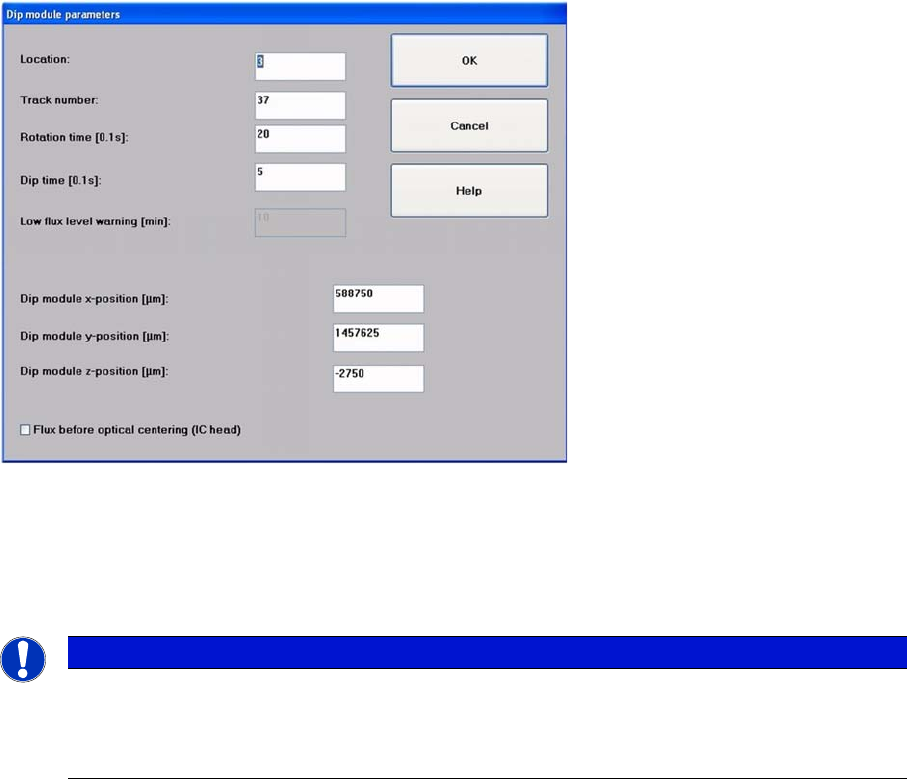
5.9.6.2 Editing the DIP Module Parameters
►Select:
"Options" -> "Fluxing" -> "DIP module parameters" from the menu to specify data for the DIP module
and for the superior process sequence.
Screen for entering the DIP module parameters
►Set the location (1-4) and the track number (7-111) of the table at which the DIP module is set up
and connected.
the track specified here must correspond with the center of the module axis along the length.
Tracks 7 and 111 are the outermost tracks in which the module can be set up.
►Set the following parameters:
Turning Time:
Ensures that a complete revolution can be performed with the set speed (typical: 30 and a speed of '4').
Dipping Time:
Defines the dwell time which the components are kept in the DIP medium, to ensure that they are com-
pletely coated.
DIP-Module X-position / DIP-Module Y-position:
These are the coordinates for the DIP plate rotary axis, determined in SITEST with the component
camera. The DIP positions for the placement head or segments are determined form here.
DIP-Module Z-position:
This is the target height for the Z axis, to ensure that the DIP procedure can be performed rapidly and
with care. Components with the same component shape can have a difference in height of up to 4 mm
and the dipping procedure will still be performed correctly.
NOTICE
The data entered at the track number is only required for powering the module electrically. The
setup location must be specified explicitly (x/Y/Z position) in this menu. As the DIP module - like
all feeders - needs to be connected to the appropriate socket on the changeover table connec-
tion panel, the setup track and the track for the electrical connection are identical.
Dip Module
Data Input at Station Computer Cleaning the DIP Module
User Manual SIPLACE S-Feeder 91
5.10 Cleaning the DIP Module
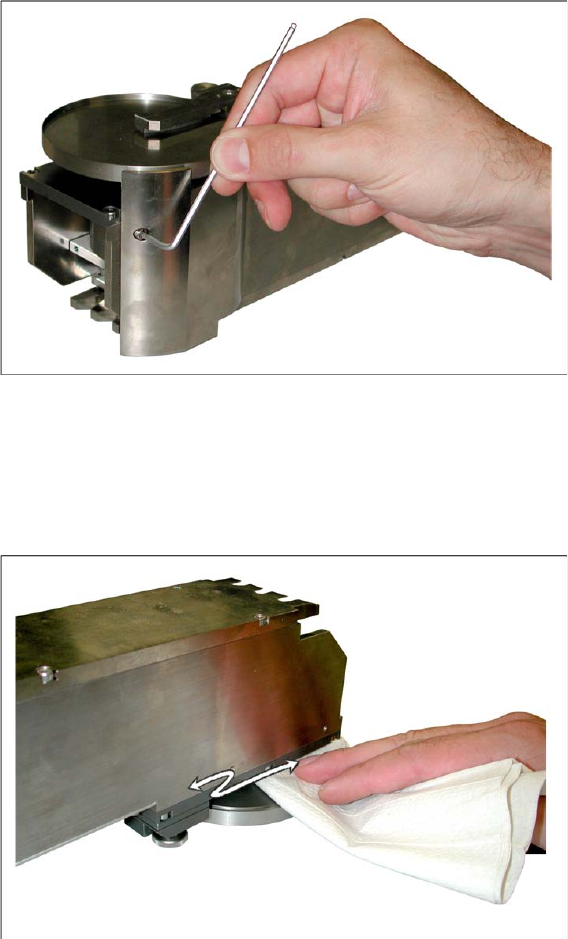
Normal cleaning of the DIP plate e.g. when the flux is refilled, should be adequate.
If the plate contents should overflow (due to excess refilling) the edge of the plate, you will need to clean
the edge and underside of the plate.
►Remove the DIP module from the changeover table.
Place it down so that you can easily access the front part.
►Remove the side cover from the DIP plate (two screws per side).
►In the event of heavy contamination, the squeegee and spacer can also be dismantled. However, this
should not normally be necessary.
►Place the DIP module down carefully on its top.
►Clean the underside of the DIP plate using a lint-free cloth and the cleaning agent recommended by
the manufacturer of the flux medium used.
►Check whether the whole area under the DIP plate is free of residual flux. If not, remove any remain-
ing residues.