00198611-01_IM_712.0_R18-2_EN.pdf - 第11页
Station Software Ver sion 712.0 (R18 - 2) / Installation Manual 11/2018 Edition 11 Figure 3-5: Recalibrating vac uum tooling 3.1 Upgrading from t he 711.1 Software V ersion No further steps requi red. 3.2 Upgrading fr om…
Station Software Version 712.0 (R18-2) / Installation Manual 11/2018 Edition
10
Loss of Calibration Data for Vacuum Tooling
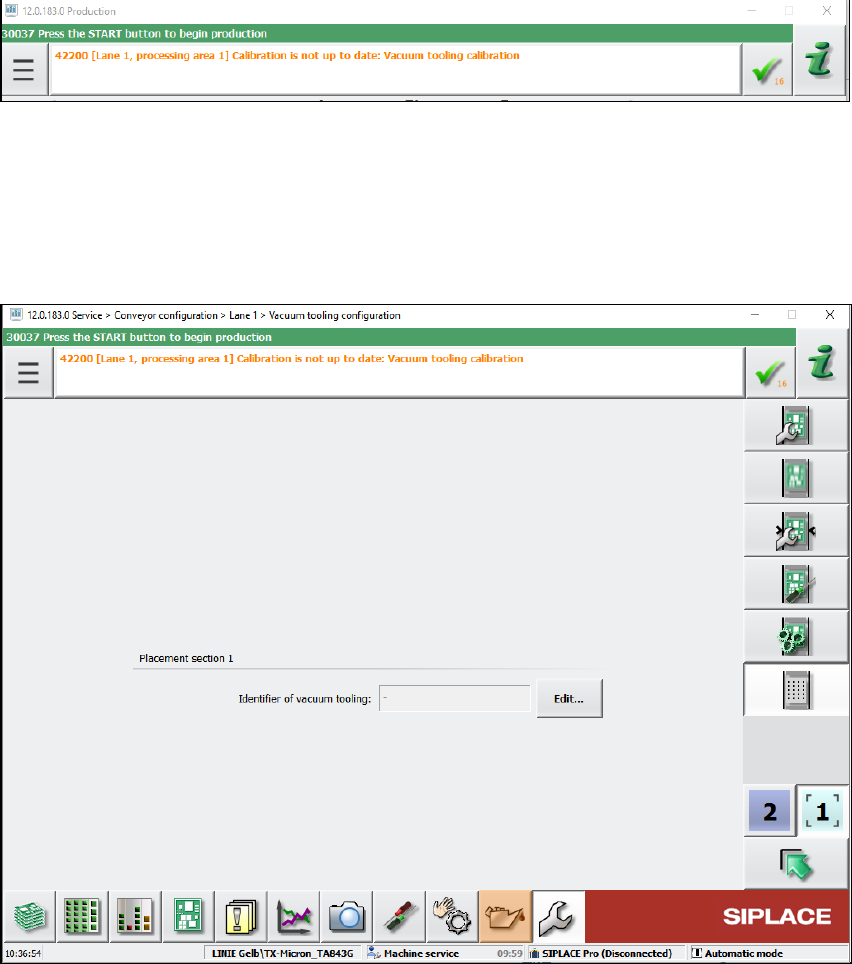
The following message may occur when upgrading the station software:
Figure 3-3: Error message: Vacuum tooling calibration
In this case, detailed information can be found in the assistance to this error message or in the
topic "Calibration/Vacuum Tooling" in the Online Help for the station software.
► The following steps must be performed:
Depending on the machine type, the vacuum tooling ID must be entered in the dialog below and
the corresponding file reloaded.
Figure 3-4: Vacuum tooling configuration
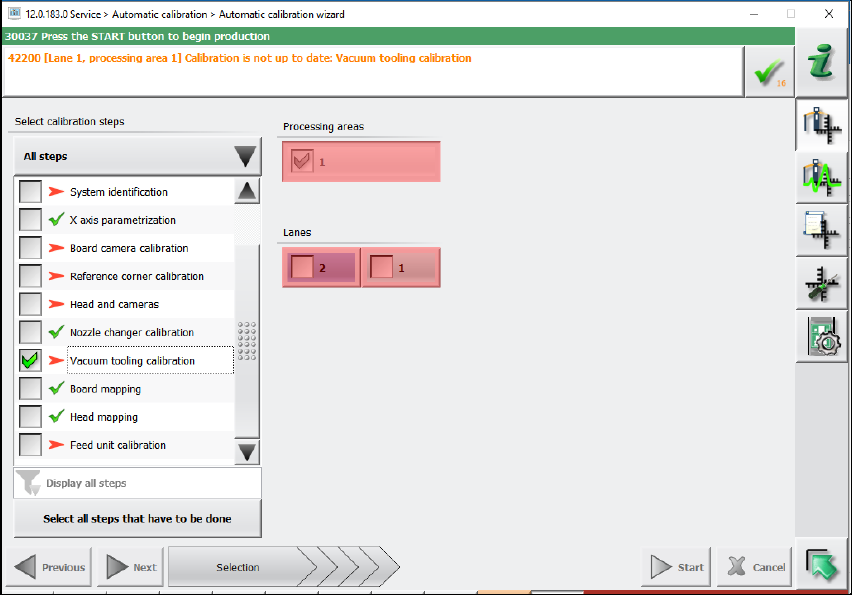
Additionally, the vacuum toolings must be recalibrated by selecting the vacuum tooling calibration
in the automatic calibration wizard.
Station Software Version 712.0 (R18-2) / Installation Manual 11/2018 Edition
11
Figure 3-5: Recalibrating vacuum tooling
3.1 Upgrading from the 711.1 Software Version
No further steps required.
3.2 Upgrading from the 711.0 Software Version
No further steps required.
3.3 Upgrading from the 710.1 Software Version
No further steps required.
3.4 Upgrading from the 710.0 Software Version
No further steps required.
3.5 Upgrading from the 709.1 Software Version
No further steps required.
Station Software Version 712.0 (R18-2) / Installation Manual 11/2018 Edition
12
3.6 Upgrading from the 709.0 Software Version
► Predictive Maintenance:
By installing station software version 709.1, the calculation of the maintenance display for
placement heads, cutters and X-/Y-axes has been changed for the SX placement machines.
The calculation is now based on time.
For this, the following conditions must be met:
► Ensure that the system time of the station computer is set correctly.
► Perform a complete maintenance of the machine and placement heads before installing the
station software. This is required as a date stamp is stored in the corresponding EEPROMs
with the new station software version and this stamp is used for the maintenance display.
3.7 Upgrading from the 708.x Software Version
► Calibration of head parameter identification is necessary for all C&P20 P heads. This can be
done either by automatic calibration or by single calibration.
3.8 Upgrading from the 707.x Software Version
► The 708.x station software version runs with Windows Embedded Standard 7 (WES7) only.
The station computer must be equipped with at least 2 GB memory with WES7, 32-bit and 4
GB memory with WES7, 64-bit respectively. If necessary, station computers in the field must be
exchanged or upgraded with a memory extension. Please refer to the Technical Information
TI2014-09E04.
► When upgrading from a previous station software version to the 708.x version, C&P head
segments with the Deactivated or Not used state will be reset to the Activated state
automatically! If required, the status for such segments must be changed manually again.
3.9 Upgrading from the 706.xx Software Version
► If necessary, perform an upgrade to the Microsoft Windows Embedded Standard 7 (WES7,
32-bit or 64-bit) operating system. Please refer to sections 4.1.1 and 5.3.1.
► With the installation of the 707.x station software, statistic data (maintenance intervals) is
registered for the CPP and C&P20A placement heads and the SX main axis. To achieve a
defined initial state for the maintenance due, the correspondent maintenance operations must
be performed on the subsystems after the software installation.
► An upgrade of the embedded software is necessary for the LDU-X. Generally, it is not possible
to perform a download of the embedded software via the station software for the LDU-X. The
LDU-X must be upgraded to the 2.02 software version with the aid of an external PC.
► There is new embedded software for the feeders. As soon as a feeder with an elder eSW is set
up an update of the eSW is proposed. This can be cancelled but it is not possible to take out
the table as long as the update is pending. To get the table out without a download you must
take out the feeders or disable the feeder download within the SW options.
► There is new embedded software for CPP and C&P20 placement heads. After an update from
a lower version they are recognized as modified heads and the head data must be saved
manually once after the installation.
► When upgrading to the 707.x station software the inspection options will be reset to the
respective default values. If necessary, the inspection options must be adjusted under Settings
– Machine options – Inspection.