00198611-01_IM_712.0_R18-2_EN.pdf - 第21页
Station Software Ver sion 712.0 (R18 - 2) / Installation Manual 11/2018 Edition 21 4.3 Network Confi guration Station computer Coplan computer / feeder computer Private network between station computer and Coplan compute…
Station Software Version 712.0 (R18-2) / Installation Manual 11/2018 Edition
20
4.2.1.1 Station Computer/Coplan Computer with 3D Coplan Sensor
Optionally, the coplanarity module with the 3D coplan sensor (type 37) can be installed in the
SIPLACE X-series, SX1/SX2 (V2) and X-series S placement machines.
Detailed information on the 3D coplanarity module can be found in the corresponding Assembly
Instructions, item numbers [00195344-xx] (for X-series), [00196842-xx] (for SX1/SX2) und
[00197395-xx] (for X-series S).
4.2.1.2 Station Computer/Feeder Computer for SIPLACE BulkFeeder X
Optionally, the SIPLACE BulkFeeder X can be set up and installed at the X-series, X-series S,
X4 S micron and SX1/SX2 (V2) placement machines.
Detailed information on the SIPLACE BulkFeeder X can be found in the SIPLACE BulkFeeder X
Operating Manual, item no. [00198045-xx].
Station Software Version 712.0 (R18-2) / Installation Manual 11/2018 Edition
21
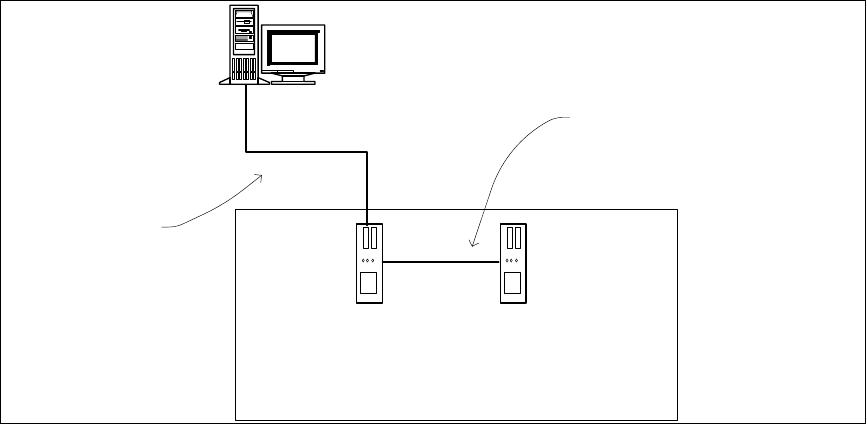
4.3 Network Configuration
Station
computer
Coplan computer /
feeder computer
Private network between
station computer and Coplan
computer / feeder computer
SIPLACE LAN
SIPLACE Pro
Figure 4-1: Network connections between the machine and SIPLACE Pro
In two-computer operation a separate private network is set up between the station computer and
the Coplan computer or feeder computer via a subnet mask.
Fixed IP addresses for the station computer, Coplan computer or feeder computer can thus be
assigned for all SIPLACE machines. These IP addresses are not known outside the private
network, for instance in the SIPLACE LAN.
These IP addresses need not be further configured by the operator while the station software is
being installed.
Please also refer to chapter 6.

Station Software Version 712.0 (R18-2) / Installation Manual 11/2018 Edition
22
5 Setting up the Station Computer
5.1 Installation Sequence
Back up the machine data
BIOS update on the station computer
Perform BIOS update
Install Windows operating system for the
station computer
(including selection of the computer
configuration and installation of the touch
screen)
Install station software
and additional programs
BIOS settings on the station computer
Perform BIOS settings
Finish the installations
Please refer to section 5.2.
Please refer to section 5.2.
See separate Installation Manual for details on
installing the Windows operating system (WES7
or Win10), item no. [00198622-xx].
For details on calibrating the touchscreen, please
refer to section 5.3.3.
Please refer to sections 5.4, 5.5, 5.6 and chapter
6.
Figure 5-1: Installation sequence