KE-750_MS.pdf - 第178页
3.6.3 Control Menu (1) Start Up Pressing F9 key displays a pop up menu. Choose from menu to execute. Access to "3/Option" within "1/Default Setting" is not possible for units where the option is not y…
(1) Key Input
- " " key : Scrolls up 1 column
- " " key : Scrolls down 1 column
- "Pg Up" key : Scrolls up 1 page
- "Pg Dn" key : Scrolls down 1 page
- "Tab" key : Screen advances to next window
- "Shift" + "Tab" keys : Screen returns to previous window
- "Cntrl" + "Pg Up" keys, "Home" key : Displays first page
- "Cntrl" + "Pg Dn" keys, "End" key : Displays last page
(2) Track Ball, Mouse
- Click on " " key : Scrolls up 1 column
- Click on " " key : Scrolls down 1 column
- Hold " " key and click on "Scroll bar" : Scrolls up 1 page
- Hold " " key and click on "Scroll bar" : Scrolls down 1 page
- Drag "Scroll bar" : Scrolls in direction of movement
2-10
3.6.3 Control Menu
(1) Start Up
Pressing F9 key displays a pop up menu. Choose from menu to execute.
Access to "3/Option" within "1/Default Setting" is not possible for units where the option is not yet
installed.
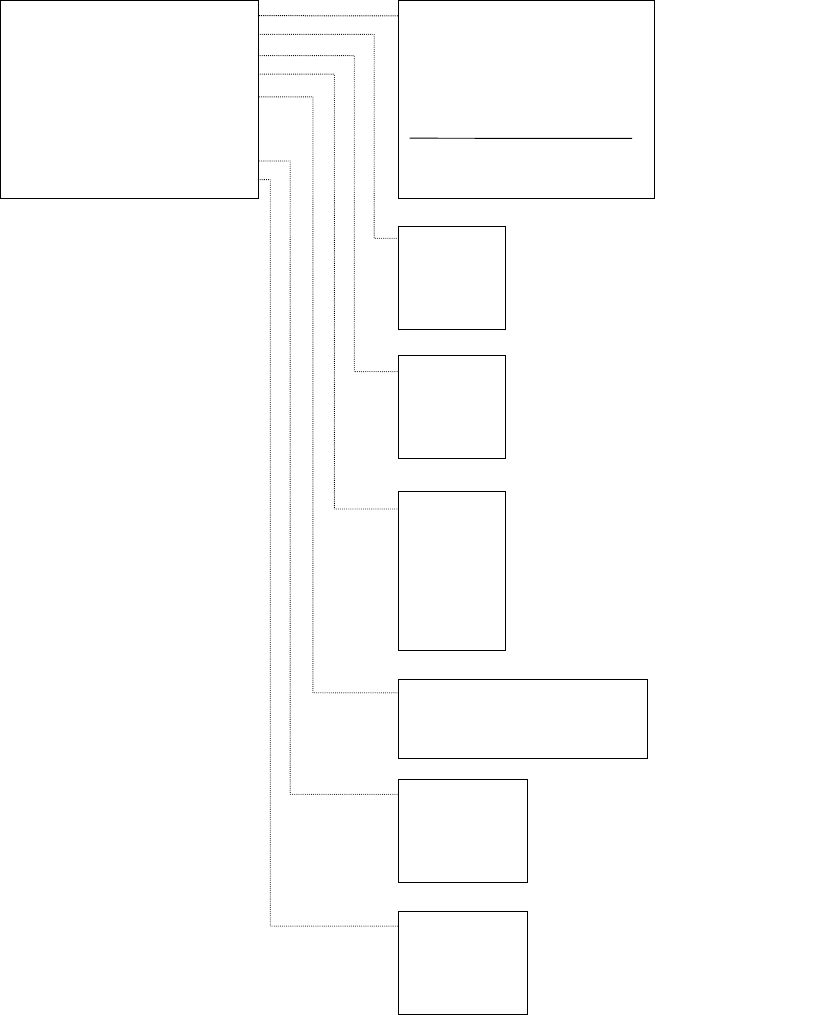
(2) Menu Contents
1/All Axes
2/XY Axes
3/Z Axis
4/
θ
Axis
(With CAL Block No. 2 Mark Recognition)
(All Heads)
(All Heads)
1/Jig Mounting Position
2/CAL Block No. 1 Mark Position
3/CAL Block No. 2 Mark Position
4/CAL Block Center Position
5/Head Wait Position
6/Origin Position
7/Free Coordinates
1/XY Axis Movement >>
2/Origin Return >>
3/Vacuum Control >>
4/Lighting Control >>
5/Conveyor Control >>
6/ATC Slide Plate Control
7/AWC Origin Return
8/Histogram >>
9/Lightmap >>
(OCC Standard)
(OCC Standard)
(OCC Standard)
(OCC Standard)
(OCC Standard)
(OCC Standard)
(OCC Standard)
1/L Head
2/C Head
3/R Head
4/CAL Block
(With CAL Block No. 2 Mark Recognition)
(All Heads)
(All Heads)
1/Board Entry (Hole Std)
2/Board Entry (Size Std)
3/Board Exit
1/OCC
2/CAL Block
3/Std VCS
4/Opt VCS
5/BGA (Std)
6/BGA (Opt)
7/OCC22
(*)Note 1
1/OCC
2/Std VCS
3/Option VCS
4/OCC2
(*)Note 2
1/OCC
2/Std VCS
3/Option VCS
4/OCC2
(*)Note 3
9 (*)Notes 1, 2, 3
Not displayed on KE-730 and KE-740.
2-11
c Free Coordinate Movement
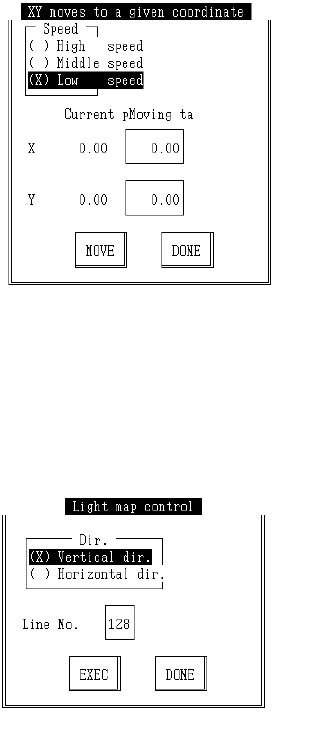
Select "1XY Move", then "7/Optional pos..." and the following dialog will appear.
Enter the target coordinates, select "Move" button, press F3 key and movement will be made
with OCC standard.
d Lightmap
Select "9/Light map" from the control menu and the following control dialog will appear.
Enter direction and line number, select "Enter" and press F3 to execute lightmap.
2-12