KE-750_MS.pdf - 第179页
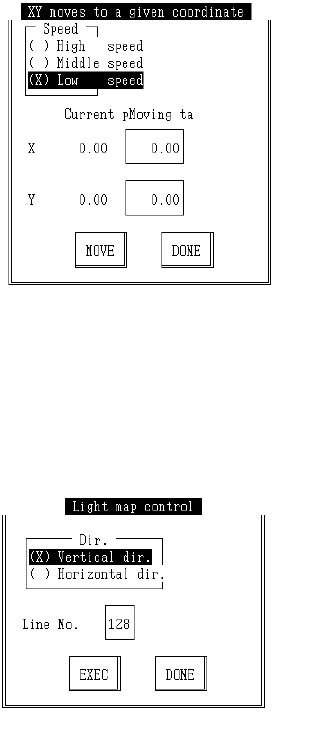
c Free Coordinate Movement Select "1XY Move", then "7/Optional pos..." and the following dialog will appear. Enter the target coordinates, select "Move" button, press F3 key and movement wil…
3.6.3 Control Menu
(1) Start Up
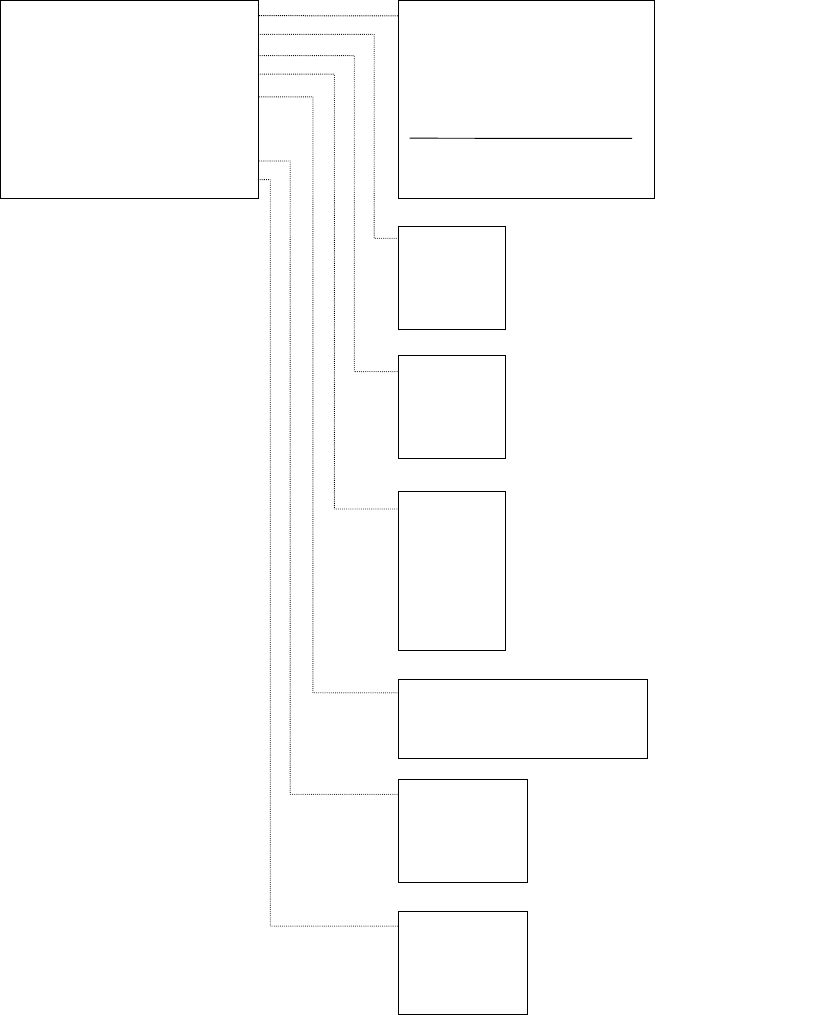
Pressing F9 key displays a pop up menu. Choose from menu to execute.
Access to "3/Option" within "1/Default Setting" is not possible for units where the option is not yet
installed.
(2) Menu Contents
1/All Axes
2/XY Axes
3/Z Axis
4/
θ
Axis
(With CAL Block No. 2 Mark Recognition)
(All Heads)
(All Heads)
1/Jig Mounting Position
2/CAL Block No. 1 Mark Position
3/CAL Block No. 2 Mark Position
4/CAL Block Center Position
5/Head Wait Position
6/Origin Position
7/Free Coordinates
1/XY Axis Movement >>
2/Origin Return >>
3/Vacuum Control >>
4/Lighting Control >>
5/Conveyor Control >>
6/ATC Slide Plate Control
7/AWC Origin Return
8/Histogram >>
9/Lightmap >>
(OCC Standard)
(OCC Standard)
(OCC Standard)
(OCC Standard)
(OCC Standard)
(OCC Standard)
(OCC Standard)
1/L Head
2/C Head
3/R Head
4/CAL Block
(With CAL Block No. 2 Mark Recognition)
(All Heads)
(All Heads)
1/Board Entry (Hole Std)
2/Board Entry (Size Std)
3/Board Exit
1/OCC
2/CAL Block
3/Std VCS
4/Opt VCS
5/BGA (Std)
6/BGA (Opt)
7/OCC22
(*)Note 1
1/OCC
2/Std VCS
3/Option VCS
4/OCC2
(*)Note 2
1/OCC
2/Std VCS
3/Option VCS
4/OCC2
(*)Note 3
9 (*)Notes 1, 2, 3
Not displayed on KE-730 and KE-740.
2-11
c Free Coordinate Movement
Select "1XY Move", then "7/Optional pos..." and the following dialog will appear.
Enter the target coordinates, select "Move" button, press F3 key and movement will be made
with OCC standard.
d Lightmap
Select "9/Light map" from the control menu and the following control dialog will appear.
Enter direction and line number, select "Enter" and press F3 to execute lightmap.
2-12
4. Details of Operation
4.1 Rough Adjustment of Origin
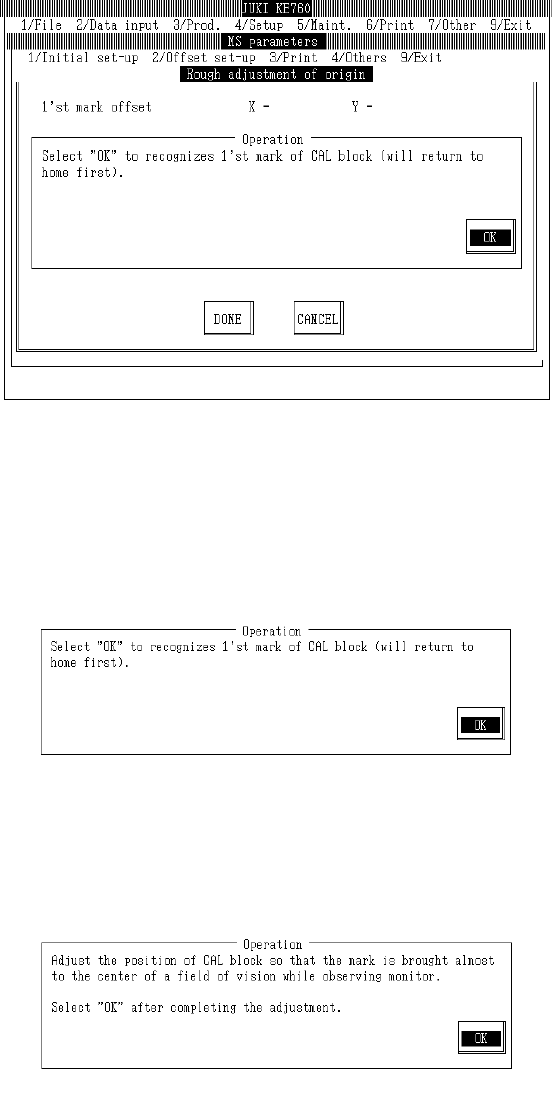
Select "1/Initial set-up" then "1/Rough adjustment of origin...", and the rough origin adjustment dialog
will appear as follows.
(1) Setting Headings
– There are no parameters for mechanical settings.
– When "Exit" is selected to close, the origin return dialog (with CAL block No. 1 mark recognition)
is usually omitted
(2) Method of Adjustment
Once preparations are completed, select "OK".
When "OK" is selected, machine returns to home and OCC moves to above CAL block No. 1 mark
and recognizes mark.
Based on the results of recognition, the offset value is displayed.
If an error occurs in mark recognition, offset display will clear.
2-13