KE-750_MS.pdf - 第187页
(1) Setting Headings No. Item Contents 1 Bad Mark Sensor Bad mark sensor option Y/N Bad mark sensor types 2 MTC MTC option Y/N MTC option types 3 O/D Stds Outer dimensional standards Y/N 4 Feeder Float Sensor (Front) Fro…
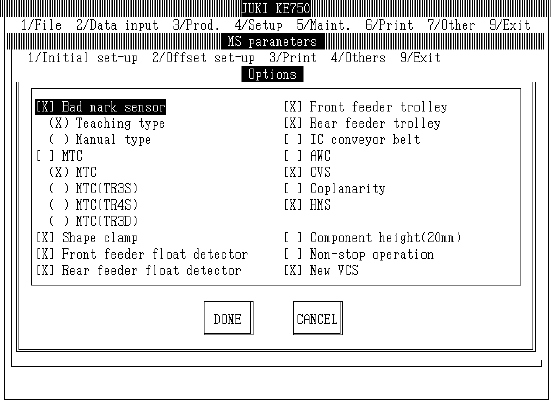
4.4 Options
4.4.1 Options
Select "1/Initial set-up" then "4/Options" and the option setting dialog will appear as follows.
(KE-730) or (KE-740)
2-19

(1) Setting Headings
No. Item Contents
1 Bad Mark Sensor Bad mark sensor option Y/N
Bad mark sensor types
2 MTC MTC option Y/N
MTC option types
3 O/D Stds Outer dimensional standards Y/N
4 Feeder Float Sensor (Front) Front feeder float sensor option Y/N
5 Feeder Float Sensor (Rear) Rear feeder float sensor option Y/N
6 Feeder Bank One-Shot
Replacement Stage (Front)
Front feeder bank one-shot replacement stage option Y/N
7 Feeder Bank One-Shot
Replacement Stage (Rear)
Rear feeder bank one-shot replacement stage option Y/N
8 IC Recovery Belt IC recovery belt option Y/N
9 AWC Automatic board width adjustment equipment option Y/N
10 CVS Parts verification option Y/N
11 Coplanarity Coplanarity option Y/N
12 HMS Height measuring equipment option Y/N
13 Height for 20mm Parts Setting for 20mm high components option Y/N
14 Non-Stop Operation Non-stop operation option Y/N (Special)
15 New Image Processing
Equipment
Distinguishes new image processing equipment (new, current)
(2) Method of Setting
– Select option units listed in the above table with the check box.
– If the setting for installed units is changed to not installed, machine setup will automatically
be modified from "Unit Available" to "Unit Not Available".
– When unit add ons change a setting from "not installed" to "installed", machine setup will
automatically change to "Unit Available".
– When changes are made to deal with 20mm high components, it is necessary to reset laser
default height.
Make changes and select "Exit" and message box with laser default height will appear.
Select "OK" and the values will be set as default in the MS parameters. Afterwards, be sure
to reset laser height in "Laser Offset". Select "Cancel" to return to setting dialog.
2-20
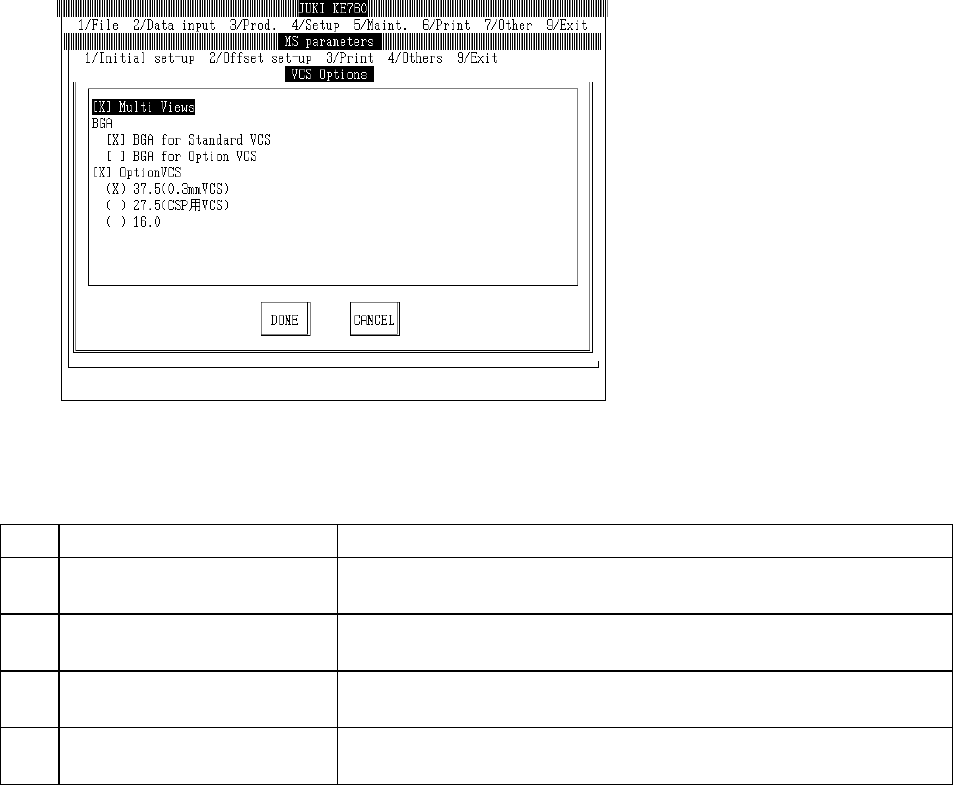
4.4.2 VCS Options
Select "1/Initial set-up" then "4/Options", and the options dialog will appear as follows.
(1) Setting Items
No. Item Contents
1 Reorganization of Split Field
Recognition
Reorganization of split field recognition completed Y/N
2 Illumination of Entire BGA (Std
VCS)
Illumination of entire ball array in BGA with std VCS Y/N
3 Illumination of Entire BGA
(Optional VCS)
Illumination of entire ball array in BGA with optional VCS Y/N
4 Optional VCS Optional VCS Y/N
Optional VCS types
(2) Method of Setting
– Select option units listed in the above table with the check box.
– If the setting for installed units is changed to "Not installed", machine setup will automatically be
modified from "Unit Available" to "Unit Not Available".
– When unit add ons change a setting from "Not Installed" to "Installed", machine setup will
automatically change to "Unit Available".
2-21