KE-750_MS.pdf - 第189页
4.5 Servo Gain Select "1/Initial set-up" then "5/Servo Gain " and the servo gain dialog will appear as follows. Display for KE-760 LAIC head – Setting Head The head to be set is selected from the comb…
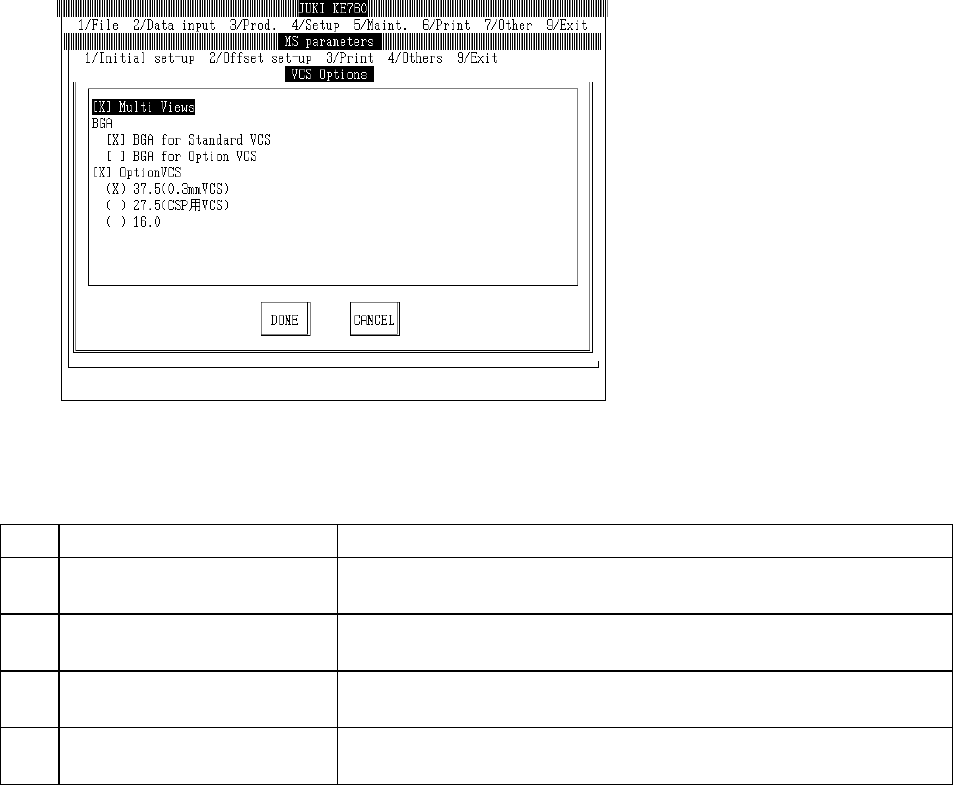
4.4.2 VCS Options
Select "1/Initial set-up" then "4/Options", and the options dialog will appear as follows.
(1) Setting Items
No. Item Contents
1 Reorganization of Split Field
Recognition
Reorganization of split field recognition completed Y/N
2 Illumination of Entire BGA (Std
VCS)
Illumination of entire ball array in BGA with std VCS Y/N
3 Illumination of Entire BGA
(Optional VCS)
Illumination of entire ball array in BGA with optional VCS Y/N
4 Optional VCS Optional VCS Y/N
Optional VCS types
(2) Method of Setting
– Select option units listed in the above table with the check box.
– If the setting for installed units is changed to "Not installed", machine setup will automatically be
modified from "Unit Available" to "Unit Not Available".
– When unit add ons change a setting from "Not Installed" to "Installed", machine setup will
automatically change to "Unit Available".
2-21
4.5 Servo Gain
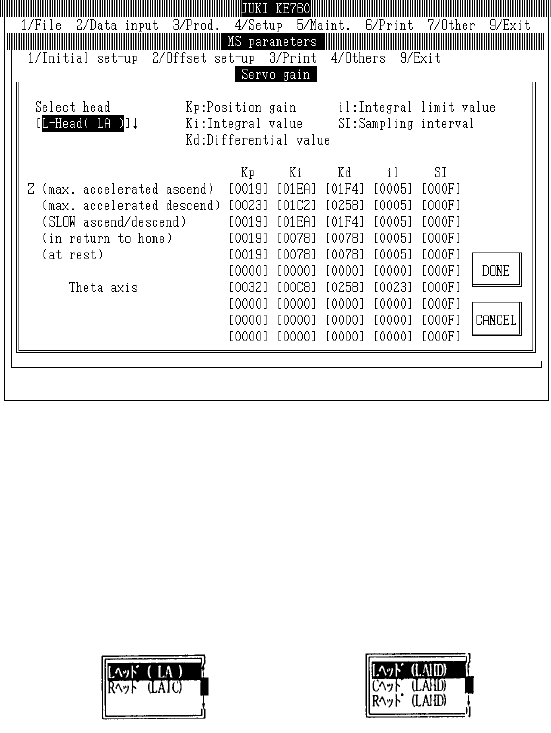
Select "1/Initial set-up" then "5/Servo Gain" and the servo gain dialog will appear as follows.
Display for KE-760
LAIC head
– Setting Head
The head to be set is selected from the combination box.
Press "Alt" + " " keys and the following overview will appear.
This does not affect the "Unit Available" setting in machine setup. (Can also be selected for units
not checked "Unit Not Available".)
Setting Head [L Head (LAHD)]
[L Head (LA)]
(KE-740) or (KE-760) (KE-730) or (KE-750)
2-22
(1) ???
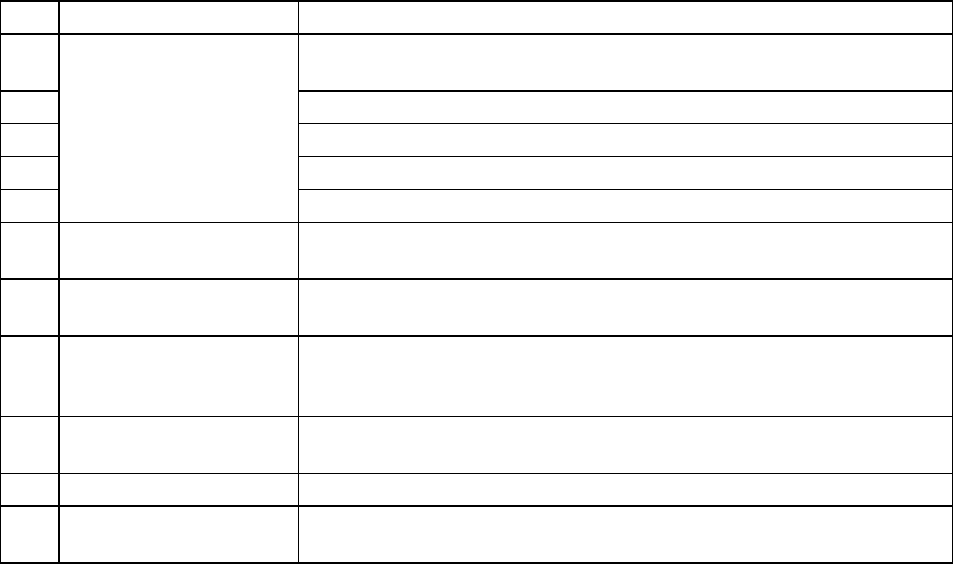
No. Item Contents
1 Z Axis (Increasing Max.
Acceleration) Kp
Position gain when increasing max. acceleration
2 Ki Integral value when increasing max. acceleration
3 Kd Differential value when increasing max. acceleration
4 il Integral limit value when increasing max. acceleration
5 SI Sampling interval when increasing max. acceleration
6 Z Axis (Decrease Max.
Acceleration)
Parameters when decreasing max. acceleration (Items same as Z Axis "Max.
Acceleration Increase")
7 Z Axis (Slow
Increase/Decrease)
Parameters when increasing/decreasing Z axis SLOW speed (Items same as Z
Axis "Max. Acceleration Increase")
8 Z Axis (Origin Return) Parameters for Z axis origin return, jog movements in nozzle laser height
detection, step movements (Items same as Z Axis "Max. Acceleration
Increase")
9 Z Axis (Stopping) Parameters for Z axis stopping (Items same as Z Axis "Max. Acceleration
Increase")
10 θ Axis Parameters for θ axis (Items same as Z Axis "Max. Acceleration Increase")
11 θ Axis (Encoder
Replacement)
Parameters for θ axis when LAIC head @ 2000 pulse (Items same as Z Axis
"Max. Acceleration Increase")
(2) Method of Setting
– Choose setting head with tuning button and then directly input 16 consecutive numeric values.
2-23