KE-750_MS.pdf - 第191页
4.6 Operation Specifications 4.6.1 Axes Select "1/Initial set-up" then "6/Specifications of action", "1/Axis" and the axis movement setting dialog will appear as follows. (1) Setting Items N…

(1) ???
No. Item Contents
1 Z Axis (Increasing Max.
Acceleration) Kp
Position gain when increasing max. acceleration
2 Ki Integral value when increasing max. acceleration
3 Kd Differential value when increasing max. acceleration
4 il Integral limit value when increasing max. acceleration
5 SI Sampling interval when increasing max. acceleration
6 Z Axis (Decrease Max.
Acceleration)
Parameters when decreasing max. acceleration (Items same as Z Axis "Max.
Acceleration Increase")
7 Z Axis (Slow
Increase/Decrease)
Parameters when increasing/decreasing Z axis SLOW speed (Items same as Z
Axis "Max. Acceleration Increase")
8 Z Axis (Origin Return) Parameters for Z axis origin return, jog movements in nozzle laser height
detection, step movements (Items same as Z Axis "Max. Acceleration
Increase")
9 Z Axis (Stopping) Parameters for Z axis stopping (Items same as Z Axis "Max. Acceleration
Increase")
10 θ Axis Parameters for θ axis (Items same as Z Axis "Max. Acceleration Increase")
11 θ Axis (Encoder
Replacement)
Parameters for θ axis when LAIC head @ 2000 pulse (Items same as Z Axis
"Max. Acceleration Increase")
(2) Method of Setting
– Choose setting head with tuning button and then directly input 16 consecutive numeric values.
2-23
4.6 Operation Specifications
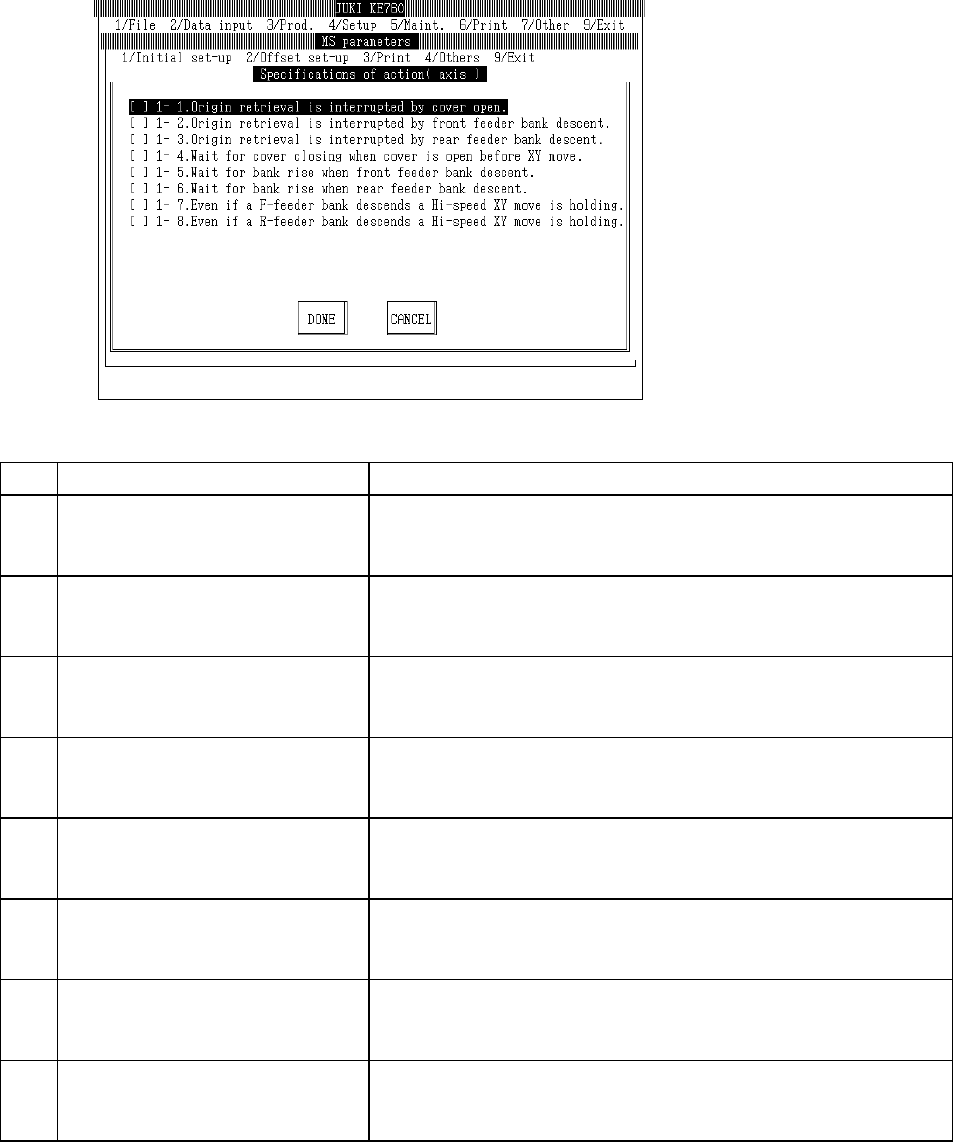
4.6.1 Axes
Select "1/Initial set-up" then "6/Specifications of action", "1/Axis" and the axis movement setting
dialog will appear as follows.
(1) Setting Items
No. Item Contents
1 1 - 1. Interruption - Cover opened during
origin return
Specifications when opened during origin return.
[ ] : Continue (Default value)
[×] : Interrupt (Origin return incomplete)
2 1 - 2. Interruption - Feeder bank (front)
lowered during home return
Specifications when front feeder bank lowers during origin return
[ ] : Continue (Default value)
[×] : Interrupt (Origin return incomplete)
3 1 - 3. Interruption - Feeder bank (rear)
lowered during home return
Specifications when rear feeder bank lowers during origin return.
[ ] : Continue (Default value)
[×] : Interrupt (Home return incomplete)
4 1 - 4. Waiting for cover to close - Cover
opened when XY axes at front.
Specifications when cover opened during XY movement.
[ ] : Disregard (Default value)
[×] : Waiting for cover to close
5 1 - 5. Waiting for bank to rise - Feeder
bank (front) lowered when XY axis at
front.
Specifications when front feeder bank descends during XY movement.
[ ] : Disregard (Default value)
[×] : Waiting for bank to rise
6 1 - 6. Waiting for bank to rise - Feeder
bank (rear) lowered when XY axis at
front.
Specifications when rear feeder bank descends during XY movement.
[ ] : Disregard (Default value)
[×] : Waiting for bank to rise
7 1 - 7. Maintain high speed XY movement
- Feeder bank (front)lowered.
Specifications for high speed XY movement with front feeder down.
[ ] : Slow down (Default value)
[×] : Do not slow down
8 1 - 8. Maintain high speed XY movement
- Feeder bank (rear)lowered.
Specifications for high speed XY movement with rear feeder down.
[ ] : Slow down (Default value)
[×] : Do not slow down
(2) Method of Setting
– Select option units listed in the above table with the check box.
2-24
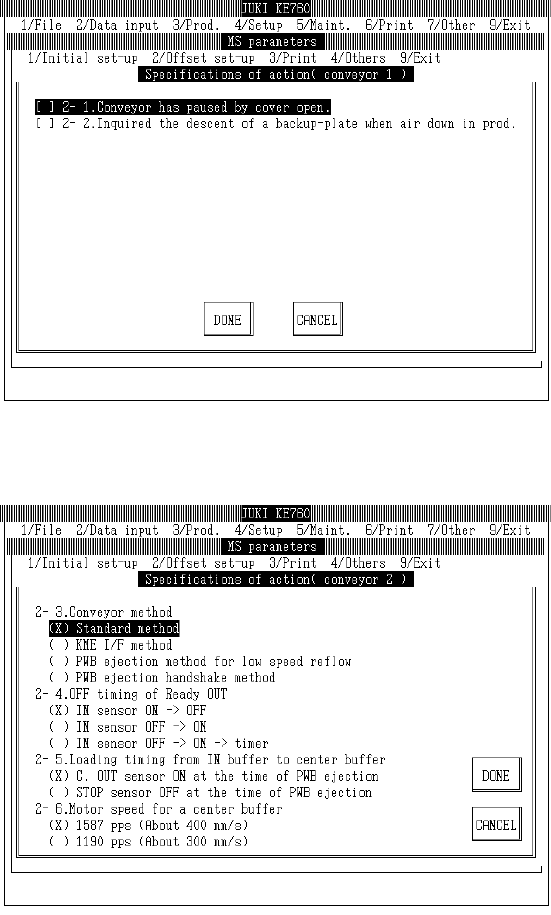
4.6.2 Conveyors
Select "1/Initial set-up" then "6/Specifications of action", "2/Conveyor 1" and the conveyor movement
spec setting dialog will appear as follows.
Select "1/Initial set-up" then "6/Specifications of action", "3/Conveyor 2" and the conveyor movement
spec setting dialog will appear as follows.
Limitation 1. Only the standard form of the KE-750 / KE-760 transport is valid.
Do not select non-standard forms.
2-25