KE-750_MS.pdf - 第192页
4.6.2 Convey ors Select "1/Initial set-up" then "6/Specifications of action", "2/Conveyor 1" and the conveyor movement spec setting dialog will appear as follows. Select "1/Initial set-…
4.6 Operation Specifications
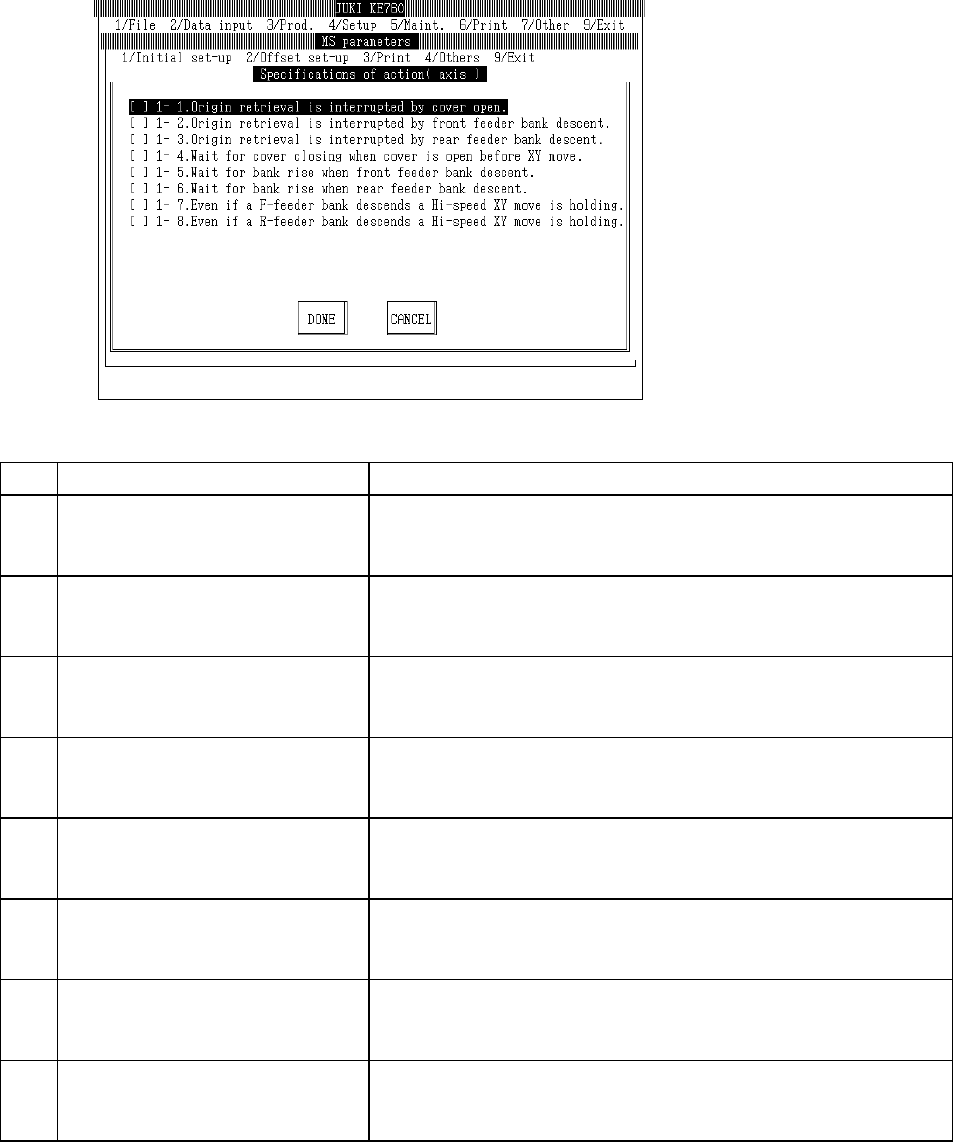
4.6.1 Axes
Select "1/Initial set-up" then "6/Specifications of action", "1/Axis" and the axis movement setting
dialog will appear as follows.
(1) Setting Items
No. Item Contents
1 1 - 1. Interruption - Cover opened during
origin return
Specifications when opened during origin return.
[ ] : Continue (Default value)
[×] : Interrupt (Origin return incomplete)
2 1 - 2. Interruption - Feeder bank (front)
lowered during home return
Specifications when front feeder bank lowers during origin return
[ ] : Continue (Default value)
[×] : Interrupt (Origin return incomplete)
3 1 - 3. Interruption - Feeder bank (rear)
lowered during home return
Specifications when rear feeder bank lowers during origin return.
[ ] : Continue (Default value)
[×] : Interrupt (Home return incomplete)
4 1 - 4. Waiting for cover to close - Cover
opened when XY axes at front.
Specifications when cover opened during XY movement.
[ ] : Disregard (Default value)
[×] : Waiting for cover to close
5 1 - 5. Waiting for bank to rise - Feeder
bank (front) lowered when XY axis at
front.
Specifications when front feeder bank descends during XY movement.
[ ] : Disregard (Default value)
[×] : Waiting for bank to rise
6 1 - 6. Waiting for bank to rise - Feeder
bank (rear) lowered when XY axis at
front.
Specifications when rear feeder bank descends during XY movement.
[ ] : Disregard (Default value)
[×] : Waiting for bank to rise
7 1 - 7. Maintain high speed XY movement
- Feeder bank (front)lowered.
Specifications for high speed XY movement with front feeder down.
[ ] : Slow down (Default value)
[×] : Do not slow down
8 1 - 8. Maintain high speed XY movement
- Feeder bank (rear)lowered.
Specifications for high speed XY movement with rear feeder down.
[ ] : Slow down (Default value)
[×] : Do not slow down
(2) Method of Setting
– Select option units listed in the above table with the check box.
2-24
4.6.2 Conveyors
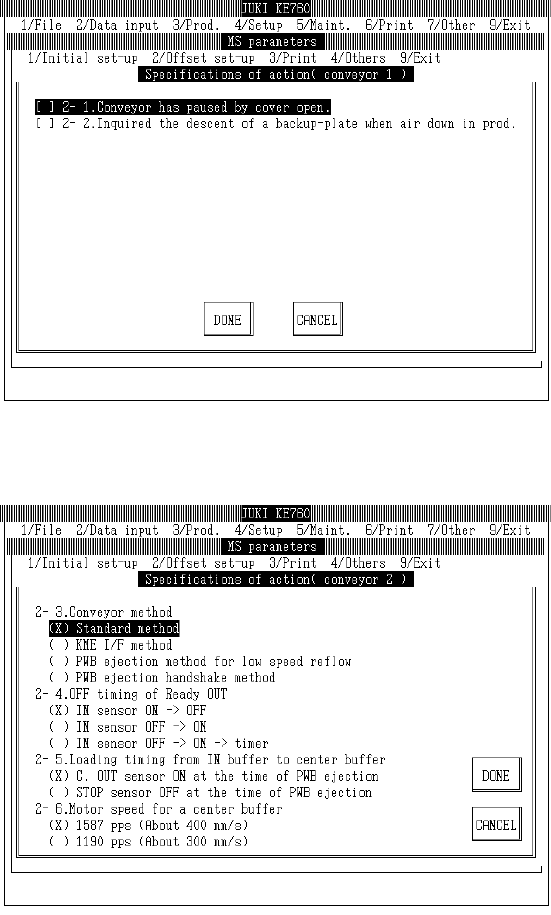
Select "1/Initial set-up" then "6/Specifications of action", "2/Conveyor 1" and the conveyor movement
spec setting dialog will appear as follows.
Select "1/Initial set-up" then "6/Specifications of action", "3/Conveyor 2" and the conveyor movement
spec setting dialog will appear as follows.
Limitation 1. Only the standard form of the KE-750 / KE-760 transport is valid.
Do not select non-standard forms.
2-25
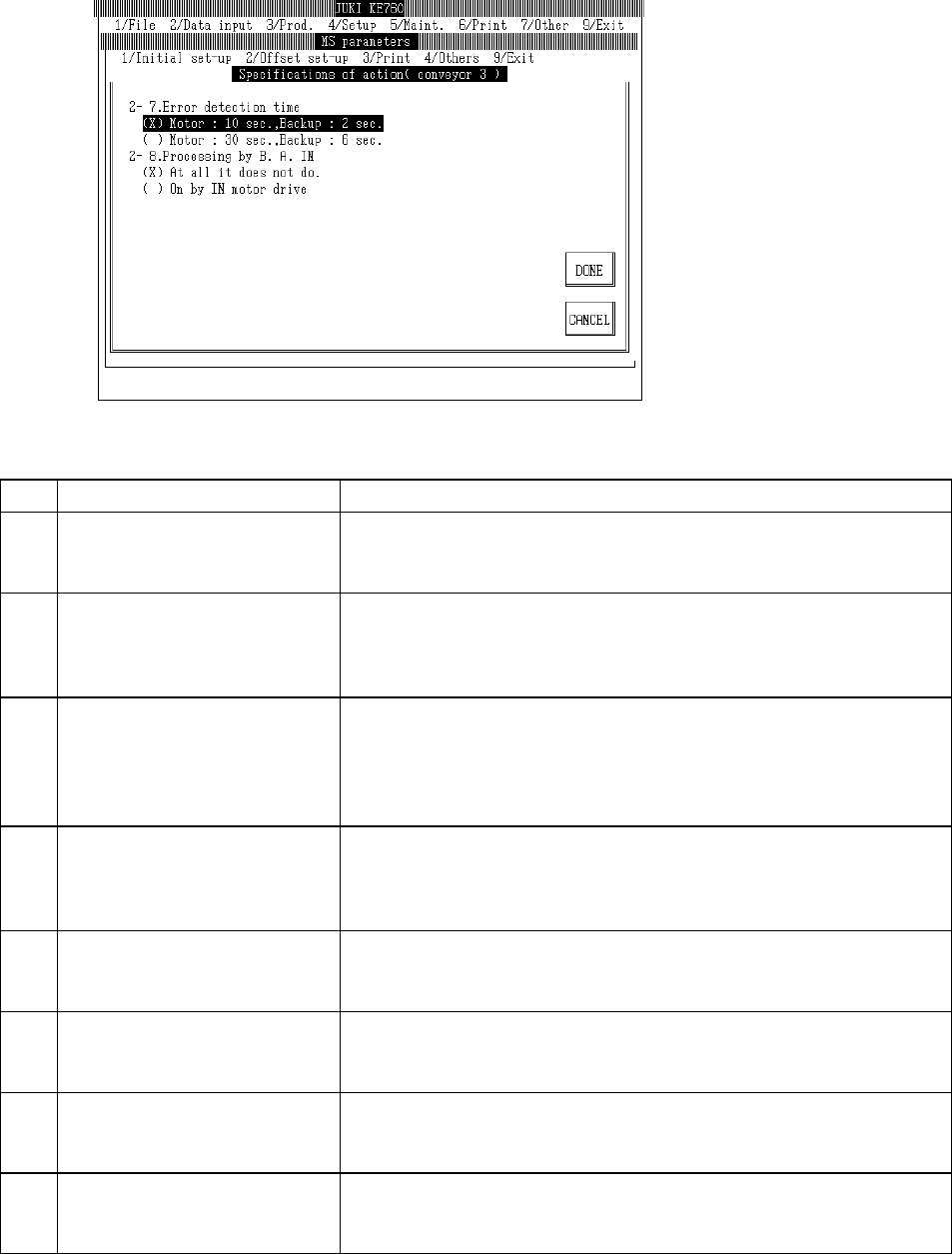
Select "1/Initial set-up" then "6/Specifications of action", "4/Conveyor 3" and the conveyor movement
spec setting dialog will appear as follows.
(1) Setting Items
No. Item Contents
1 2 - 1. Temporary stop when cover
opened during conveyance
Specification for cover opening during board transport
[ ] : Continue (Default value)
[×] : Temporary stop (Restart when closed)
2 2 - 2. Inquiry - Did back up plate
descend due to air pressure drop
during production
Inquires whether back up plate descended when air pressure dropped during
production
[ ] : Do not inquire (Default Value)
[×] : Inquire
3 2 - 3. Type of transport Type of conveyance
[×] Standard form (Default value)
[ ] Kumatsu I/F type
[ ] Low speed reflow board removal type
[ ] Board removal handshake type
4 2 - 4. Timing of OFF in Ready OUT Timing for turning "Ready OUT" to OFF
[×] IN Sensor ON OFF : When changed from ON to OFF (Default value)
[ ] IN Sensor OFF ON : When changed from OFF to ON
[ ] IN Sensor OFF ON Timer: Delay when changed from OFF to ON
5 2 - 5. Infeed timing from In buffer to
Center buffer
Timing of infeed from In buffer to Center buffer
[×] C. OUT sensor ON when board emitted (Default value)
[ ] STOP sensor OFF when board emitted
6 2 - 6. Center buffer motor speed Motor speed for center buffer
[×] 1587pps (approx. 400mm/sec) (Default value)
[ ] 1190pps (approx. 300mm/sec)
7 2 - 7. Error detection intervals Error detection interval
[×] 10 sec. for motor, 2 sec. for back up (Default value)
[ ] 30 sec. for motor, 6 sec. for back up
8 2 - 8. Processing from B.A. IN Processing from Board Available In
[×] Nothing happens (Default value)
[ ] ON starts IN motor drive
(2) Method of Setting
– Select option units listed in the above table with the check box or tuning button.
2-26