KE-750_MS.pdf - 第68页
– CNT Motor (1) Loosen stop screw in motor bracket and remove drive belt C from motor pulley A. (2) Remove motor (3) If replacing motor pulley A, align motor s haft face with pulley face when assembling. (4) To reassembl…
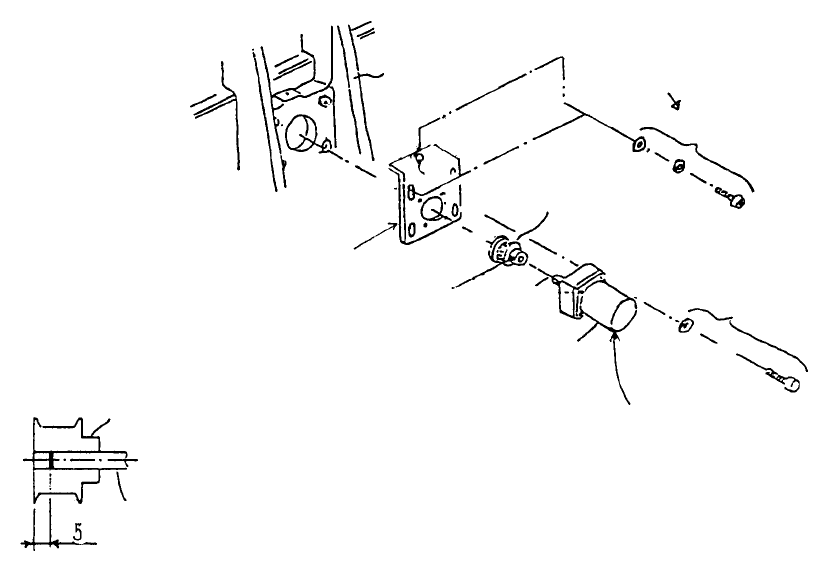
3. Conveyor Motor Replacement
– IN / OUT Motor
(1) Remove motor relay cable from connector.
(2) Loosen stop screw of motor bracket A and remove drive belt from motor pulley A.
(3) Remove motor.
(4) If motor pulley A has been replaced, position so that the end of motor shaft penetrates to 5mm
from the motor pulley face and tighten.
(5) Reassemble by following procedures (1)~(3) in reverse sequence. Drive belt tension is
determined by motor bracket height but it is not necessary to tighten the vertical screw all the way.
Set so that belt neither flops nor is overstretched.
Conveyor moto
r
shaft
Motor pulley A
* Fasten motor pulley A as shown belo
w
IN motor cable ass
y
E94807210A0
OUT motor cable assy
E94827210A0
A
lign so that cable is
oriented to side.
A
ccessory screw fo
r
conveyor motor
Stop scre
w
SM8030602TP
Motor bracket A
E2171721000
Motor bracket A
E2172721000
SEMS cap scre
w
SL6051092TN
Rail stand F
(Left side)
1-60
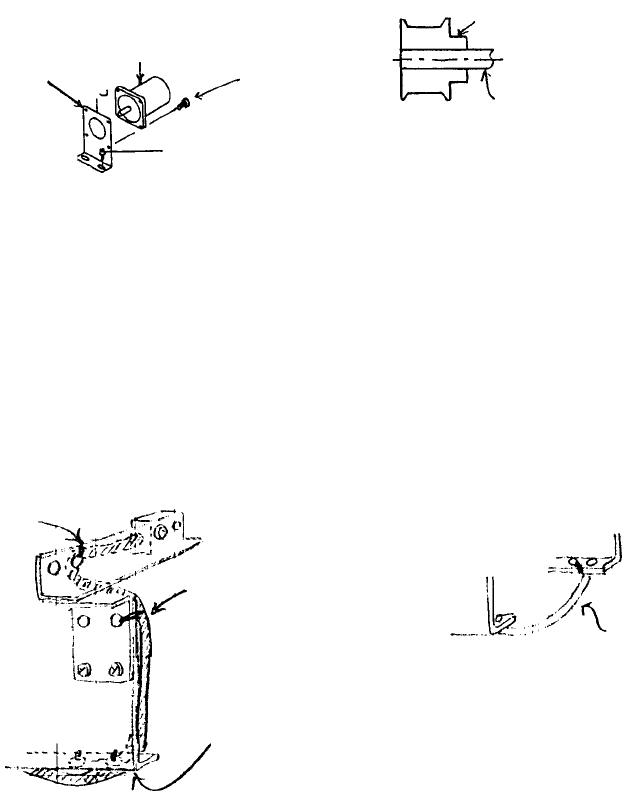
– CNT Motor
(1) Loosen stop screw in motor bracket and remove drive belt C from motor pulley A.
(2) Remove motor
(3) If replacing motor pulley A, align motor shaft face with pulley face when assembling.
(4) To reassemble, follow procedures (1), (2) in reverse sequence.
CNT motor shaft
Motor pulley A
SL6051292TN
Motor accessor
y
stop screw
CNT motor cable ass
y
E94787250A0
Motor bracket
E2021725000
4. PWB Detecting Sensor Replacement
– IN/OUT Sensors
(1) Remove stop screw SI6031092TN from sensor body. Replace sensor cable assy.
(2) Refer to QA Table, Conveyor No. 6 for instructions on sensor positioning adjustment.
(3) Organizing cables
Tie cable to 2 holes each in
bottom of fixed & movable
rails.
A
rrange slack so cable stays
inside cover when rails are
close together.
(*) When back is standard
Tie to 2 holes in
bottom of rail plate
Tie to hole in senso
r
bracket A
Tie to hole in senso
r
bracket B
1-61
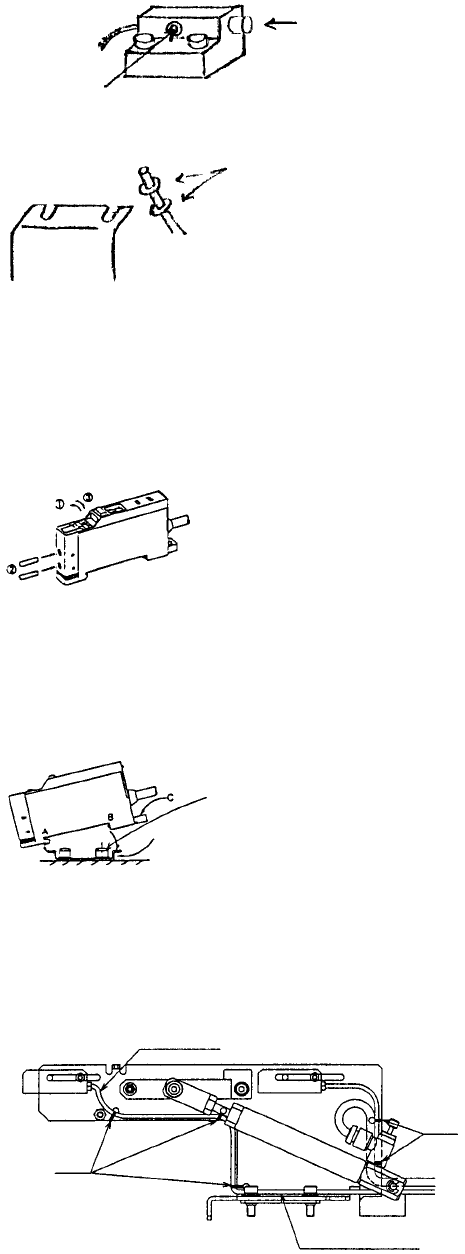
– WAIT Sensor
(1) Remove fiber from amp.
(2) Remove fiber from guide block.
Push here.
Loosen here.
(3) Remove fiber from sensor bracket. For instructions on setting sensor level, refer to QA Table.
– Assembling fiber amp unit
(1) Gently lift top of amp unit with a finger nail or screwdriver.
(2) Push fiber all the way to the back of the amp unit and trip lever.
(3) For thin fibers, first insert the thin attachment all the way into the amp, then insert and fasten
fiber.
– Mounting amp unit
Use the special mounting bracket supplied.
(1) Fit groove in front part (A) of amp unit onto special mounting bracket.
(2) Fit rear part (B) of amp unit completely onto special mounting bracket.
(3) To remove, insert screwdriver into groove (C). While pulling back, raise unit.
Special bracket
– STOP/C. OUT Sensors
(1) Remove stop screw SL4031291SC from sensor body and replace sensor cable assy.
(2) For instructions on adjusting sensor positioning, refer to QA Table, Conveyor No. 1.
(3) Organizing cables
Cable tie
Pass through gap o
f
cylinde
r
& stopper frame.
Cable ties
Connect to stopper frame.
1-62