03253524-01 KPO 2 Closed Loop.pdf - 第19页
3 USER INFORMATION 3.3 GETTING STARTED Standalone Manual Interface To Koh Young KPO 2 08/2021 19 When the KPO Monitor app is running it can be accessed from behind the printer user interface us- ing Alt-Tab on the keyboa…
3 USER INFORMATION
3.3 GETTING STARTED
18 Standalone Manual Interface To Koh Young KPO 2 08/2021
3.3.2 KPO Monitor
The KPO Monitor app is a separate application that can be used to monitor the status of the KPO
interface. It is a useful application for monitoring and testing any KPO operation.
The app is available via the Start menu.
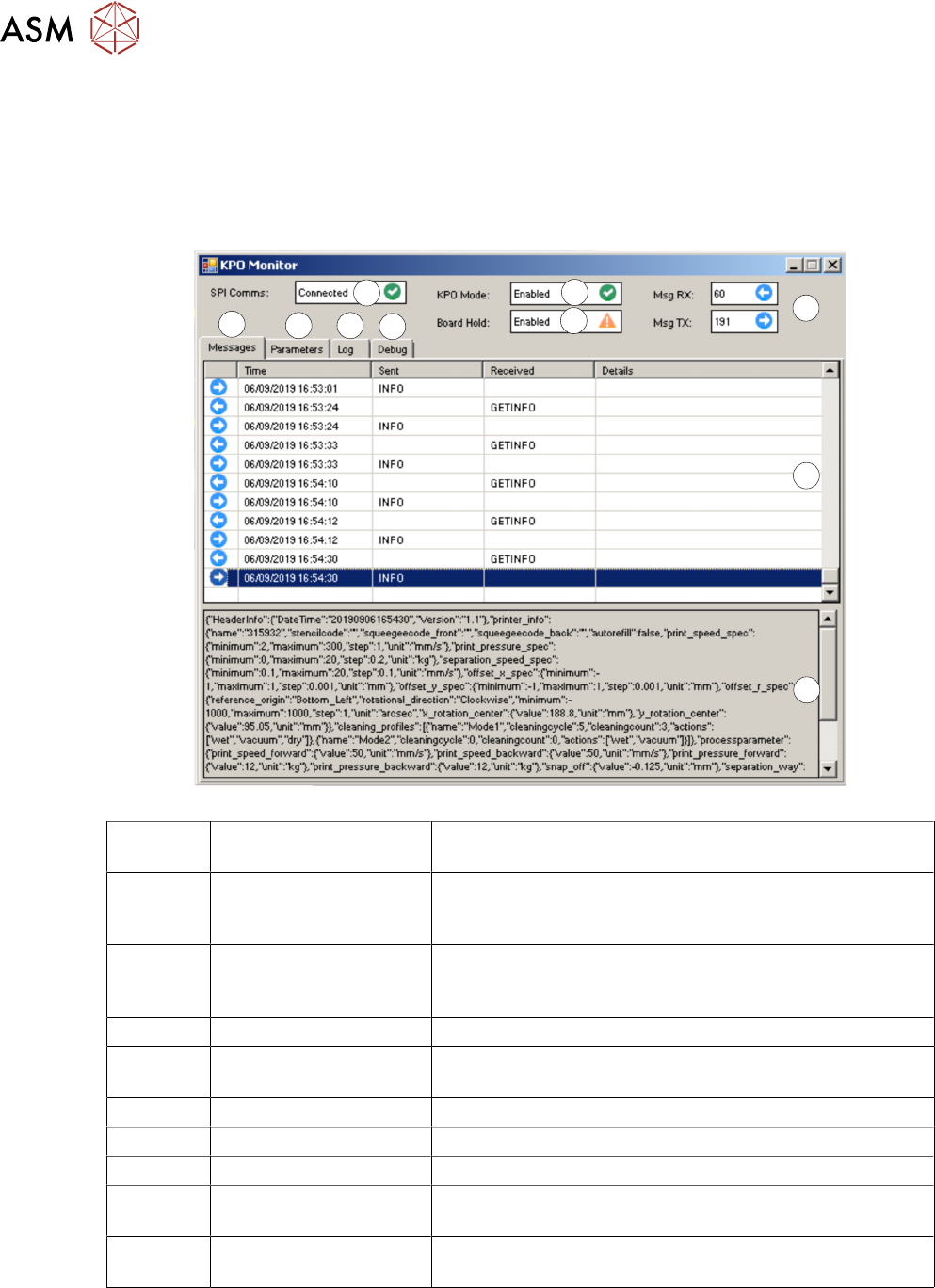
The Monitor app window displays the following User information:
1
2
3
4
5
6 7
8
9
10
}
1 SPI Comms Communication status between the printer and the SPI.
Options – Connected/Not Connected
2 KPO Mode Enables print and USC clean data being sent to the SPI.
Also, the SPI can control the print cycle.
Options – Enabled/Disabled
3 Board Hold Enable the blocking of the next board by the SPI if it is not
ready. Typically, only used during a PAM DOE
Options – Enabled/Disabled
4 Msg RX/Msg TX Message counts between the printer and SPI
5 Messages Tab Displays the summary of KPO messages sent and re-
ceived by the printer.
6 Parameters Tab Not implemented
7 Log Tab Not implemented
8 Debug Tab Not implemented
9 Message List Pane Displays the last 100 messages. The time and date, mes-
sage sent/received are shown.
10 Message Pane Displays the full message details for the highlighted mes-
sage in the Message List (9)
3 USER INFORMATION
3.3 GETTING STARTED
Standalone Manual Interface To Koh Young KPO 2 08/2021 19
When the KPO Monitor app is running it can be accessed from behind the printer user interface us-
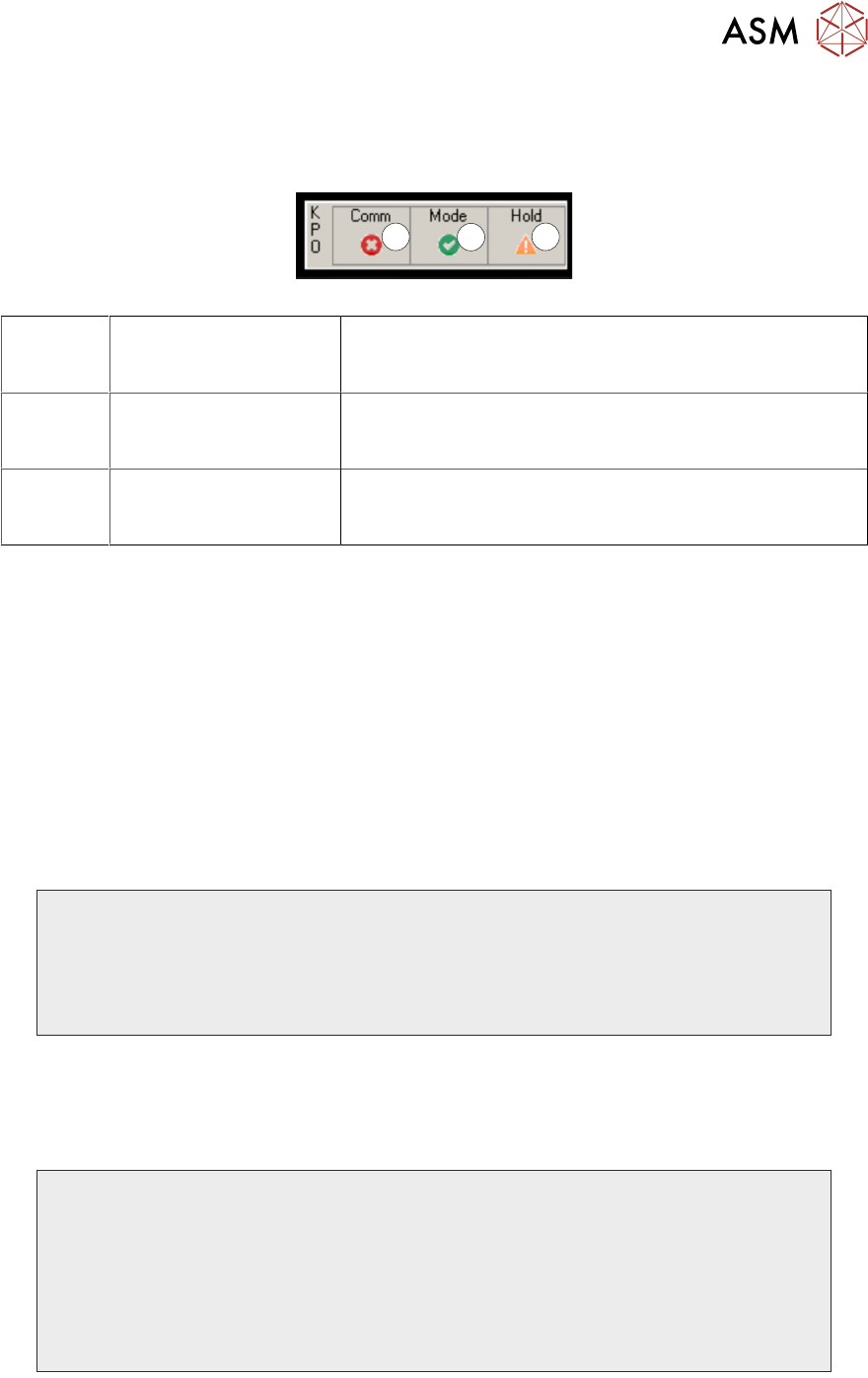
ing Alt-Tab on the keyboard. When the application is hidden or minimized the following small float-
ing window summarizing the KPO interface status is displayed in front of the printer user interface:
1
2
3
1 Comm Displays the communication status between the printer
and the SPI (as in 1 in previous table)
Options – Tick – connected/Cross - not connected
2 Mode Displays the status of the KPO Mode (as in 2 in previous
table)
Options – Tick - enabled/Cross - disabled
3 Hold Displays the status of the Board Hold (as in 3 in previous
table)
Options – Exclamation Mark – enabled/Tick - disabled
The floating window can be positioned by the user by clicking and dragging anywhere in the win-
dow border.
3.3.3 KPO Logs
The KPO plug-in records data in the following log, e:\log\plug-in\kpo folder. The log is automatically
managed, so the size of the log does not exceed 10 MB.
The log records all messages exchanged between the printer and the SPI and any process adjust-
ments. The log can be viewed, but it is intended for use by ASM Service to diagnose any commu-
nication issues.
3.3.3.1 Log Examples
Below are displayed three examples of the KPO log:
2018-09-07 14:57:40.2817: INFO: KPOPlugIn: Enabling interface
2018-09-07 14:57:40.2817: INFO: KPOPlugIn: Interface manager starting
2018-09-07 14:57:40.2817: INFO: KPOPlugIn: Comms manager starting
2018-09-07 14:57:40.2917: INFO: KPOPlugIn: Starting comms thread
2018-09-07 14:57:40.2917: INFO: KPOPlugIn: Server socket created: address=0.0.0.0:7001
2018-09-07 14:57:40.3067: INFO: KPOPlugIn: Server socket listening
2018-09-07 14:57:40.3067: INFO: KPOPlugIn: Waiting for client to connect
Waiting For Connection
2018-07-10 12:00:20.4501: INFO: KPOPlugIn: Client connected: address=10.49.40.41:53547
2018-07-10 12:00:20.4501: INFO: KPOPlugIn: Current comms state: Connected
2018-07-10 12:00:21.5951: INFO: KPOPlugIn: Packet received: |GETINFO|{"HeaderInfo": {"Version":
"1.0", "DateTime": "20180710165956"}}|
2018-07-10 12:00:21.5951: INFO: KPOPlugIn: Processing input buffer: |GETINFO|{"HeaderInfo": {"Version":
"1.0", "DateTime": "20180710165956"}}|
2018-07-10 12:00:21.5951: INFO: KPOPlugIn: Received GETINFO message:
{"HeaderInfo": {"Version": "1.0", "DateTime": "20180710165956"}}
2018-07-10 12:00:21.6101: INFO: KPOPlugIn: Sending INFO message:
Connected To SPI
3 USER INFORMATION
3.3 GETTING STARTED
20 Standalone Manual Interface To Koh Young KPO 2 08/2021
2018-07-10 12:01:52.8953: INFO: KPOPlugIn: Parameter change: Front Print Speed - 100(mm/s) -
> 60.0(mm/s)
2018-07-10 12:01:52.8953: INFO: KPOPlugIn: Parameter change: Rear Print Speed - 100(mm/s) -
> 60.0(mm/s)
2018-07-10 12:01:52.8953: INFO: KPOPlugIn: Parameter change: Front Pressure - 0(kg) -> 53.14(N)
2018-07-10 12:01:52.8953: INFO: KPOPlugIn: Parameter change: Rear Pressure - 0(kg) -> 53.14(N)
2018-07-10 12:01:52.8953: INFO: KPOPlugIn: Parameter change: Separation Speed - 20(mm/s) ->
5.0(mm/s)
Printing With Parameter Changes
NOTE
KPO uses Newtons for print pressure. The printer software automatically converts to kg or lbs.