00198829-01_SM_X-Series-S_Hxxxx_EN.pdf - 第203页
7 Conveyor 7.6 Conveyor Belt, Belt Drive and Hexagonal Shaft Service Manual SIPLACE X-Series S (from Hxxxx) 01/2021 203 7.6.3 Replacing the tape drive Parts, equipment and tools ● Belt drive assembly SXa [03092315-xx] ● …
7 Conveyor
7.6 Conveyor Belt, Belt Drive and Hexagonal Shaft
202 Service Manual SIPLACE X-Series S (from Hxxxx) 01/2021
Setting
► Use the software to move the conveyor sides into a position which allows you best access. As
an alternative, you can loosen the clamps for the relevant sides in dual conveyors.
7.2 "Loosening the Conveyor Side Clamps" [}162]
► Switch off the machine, disconnect it from the power supply and secure it to prevent
unauthorized reactivation.
1.2 "Preparatory work..." [}16]
► Check the belt tension at the relevant measuring point.
► Correct the belt tension when needed, using the movable idler pulley.
► Repeat the measurement 4 times.
7.6.2.2 Calculating the belt tension
NOTICE
For conveyor belt only
This calculation only applies to the conveyor belt.
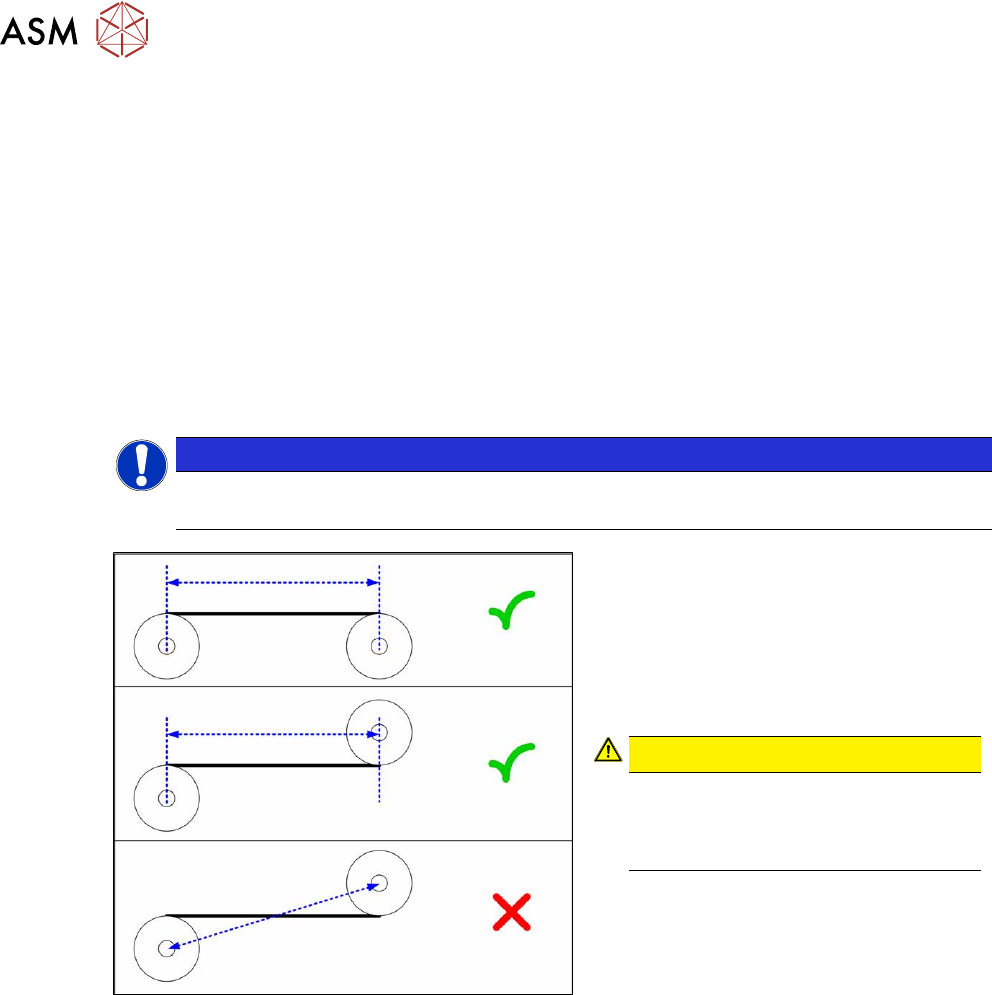
Fig.266: Measuring the distance
► Define the two idler pulleys between
which you want to set the belt tension.
If possible, do not use the movable
idler pulleys.
► Measure the distance between the two
idler pulleys parallel to the conveyor
belt.
CAUTION!
Note that it is not always possible to
simply measure the distance
between the idler pulleys from cen-
ter to center.
.
► Calculate the belt tension using the fol-
lowing formula:
20000 [Hz mm]
/ idler pulley spacing [mm]
The permissible tolerance is always plus/
minus 10% of the calculated value.
Example
Distance between the idler pulleys: 235mm
Calculation:
20000 / 235 = 85 (rounded, exactly 85.106…)
10 % of 85.106… = 9 (rounded, exactly 8.5106…)
Result:
Belt tension: 85 +/-9 Hz
7 Conveyor
7.6 Conveyor Belt, Belt Drive and Hexagonal Shaft
Service Manual SIPLACE X-Series S (from Hxxxx) 01/2021 203
7.6.3 Replacing the tape drive
Parts, equipment and tools
●
Belt drive assembly SXa [03092315-xx]
●
Bearing for hexagonal shaft SXa (plastic bearing) – pack of 10 [03092024-xx]
Overview
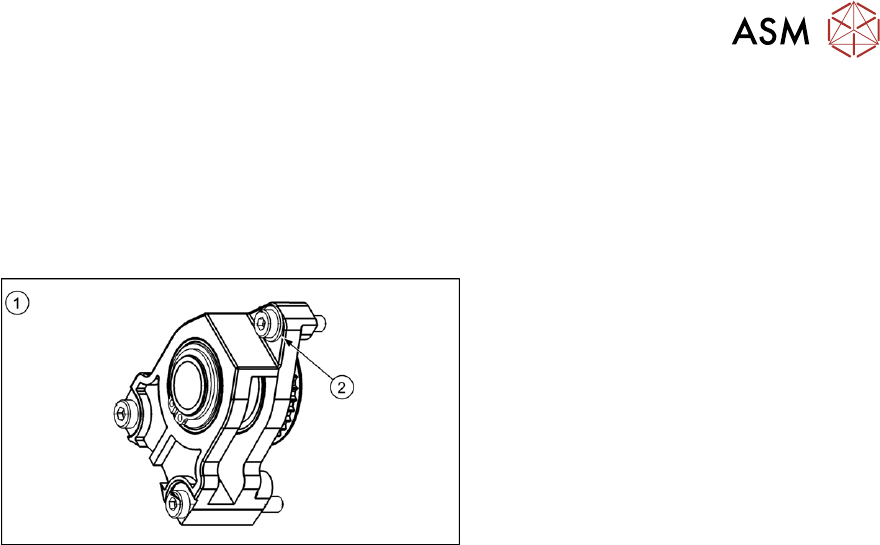
Fig.267: Overview of tape drive
1. Tape drive
2. Washer under the top fastening screw
Removal/installation
► Replacement of the belt drive is identical to replacement of the conveyor drive. For more in-
formation about this read section 7.4.1
"Replacing the conveyor drive" [}173].
7.6.4 Replacing the drive shaft on the tape drive
Parts, equipment and tools
●
Synchronous shaft assembly SXa [03092383-xx]
●
Bearing for hexagonal shaft SXa (plastic bearing) – pack of 10 [03092024-xx]
Removal/installation
► Replacement of the drive shaft on the tape drive is follows the same procedure as replace-
ment of the toothed belt on the conveyor drive.
7.4.4 "Replacing the toothed belt (conveyor drive)" [}179]
7 Conveyor
7.6 Conveyor Belt, Belt Drive and Hexagonal Shaft
204 Service Manual SIPLACE X-Series S (from Hxxxx) 01/2021
7.6.5 Replacing the idler pulley
Parts, equipment and tools
●
Idler pulley SXa [03092899Sxx] (including screws, spacer and clamping device)
●
Magnet lifter, if needed or tweezers and adhesive tape
●
Torx screwdriver ESD 1.0-5.0 Nm [03078400-xx]
●
Bit holder for TorqueVario screwdriver [03078706-xx]
●
Bit, size 4
●
Measuring scale, if needed
Overview
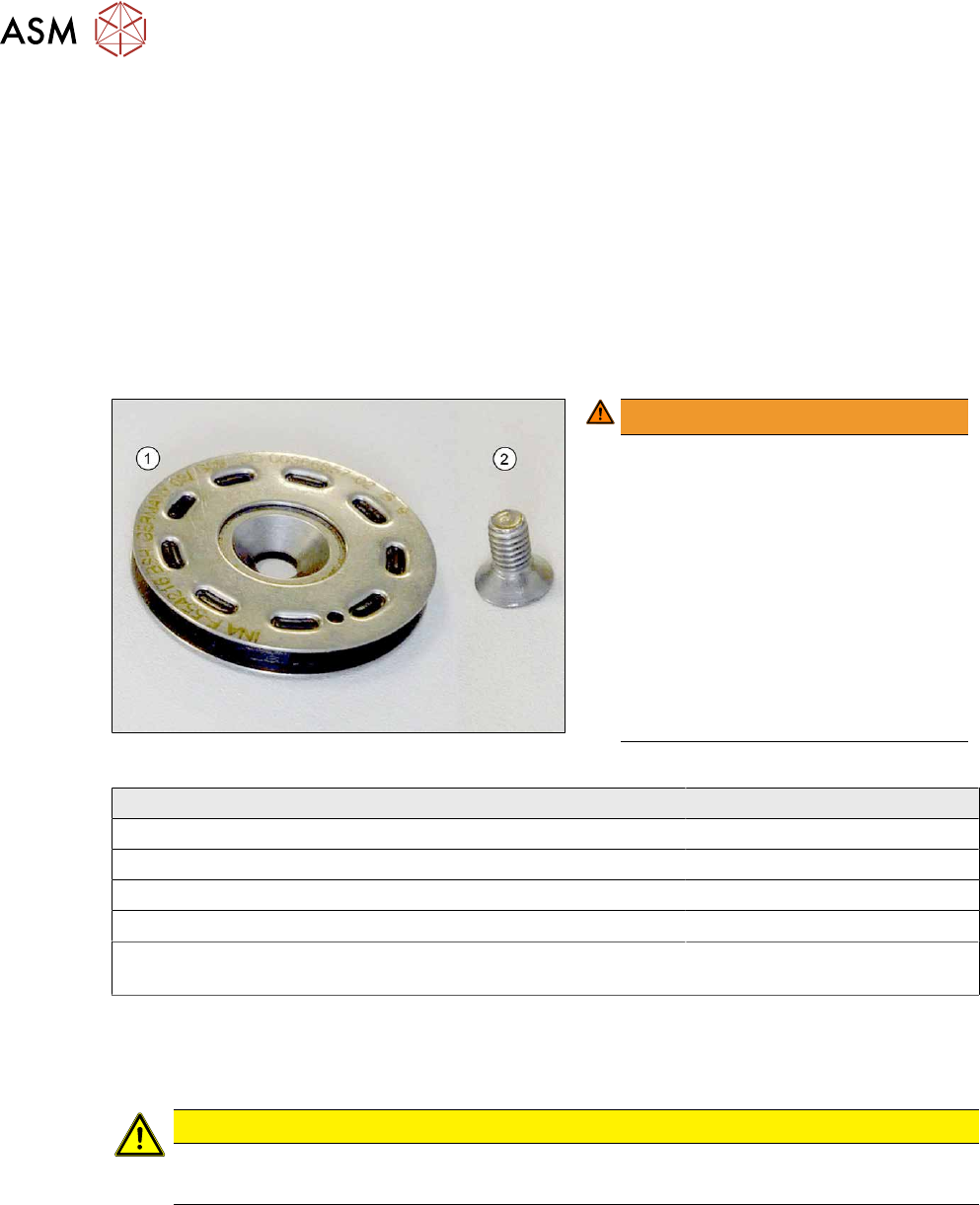
Fig.268: Idler pulley with fastening screw
WARNING!
Tighten the screws(1) fastening the
idler pulleys(2)
with 1.8Nm. Make
sure that you do not tighten the screws
too much. This could cause irreparable
damage to the conveyor!
The corresponding threads are only in
1.5 to 2mm thick plates and could be
damaged if you use a torque which is
too high. For this reason, avoid using
screws which are too short. Use a
measuring scale to check, if needed!
This could cause irreparable damage
to the conveyor!
.
Installation location of idler pulley Fastening screw
Placement area ISO10642 - M4x6
Movable idler pulleys ISO10642 - M4x8
Other positions in the input, intermediate and output area ISO10642 - M4x10
Exception: conveyor side A next to the LLS transmitter ISO10642 - M4x8
First and last idler pulley on the transfer positions to the prede-
cessor and successor machine
One additional spacer disk
For an overview of the individual movable idler pulleys on the conveyor sides, see section 7.6.2.1
"Setting the Tension of the Conveyor Toothed Belt" [}200].
Removal
CAUTION
Toothed belt
► Make sure that the toothed belt is not folded or otherwise damaged.
► Use the software to move the conveyor sides into a position which allows you best access. As
an alternative, you can loosen the clamps for the relevant sides in dual conveyors.
7.2 "Loosening the Conveyor Side Clamps" [}162]
► Switch off the machine, disconnect it from the power supply and secure it to prevent
unauthorized reactivation.
1.2 "Preparatory work..." [}16]
► Loosen the movable idler pulley.