00198829-01_SM_X-Series-S_Hxxxx_EN.pdf - 第263页
8 Head exchange 8.5 Replacing the SIPLACE C&P20P/M2 Service Manual SIPLACE X-Series S (from Hxxxx) 01/2021 263 Fig.348: Pneumatic connections ► Disconnect the pneumatic connec- tions (1) to (3) from the placement…
8 Head exchange
8.5 Replacing the SIPLACE C&P20P/M2
262 Service Manual SIPLACE X-Series S (from Hxxxx) 01/2021
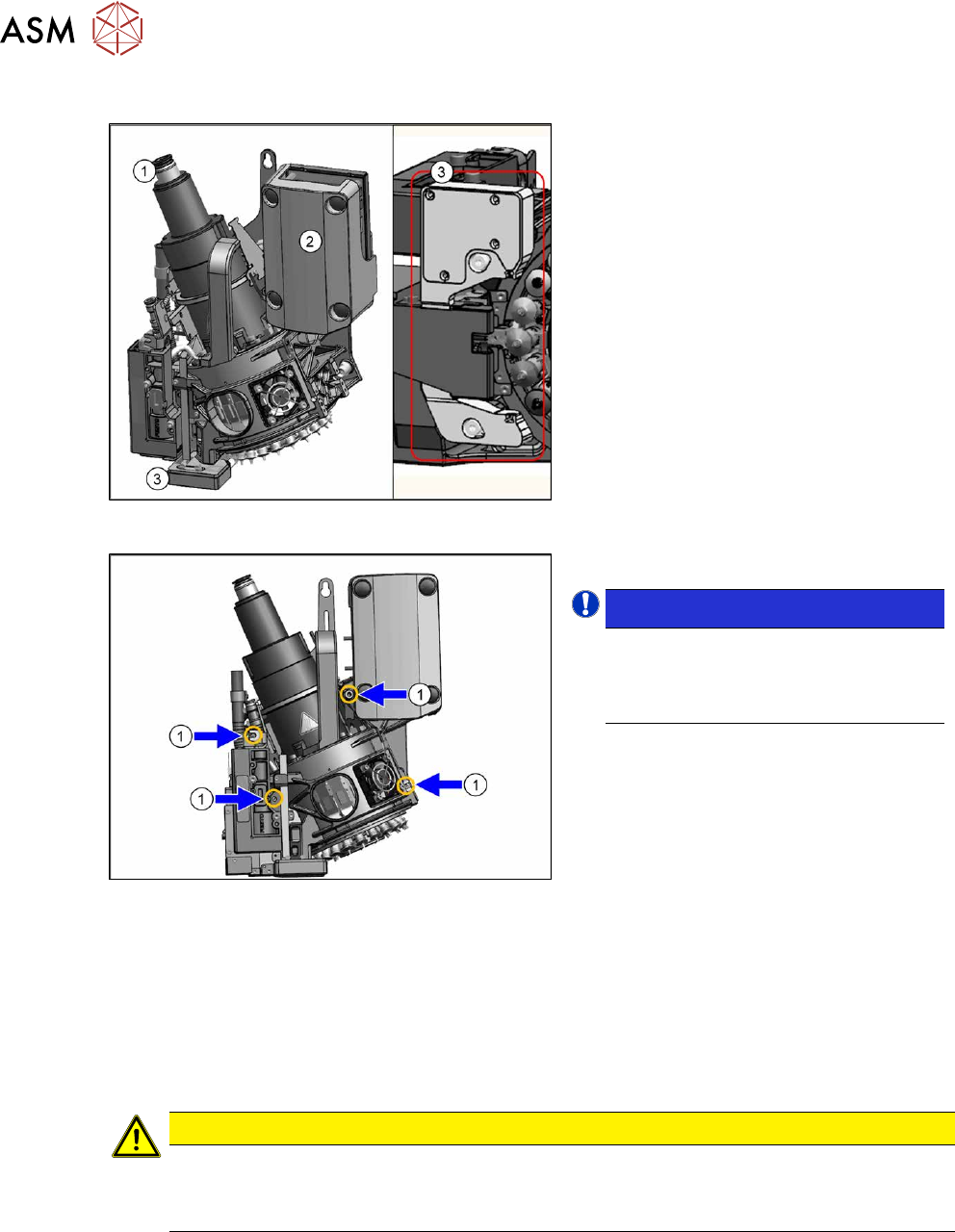
Overview
Fig.346: SIPLACE C&P20P
1. Holding circuit connection
2. Intermediate distributor board (behind
the cover)
3. Component sensor
Fig.347: Fastening screws
1. Four fastening screws (yellow marks)
NOTICE!
The length of the exhaust air hose "Sil-
icon hose Di8 Da12 electrically con-
ductive 1m" [03006727Sxx] on the
SIPLACE C&P20P/M2 is 355mm.
.
Removal
► Switch off the machine, disconnect it from the power supply and secure it to prevent
unauthorized reactivation.
1.2 "Preparatory work..." [}16]
► Switch off the compressed air supply
5.2 "Disabling the compressed air supply" [}86]
CAUTION
Take great care when dismantling the placement head!
The component sensor prisms, underneath the placement head, could be damaged.
► Never place the placement head down on the component sensor.
► Fit the protective cap onto the component sensor for the placement head.
8 Head exchange
8.5 Replacing the SIPLACE C&P20P/M2
Service Manual SIPLACE X-Series S (from Hxxxx) 01/2021 263
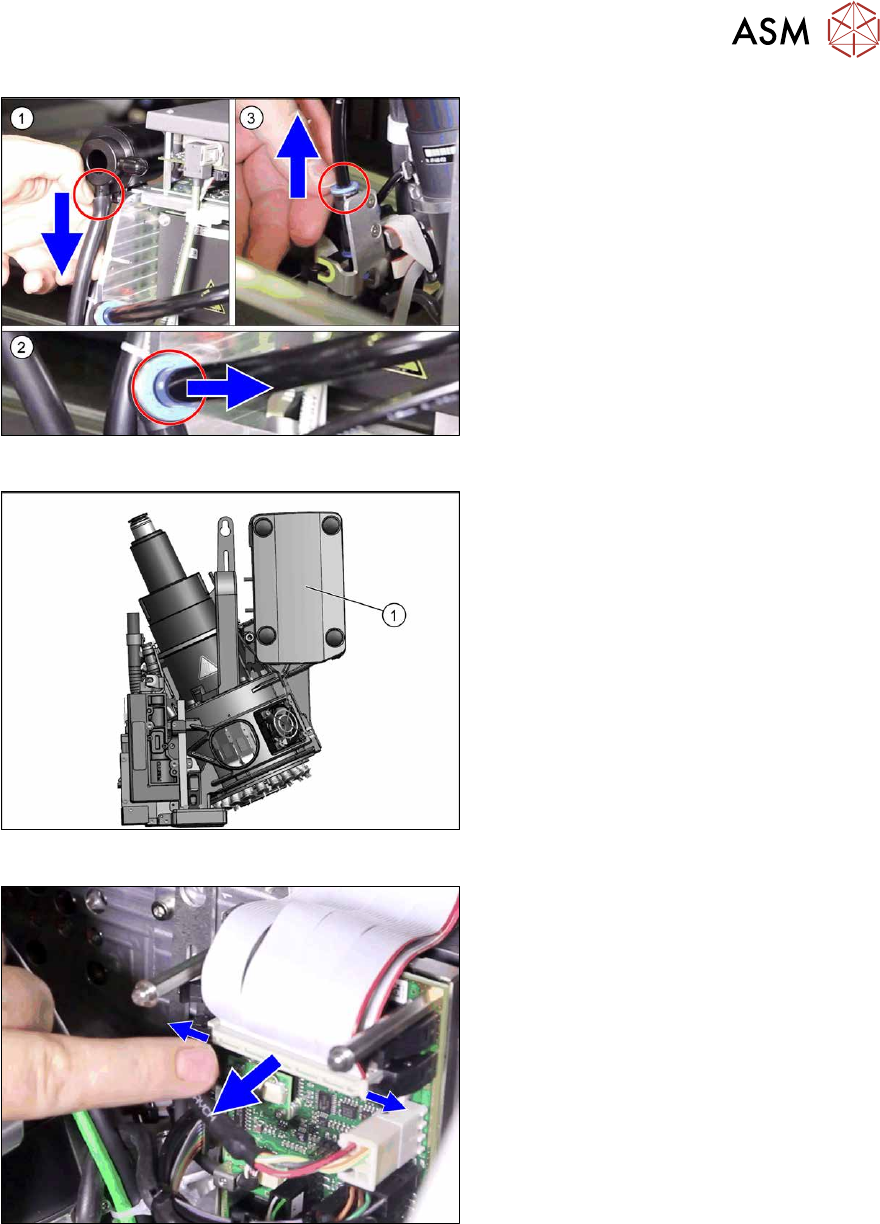
Fig.348: Pneumatic connections
► Disconnect the pneumatic connec-
tions(1)
to(3) from the placement
head.
Fig.349: Cover on intermediate distributor board
► Remove the cover(1) (press studs).
Fig.350: Flat ribbon cable
► Unplug the ribbon cables between the
placement head and the head adapter.
► Open the cable holders and unplug the PCB camera cable from the Vision Head Interface.
While unplugging the cables, press the clamps on both sides of the connectors and open any
cable ties.
► Unscrew all four M4 fastening screws with a long Torx key.
► Carefully lift the placement head out of the locating pins on the head plate and from the hook.
► Placing the head into the head transport box
► If you need to perform further work on this placement head (e.g. replacing spare parts), fit the
placement head to the head mount [03056231-xx].

8 Head exchange
8.5 Replacing the SIPLACE C&P20P/M2
264 Service Manual SIPLACE X-Series S (from Hxxxx) 01/2021
Installation
► If you replace the placement head without the component camera, you will need to fit the old
camera into the new head. In this case a full calibration is necessary. Read the service
manual for your placement head for more information.
► The placement head must be converted using the "Holding circuit assembly/C&P20" kit
[03005123Sxx] or the "Compressed air mode CP20x" kit [03106765‑xx] for compressed air
mode.
► Make sure that the assembly position on the head plate is correct.
► Tighten the four head fastening screws (M4) with a torque of 2.7 Nm.
NOTICE
Various hose lengths on SIPLACE X-Series S
The hose to the pressure control valve will vary in length, depending on the installation loc-
ation (standard gantry or rotated gantry).
► Shorten or replace the hose, where necessary.
Follow the removal instructions in reverse order for further installation.
See also
2 8.9 "Installation Positions on the Head Plate" [}278]