00198829-01_SM_X-Series-S_Hxxxx_EN.pdf - 第276页
8 Head exchange 8.8 Replacing the SIPLACE Twin 276 Service Manual SIPLACE X-Series S (from Hxxxx) 01/2021 Removal ► Switch off the machine, disconnect it from the power supply and secure it to prevent unauthorized reacti…
8 Head exchange
8.8 Replacing the SIPLACE Twin
Service Manual SIPLACE X-Series S (from Hxxxx) 01/2021 275
Overview
The Twin consists of two identical Twin modules (segments), which are fitted at an angle of 180°.
NOTICE
Module 1 and 2
The removal procedure is described here for module1 (left). Removal for module 2 (right)
is the same.
► In the case of older Twin modules, you might need to remove module 2 before remov-
ing module 1. During installation, you would then need to fit module 1 before fitting
module 2.
► In the case of newer Twin modules, the modules can be removed and fitted individu-
ally.
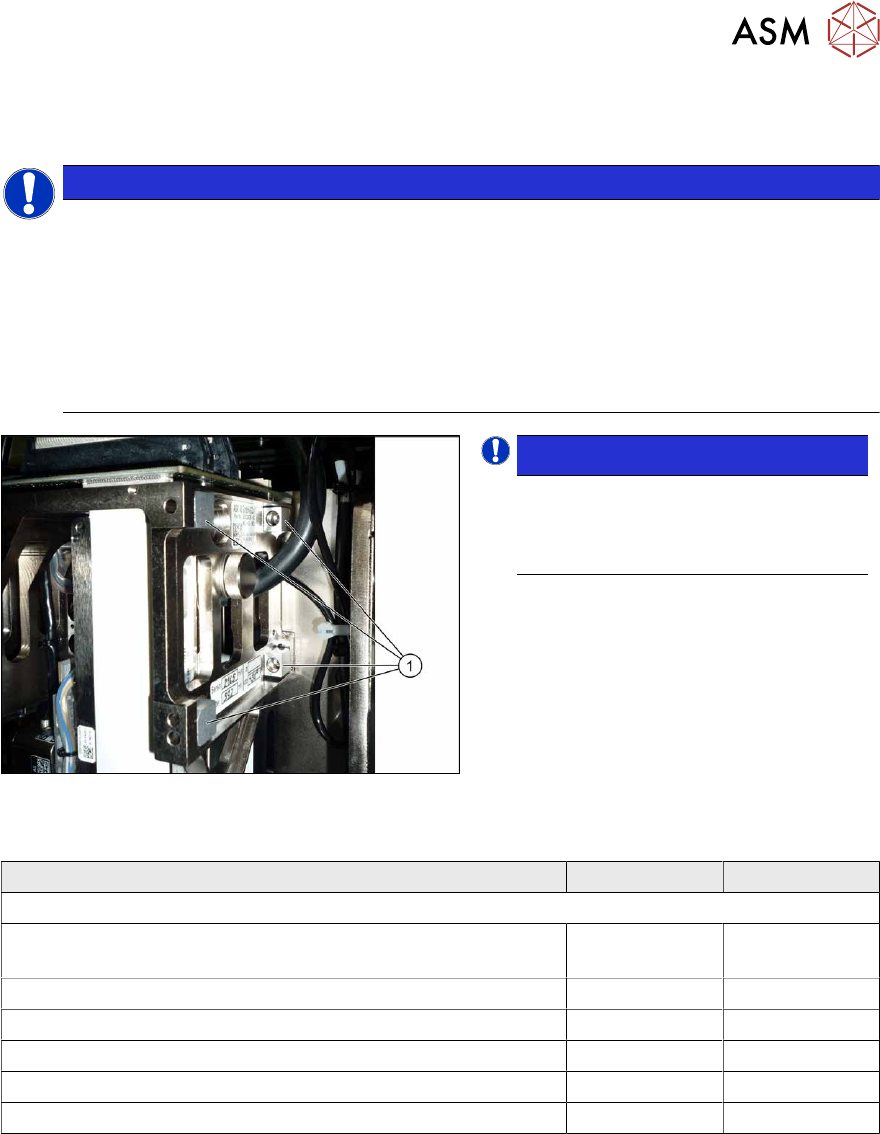
Fig.369: Captive screws
NOTICE!
When using modules with captive
screws(1)
you may need to fit these
screws on the other side
depending on
the installation position.
.
Observe the various different hose lengths:
Designation Item no. Length
Other hoses on the machine:
Hose supplied "silicone hose. Di8 Da12 electrically conduct-
ive 1m"
03006727Sxx
●
Cooling air hose X motor 03006777-xx 180 mm
●
Cooling air hose P+P module right 03006779-xx 395 mm
●
Cooling air hose P+P module left 03006780-xx 230 mm
●
Cooling air hose X motor TX 03126503-xx 210 mm
●
Cooling air hose X motor rotated gantry 03059420-xx 440 mm
8 Head exchange
8.8 Replacing the SIPLACE Twin
276 Service Manual SIPLACE X-Series S (from Hxxxx) 01/2021
Removal
► Switch off the machine, disconnect it from the power supply and secure it to prevent
unauthorized reactivation.
1.2 "Preparatory work..." [}16]
► Switch off the compressed air supply
5.2 "Disabling the compressed air supply" [}86]
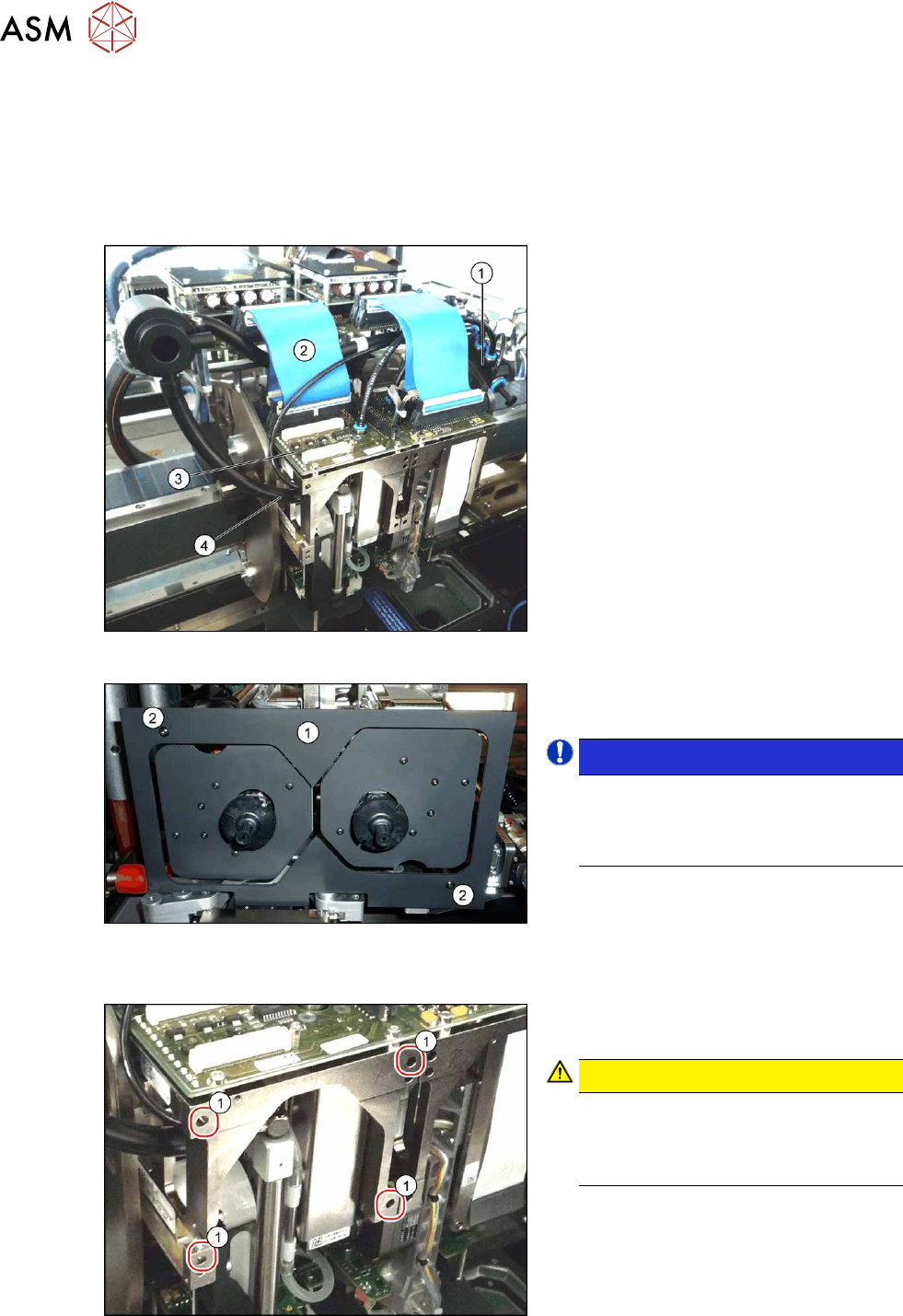
Fig.370: Connections (example of SIPLACE SX1 shown)
► Move the gantry into a position which
allows you best access.
► Unplug the pneumatic connection from
the Twin vacuum generator to the
pneumatic distributor(1)
and from the
silencer.
► Disconnect the exhaust air silicone
hose from the Twin vacuum generator
(4)
.
► Unplug the pneumatic connection from
the pneumatic distributor(1)
to the
Twin return cylinder.
► Unplug the flat ribbon cable(2) from
the head main board(3)
on the Twin.
Fig.371: Camera lens hood
► Remove the camera screen(1). This is
fastened with two black screws(2)
.
NOTICE!
Only use these black screws to fix the
camera lens hood. This prevents re-
flection when measuring components
with the stationary camera.
.
Each module is fixed with four screws (TX20) to the head plate and is positioned with two pins.
Fig.372: Fastening screws
► Unscrew the first three fastening
screws.
CAUTION!
Hold tight!
Hold the module tight before removing
the last of the four screws. The module
could otherwise fall down.
.
► Unscrew the fourth fastening screw and
pull the module out of the pins.

8 Head exchange
8.8 Replacing the SIPLACE Twin
Service Manual SIPLACE X-Series S (from Hxxxx) 01/2021 277
► Placing the head into the head transport box
► If you need to perform further work on this placement head (e.g. replacing spare parts), fit the
placement head to the head mount [03056231-xx].
Installation
Follow the removal instructions in reverse order for installation. Also observe the following instruc-
tions:
► Fit the fastening screws on the other side of the module, if needed (see above).
► Make a note of the force values for the new module. These force values can be found on a
label at the side of the module.
► Make sure that the assembly position is correct.
► Perform a head calibration.
See also
2 8.9 "Installation Positions on the Head Plate" [}278]
2 8.10 "Calibration" [}279]