00198829-01_SM_X-Series-S_Hxxxx_EN.pdf - 第349页
9 Component feeding 9.4 Docking Station for Component Trolley Service Manual SIPLACE X-Series S (from Hxxxx) 01/2021 349 Fig.495: FCU cover plate ► Remove the two screws (2) fastening the FCU cover plate (1) . Fig.49…
9 Component feeding
9.4 Docking Station for Component Trolley
348 Service Manual SIPLACE X-Series S (from Hxxxx) 01/2021
Overview
1
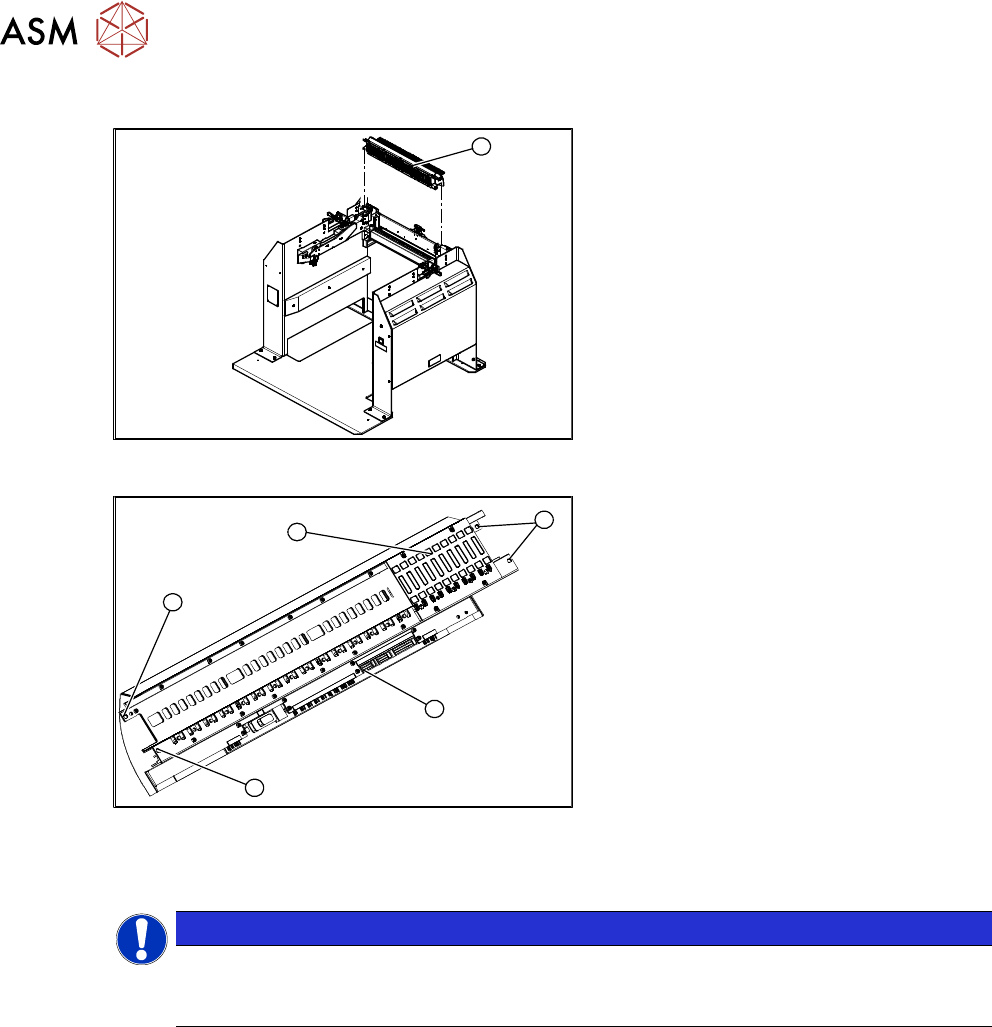
Fig.493: FCU on docking station
1. Feeder control unit
3
3
1
3
2
Fig.494: FCU overview
1. FCU assembly
2. Terminal strip
3. Screws fastening the FCU
Depending on the version, there will be
four or six screws.
Removal
NOTICE
Example shown as diagram
The tasks to be performed are described using the example of the SIPLACE TX1 V1. The
procedure for the docking station is the same.
► Switch off the machine, disconnect it from the power supply and secure it to prevent
unauthorized reactivation.
1.2 "Preparatory work..." [}16]
► Dismantle and remove the feeder unlocking device.
9.4.7 "Replacing the 40-fold feeder unlocking device" [}346]
9 Component feeding
9.4 Docking Station for Component Trolley
Service Manual SIPLACE X-Series S (from Hxxxx) 01/2021 349
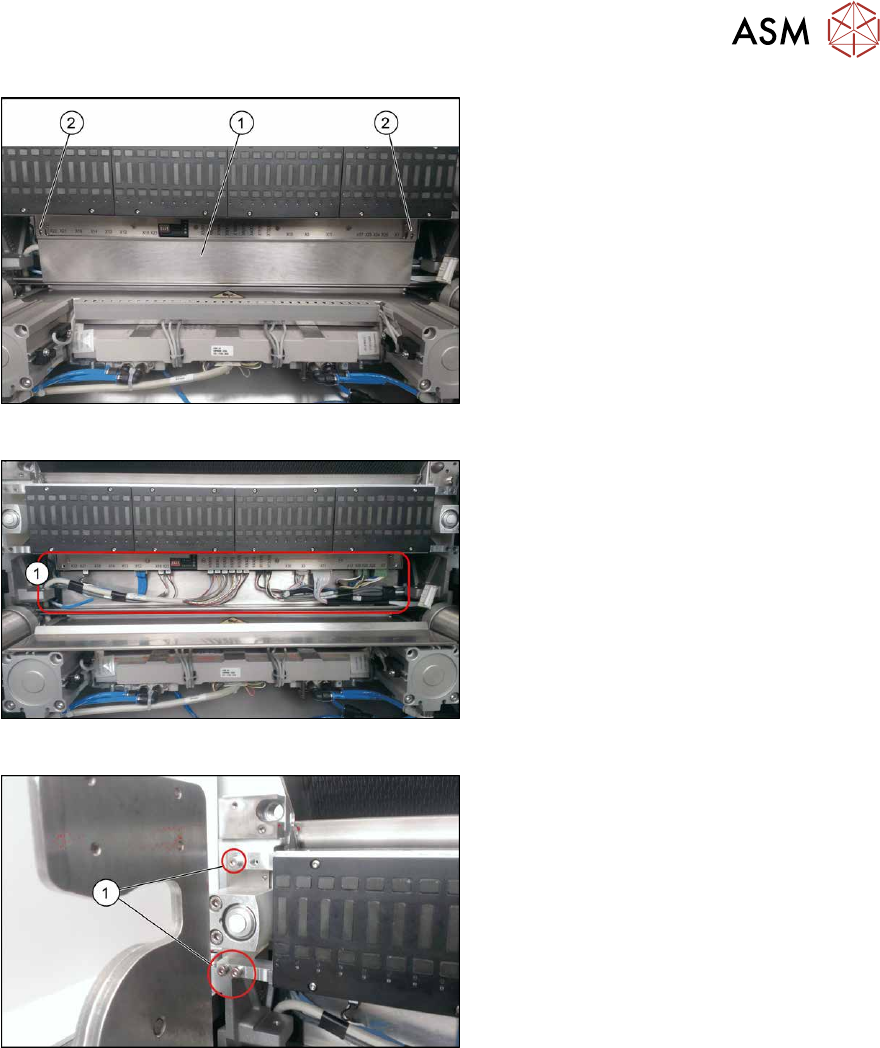
Fig.495: FCU cover plate
► Remove the two screws(2) fastening
the FCU cover plate(1)
.
Fig.496: Connections
► Unplug all electrical connections from
the terminal strip of the FCU.
Fig.497: Fastening screws
► Remove the screws(1) fastening the
FCU on both sides.
Depending on the version, there will be
four or six screws.
► Carefully lever the FCU out of the locating pins.
► Remove the earth terminal.
Installation
► Set the DIP switches on the FCU.
► Refit the cover plate and the FCU.
► Place the connection cable in the recess and carefully push in the new FCU. Make sure you
do not pinch any cables.
► Pull the ends of the cables out from under the terminal strip.
► Plug in all electrical connections as labeled on the terminal strip.
Further installation is performed by following the above instructions in the reverse order.
9 Component feeding
9.4 Docking Station for Component Trolley
350 Service Manual SIPLACE X-Series S (from Hxxxx) 01/2021
9.4.9 Replacing the Complete Coupling - Earthing and Compressed Air for the
Bulk Case
Parts
You can either replace the individual coupling socket or the complete coupling unit for ground and
compressed air.
03017026-xx Coupling socket for compressed air coupling
03017025-xx Complete coupling for ground connection and compressed air
Equipment and tools
00353832-xx Allen key set
Overview
3
1
2
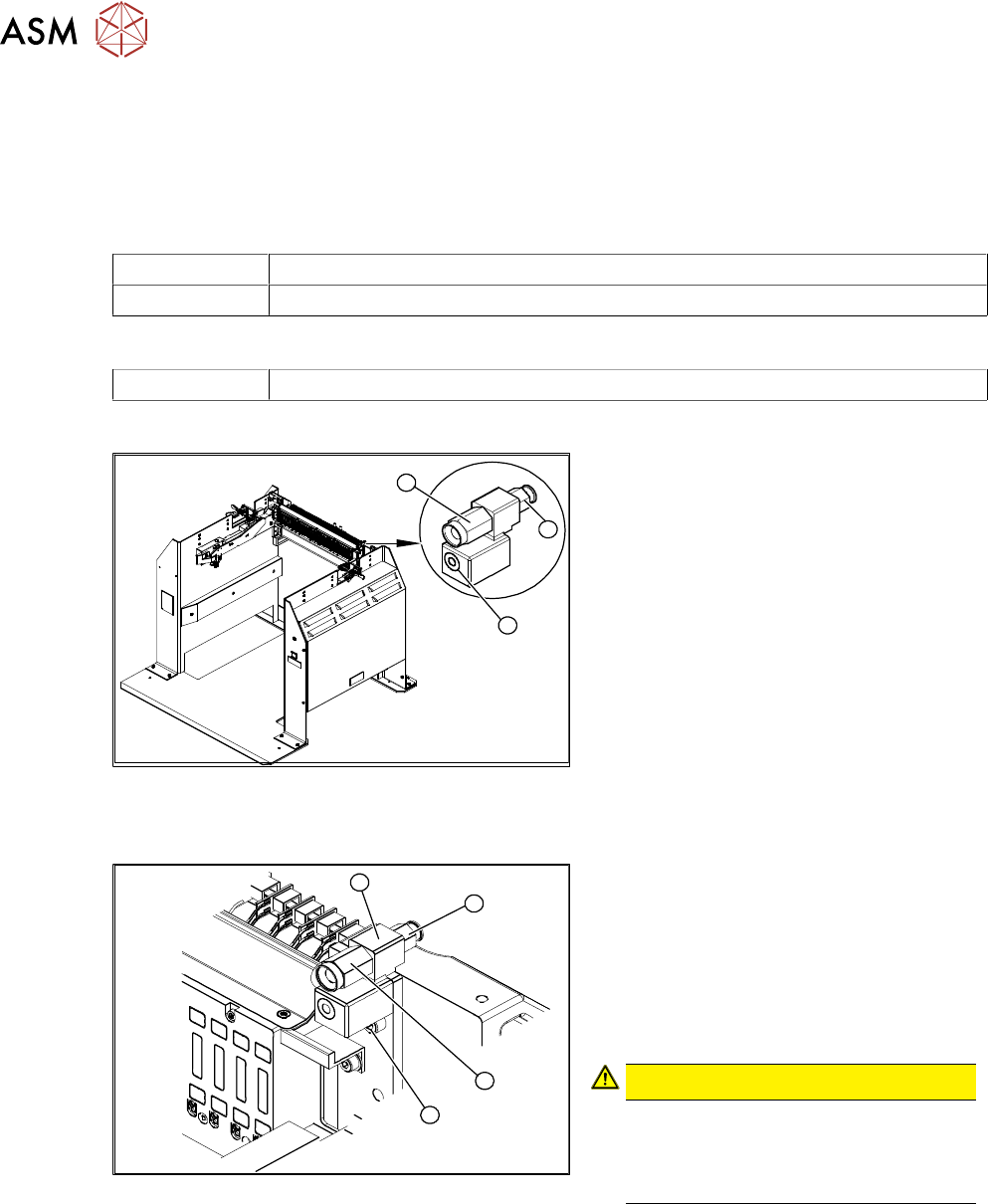
Fig.498: Coupling on docking station
1. Coupling socket for component trolley
compressed air coupling (bulkcase
feeder)
2. Compressed air connection to the
pneumatic control value 5.5 bar
3. Component trolley ground coupling
(bulkcase feeder)
Removal/installation
3
2
4
1
Fig.499: Removing the coupling
1. Fastening the complete coupling
(ground and compressed air)
2. Coupling socket for compressed air
coupling
3. Mount
4. Pneumatic connection to pressure con-
trol valve 5.5 bar at the back
CAUTION!
Risk of injury from compressed air
Risk of injury when disconnecting
pressurized compressed air lines.
Switch off the compressed air supply.
.
Individual replacement of coupling socket for compressed air coupling
► Unplug the compressed air connection.
► Use an open-end wrench to unscrew the coupling socket from its mount.
► Screw in the new coupling socket and connect the compressed air supply.
► Switch on the compressed air supply.
► Check the set pressure of 5.5 bar at the pressure control valve (located at the back).