00198829-01_SM_X-Series-S_Hxxxx_EN.pdf - 第378页
9 Component feeding 9.6 Smart Pin Support 378 Service Manual SIPLACE X-Series S (from Hxxxx) 01/2021 9.6.18.1 Magazine recognition board Fig.543: Magazine recognition board [03093494-xx] The magazine recognition board i…
9 Component feeding
9.6 Smart Pin Support
Service Manual SIPLACE X-Series S (from Hxxxx) 01/2021 377
9.6.18 Replacing the Magazine Recognition Board
NOTICE
Technical information "SPS: Malfunction of magazine identification boards"
► If the magazine identification board fails, observe the technical information "SPS: Mal-
function of magazine identification boards" [DE: TI2014-07D06] [EN: TI2014-07E06].
NOTICE
From SW 706.1 SP2
From SW 706.1 SP2, magazines can be fitted without the "magazine recognition" function.
In this case, the machine can only be configured manually via the software (Autoconfig).
► For more information, please read the assembly instructions.
Parts, equipment and tools
●
Magazine recognition SPS assembly [03093494-xx]
●
Assembly instructions "Smart Pin Support" for SIPLACE X‑SeriesS [DEEN:00197394‑xx]
Overview
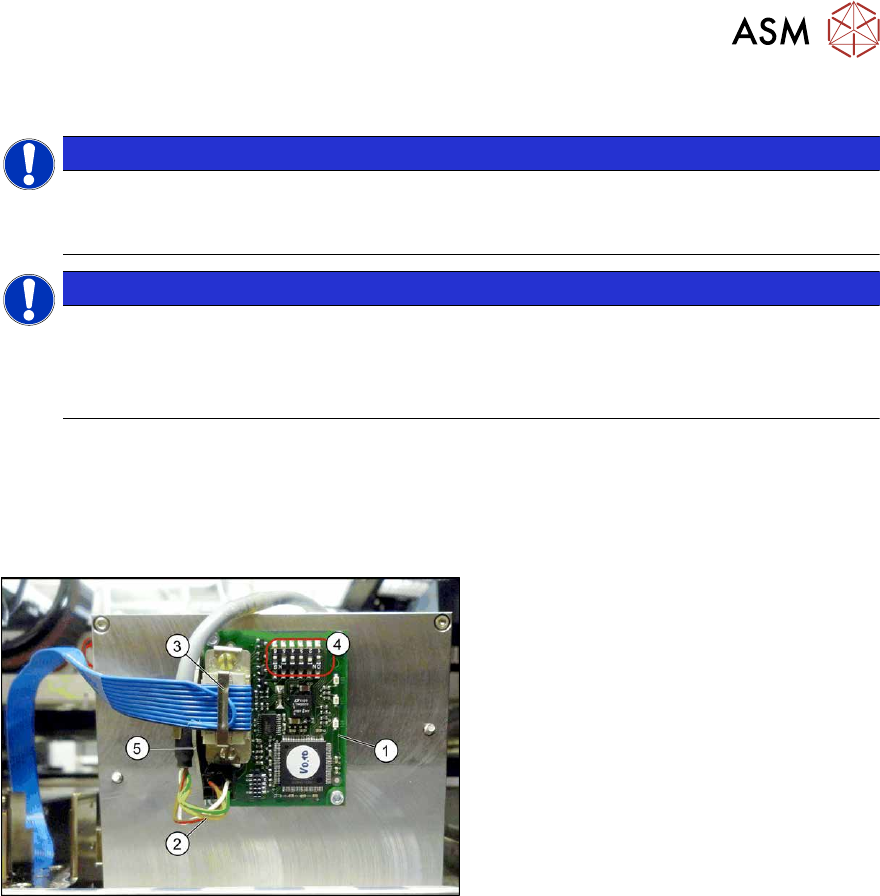
Fig.542: Magazine recognition board (using example ofQ10
here)
1. Magazine recognition board
2. Power supply cable
3. Flat ribbon cable
4. Jumper
5. Metal bracket
Removal/installation
Refer to the assembly instructions for details of removal and installation:
●
Assembly instructions "Smart Pin Support" for SIPLACE X‑SeriesS [DEEN:00197394‑xx]
9 Component feeding
9.6 Smart Pin Support
378 Service Manual SIPLACE X-Series S (from Hxxxx) 01/2021
9.6.18.1 Magazine recognition board
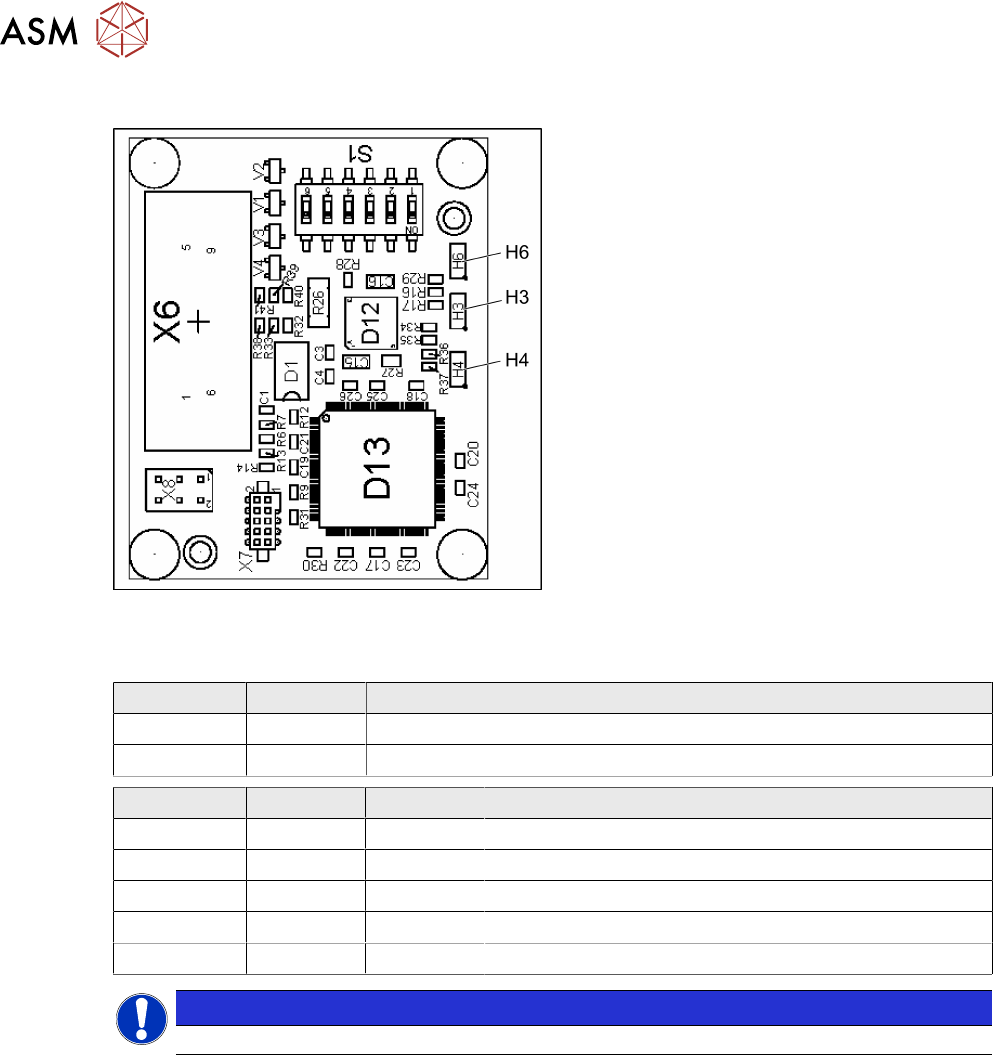
Fig.543: Magazine recognition board [03093494-xx]
The magazine recognition board is part of the
pin magazines for the "Smart Pin Support"
option.
This board may be missing, depending on the
magazine version used.
LEDs:
H3: not used
H4: FPGA OK
H6: Power supply 3.3 V OK
DIP switch S1 - jumper assignment
S1.1 S1.2 Magazine connected at:
ON OFF NC connection 2
OFF ON NC connection 4
S1.4 S1.5 S1.6 Meaning
OFF OFF OFF Garage is switched off
ON OFF OFF Garage type W5
OFF ON OFF Garage type Q10
ON ON OFF Garage type L10
X X ON Reserved
NOTICE
Jumper S1.3 is not used.
10 Miscellaneous
10.1 eSW Download (SW 70x)
Service Manual SIPLACE X-Series S (from Hxxxx) 01/2021 379
10 Miscellaneous
10.1 eSW Download (SW 70x)
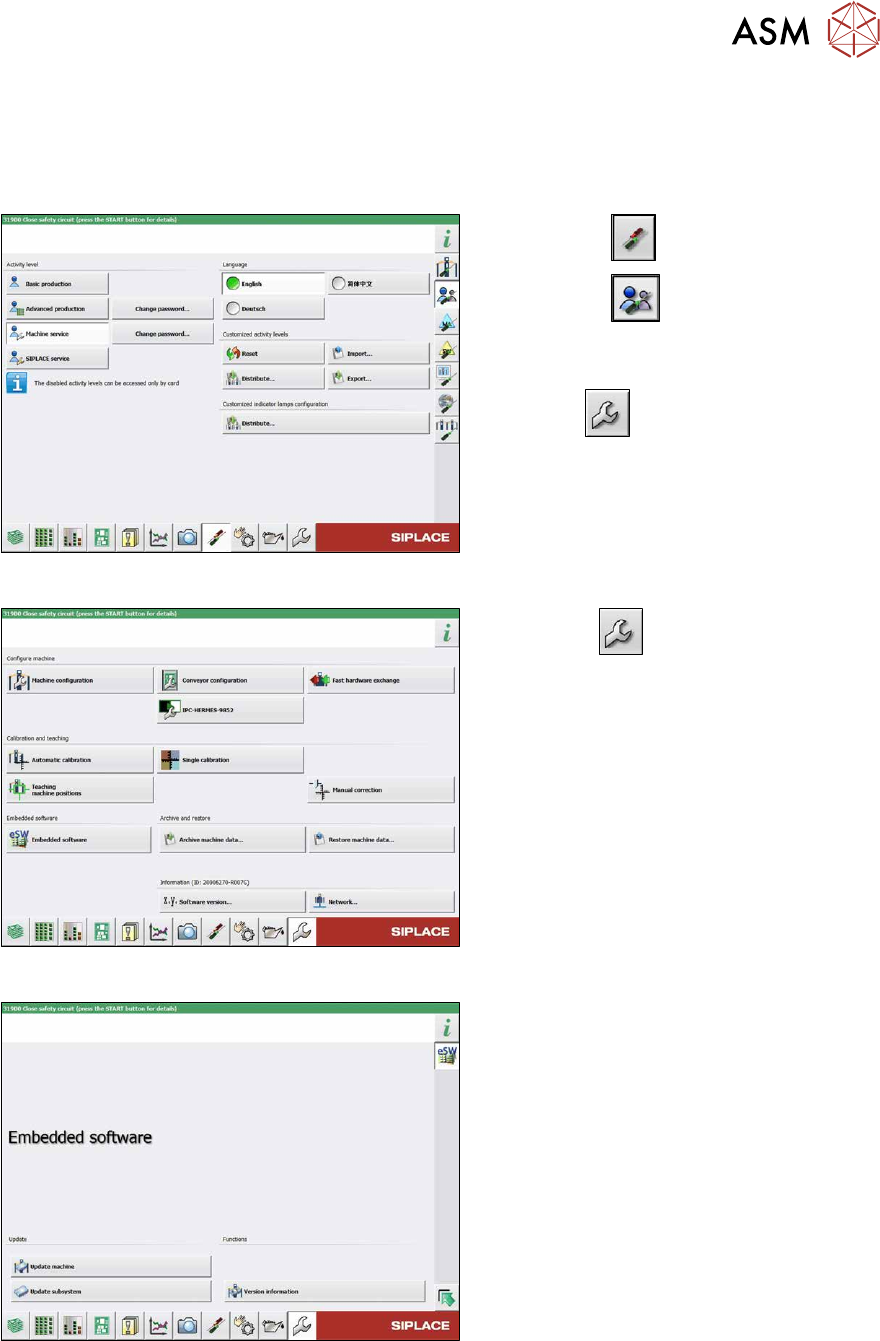
Fig.544: Select operator level
► Select the button.
► Select the button.
► Switch over to the operator level Ma-
chine service.
ð The button will be shown.
Fig.545: Service menu
► Click the button to enter the Ser-
vice menu.
► Click on the Embedded software but-
ton.
Fig.546: Embedded software menu
Select the required function:
► Click on Update machine… to check
the entire machine and to perform an
eSW download for multiple subsystems
(see next picture).
► Click on Update subsystem… to se-
lect one subsystem, check and to per-
form an eSW download.
► Click on the button Version informa-
tion…, to view all versions of the sub-
systems, BIOS, application 1/2/3/5.