00198829-01_SM_X-Series-S_Hxxxx_EN.pdf - 第69页
4 Electrics and control system 4.2 BoxPC Service Manual SIPLACE X-Series S (from Hxxxx) 01/2021 69 4.2.3 Replacing the LAN card Parts, equipment and tools ● LAN card PCI-Express 2x gigabit LAN [03198999‑xx] (replaces [03…
4 Electrics and control system
4.2 BoxPC
68 Service Manual SIPLACE X-Series S (from Hxxxx) 01/2021
4.2.2 Replacing the GigE Ethernet Adapter
Parts, equipment and tools
●
GigE ethernet adapter PCI-E I340-T4 [03105575‑xx]
●
GigE-Ethernet-Adapter PCI-E I350 T2 V2 BLK [03115569‑xx]
NOTICE
If an older version of the card [03105575‑xx] is replaced with a newer version
[03115569‑xx], this will need to be configured using a script (see respective technical in-
formation, still in progress on publication of this document).
Overview
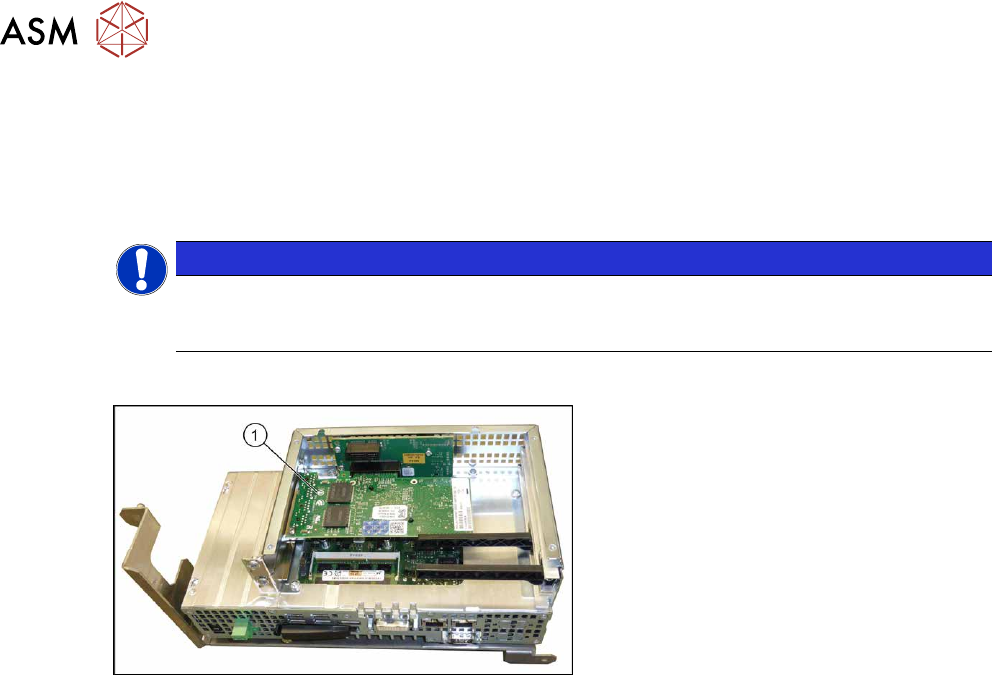
Fig.75: GigE Ethernet adapter in the BoxPC 427D
1. GigE ethernet adapter
Removal
► Switch off the machine, disconnect it from the power supply and secure it to prevent
unauthorized reactivation.
1.2 "Preparatory work..." [}16]
► Dismantle and remove the BoxPC from the machine.
► Remove the screws fastening the cover of the BoxPC and open the cover.
► Remove the screw fastening the Ethernet adapter and remove the Ethernet adapter.
Installation
Follow the removal instructions in reverse order for installation. Also observe the following instruc-
tions:
► Make sure that the plug-in card is correctly fitted into its slot.
4 Electrics and control system
4.2 BoxPC
Service Manual SIPLACE X-Series S (from Hxxxx) 01/2021 69
4.2.3 Replacing the LAN card
Parts, equipment and tools
●
LAN card PCI-Express 2x gigabit LAN [03198999‑xx] (replaces [03118416‑xx])
Overview
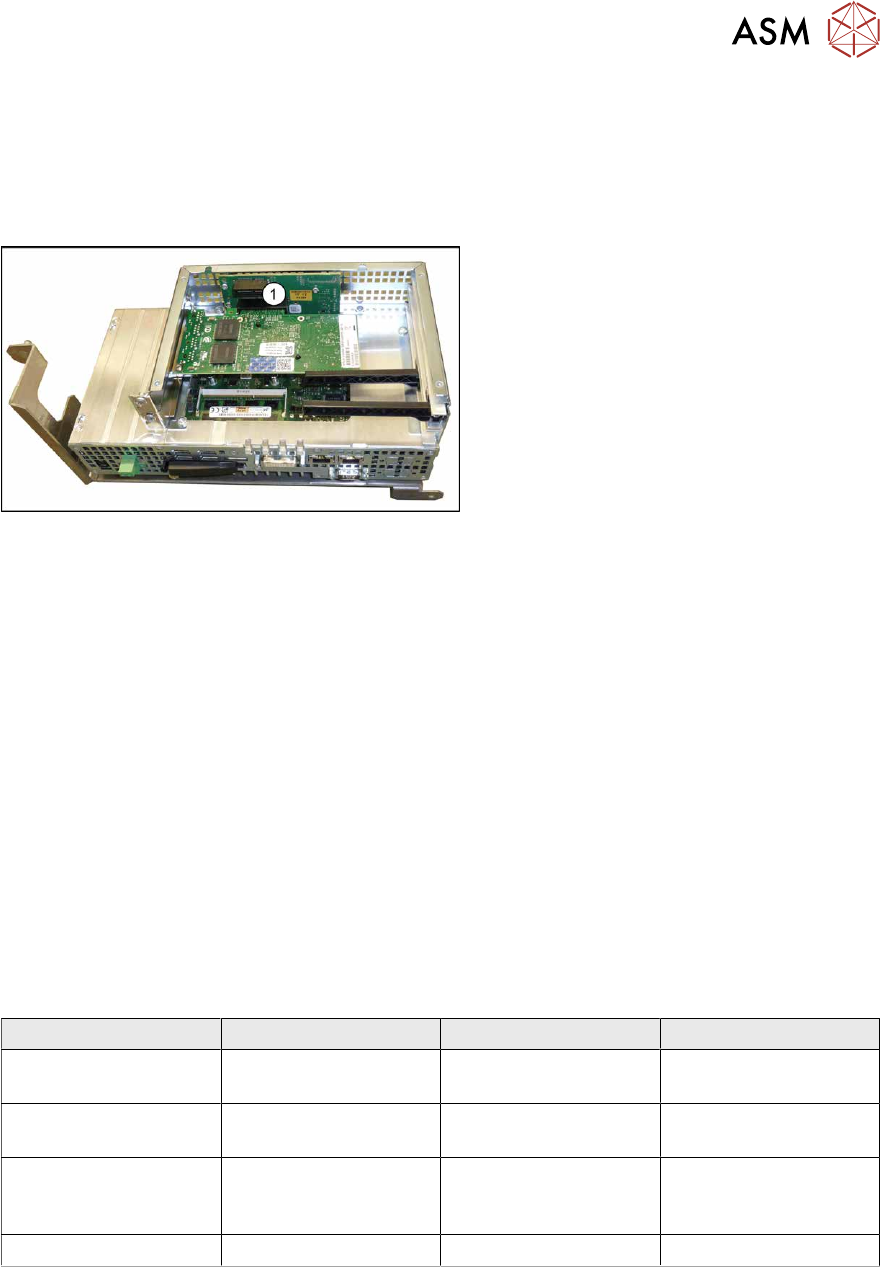
Fig.76: BoxPC 427D
1. Free slot for the LAN card
The "LAN card PCI-Express 2x gigabit
LAN" [03118416-xx] is required for the in-
stalled 3D coplan or barcode scanner.
Removal
The plug-in card is fitted in the BoxPC.
► Switch off the machine, disconnect it from the power supply and secure it to prevent
unauthorized reactivation.
1.2 "Preparatory work..." [}16]
► Dismantle and remove the BoxPC from the machine.
► Open the covers above the plug-in cards.
► Remove the screw fastening the LAN card and remove the LAN card.
Installation
Follow the removal instructions in reverse order for installation. Also observe the following instruc-
tions:
► Make sure that the plug-in card is correctly fitted into its slot.
► Configure the IP settings for the LAN card (see below):
Overview of IP addresses
IP address Subnet mask Comment
SIPLACE Lan 172.22.xxx.xxx 255.255.0.0 LAN connection on the
computer
CIN-Box 192.168.255.239 255.255.255.224 LAN connection on the
computer
Station computer 192.168.255.249 255.255.255.240 Additional LAN card for
the coplanarity com-
puter
Coplanarity computer 192.168.255.253 255.255.255.240
4 Electrics and control system
4.2 BoxPC
70 Service Manual SIPLACE X-Series S (from Hxxxx) 01/2021
4.2.4 Replacing the RAM in the BoxPC
Parts, equipment and tools
NOTICE
RAM
Microsoft Windows 10 needs 4 GB RAM.
PC type RAM module type
BoxPC 427D [03114177Sxx] 4 GB DDR 1333Mhz PC3-10600 SO-DIMM
For coplan:
BoxPC ABP402-A CPU1020E 2xPCI SSD
(iBase) [03120423‑xx]
(replaces: BoxPC 627C [03094731‑xx])
2x 2GB DDR3 SO-DIMM
For more information about the memory modules and sizes needed, refer to the parts catalogue
or contact the SIPLACE hotline.
Overview
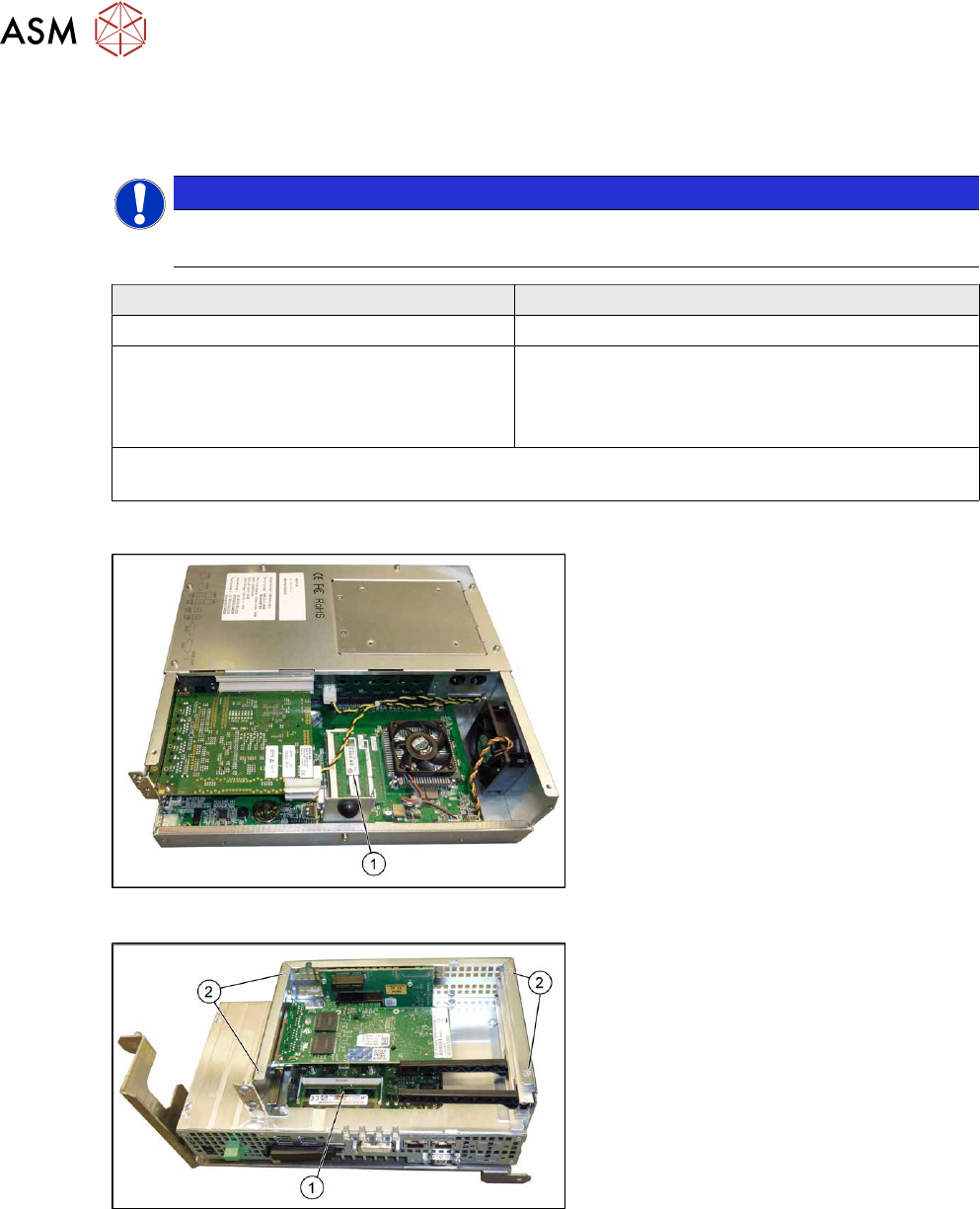
Fig.77: BoxPC ABP402-A iBase
1. Memory extension
Fig.78: BoxPC 427D
1. Memory extension
2. Four screws fastening the cover
Removal
► Switch off the machine, disconnect it from the power supply and secure it to prevent
unauthorized reactivation.
1.2 "Preparatory work..." [}16]
► Dismantle and remove the BoxPC from the machine.
► Remove the screws fastening the cover of the BoxPC and open the cover.
► If needed, remove the plug-in cards blocking access to the memory extension.
► Open the locks on both sides of the memory extension and remove the memory extension.