00197193-02_IM_SIPLACE_EDM_2.1_EN.pdf - 第21页
EDM V2.1 / I nstallat ion Ma nual Ausgabe 11/2012 E dition 21 4.3 Upgradi ng from a previous ver sion 4.3.1 Conditions / dow n w ard compatibilit y Installing d iffer ent versions of EDM on M aster an d Client shou ld be…
EDM V2.1 / Installation Manual Ausgabe 11/2012 Edition
20
4.2.7 Finishing the installation
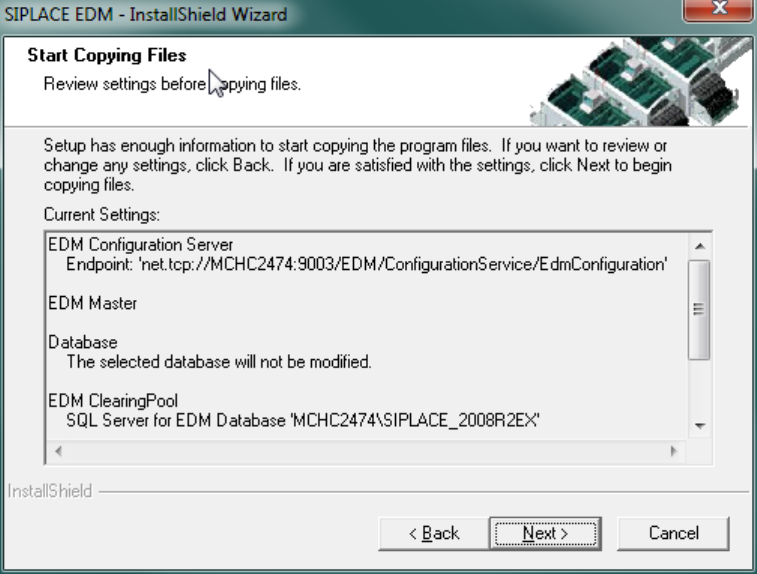
Preparation for the installation is now complete, the files for SIPLACE EDM can be copied and the
configuration can be carried out. The screen below shows a summary of the activities that need to
be carried out for installing a Master Server.
Figure 4-8: Finishing the installation
Depending on the chosen options, some configuration dialogs are presented during the last steps
of the setup program:
► On installing a Configuration Server, the “Basic EDM Settings” dialog (5.2.1.1) is shown
► If no Configuration Server has been installed on the current computer, then the Setup tool
shows the “Change Line Settings” dialog (5.2.1.2).
EDM V2.1 / Installation Manual Ausgabe 11/2012 Edition
21
4.3 Upgrading from a previous version
4.3.1 Conditions / downward compatibility
Installing different versions of EDM on Master and Client should be avoided. If different versions of
SIPLACE Pro are used on the EDM Master and the EDM lines, some restrictions apply because
the format of the data transferred depends on the SIPLACE Pro version used. During an upgrade,
the Master Server, all Line Servers and all Clearing Pools must therefore be converted to EDM 2.1
(and thus to SIPLACE Pro 10.1).
EDM 2.1 can use all templates that were created for EDM 1.1 or later, as well as custom workflows
from EDM 1.1 or later.
CAUTION
Please read section 5.3.7, Notifications/Rules… before converting any filter from EDM
2.0 or earlier to EDM 2.1.
Existing filter settings on the EDM Master are retained and updated, but it is recommended that
you manually inspect the converted file (it may be that your own custom changes have been
superseded by improvements to the default configuration).
4.3.2 Simultaneous upgrade over all lines
Where possible, production on all the lines to be upgraded should be suspended for the duration of
the upgrade. As soon as all the components have been converted, production can be restarted.
Perform the upgrade operation as follows:
1. Interrupt production on all the lines to be upgraded.
2. Transfer all notifications from the Line Servers to the Master Server.
3. Accept/reject all notifications in the Clearing Pool.
4. Close all EDM applications.
5. Install SIPLACE Pro and then the EDM Master Server (with Configuration Server) on the
Master Server.
6. Install SIPLACE Pro and then EDM Line Server on all lines. After installing an EDM Line
Server, the production on that EDM Line can be resumed immediately.
CAUTION
To avoid all notifications still in the Clearing Pool from being lost, the EDM database
must not be deleted.
7. Resume production.
Simultaneous upgrade across all the lines is to be preferred to a step-by-step upgrade of individual
lines (insofar as this is possible).
EDM V2.1 / Installation Manual Ausgabe 11/2012 Edition
22
4.3.3 Step-by-step upgrade of individual lines
Since it is not always possible to perform a simultaneous upgrade across all the lines, EDM
provides a step-by-step upgrade procedure that permits restricted operation of an EDM 2.1 Line
Server in conjunction with a Master Server from an earlier version for the duration of the upgrade.
CAUTION
This compatibility mode should not be used for long-term mixed operation of an EDM 2.1
Line Server with a Master Server from an earlier version of EDM.
During the step-by-step upgrade, it is still possible for an EDM Line Server to pull/push data from
the Master Server. However, it is not possible to transfer modified objects into the Master Server.
All the notifications that arise during that period are saved in the Clearing Pool and can be
transferred to the EDM Master Server when the step-by-step upgrade has been terminated by
upgrading the Master Server.
It is recommended to carry out gradual upgrading of individual lines as follows:
1. Prepare another computer to hold a temporary, standalone EDM Configuration Server
(EDM 2.1) and run the EDM Configuration Server setup type EDM Configuration Server.
If another computer or virtual machine is not available, the Configuration Server may be
installed along with the first upgraded EDM Line in step 5.
2. Interrupt production on one of the lines to be upgraded.
3. Transfer all notifications from the Line Server of this line to the Master Server.
4. Upgrade SIPLACE Pro to the new version on the Line Server of this line.
5. Install the EDM Line on the Line Server of this line and make it using the standalone
configuration server. If you have chosen not to use a standalone server for upgrading the
first Line server, proceed as follows instead:
► Select the "EDM Line" and "Configuration Server" options within the "Custom
Setup" setup, in order to provide a Configuration Server.
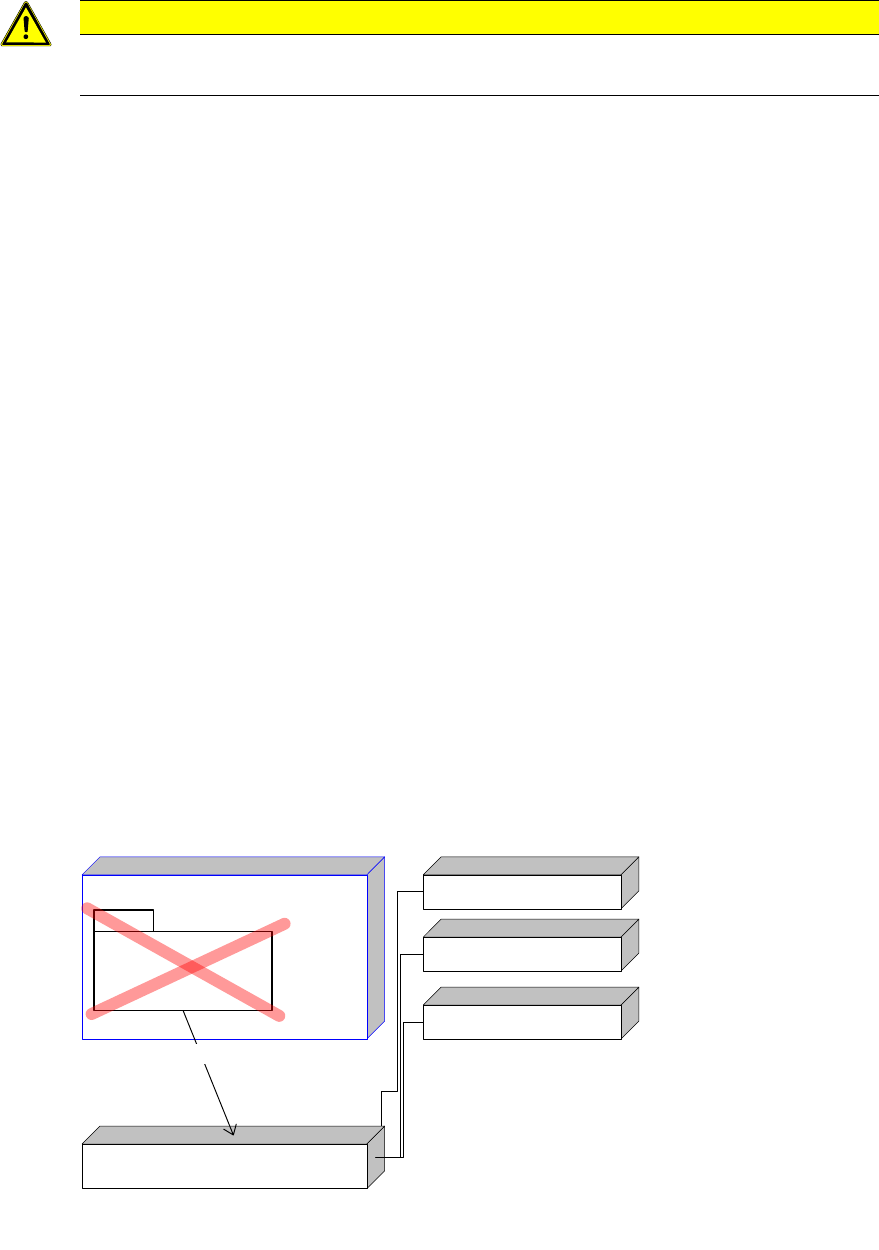
6. If the old version already uses a Configuration Server (e.g. EDM 2.0), run the script
MoveEdmConfigServer.bat, located in the Tools subdirectory of the EDM installation
path, on the temporary Configuration Server to move all the EDM Clients attached to the
old configuration server as well as all configuration settings to the temporary EDM 2.1
Configuration Server.
7. Resume production on this line.
EDM Master
Configuration Server
(old Version)
Edm Line (old Version)
Edm Line (old Version)
Edm Line (new Version)
EDM Configuration Server (new Version)
MoveEdmConfigServer.bat
Figure
4-9Configuration Server ditribution after step 6, if upgrading from EDM 2.0