00197193-02_IM_SIPLACE_EDM_2.1_EN.pdf - 第25页
EDM V2.1 / I nstallat ion Ma nual Ausgabe 11/2012 E dition 25 This dial og provid es access to basic set tings that are comm on to all EDM c omputer s: • Mast er Server is th e EDM Mas ter Server ’s hostnam e. • Default …

EDM V2.1 / Installation Manual Ausgabe 11/2012 Edition
24
5 Configuration
5.1 Settings in SIPLACE Pro Desk
To guarantee proper operation of SIPLACE EDM, it is necessary to change some settings in
SIPLACE Pro Desk.
● SIPLACE EDM associates objects on the Master Server and the Line Servers using their
names, i.e. an object must have the same name on all computers. It is recommended that you
suppress the ability to rename and create objects on EDM lines using the user permissions
management facilities in SIPLACE Pro.
● The Vision Data Manager (VDM) must be activated on all SIPLACE Pro Desk installations that
are to participate in EDM to allow Vision data (BLOBs), camera parameters and illumination
parameters to be processed for the line and the station.
● Some settings for SIPLACE Pro Desk (under Tools – Settings - General Settings) must be
consistent across all EDM Client computers and the EDM Master. Currently, this only applies to
the two options for the extended custom nozzle number range (Twin Head and CPP head)
5.2 EDM-specific settings
CAUTION
After any change has been made (and saved) to the configuration, the changes will
immediately be distributed to each connected EDM service.
5.2.1 Basic EDM Configuration Dialogs
During the setup procedure, the user might want to adjust several vital settings. Based on the setup
type, two different dialogs are available
5.2.1.1 Basic Configuration for Configuration Server
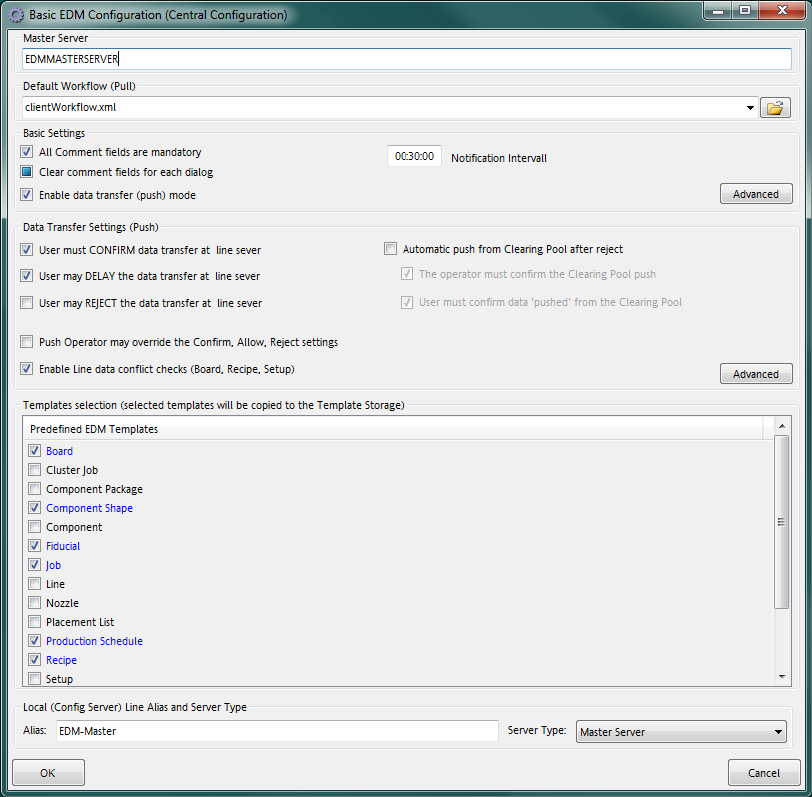
The Configuration Server Basic Configuration dialog is presented during the setup procedure. If
needed, the dialog is recalled via the Edm Post-Configuration Tool shortcut in the
SIPLACE EDM\Administration start menu.
EDM V2.1 / Installation Manual Ausgabe 11/2012 Edition
25
This dialog provides access to basic settings that are common to all EDM computers:
• Master Server is the EDM Master Server’s hostname.
• Default Workflow (Pull) defines the workflow document to be used by default in EDM Line
“pull” scenarios.
• Basic Settings define the behavior of the comment dialog on EDM Lines.
• The Data Transfer Settings group configures the Push Mode settings.
• Templates selection provides the user with a list of predefined application templates that
may be installed onto the master server.
• The Local group contains the configuration server’s basic settings.
• The Advanced button opens an editor to adjust all settings as described in section 6.3
(Configuration File).
5.2.1.2 Basic Configuration for EDM Client Computers
EDM V2.1 / Installation Manual Ausgabe 11/2012 Edition
26
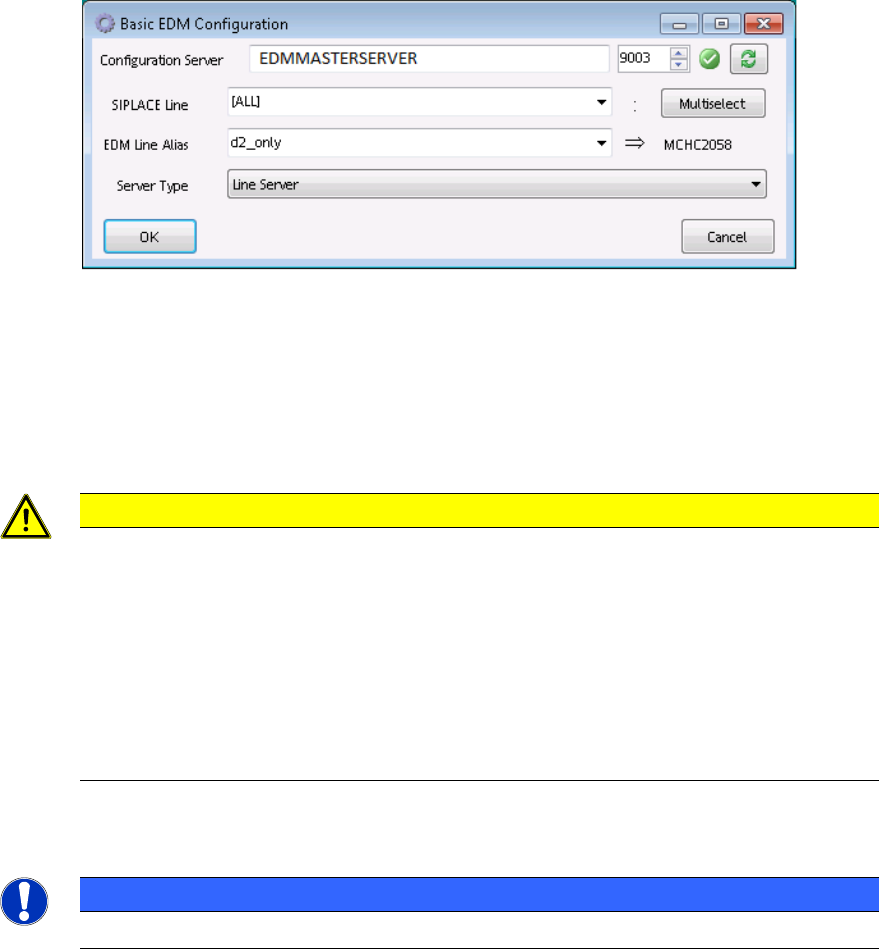
• Each EDM-Service needs access to a Configuration Server. The user might change it in the
Configuration Server text box.
• The SIPLACE Line control contains the SIPLACE Pro names of the (physical) lines that
are assigned to this Client computer. If needed, multiple lines may be selected via the
Multiselect button.
CAUTION
It is necessary to define this setting if
– the EDM VDM BLOB functions are to be used (especially for the Extended
Difference Editor)
– Protection against overwriting current product data is activated in push mode
(see section 6.3.7.4 Protection against overwriting current production data).
Otherwise, BLOBs will be accepted for all SIPLACE Pro lines present in the local
SIPLACE Pro database (see section 6.3.2).
• The EDM Line Alias text box defines the alias name used to identify this Client computer
NOTICE
The alias name should always be defined for EDM Line Servers.
• The Server type combo box lets the user select the computer’s role, which usually should
be set to “Line Server”.