00197193-02_IM_SIPLACE_EDM_2.1_EN.pdf - 第26页
EDM V2.1 / I nstallat ion Ma nual Ausgabe 11/2012 E dition 26 • Each ED M - Servic e needs ac cess to a Co nfigurat ion Server. T he user m ight chan ge it in th e Configura tion Server tex t box. • The SIPL ACE Lin e co…
EDM V2.1 / Installation Manual Ausgabe 11/2012 Edition
25
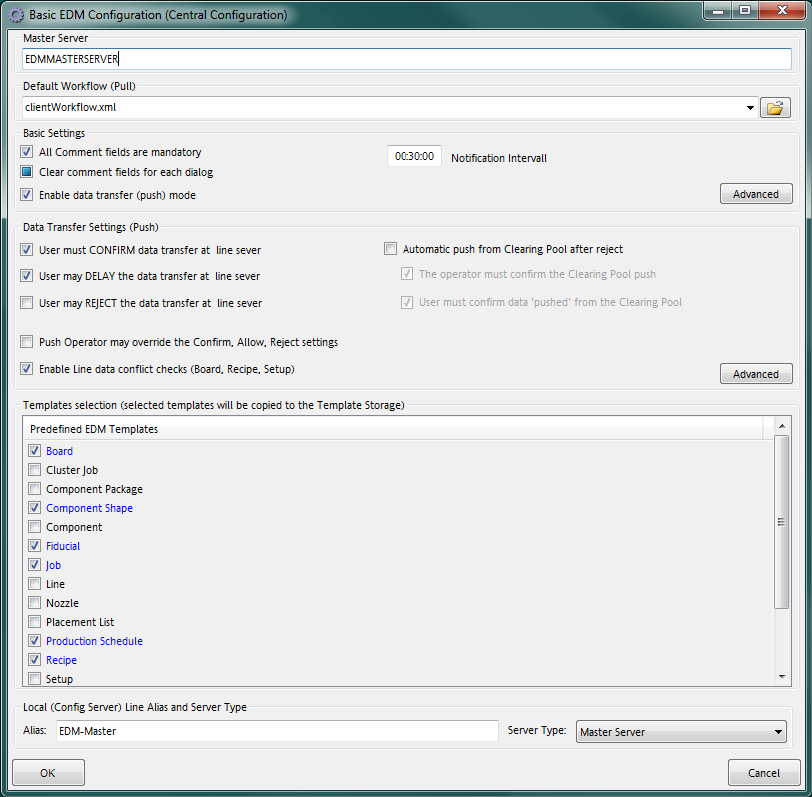
This dialog provides access to basic settings that are common to all EDM computers:
• Master Server is the EDM Master Server’s hostname.
• Default Workflow (Pull) defines the workflow document to be used by default in EDM Line
“pull” scenarios.
• Basic Settings define the behavior of the comment dialog on EDM Lines.
• The Data Transfer Settings group configures the Push Mode settings.
• Templates selection provides the user with a list of predefined application templates that
may be installed onto the master server.
• The Local group contains the configuration server’s basic settings.
• The Advanced button opens an editor to adjust all settings as described in section 6.3
(Configuration File).
5.2.1.2 Basic Configuration for EDM Client Computers
EDM V2.1 / Installation Manual Ausgabe 11/2012 Edition
26
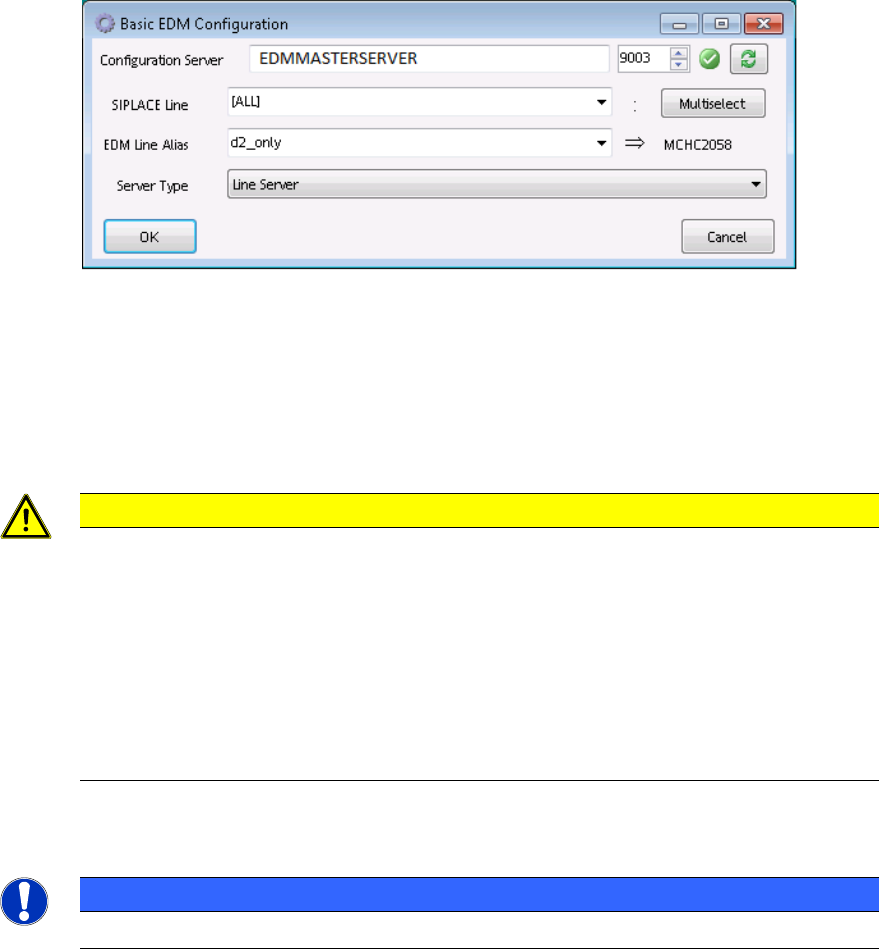
• Each EDM-Service needs access to a Configuration Server. The user might change it in the
Configuration Server text box.
• The SIPLACE Line control contains the SIPLACE Pro names of the (physical) lines that
are assigned to this Client computer. If needed, multiple lines may be selected via the
Multiselect button.
CAUTION
It is necessary to define this setting if
– the EDM VDM BLOB functions are to be used (especially for the Extended
Difference Editor)
– Protection against overwriting current product data is activated in push mode
(see section 6.3.7.4 Protection against overwriting current production data).
Otherwise, BLOBs will be accepted for all SIPLACE Pro lines present in the local
SIPLACE Pro database (see section 6.3.2).
• The EDM Line Alias text box defines the alias name used to identify this Client computer
NOTICE
The alias name should always be defined for EDM Line Servers.
• The Server type combo box lets the user select the computer’s role, which usually should
be set to “Line Server”.
EDM V2.1 / Installation Manual Ausgabe 11/2012 Edition
27
5.3 EDM Configuration Manager
The EDM Configuration Manager is the central tool to control an EDM environment. The user
changes settings and options that are then transferred to the Client computers.
After changing a setting, the user applies them with the Save button. If changes were detected, a
dialog is shown to confirm the immediate transfer to the affected EDM Client computers.
5.3.1 Regular expressions for search patterns, rules and roles
In several edit fields, regular expressions are used instead of (case-sensitive) string patterns.
Some edit fields provide a Regexp check box to activate regular expression evaluation on this field;
others use regular expressions by default (e.g. the Name Pattern section of the notification rules).
EDM uses the standard regular expressions of the .NET Framework. A reference guide is available
on Microsoft®’s MSDN online library (http://msdn.microsoft.com/en-us/library/az24scfc.aspx).
5.3.2 Configuration Sets
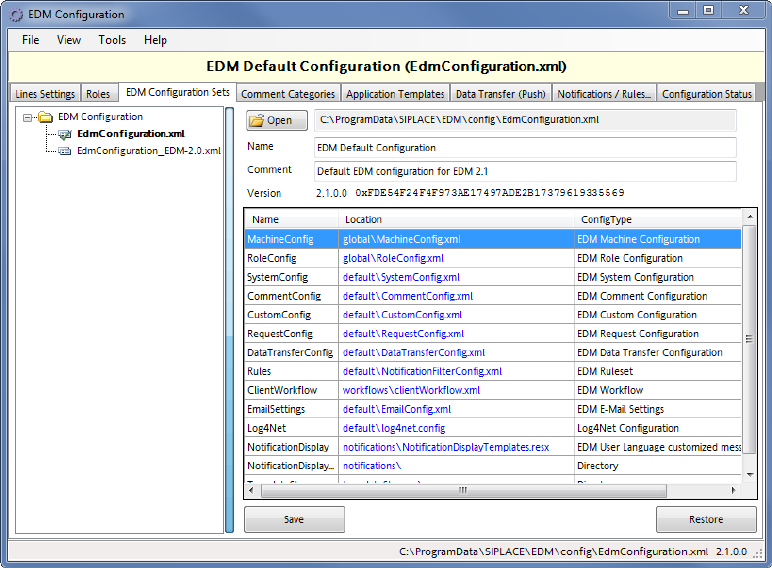
The left-hand side of the GUI shows a list of all configuration sets. The context menu makes
available some edit functionality (New set, duplicate…).
By selecting an EDM Configuration Set, all subsequent operations refer to this Configuration Set.
The grid on the right-hand side shows the name of the configuration item, together with the location
of the associated configuration file (on the configuration server). The checksums serve as “unique”
version identifier e.g. to detect changed configuration items.
5.3.3 Lines Settings