03217917-01-01E By DEK Technical Reference Manual Vol 1_enPDFA.pdf - 第117页
9 MACHINE CONTROL 9.4 CAN BUS TECHNICAL REFERENCE MANUAL Vol 1 E By DEK 04/2019 117 9.4 CAN BUS Servo Node 9 Camera Y Motor Servo Node 8 Camera X Motor CAN Bus The Controller Area Network (CAN) is a bus system for machin…
9 MACHINE CONTROL
9.3 M36 MACHINE CONTROL ENCLOSURE
116 TECHNICAL REFERENCE MANUAL Vol 1 E By DEK 04/2019
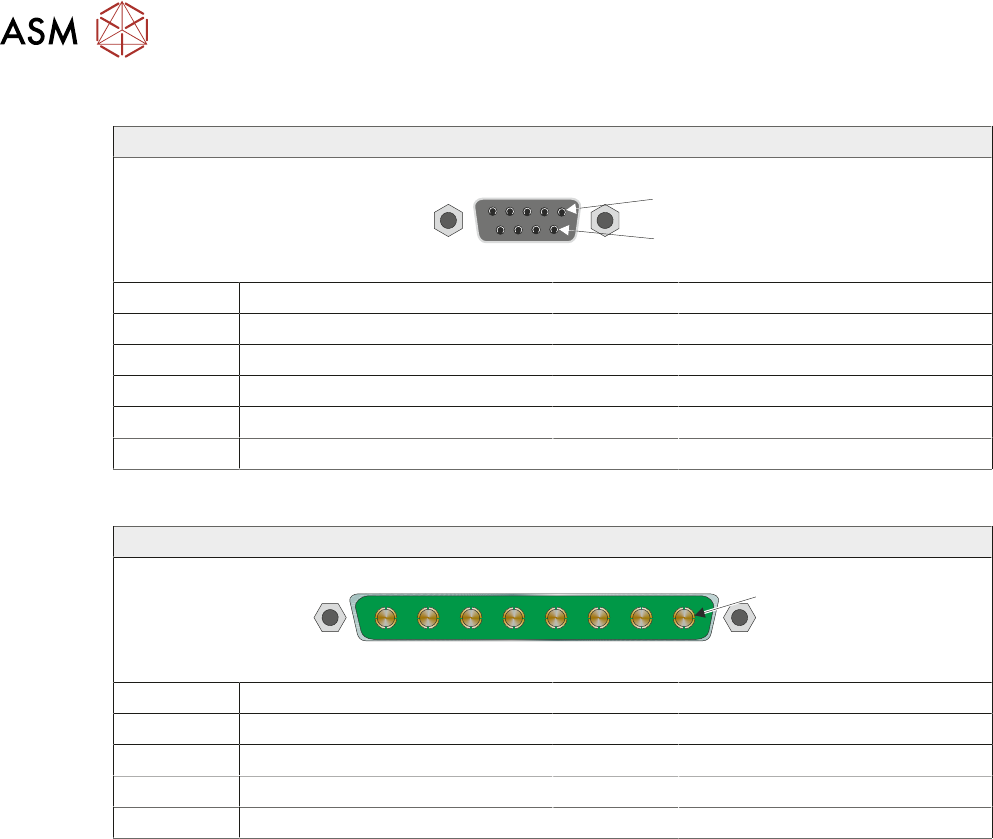
9.3.5.17 M36SK25
9 Way D Type Socket
1
6
Pin No Signal Pin No Signal
1 CH1 B- 6 N/C
2 N/C 7 CH1 A+
3 CH1 B+ 8 N/C
4 N/C 9 N/C
5 CH1 A-
9.3.5.18 M36PL26
8 Way Power D Type Plug
1
Pin No Signal Pin No Signal
1 +12V 5 +24V US
2 0V Return 6 0V Return
3 +24V SW (Belt Motors) 7 +24V SW (Stepper Motors)
4 0V Return 8 0V Return
9 MACHINE CONTROL
9.4 CAN BUS
TECHNICAL REFERENCE MANUAL Vol 1 E By DEK 04/2019 117
9.4 CAN BUS
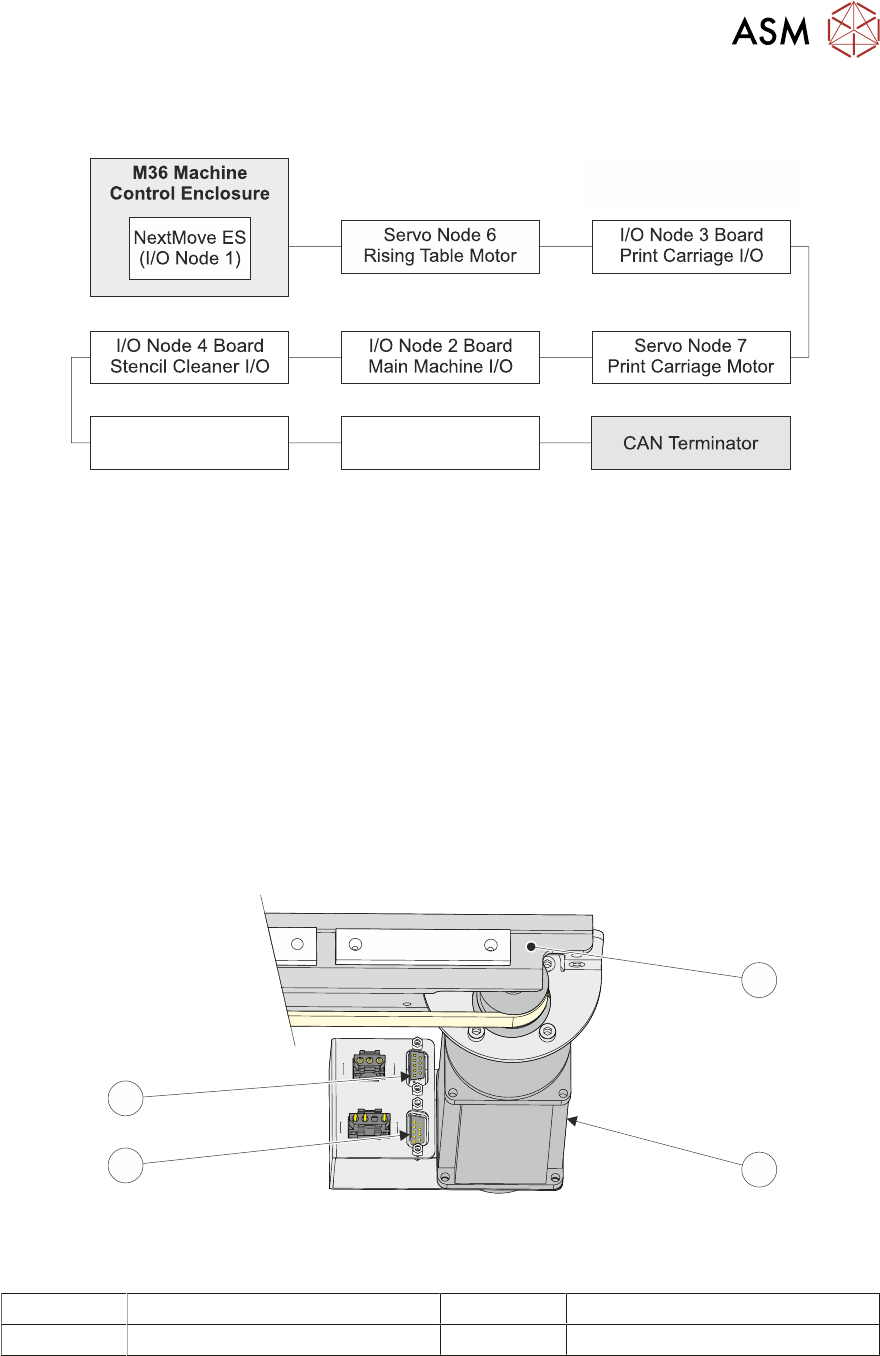
Servo Node 9
Camera Y Motor
Servo Node 8
Camera X Motor
CAN Bus
The Controller Area Network (CAN) is a bus system for machine motion control. An encoder/de-
coder for the 500Kbit/s rate CAN serial link is fitted to the NextMove ES card to enable communica-
tion with the CAN Nodes. The CAN is a 2-wire data link designed for transmission of small data
packets for fast update of axis position information.
The CAN Bus connects the NextMove ES card to the Nodes that provide machine motion, switch
functions and sensor feedback. There are two different types of Nodes:
●
I/O Node Boards
●
Stepper Nodes
For the CAN Bus to work correctly, the CAN Bus must be terminated using a CAN Terminator. The
CAN Terminator is fitted to the output connector of the last node in the CAN Bus line and consists
of a 9 pin D type connector with a link resistor fitted inside the connector hood.
1
2
3
4
CAN Terminator Connection
1 Camera Carriage 3 Connector for CAN Bus Input
2 Camera X Motor (Servo Node 8) 4 Connector for CAN Terminator
9 MACHINE CONTROL
9.4 CAN BUS
118 TECHNICAL REFERENCE MANUAL Vol 1 E By DEK 04/2019
9.4.1 I/O Node Boards
CAUTION
ANTI-STATIC HANDLING. STANDARD PRECAUTIONS MUST BE ADHERED TO
WHEN HANDLING ELECTRONIC CARDS AND CONFIGURING AND INSERTING
INTO THE ENCLOSURES.
The I/O Node Boards consists of multiple inputs and outputs, CAN encoder/decoder and multi-way
connectors for machine components.
There are three I/O Node Boards fitted to a standard machine with a possible one other board for
the underscreen cleaner, if fitted, these are:
●
I/O Node 1 - NextMove ES card (CAN master) located in the M36 Machine Control Enclosure
(standard)
●
I/O Node 2 - Main Machine I/O board located at the rear of the machine (standard)
●
I/O Node 3 - Print Carriage I/O board located inside the print carriage extrusion (standard)
●
I/O Node 4 - Screen Cleaner I/O board located at the rear of the machine (optional)
I/O Nodes 2 and 4 have a green (status) and a red (error) LED mounted on the board. The status
LED should flash twice periodically and the error LED should not be illuminated during normal op-
eration. The following table describes other operations of the LEDs:
No of Pulses Red (error) LED Green (status) LED
Static Off No error Initialisation/Code execution stopped
1 Node ID from DIP switches is 0 CANopen NMT state is 'pre-opera-
tional'
2 EEPROM contents invalid (EEPROM
empty/checksum error)
CANopen NMT state is 'operational'
3 EEPROM access impossible (hard-
ware error)
CANopen NMT state is 'stopped'
4 CAN controller switched to 'bus-off'
mode
N/A
5 Firmware error N/A
6 Controller overload N/A
Static On Sever hardware/software error N/A
9.4.2 I/O Node 1
I/O Node 1 is the CAN master and is also known as the NextMove ES card housed in the M36 Ma-
chine Control Enclosure. For more information, refer to 9.3.2 "NextMove ES Card" [}99].