03217917-01-01E By DEK Technical Reference Manual Vol 1_enPDFA.pdf - 第163页
11 SQUEEGEE MODULE 11.4 CALIBRATIONS TECHNICAL REFERENCE MANUAL Vol 1 E By DEK 04/2019 163 11.4 CALIBRATIONS 11.4.1 Squeegee Pressure Calibration Squeegee pressure calibration is carried out on machines, fitted with the …
11 SQUEEGEE MODULE
11.3 REPLACEMENT PROCEDURES
162 TECHNICAL REFERENCE MANUAL Vol 1 E By DEK 04/2019
6
6
5
4
3
2
1
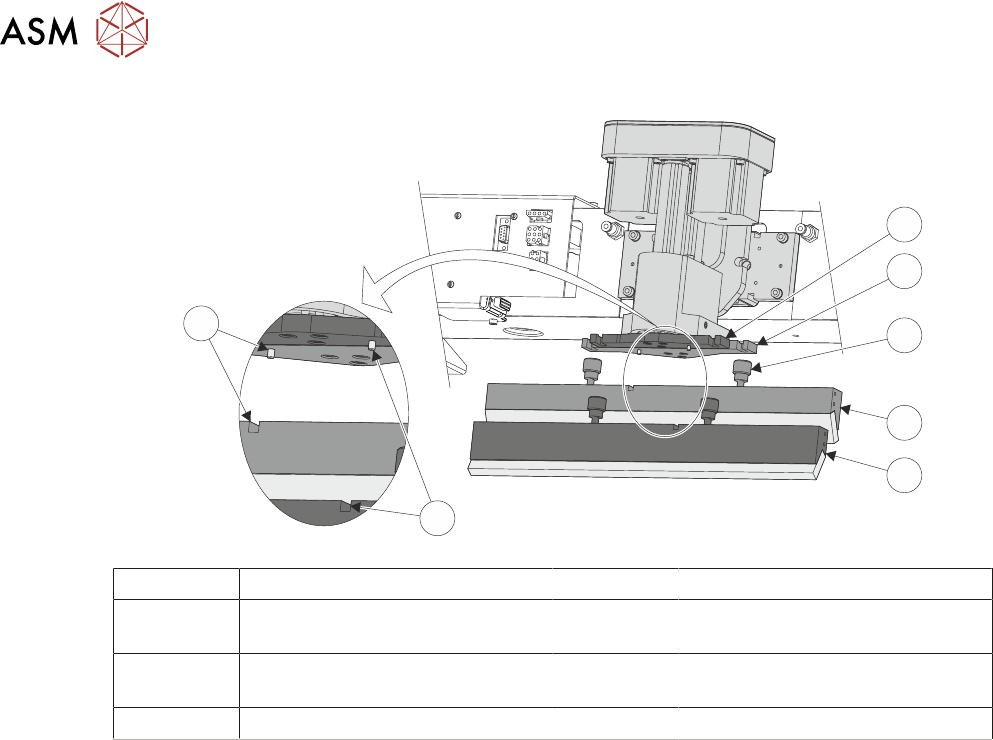
1 Front Squeegee Mount 5 Front Squeegee
2 Rear Squeegee Mount 6 Front Squeegee Key and Keyway
Slot
3 Locking Thumbscrew (in 4 posi-
tions)
7 Rear Squeegee Key and Keyway
Slot
4 Rear Squeegee
► Close the printhead cover.
► Press the System button.
► Select Continue.
► Select Back.
► Carry out 11.4.2 "Squeegee Reference Height (Pressure Feedback)" [}165].
11 SQUEEGEE MODULE
11.4 CALIBRATIONS
TECHNICAL REFERENCE MANUAL Vol 1 E By DEK 04/2019 163
11.4 CALIBRATIONS
11.4.1 Squeegee Pressure Calibration
Squeegee pressure calibration is carried out on machines, fitted with the Pressure Hardware op-
tion, after the following circumstances:
●
The squeegee mechanism is replaced
●
The strain gauge bridge in the squeegee mechanism is replaced
●
The rising table sensors have been replaced or adjusted
A force meter calibration jig and squeegee pressure plate are required to perform the squeegee
pressure calibration.
NOTE
1. Ensure that the rising table print reference height is set correctly before commencing, (the
calibration relies upon accurate positioning of the table to make a reference).
2. Ensure that the Pressure Hardware parameter in Maintenance\Machine Setup\Options is set
to FITTED.
Use the following procedure to calibrate the squeegee pressure:
WARNING
BOARD CLAMPS. EXTREME CARE MUST BE EXERCISED WHEN WORKING IN
THE TOOLING AREA OF THE MACHINE TO AVOID INJURY. THE FOILS ON THE
FRONT AND REAR BOARD CLAMPS ARE VERY SHARP.
► Select Open Cover Commands.
► Select Carriage To Rear.
► Select Unload Screen.
► Open the printhead cover.
► Remove the stencil from the machine.
► Remove the tooling from the manual tooling plate.
► Close the printhead cover.
► Press the System button.
► Select Back.
► Select Maintenance.
► Select Calibrations.
► Select Classic Calibrations.
► Select Pressure.
► Select Calibrat Readings.
The rails are checked for the presence of a board, the print carriage moves to the calibration posi-
tion, the rear rail moves to home position, the table homes and the board clamps are closed.
► The machine cover is unlocked and the message ‘Fit the pressure calibration rig’ is dis-
played with the following window:
CALIBRATION DATA
Gain Factor
1.02
► Open the printhead cover.
11 SQUEEGEE MODULE
11.4 CALIBRATIONS
164 TECHNICAL REFERENCE MANUAL Vol 1 E By DEK 04/2019
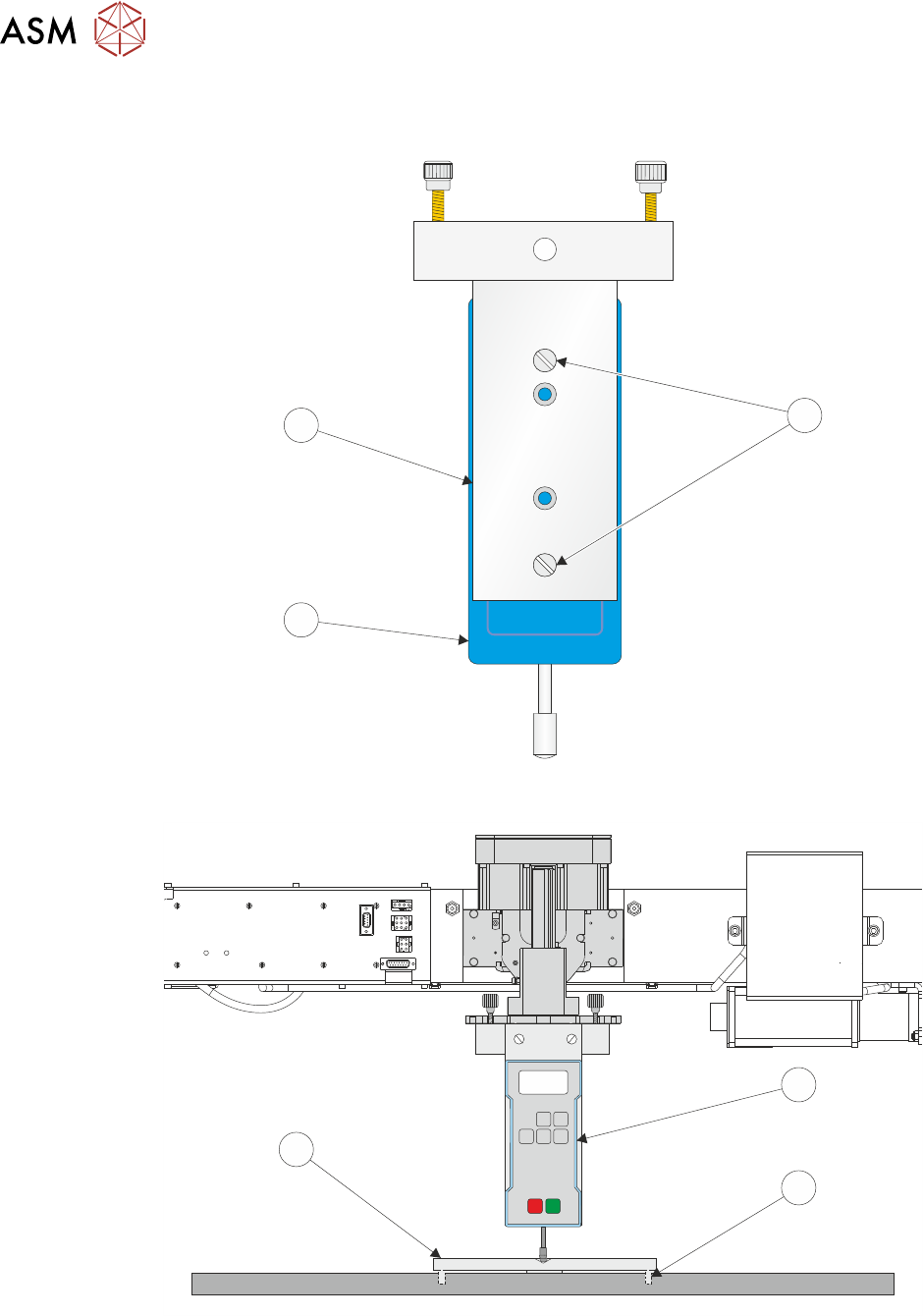
► Ensure that the calibration jig (2) is secured to the mounting plate (3) as shown in the follow-
ing graphic:
A
A
S
S
1
3
2
► Fit the calibration jig (4) to the front squeegee position.
O
OFF
I
ON
UNITS
Zero
MAX TXD
RESET
00.00
4
5
6
► Fit the squeegee pressure plate (6) to the rising table ensuring that the locating dowels (5) in-
sert the holes of the rising table.
NOTE
During the squeegee pressure calibration the dwell height of the rear squeegee is 15mm regard-
less of the set up value. This height is set during calibration only.