03217917-01-01E By DEK Technical Reference Manual Vol 1_enPDFA.pdf - 第169页
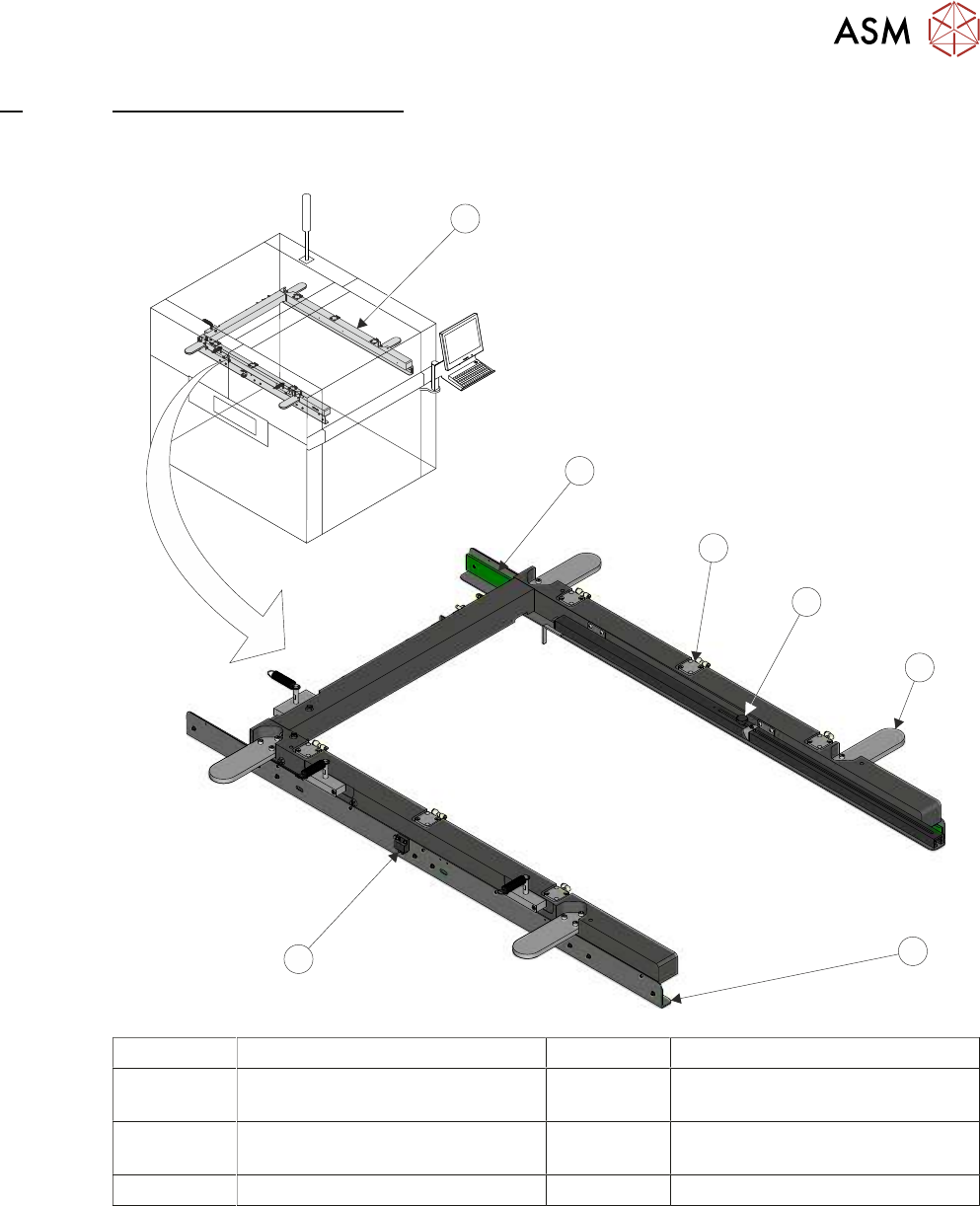
12 MACHINED C CHASE MODULE 12.1 OVERVIEW TECHNICAL REFERENCE MANUAL Vol 1 E By DEK 04/2019 169 12 MACHINED C CHASE MODULE 12.1 OVERVIEW 1 2 3 4 5 6 7 1 Machined C Chase 5 Roller Counter Plate (4 positions) 2 Stencil Guid…

11 SQUEEGEE MODULE
11.4 CALIBRATIONS
168 TECHNICAL REFERENCE MANUAL Vol 1 E By DEK 04/2019
11.4.3 Squeegee Reference Height (Non Pressure Feedback)
The squeegee reference height is carried out after a squeegee change on machines without the
Pressure Hardware option. This procedure must be used if Pressure Hardware is disabled.
Use the following procedure to set the squeegee reference height:
► Select Open Cover Commands.
► Select Carriage To Front.
► Select Unload Screen.
► Open the printhead cover.
► Remove the stencil from the machine.
► Fit the required squeegees to the front and rear squeegee mounts as detailed in 11.3.2 "Fitting
the Squeegees" [}161].
► Close the printhead cover.
► Press the System button.
► Select Back.
► Select Setup Product.
► Select Squeegees.
► Select Calibrate Heights.
► The following machine sequence is carried out:
●
The rails are checked for the presence of a board.
●
The rising table is driven to print height.
●
The board clamps are closed.
●
The print carriage drives the front squeegee over the front rail.
●
The front and rear squeegees are driven down by the stepper motor to dwell height.
Calibrate Front Squeegee
► Select Calibrate Front Squeegee.
► The front squeegee is driven down to the current reference height position.
► Select Jog.
► Open the printhead cover.
► Using a 0.1mm shim placed between the front rail and the front squeegee, check that the
shim moves with a small amount of friction.
► If the gap is correct, go to Calibrate Rear Squeegee.
► For adjustment, select the appropriate Jog Up/Jog Down button on the monitor.
► Using the two button controls simultaneously, jog the squeegee in the chosen direction.
► Recheck the gap.
► Repeat previous three steps until the correct gap is achieved.
Calibrate Rear Squeegee
► Close the printhead cover.
► Press the System button.
► Select Back.
► Select Save.
► Select Calibrate Rear Squeegee.
► The rear squeegee is driven down to the current reference height position.
► Repeat the Calibrate Front Squeegee steps for the rear squeegee.
► Select Back.
► Select Back.
► Select Back.
12 MACHINED C CHASE MODULE
12.1 OVERVIEW
TECHNICAL REFERENCE MANUAL Vol 1 E By DEK 04/2019 169
12
MACHINED C CHASE MODULE
12.1 OVERVIEW
1
2
3
4
5
6
7
1 Machined C Chase 5 Roller Counter Plate (4 positions)
2 Stencil Guide Strip (2 positions) 6 Stencil Support Plate
(in 2 positions)
3 Pneumatic Stencil Clamps
(6 positions)
7 Stencil at Centre Sensor
4 Stencil Depth Adjuster
The machined C chase module is a fixed width system, providing a receptacle for 29 inch square
stencils.
The stencil is loaded from the front of the machine and slid into the machine along the stencil sup-
port plates. The spring loaded right hand stencil guide strip aligns the stencil with the fixed left hand
stencil guide strip.
The stencil is clamped in the chase using pneumatic cylinders that clamp the stencil to the stencil
support plates.
The chase is a floating assembly mounted on a bearing set. The chase is positioned to align the
stencil to the correct printing position. During printing, the chase is pneumatically clamped to the
left and right printhead assemblies to maintain the aligned position, 14 "SCREEN ALIGNMENT
MODULE" [}185] refers.
12 MACHINED C CHASE MODULE
12.1 OVERVIEW
170 TECHNICAL REFERENCE MANUAL Vol 1 E By DEK 04/2019
A screen at centre sensor is used to detect the presence of a stencil in the chase.
12.1.1 Screen Loading
There is one of two methods used for achieving correct position of the stencil within the chase:
●
Screen Depth Adjuster
●
Semi-Auto Screen Loader
NOTE
Only one of the above items would be fitted to the machine at any one time.
12.1.1.1 Screen Depth Adjuster
20”
24”
650
TO
FRONT
OF
IMAGE
REAR
OF
STENCIL
CENTRE
JUSTIFIED
IMAGE
SIZE
2
3
1
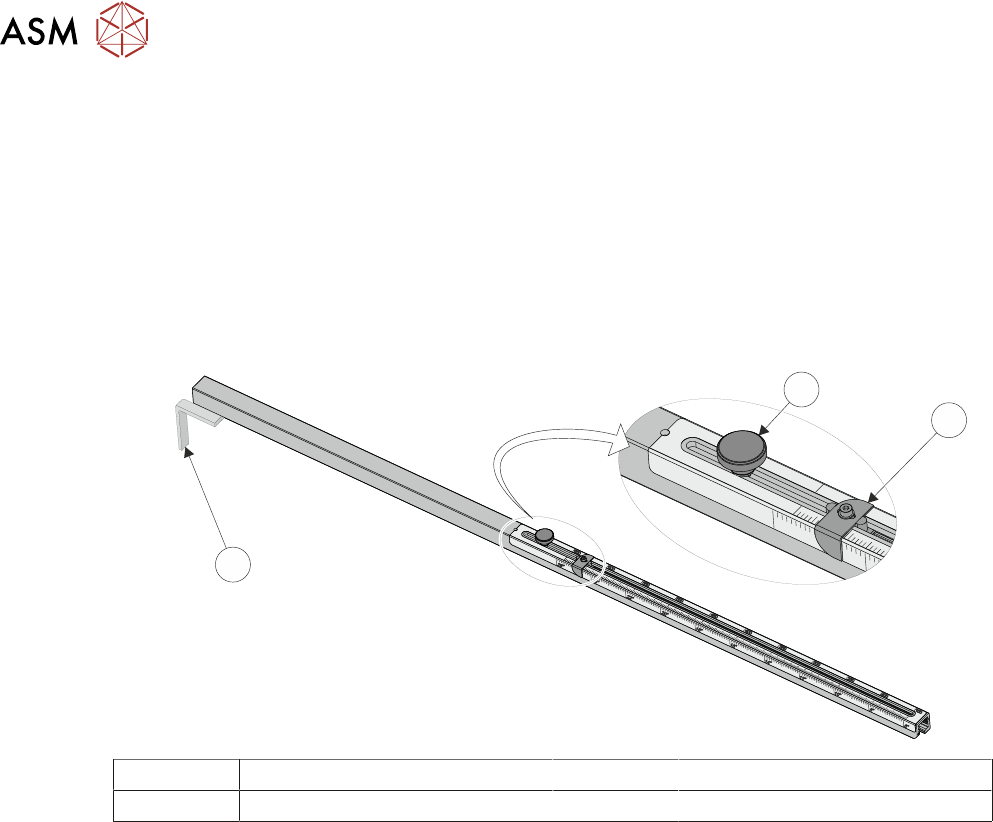
1 Measurement Guide 3 Locking Adjustment Knob
2 End Stop
The screen depth adjuster is set by the operator prior to loading the stencil. The stencil is loaded
manually into the chase until it reaches the stop at the end of the screen depth adjuster.
NOTE
For further information on setting the screen depth adjuster, refer to 12.3.1 "Screen Depth Ad-
juster" [}174]in the Adjustments and Settings section of this chapter.