03217917-01-01E By DEK Technical Reference Manual Vol 1_enPDFA.pdf - 第234页
16 TRANSPORT RAILS MODULE 16.4 ADJUSTMENTS AND SETTINGS 234 TECHNICAL REFERENCE MANUAL Vol 1 E By DEK 04/2019 ► Select Rails To Board Width . ► Adjust the sensor position, so that a 3.5mm gauge fits between the sensor an…
16 TRANSPORT RAILS MODULE
16.4 ADJUSTMENTS AND SETTINGS
TECHNICAL REFERENCE MANUAL Vol 1 E By DEK 04/2019 233
16.4 ADJUSTMENTS AND SETTINGS
16.4.1 Rail Lifted Sensors
► Select Maintenance.
► Select Diagnostics.
► Select Confirm.
► From the displayed table, select Rising Table.
► Select Home Table.
► Select Back.
► From the displayed table, select Rail System from the table.
► Select Home Rails.
► Remove the left and right hand side safety covers to gain access to the rear rail.
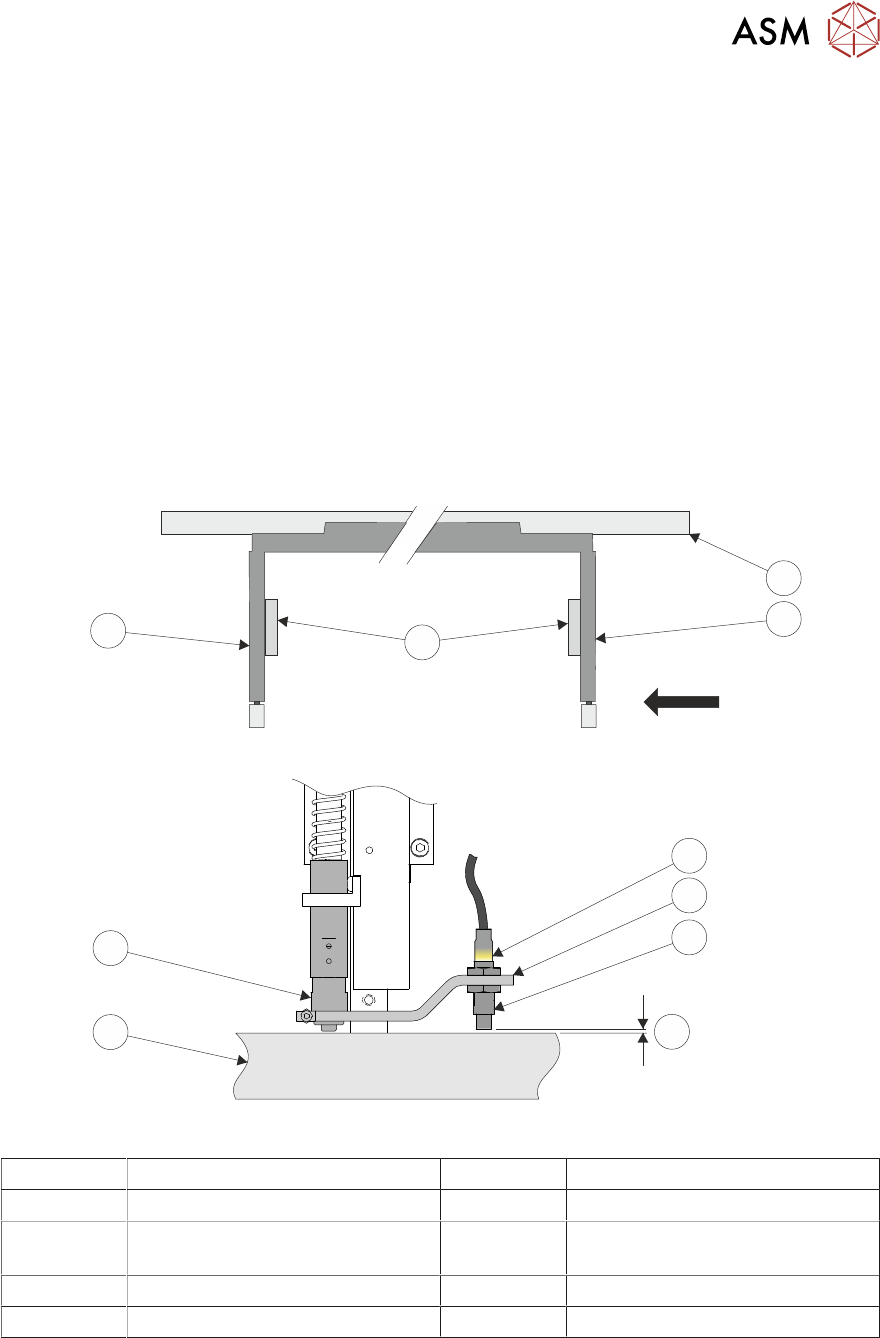
► Identify the rear right rail transport leg and the rail stop bar (clatter bar).
View on Arrow
4
3
1
2
5
6
7
8
9
10
1 Rear Rail 6 Sensor Support Bracket
2 Right Transport Leg 7 Sensor
3 Linear Bearings 8 3.5mm GO
4mm NO GO
4 Left Transport Leg 9 Rail Stop Bar (Clatter Bar)
5 Sensor LED 10 Shock Absorber
► Adjust the sensor position, so that a 3.5mm gauge fits between the sensor and the top face of
the clatter bar and a 4mm gauge does not fit.
► Repeat previous Step for left hand end of the rear rail.
► Select Board Width parameter.
► Enter a value of 40.5mm (minimum board width), and select Accept.

16 TRANSPORT RAILS MODULE
16.4 ADJUSTMENTS AND SETTINGS
234 TECHNICAL REFERENCE MANUAL Vol 1 E By DEK 04/2019
► Select Rails To Board Width.
► Adjust the sensor position, so that a 3.5mm gauge fits between the sensor and the top face of
the clatter bar and a 4mm gauge does not fit, at the rear right rail transport leg. Repeat for left
hand end of the rail.
► Select Back.
► Select Exit Diagnostics.
► Select Confirm.
16 TRANSPORT RAILS MODULE
16.4 ADJUSTMENTS AND SETTINGS
TECHNICAL REFERENCE MANUAL Vol 1 E By DEK 04/2019 235
16.4.2 Board at Left/Right Optos
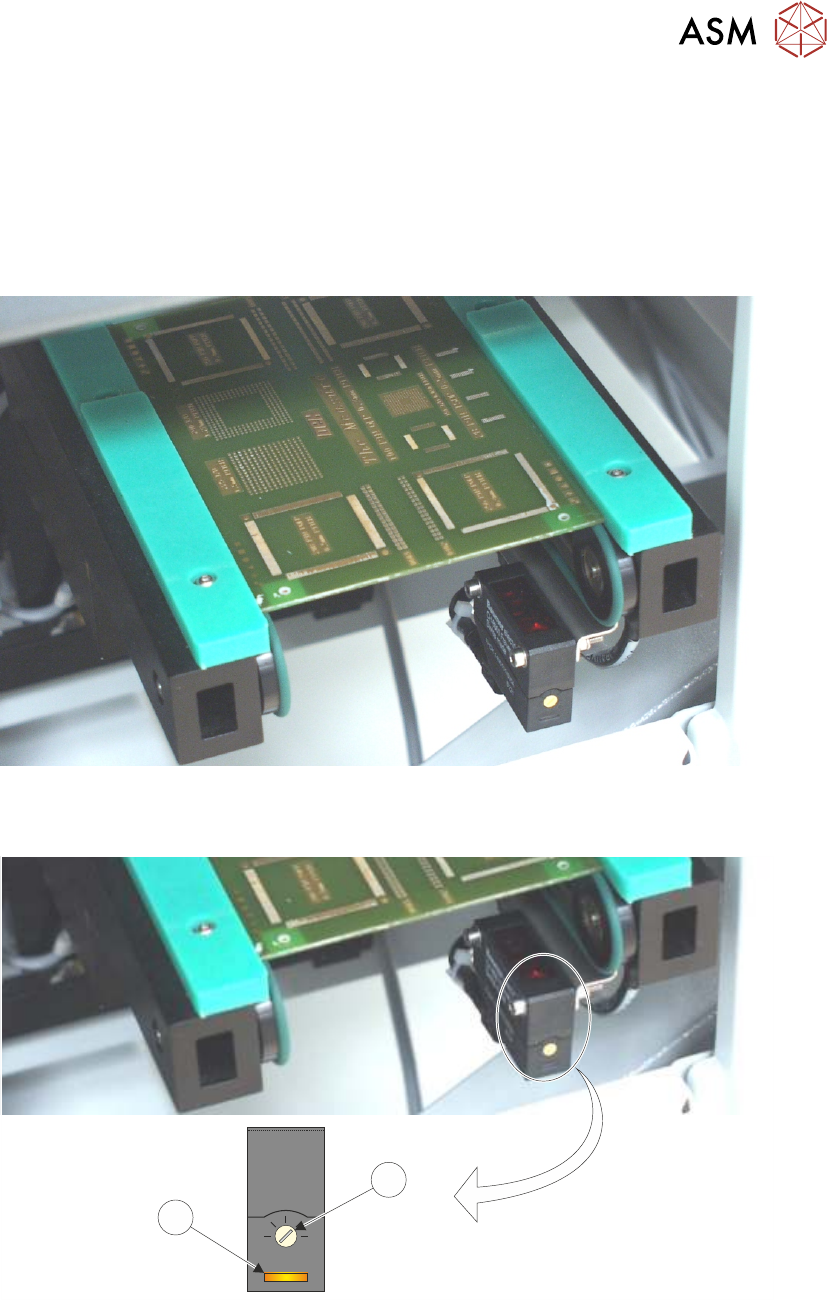
The board at left/right optos switching threshold can be adjusted by means of a sensitivity control.
This ensures that when a board is fed into the machine (via the transport belts) the sensor output
switches to ON.
To achieve an optimum setting carry out the following procedure:
► Place a board on the rails covering the sensor.
► Turn the sensitivity control (1) fully anti-clockwise, ensure that the amber LED (2) is OFF.
+
-
1
2
► Re-adjust the sensitivity control (1) clockwise until the amber LED (2) is ON.
NOTE
If the amber LED is flashing, this indicates a week signal. Re-adjust the sensitivity control.
► Remove the board from the rails and confirm the amber LED is OFF.
► Turn the board 90° and position back onto the rail system, (so that the board lies on top of the
rail system as shown in the figure below).