03217917-01-01E By DEK Technical Reference Manual Vol 1_enPDFA.pdf - 第248页
16 TRANSPORT RAILS MODULE 16.4 ADJUSTMENTS AND SETTINGS 248 TECHNICAL REFERENCE MANUAL Vol 1 E By DEK 04/2019 1 2 3 ► Checking both left and right, continue to manually move the rear rail to close the gap for a snug (not…
16 TRANSPORT RAILS MODULE
16.4 ADJUSTMENTS AND SETTINGS
TECHNICAL REFERENCE MANUAL Vol 1 E By DEK 04/2019 247
► Tighten the bolts slackened at the start of this Adjustment.
► Recheck the parallelism as detailed in Parallelism Check.
► When the adjustment is complete, remove the board edge guides from each end of the rail.
► Remove each bolt disturbed (one at a time), apply a suitable locking compound and fully
tighten.
► Refit the board edge guide to each end of the rail.
Close Up
► Remove the rail setting jig from the rising table.
► Fit the board clamp to the front rail.
► Close the printhead cover.
► Press the System button.
► Select Exit.
► Select Exit.
► Select Back.
16.4.6 Rear Rail Parallelism
WARNING
BOARD CLAMPS. EXTREME CARE MUST BE EXERCISED WHEN WORKING IN
THE TOOLING AREA OF THE MACHINE TO AVOID INJURY. THE FOILS ON THE
FRONT AND REAR BOARD CLAMPS ARE VERY SHARP.
NOTE
Ensure Front Rail Parallelism has been carried out prior to commencing this procedure. It is recom-
mended the rear rail parallelism procedure is carried out by two persons.
► Select Shut Down.
► Select Continue.
► Switch the mains isolator to OFF. Use a suitable lock to lockout the electrical circuit.
► Open the printhead front cover.
► Remove the left and right machine side panels.
► Manually wind the rear transport rail leadscrew to move the rail forwards.
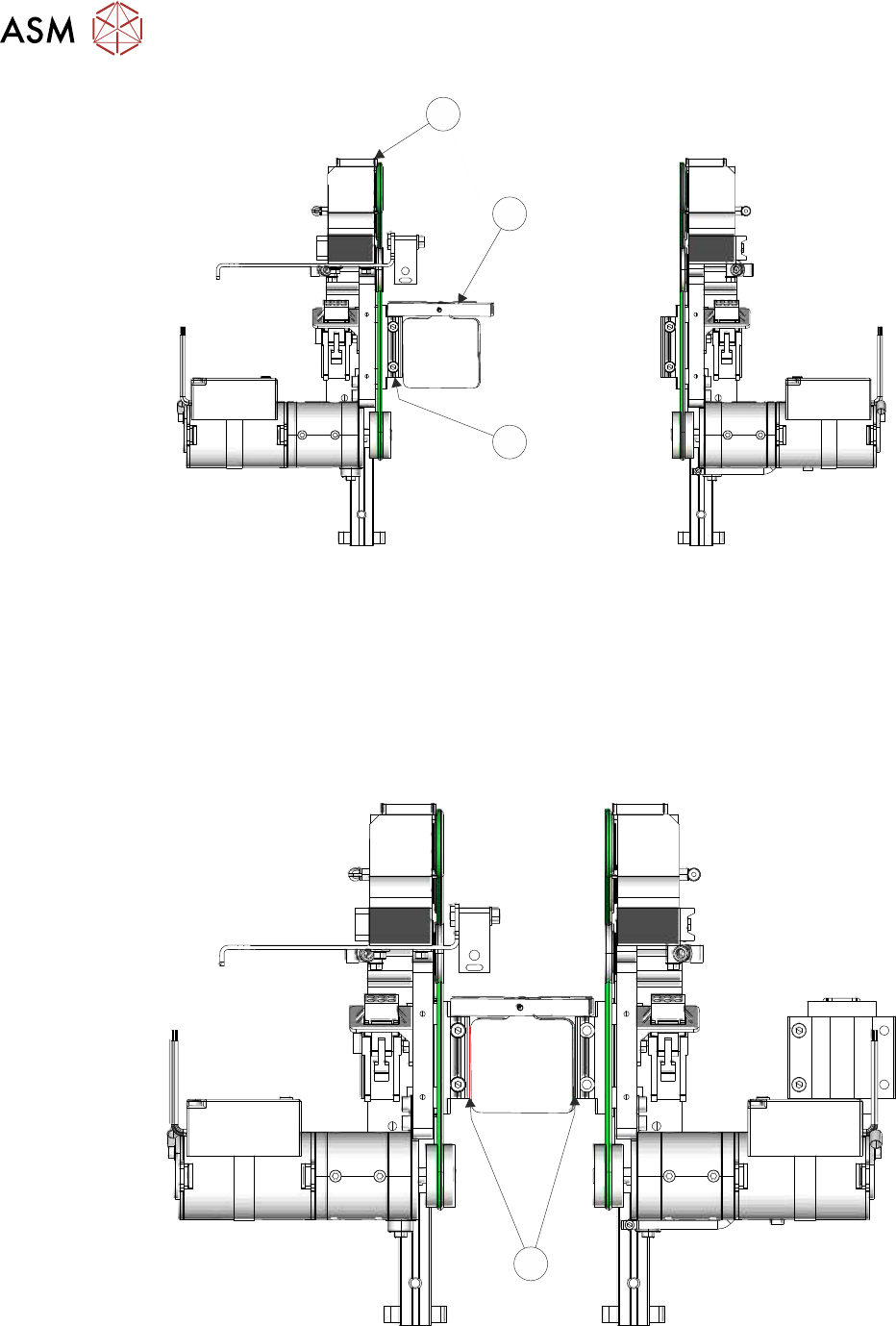
► Rest a pair of transport rail tools (2) (Part No 205530) on both left and right front transport rail
linear guide bearing blocks (3).
16 TRANSPORT RAILS MODULE
16.4 ADJUSTMENTS AND SETTINGS
248 TECHNICAL REFERENCE MANUAL Vol 1 E By DEK 04/2019
1
2
3
► Checking both left and right, continue to manually move the rear rail to close the gap for a
snug (not tight) fit.
Paralleism Check
NOTE
If the rails are not parallel, one side makes contact before the other side. Go to Adjustment to ad-
just the rails.
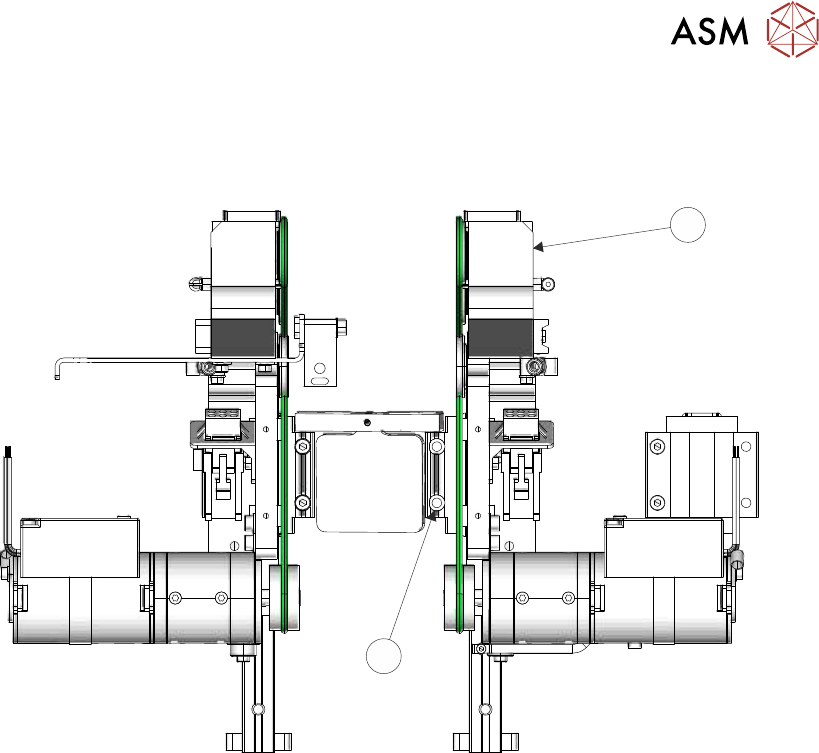
► Attempt to slide a 0.05mm feeler gauge between the rear bearing blocks (4) (left and right
hand side) and the transport rail tools (front and rear); as shown below:
4
► If both sets of linear guides are without gaps, the rear transport rail is parallel to the front rail,
go to Close Up.
16 TRANSPORT RAILS MODULE
16.4 ADJUSTMENTS AND SETTINGS
TECHNICAL REFERENCE MANUAL Vol 1 E By DEK 04/2019 249
Adjustment
► Using a 3.0mm Allen key, loosen the four securing screws (6) that secure the right hand side
bearing block on the rear rail (5).
5
6
► Loosen the four securing screws that secure the left hand side bearing block on the rear rail
(5).
► Gently move the rear rail to close the gap on the appropriate side.
► Using the feeler gauge, check the left and right hand bearing blocks to ensure there is no gap.
► Tighten all eight upper securing screws and recheck for gaps.
Close Up
► Remove the transport rail tools.
► Refit the machine panels removed previously.
16.4.7 Board to Snugger Gap
This setting is used to ensure that the board runs freely when transported on the rails.
► Ensure that the calibration board product is loaded into the product file.
► Select Open Cover Commands.
► Select Carriage To Rear.
► Select Unload Screen.
► Open the printhead cover.
► Remove the stencil from the printer.
► Place the calibration board on the input transport rail belts. Manually move the board into the
tooling area of the printer. Check for any clicks or knocks where the board may catch on the
shoulders of the rail, or mid section modules. If tight areas are detected the rails should be ad-
justed.
► With the board in the tooling area, use a 0.2mm feeler gauge between the edge of the board
and the snugger plate. If the feeler gauge is either tight or loose, adjust the ‘Set Rail Board
Width Calibration’ accordingly.
► Manually remove the board.