03217917-01-01E By DEK Technical Reference Manual Vol 1_enPDFA.pdf - 第255页
16 TRANSPORT RAILS MODULE 16.5 REPLACEMENT PROCEDURES TECHNICAL REFERENCE MANUAL Vol 1 E By DEK 04/2019 255 16.5.3 Board Clamps to Snuggers W ARNING BOARD CLAMPS. EXTREME CARE MUST BE EXERCISED WHEN WORKING IN THE TOOLIN…
16 TRANSPORT RAILS MODULE
16.5 REPLACEMENT PROCEDURES
254 TECHNICAL REFERENCE MANUAL Vol 1 E By DEK 04/2019
► Close the front printhead cover.
► Press the System button.
► Select Load Screen.
► Select Back.
16.5.2 Board Clamp Foil Replacement
WARNING
BOARD CLAMPS. EXTREME CARE MUST BE EXERCISED WHEN WORKING IN
THE TOOLING AREA OF THE MACHINE TO AVOID INJURY. THE FOILS ON THE
FRONT AND REAR BOARD CLAMPS ARE VERY SHARP.
If the board clamp is fitted to the machine, use the Board Clamp Replacement procedure to remove
and refit the board clamps.
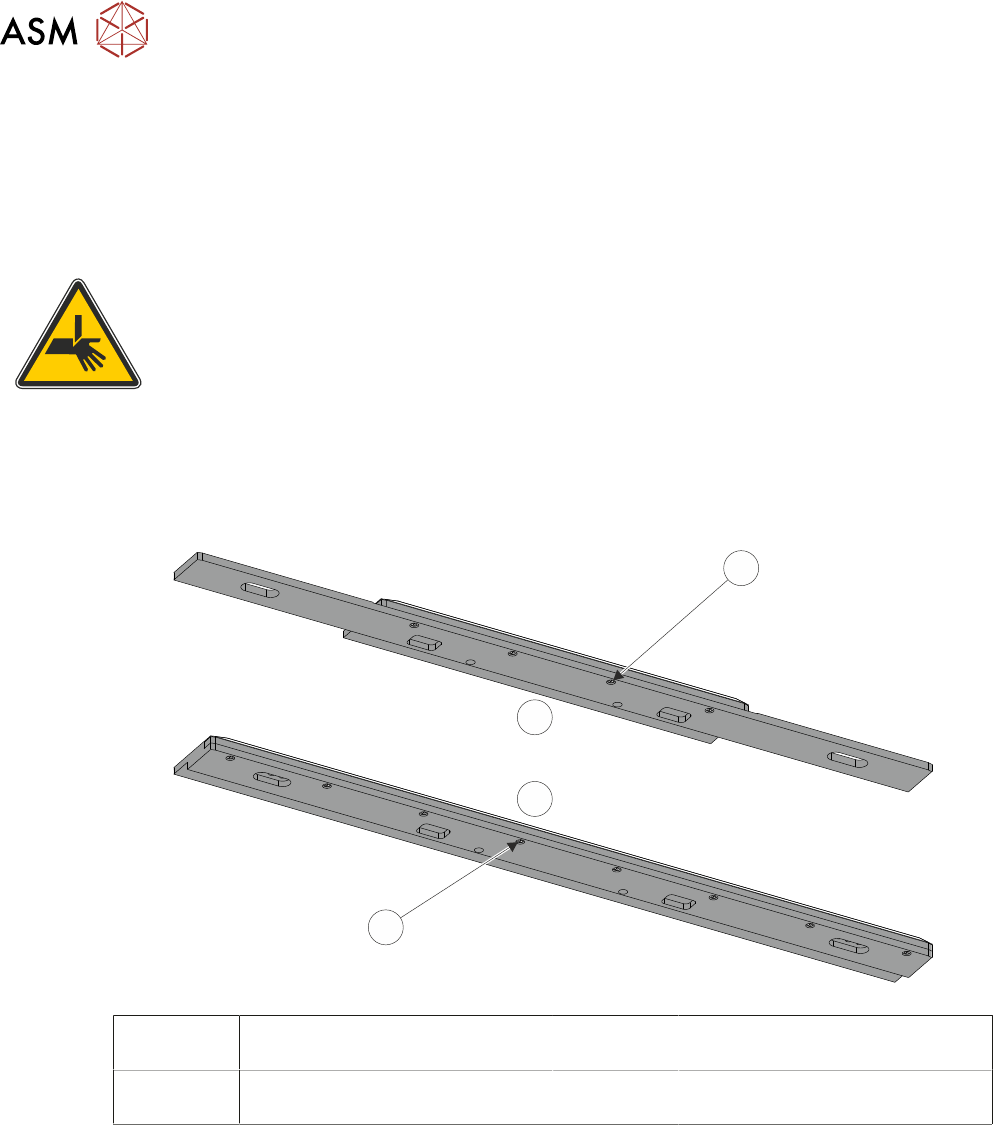
► Remove the M2.5 x 6mm pan headed slotted screws (1)/(4) securing the foil to the board
clamp. Discard the foil and retain the screws (1)/(4).
1
2
3
4
1 Board Clamp Foil Securing
Screws (4 positions)
3 View on Underside of 500mm
Board Clamp Mechanism
2 View on Underside of 250mm
Board Clamp Mechanism
4 Board Clamp Foil Securing
Screws (8 positions)
► Fit the new foil with the previously removed screws (1)/(4) and tighten to a torque of 0.2Nm.
16 TRANSPORT RAILS MODULE
16.5 REPLACEMENT PROCEDURES
TECHNICAL REFERENCE MANUAL Vol 1 E By DEK 04/2019 255
16.5.3 Board Clamps to Snuggers
WARNING
BOARD CLAMPS. EXTREME CARE MUST BE EXERCISED WHEN WORKING IN
THE TOOLING AREA OF THE MACHINE TO AVOID INJURY. THE FOILS ON THE
FRONT AND REAR BOARD CLAMPS ARE VERY SHARP.
NOTE
This procedure is valid when converting from either board clamps or foil-less clamps.
► Select Open Cover Commands.
► Select Carriage To Rear.
► Select Unload Screen.
► Open the front printhead cover.
► Remove the stencil from the machine.
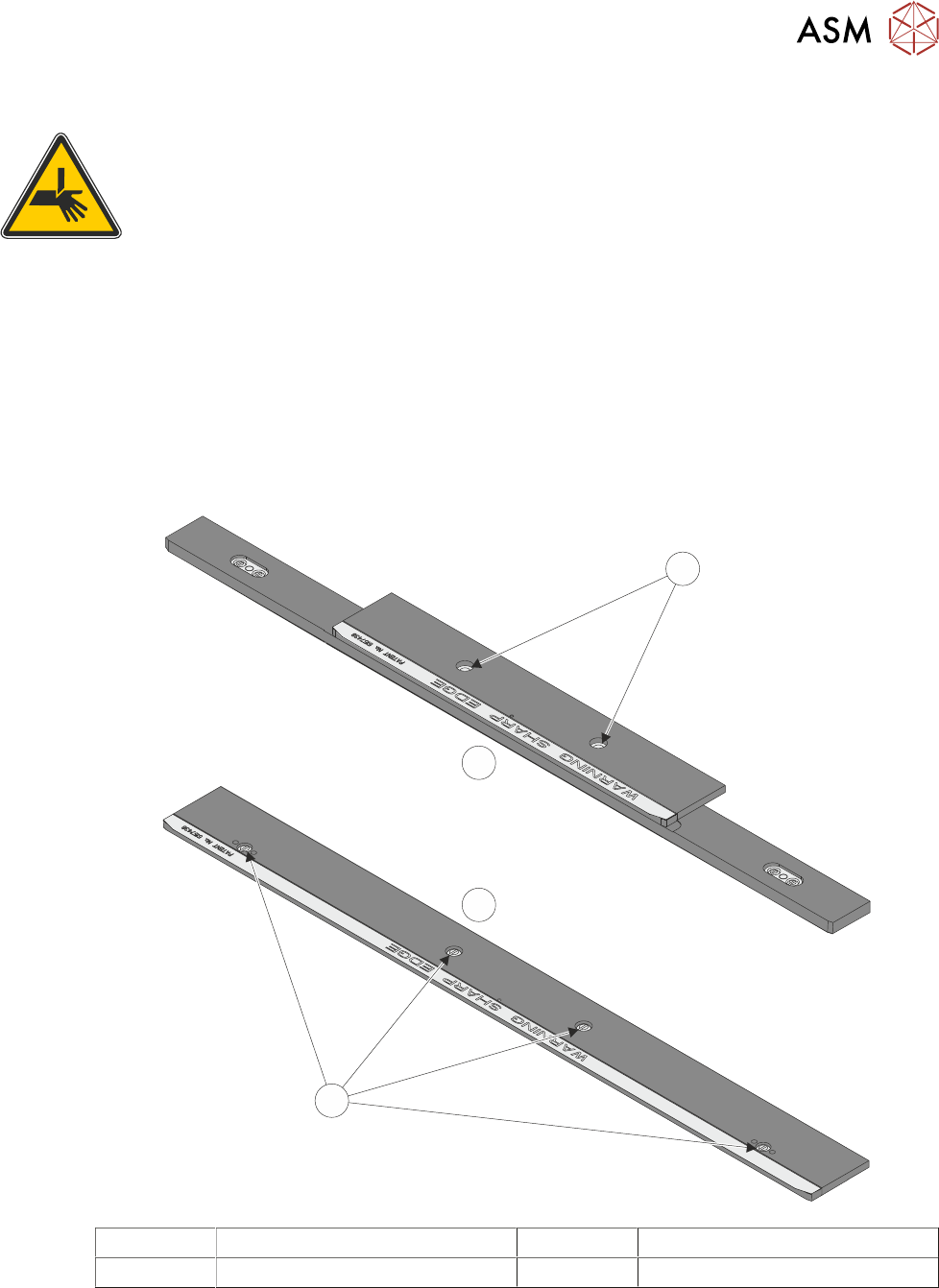
► Remove the securing screws (1) from the rear board clamp and remove the board clamp.
1
2
1
3
1 Board Clamp Securing Screws 3 500mm Board Clamp Mechanism
2 250mm Board Clamp Mechanism
► Place the new board clamp in position on the location plates.
► Secure the board clamp in position with the previously removed screws (1).
NOTE
The Board Clamp Setting procedure is not required after board clamp replacement.
► Refit the stencil.
16 TRANSPORT RAILS MODULE
16.5 REPLACEMENT PROCEDURES
256 TECHNICAL REFERENCE MANUAL Vol 1 E By DEK 04/2019
► Remove the securing screws (1) from the front board clamp and remove the board clamp.
► Fit the appropriate snugger base plate to the rear rail and secure using the M4 pan head
screws.
► Fit the appropriate front snugger plate to the front rail and secure using the M4 pan head
screws.
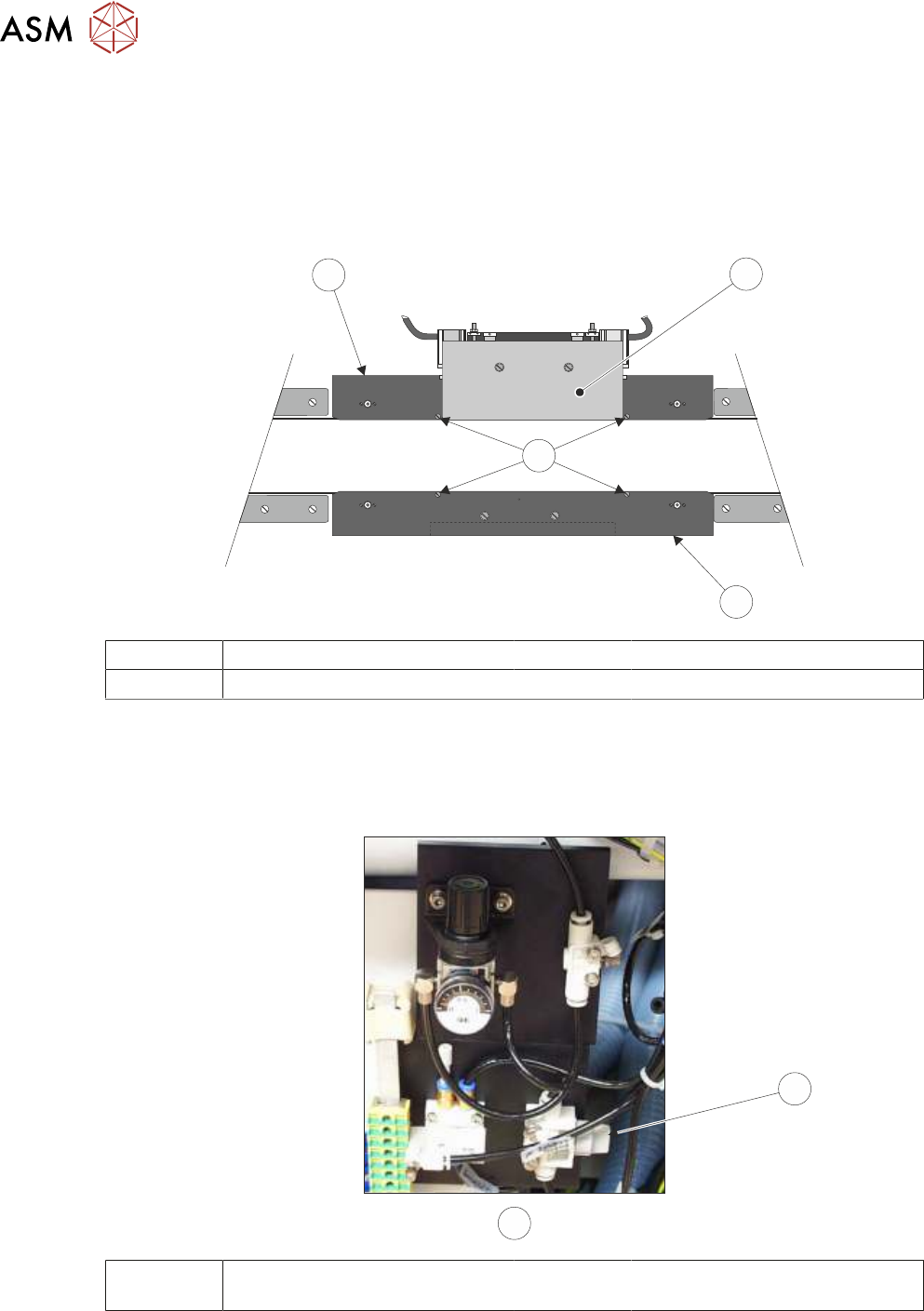
► Fit the rear snugger plate (4), don’t tighten the M4 pan head securing screws.
7
4
5
6
4 Rear Snugger Plate 6 Downstops
5 Front Snugger Plate 7 Snugger Base Plate
► Close the front printhead cover.
► Press the System button.
► Locate the magnetic plate on the right hand side of the machine containing the pneumatics for
the snuggers.
8
9
8 Pneumatic Switch 9 View on Right Hand Side of Ma-
chine
► Turn the pneumatic switch On.
► Load the product file to be printed, the rear rail moves to set the board width.