03217917-01-01E By DEK Technical Reference Manual Vol 1_enPDFA.pdf - 第290页
17 CAMERA SYSTEM MODULE 17.6 APPENDIX A - VISION SYSTEM SETUP 290 TECHNICAL REFERENCE MANUAL Vol 1 E By DEK 04/2019 NOTE If the changes are not saved, the changes remain in memory until the machine is shut down or an- ot…

17 CAMERA SYSTEM MODULE
17.6 APPENDIX A - VISION SYSTEM SETUP
TECHNICAL REFERENCE MANUAL Vol 1 E By DEK 04/2019 289
17.6 APPENDIX A - VISION SYSTEM SETUP
17.6.1 Preparing the Vision System
The following procedure is typical for all fiducial shapes, although in this procedure a circle fiducial
shape is referred to throughout.
► Select Setup Product.
► Select Fiducials.
► Select Load Board.
► Place a board on the input side of the rails.
► Select Auto Board.
► Select Fiducial Setup.
► Select the board or stencil fiducial that requires setting up from the control buttons on the left.
► Select Shape to change the fiducial type. The options are:
●
Circle
●
Rectangle
●
Diamond
●
Cross
●
Video Model
NOTE
Video Model allows a unique feature to be used instead of a standard fiducial shape.
► Select Width to change the overall width of the fiducial.
► Select Board Fiducial # /X Board Fiducial # Y to change the location of the fiducial in the X
and Y directions. The dimension is measured from the left hand side edge of the board to the
centre of the fiducial.
► Select Fiducial Inner Contour/Fiducial Outer Contour to setup the area within the fiducial
to be ignored by the vision system.
► Select Accept Score to setup the level as to whether a found fiducial should be accepted or
rejected.
► Select Background to select whether the area surrounding the fiducial is lighter or darker in
comparison to the fiducial colour.
► Select the Lighting tab.
► Adjust the lighting parameters to a level whereby the fiducials just ‘white out’, without bloom-
ing. Default level 8 on both Vertical and Oblique is usually adequate for the majority of fidu-
cials.
► Select the Manual Setup tab.
► Select Learn and Locate.
A table appears on the monitor indicating the score of the fit between the synthetic fiducial and the
actual fiducial. The synthetic fiducial parameters may need resetting and re-learning to obtain a
better figure if there are other features in the camera window.
► Select Continue.
► Select Locate.
► Select Continue.
► Repeat select Shape process for other fiducials that require setting up.
► Select Exit.
► Select Unload Board.
► Select Auto Board.
► Select Back.
► Select Save.
17 CAMERA SYSTEM MODULE
17.6 APPENDIX A - VISION SYSTEM SETUP
290 TECHNICAL REFERENCE MANUAL Vol 1 E By DEK 04/2019
NOTE
If the changes are not saved, the changes remain in memory until the machine is shut down or an-
other product file is loaded.
► Select Back.
► Select Auto Board.
► Remove the board from the rails.
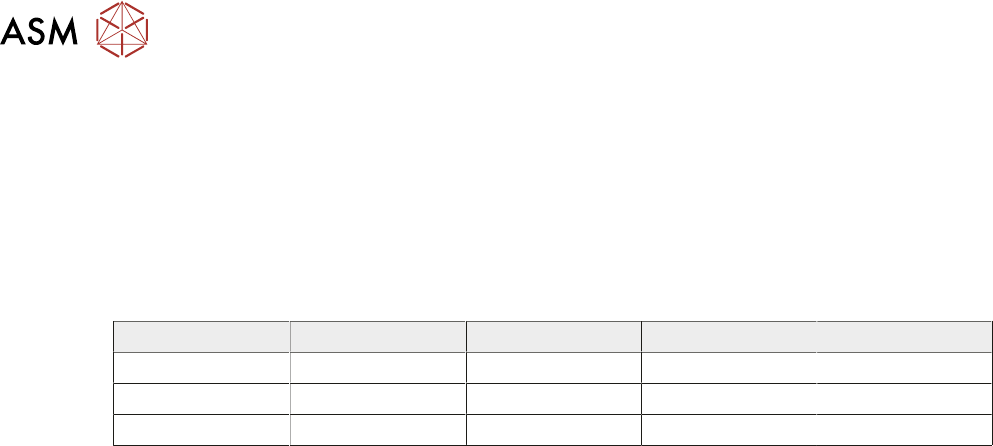
The above procedure is for a circular fiducial. There are some extra parameters for the other fidu-
cials which are listed in the table below:
Rounding Height Rotation Leg Width
Rectangle Yes Yes Yes No
Diamond No Yes Yes No
Cross No Yes Yes Yes
17.6.2 Video Model
If a board has no fiducials or the condition of the fiducials prevents satisfactory recognition, the
user can employ video models as an alternative to fiducials. Video models use the relationship
between the image of an area of the stencil and the same area of the board to align the board and
stencil. The area of the board selected for use as a video model should have shapes withconsist-
ent, solid boundaries. The shape should also have edges in both the X and Y planes to produce an
image with good X and Y information for accurate positioning.
There are three video model types:
●
Auto - Uses a video model type best suited to the type of fiducial being learnt.
●
Type 1 - Uses a geometric pattern matching technique to produce a synthetic model of the
feature to be learnt. Best suited to features that are not replicated in the camera field of view.
A unique view is ideal for this model.
●
Type 2 - Uses a reference image to make a template of all the features and the board back-
ground within the camera field of view and uses comparison techniques to locate the model. A
good choice where there is duplication in the image such as a BGA device or QFP pad