CP-7[732-742]-series Mechanical Reference(2.9E).pdf - 第154页
1.2 T ape-end Detection (Station 1) Point Tape end detection is performed by a reflector type sensor which activates at a point near the end of the tape. This enables the operator to know when a feeder is nearly out of t…
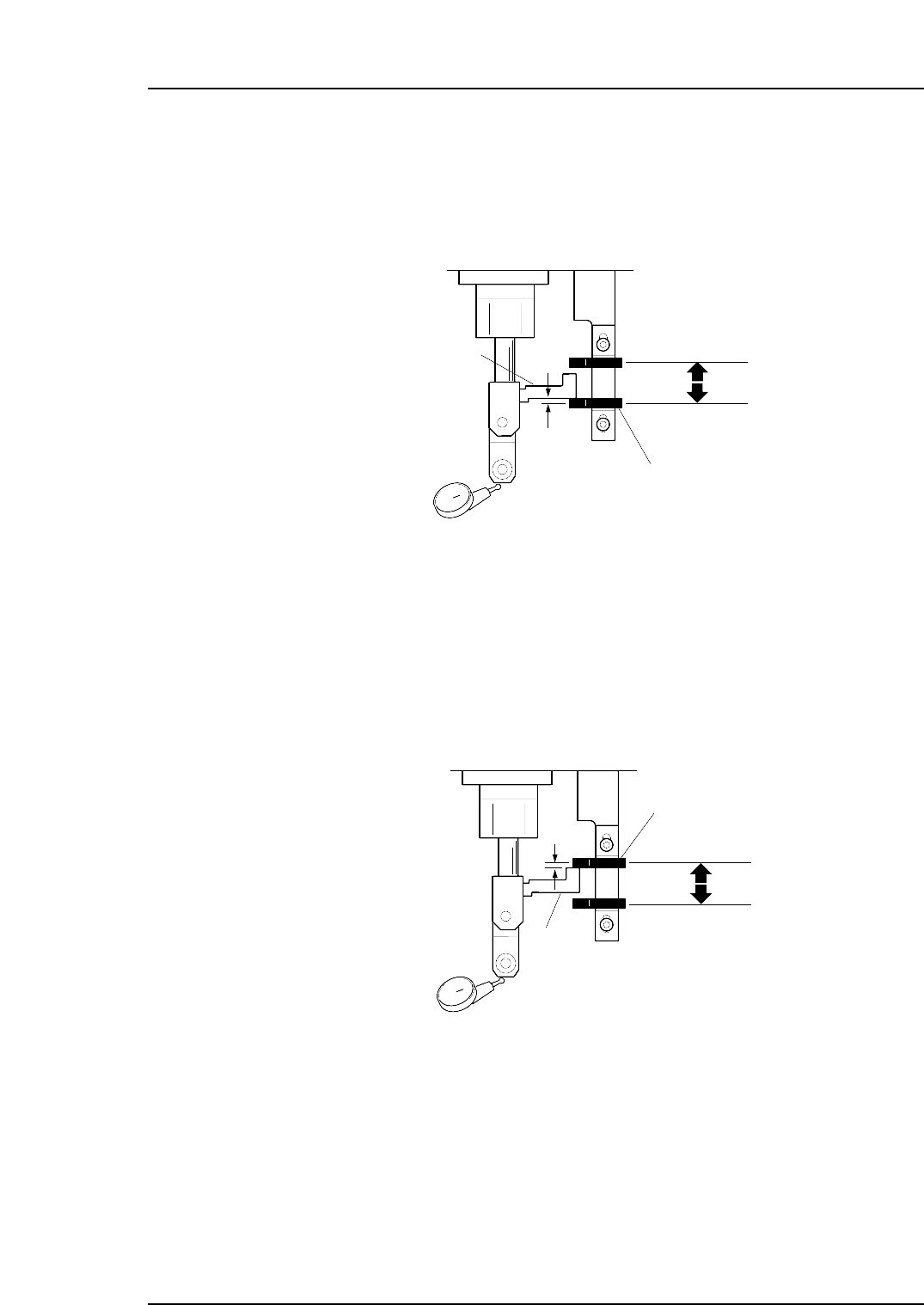
1.1.2 Advance Sensor Position Adjustment
1. When the dog is at the lower limit at cam angle 200°, ensure that the sensor is ON.
2. Set a dial gauge to the roller and adjust the sensor to go off 0.5 mm above the
lower limit.
1.1.3 Retract Sensor Position Adjustment
1. When the dog is at the upper limit at cam angle 0°, ensure that the sensor is ON.
2. Set a dial gauge to the roller and adjust the sensor to go off 0.5 mm below the
upper limit.
Retract sensor
Dog Lower Limit
0.5 mm
Dog Upper Limit
Dog
C7SM4004a
Advance sensor
Dog Lower Limit
Dog Upper Limit
Dog
C7SM4003a
0.5 mm
Part 4 Chapter 1 Station Adjustments
Edition 2.4 4-1-3 CP-7 series Mechanical Reference
1.2 Tape-end Detection (Station 1)
Point
Tape end detection is performed by a reflector type sensor which activates at a point near
the end of the tape. This enables the operator to know when a feeder is nearly out of
tape.
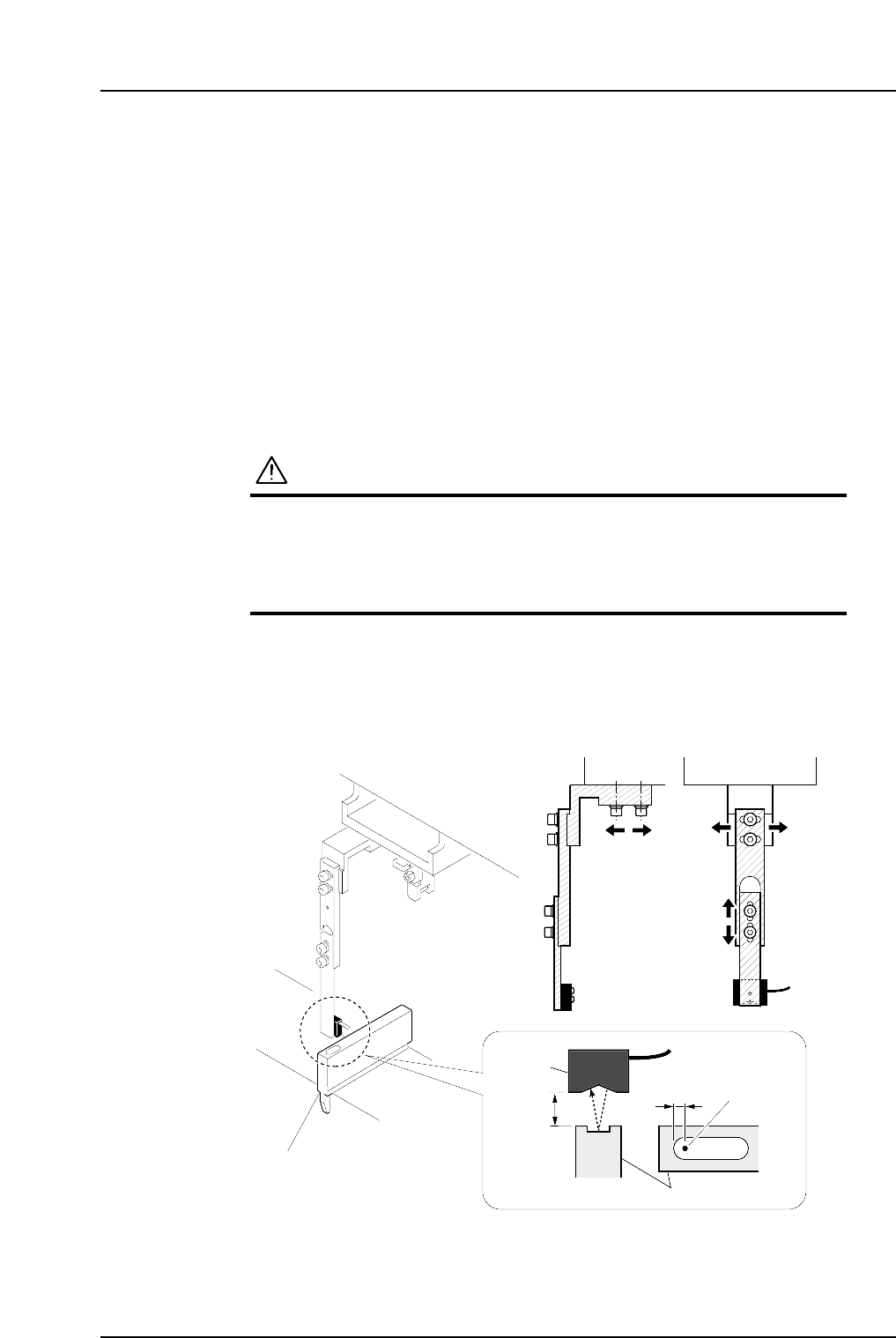
1.2.1 Sensor Position Adjustment
1. Set the adjustment jig (Z9526ADCPJ8550) in the D1 position.
2. Press [Position] - (Position)[D1-axis] - enter[1] - [OK] and the START button to
move the adjustment jig to station 1.
3. Press the EMERGENCY STOP button to take the 200V down to 100V.
WARNING
• Always be sure to cut off the 200V power before carrying
out any work.
• Exercise extreme caution when working on the machine if
the cam is not at its origin (0 deg.). Recoil of the cam
axis can endanger the operator.
4. Ensure that the distance between the top surface of the adjustment jig and the
sensor is approximately 11 to 12 mm.
5. Adjust the sensor position so that the sensor beam appears at 7 mm from the rear
edge of the adjustment jig slit.
Sensor
11
~
12 mm
7 mm
Beam
Adjustment jig
(Z9526ADCPJ8550)
Adjustment jig
C7SM4005b
Part 4 Chapter 1 Station Adjustments
Edition 2.4 4-1-4 CP-7 series Mechanical Reference
1.2.2 Sensor Amplifier Adjustment
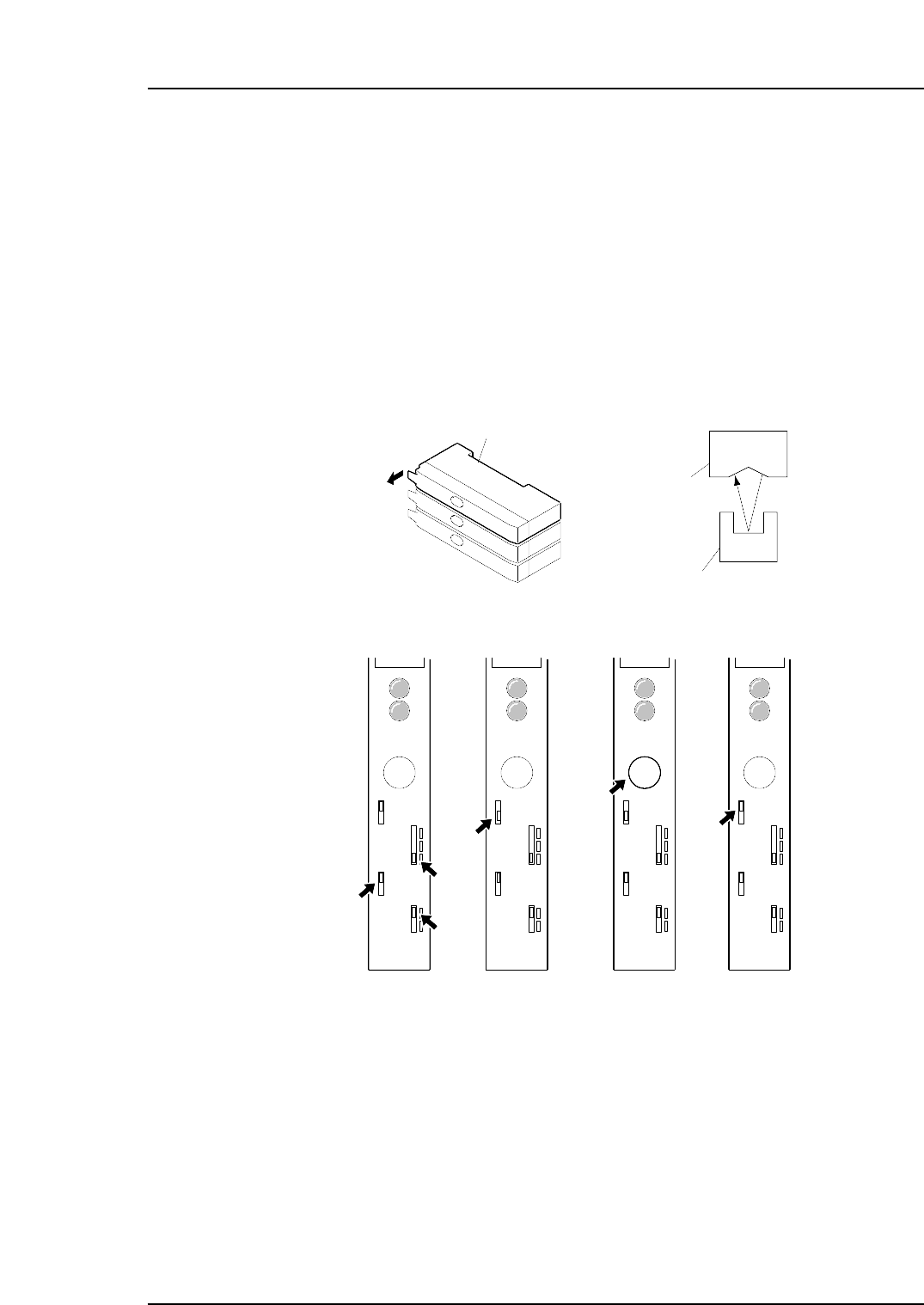
Set the jig (Z9526ADCPJ8550) in position at device number one.
1. Open the cover of the amplifier and set each switch as follows:
Timer: OFF
Output: D ON
Sensitivity: FINE
2. Release the LOCK of the protect switch.
3. At PICK UP POS. D1, check that the light is striking the center of the channel on
the jig as indicated in the figure below. Press and hold down the SET button for
three seconds or more. (The display light changes to yellow.)
4. LOCK the protect switch.
5. Check if the sensor can detect the tape end.
SET
LOCK
OFF D
ON D
OFF
FINE
TURBO
D ON
L ON
SET
LOCK
OFF D
ON D
OFF
FINE
TURBO
D ON
L ON
SET
LOCK
OFF D
ON D
OFF
FINE
TURBO
D ON
L ON
SET
LOCK
OFF D
ON D
OFF
FINE
TURBO
D ON
L ON
( 1 ) ( 2 ) ( 3 ) ( 4 )
C7SM4006a
Tape end check sensor amplifier
Sensor
Jig ( Z9526ADCPJ8550 )
Open the cover
Part 4 Chapter 1 Station Adjustments
Edition 2.4 4-1-5 CP-7 series Mechanical Reference