CP-7[732-742]-series Mechanical Reference(2.9E).pdf - 第209页
Part 5 Chapter 1 Troubleshooting T able Edition 2.7 5-1-6 CP-7 series Mechanical Reference 1.4 Panel Conveyance Related Errors No. 4-1 4-2 4-3 4-4 M: Part 1 Chapt 3 M: Part 1 Chapt 3 M: Part 1 Chapt 3 S: Part 3 Chapt 1 S…
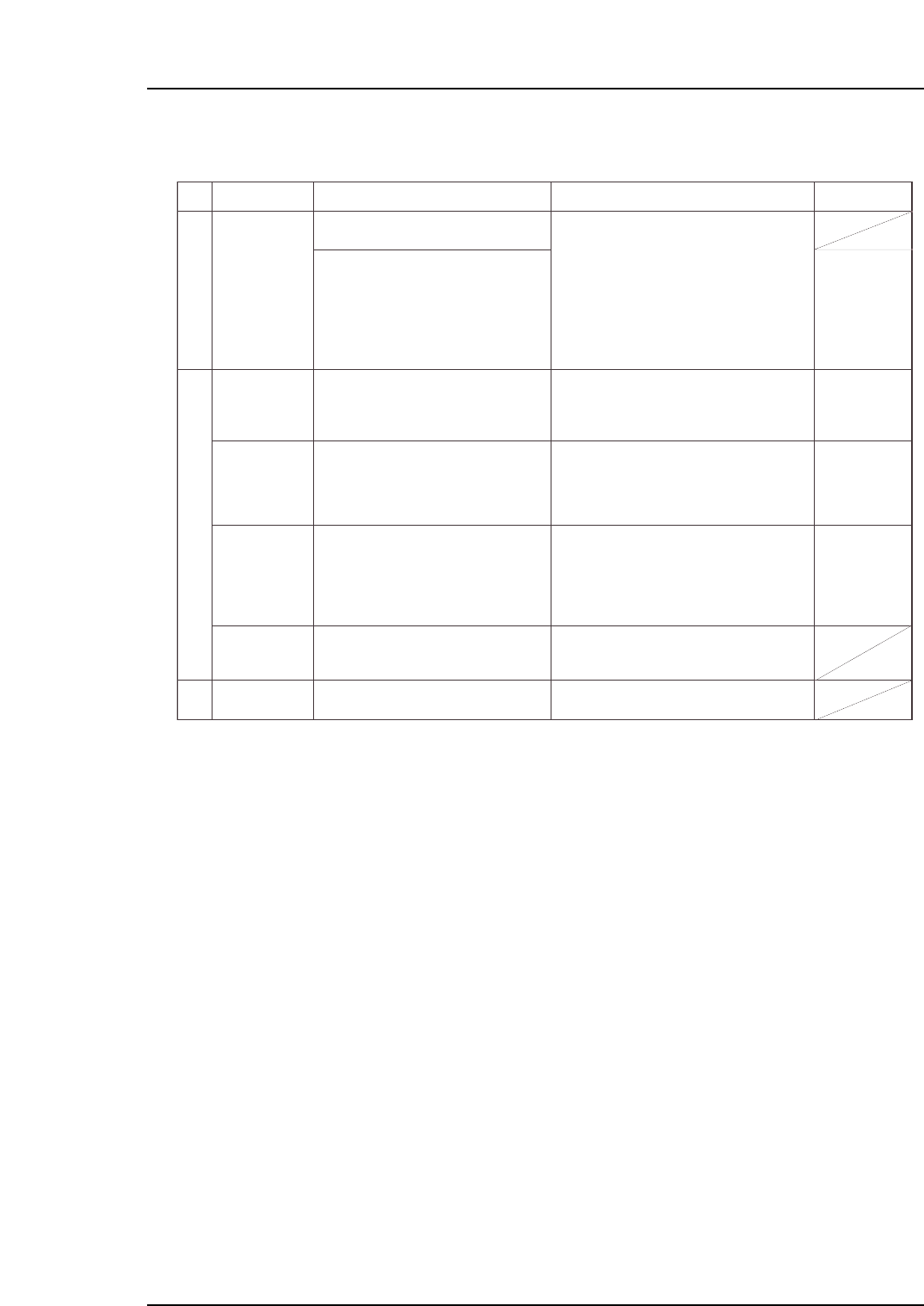
1.3 Vision Processing Errors
No.
3-1
3-2
3-3
M: Part 3
Chapt 1 "1.9"
Chapt 3
"3.1", "3.2"
T: Part 3
Lesson 2
"2.1.1", "2.1.2"
U: Part 2
Chapt 4
"Appearance",
"[Element]
window"
T: Part 3
Lesson 2
"2.1.1"
U: Part 2
Chapt 4
"Appearance"
M: Part 3
Chapt 1 "1.5"
Part size is
different from
Part Data
setting value.
Replace the error part with the correct
part type.
This error occurs because the part
information set in Part data is different from
the part on the machine.
If the problem is being caused by a soiled
nozzle, the vision processing error will occur
only when that soiled nozzle is used.
If the prism box surface is soiled, vision
processing errors will occur for almost all
parts.
Frequent vision processing errors may be
caused by slight differences between the
actual part dimensions and the dimension
settings. In such cases, measure the actual
part, and enter those dimensions as the
settings.
The brightness adjusting function is
supported from V1.18.
Enter the correct (error part's) part size,
part height, lead pitch, etc., settings in
Part data.
Check for dust, etc., around the
displayed image of the part causing the
vision processing error, the wipe the
prism box surface clean with a dry cloth
or cotton swab.
Measure the size of the part where
frequent errors are occurring, then enter
this correct size in Part data.
Replace the UV lamp if a "Replace UV
lamp" message displays after performing
a nozzle center measurement.
Refer to item 2 (Pickup Errors).
Check production information to see if a
specific nozzle is causing the vision
processing errors. If so, clean/replace
that nozzle, or replace its reflective seal.
Nozzle is soiled.
Prism box
surface is soiled.
The part size is
slightly different
from the Part
data setting.
UV lamp life has
expired.
Parts are not
being picked up.
Cause Remedy Remarks
Ref. Page
Part 5 Chapter 1 Troubleshooting Table
Edition 2.7 5-1-5 CP-7 series Mechanical Reference
Part 5 Chapter 1 Troubleshooting Table
Edition 2.7 5-1-6 CP-7 series Mechanical Reference
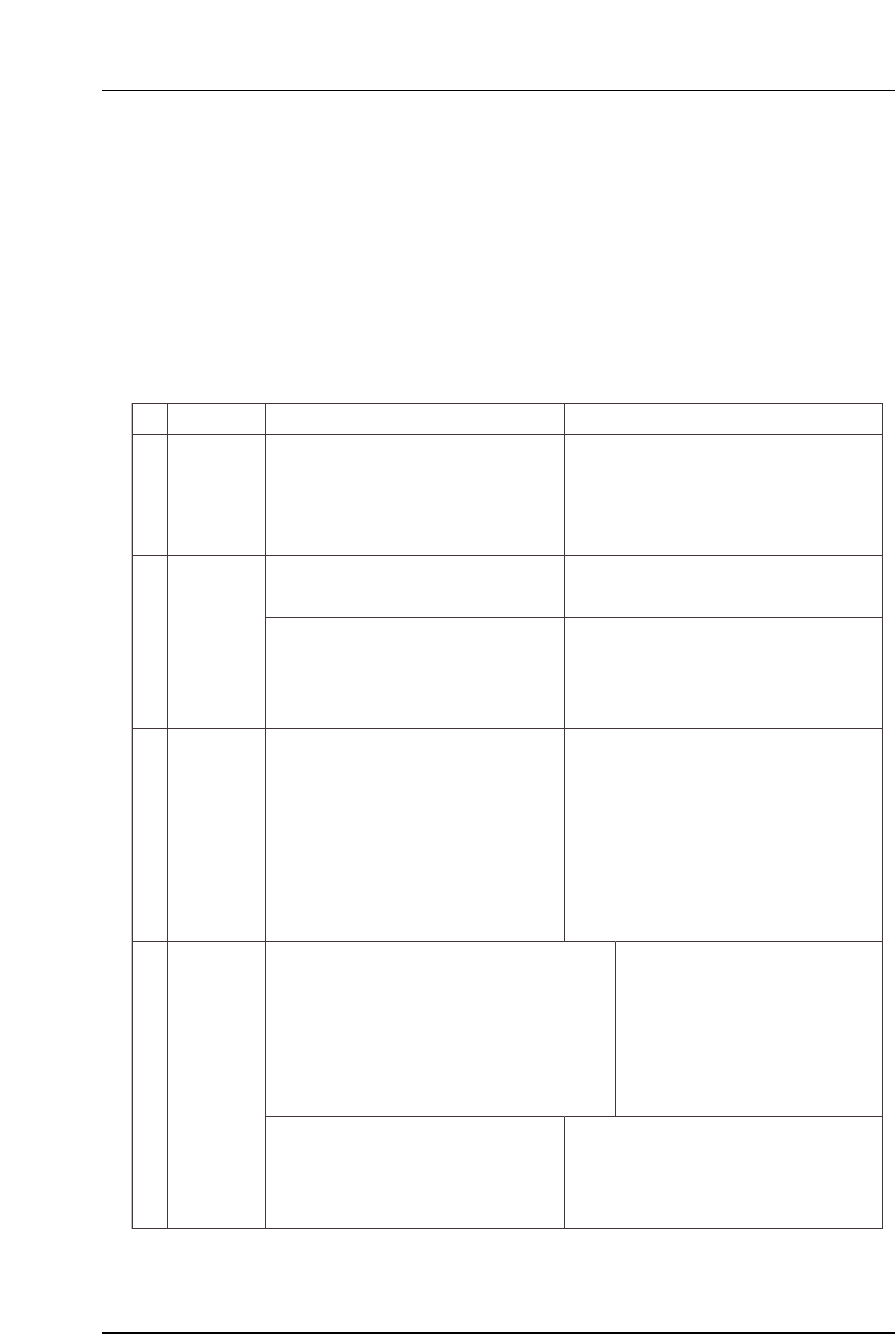
1.4 Panel Conveyance Related Errors
No.
4-1
4-2
4-3
4-4
M: Part 1
Chapt 3
M: Part 1
Chapt 3
M: Part 1
Chapt 3
S: Part 3
Chapt 1
S: Part 3
Chapt 1
M: Part 1
Chapt 3
S: Part 3
Chapt 1
In-carrier panel
conveyance
error
(1) Check whether the panel is being clamped
correctly.
(2) Check the following sensors for problems
(1) - (6) (described above).
(1) Check the following sensor for problems
(3) - (6) (see above).
(2) Check the in-carrier conveyance cylinder for
problem (7) (see above).
XOB1 or XOB2 panel sensor fails to
switch on at carrier advance limit even
though a panel has been loaded from
the in-lifter.
Or, panel has been conveyed from the
in-carrier to the XY-table, but the X0B1
or XOB2 panel sensor fails to switch off.
In-carrier may not be moving all the
way to its motion limit position.
In-carrier was advanced, but the in-
carrier advance limit sensor failed to
switch on.
In-carrier was conveyed, but the in-
carrier advance limit or retract limit
sensor failed to switch on.
An in-carrier cycle error occurs if the
advance limit or retract limit sensor
fails to switch on within 8 seconds.
In-carrier may not be moving all the
way to its motion limit position.
In-carrier advance limit panel check (1) XOB1
In-carrier advance limit panel check (2) XOB2
In-carrier advance limit check XOB3
(1) Check the following sensor for problems
(3) - (6) (see above).
In-carrier advance limit check XOB3
In-carrier retract limit check XOB4
Execute the following commands to see if the
carrier can be moved to its motion limit position:
[Panel Loader]-[Loader Maintenance]-[In-side]-
[Carrier Extend/Carrier Retract]-[START].
(2) Check the in-carrier conveyance cylinder for
problem (7) (see above).
Execute the following commands to see if the
carrier can be moved to its motion limit position:
[Panel Loader]-[Loader Maintenance]-[In-side]-
[Carrier Extend/Carrier Retract]-[START].
In-carrier cycle
error
Cause Remedy Remarks Ref. Page
In-carrier
advance limit
error
• Most panel conveyance errors are caused by sensor problems. As a rule, these errors occur due to
one of the following 6 causes. After checking the machine's error display content, check the following
items at the sensor in question.
(1) Panel detection problem.
(2) Sensor beam emitter is aimed at a notched area of the panel.
(3) Sensor beam emitter is soiled (foreign matter is present).
(4) Sensor has failed.
(5) Disconnected/severed cable, etc.
(6) I/O board and I/O terminal board malfunction.
• As a malfunctioning actuator may be responsible for problems with sensors which detect the cylinder
actuator stroke end, etc., item (7) shown below should also be checked.
(7) Sensor detection problem caused by malfunctioning cylinder, etc.
* The "X???" and "Y???" values which appear in the remedy column correspond to
the I/O map assignment numbers.
In-carrier
clamping error
(1) Check the following sensor for problems (3) - (6)
(see above).
• In-carrier clamper was
closed but the clamp sensor
failed to switch on.
• In-carrier clamper was
opened but the unclamp
sensor failed to switch on.
The clamper may not be closing/
opening all the way to its limit position.
In-carrier retract limit panel clamp check (fixed-rail side) X0B7
In-carrier retract limit panel clamp check (adjustable-rail side) X0B8
In-carrier advance limit panel clamp check (fixed-rail side) X0B9
In-carrier advance limit panel clamp check (adjustable-rail side) X0BA
In-carrier retract limit panel unclamp check (fixed-rail side) X0BB
In-carrier retract limit panel unclamp check (adjustable rail side) X0BC
In-carrier advance limit panel unclamp check (fixed-rail side) X0BD
In-carrier advance limit panel unclamp check (adjustable-rail side) X0BA
(2) Check the in-carrier clamping/unclamping
cylinder for problem (7) (see above.)
Execute the following commands to see if the
carrier can be moved to its motion limit position:
[Panel Loader]-[Loader Maintenance]-[In-side]-
[Carrier Extend/Carrier Retract]-[START].
Part 5 Chapter 1 Troubleshooting Table
Edition 2.7 5-1-7 CP-7 series Mechanical Reference
No.
4-5
4-6
4-7
4-8
M: Part 1
Chapt 3
M: Part 1
Chapt 3
M: Part 1
Chapt 3
S: Part 3
Chapt 1
S: Part 3
Chapt 1
M: Part 1
Chapt 3
M: Part 1
Chapt 3
M: Part 2
Chapt 1
S: Part 3
Chapt 1
S: Part 3
Chapt 2
4-9
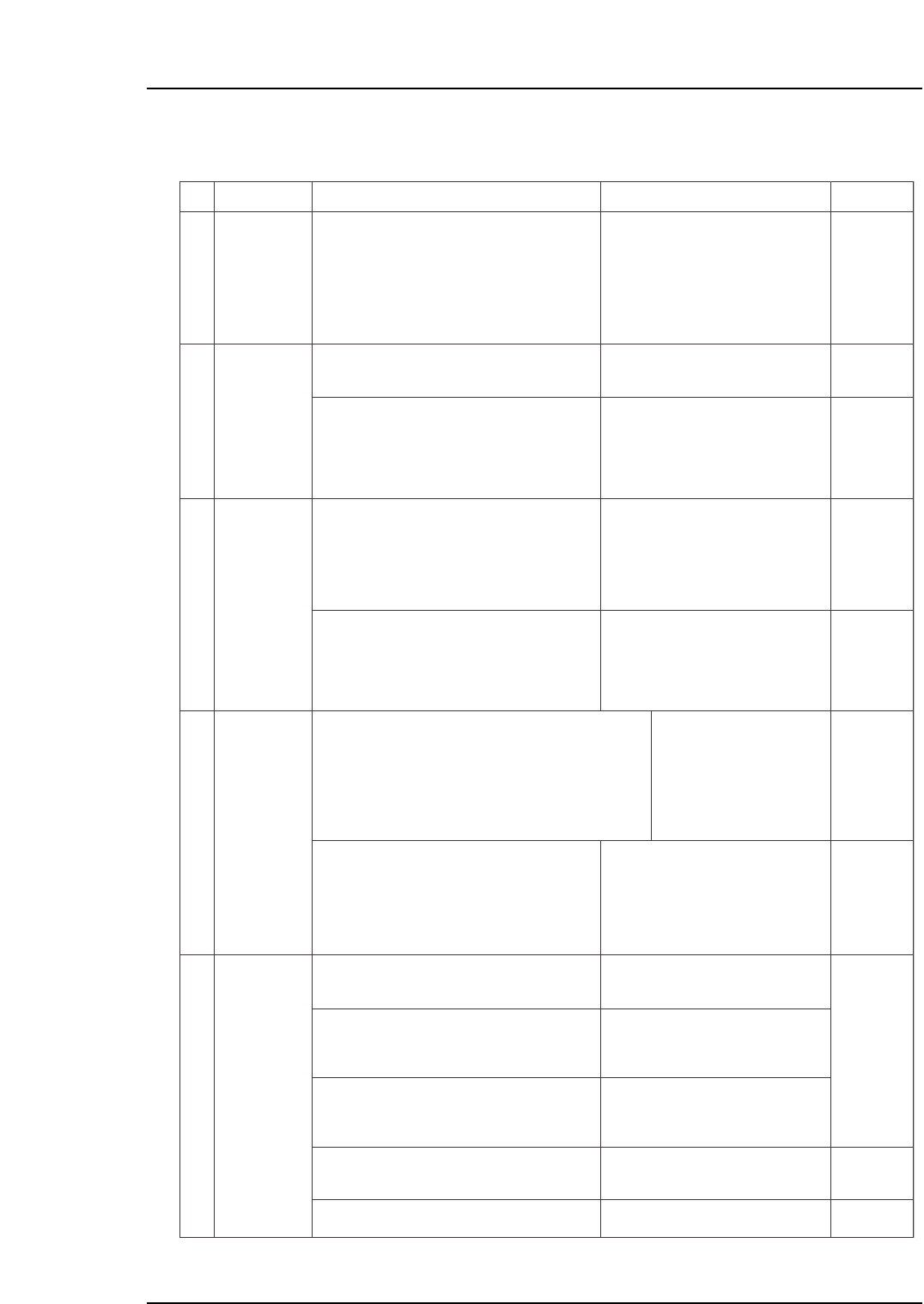
Panel sensor or panel arrival sensor
fails to switch on even though a panel
has been received from the XY-table.
Out-carrier advance limit sensor failed
to switch on even though the out-
carrier was advanced.
Carrier may not be moving all the way
to its motion limit position.
Carrier may not be moving all the way
to its motion limit position.
• Out-carrier was conveyed, but the
out-carrier advance limit or retract
limit sensor failed to switch on.
• An Out-carrier cycle error occurs if
the advance limit or retract limit
sensor fails to switch on within 8
seconds.
(1) Check the following sensors for problems
(3) - (6) (see above).
(1) Check the following sensor for problems
(3) - (6) (see above).
(1) Verify that the carrier has properly clamped
the panel.
(2) Check the following sensors for problems
(1) - (6) (described above).
Out-conveyor
panel
conveyance
error
Out-carrier
advance
limit error
Out-carrier
cycle error
Execute the following commands to see if the
carrier can be moved to its motion limit position:
[Panel Loader]-[Loader Maintenance]-[Out-side]
-[Carrier Extend/Carrier Retract]-[START].
Execute the following commands to see if the
carrier can be moved to its motion limit position:
[Panel Loader]-[Loader Maintenance]-[Out-side]-
[Carrier Extend/Carrier Retract]-[START].
Out-carrier advance limit panel check (1) X0CC
Out-carrier advance limit panel check (2) X0CD
Out-conveyor 1 panel arrival check X0C7
Out-conveyor 2 panel arrival check X0C9
Out-carrier advance limit check X0CE
Out-carrier retract limit check X0CF
Out-carrier advance limit check X0CE
(2) Check the in-carrier conveyance cylinder for
problem (7) (see above).
(2) Check the carrier conveyance cylinder for
problem (7) (see above).
Out-carrier
clamp error
(1) Check the following sensors for problems
(3) - (6) (see above).
• Out-carrier clamper was
closed, but the clamp sensor
failed to switch on.
• Out-carrier clamper was
opened, but the unclamp
sensor failed to switch on.
Clamper may not be moving all the
way to its motion limit position.
Panel request occurred, but the panel
loading sensor failed to switch on.
In-conveyor panel deceleration sensor
failed to switch on even though the
panel passed the in-conveyor panel
loading sensor position.
In-conveyor panel sensor failed to
switch on even though the panel
passed the in-conveyor panel
deceleration sensor.
The in-conveyor motor may not be
operating
Out-carrier retract limit panel clamp check (fixed-rail side) X0D2
Out-carrier retract limit panel clamp check (adjustable-rail side) X0D3
Out-carrier advance limit pnale clamp check (fixed-rail side) X0D4
Out-carrier advance limit panel clamp check (adjustable-rail side) X0D5
Out-carrier retract limit panel unclamp check (fixed-rail side) X0D6
Out-carrier retract limit panel unclamp che
(1) Check the following sensor for problems
(1) - (6) (described above).
In-conveyor
panel
conveyance
error
Cause Remedy Remarks Ref. Page
(2) Check the out-carrier's panel clamping/
unclamping cylinder for problem (7) (see
above).
Execute the following commands to see if the
carrier can be moved to its motion limit position:
[Panel Loader]-[Loader Maintenance]-[Out-side]-
[Carrier Extend/Carrier Retract]-[START].
* The "X???" and "Y???" values which appear in the remedy column correspond to
the I/O map assignment numbers.
In-conveyor panel loading check X0B0
(2) Check the following sensors for problems
(1) - (6) (described above).
In-conveyor 1 panel deceleration start point X0AB
In-conveyor 2 panel deceleration start point X0AD
(3) Check the following sensors for problems
(1) - (6) (described above).
(5) If the panel is caught at some point along the
conveyor, change the conveyor width.
In-conveyor 1 panel arrival check X0AC
In-conveyor 2 panel arrival check X0AE
(4) Check the in-conveyor motor for problem (7)
(see above).
In-conveyor motor ON Y029