00195011-01.pdf - 第12页
Installation Manual Station Software Version 408.01 3.2.3 Station computer 3.2.3.1 Station computer CS und CF SCENIC C610 i 865GV Name Celeron ® CPU 2.80 GHz CPU / clock frequency 256 MB (248MB) RAM memory 40 GB (38.xxx …
Installation Manual, Station Software Version 408.01 Edition 03/2006
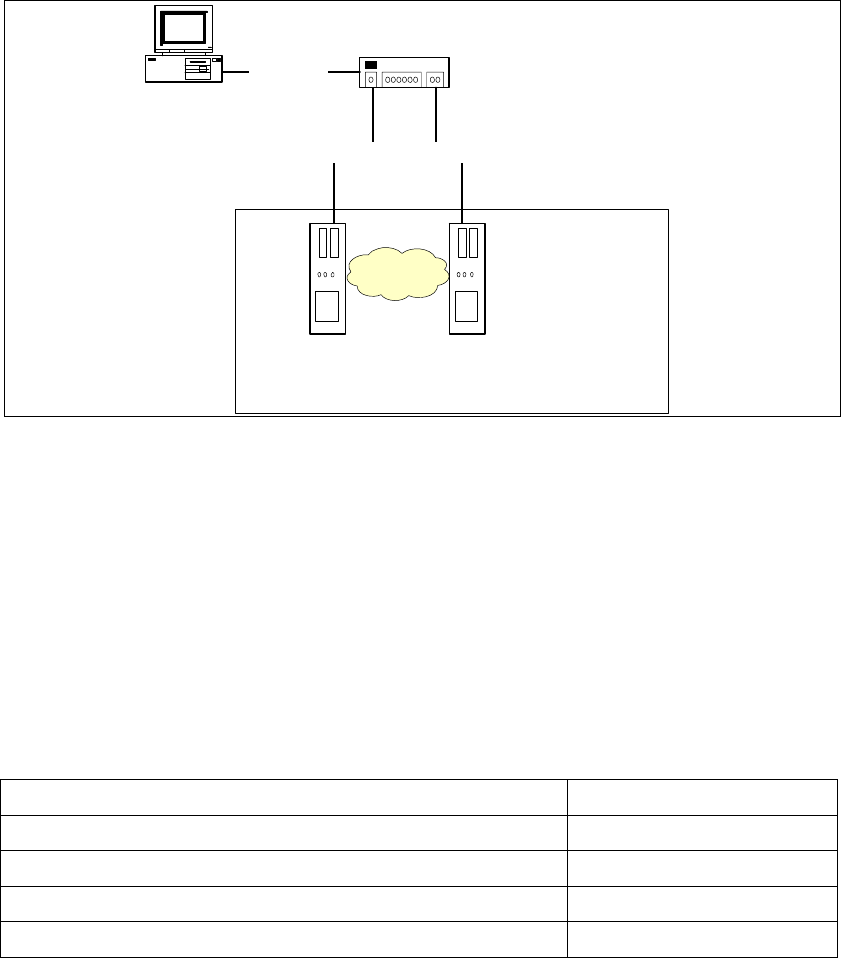
3.2.2 Network configuration
S23, F5 HM, CS, CF machine
SIPLACE Pro
Station computer Maschine controller
100 Base-T
Switch
100 Base-T
private network
10 Base-T
Fig. 3-2: Network connections between the machine and SIPLACE Pro
A separate private network (100 Mbit) is set up between the station computer and the machine
controller via a subnet mask.
Fixed IP addresses for the station computer and the machine controller can thus be assigned for all
SIPLACE machines. These IP addresses are not known outside the private network, for instance in
the SIPLACE LAN.
These IP addresses need not be further configured by the operator while the station software is
being installed.
IP address, station computer
192.168.255.249
IP address, machine controller
192.168.255.250
Subnet mask, station computer/machine controller
255.255.255.248
IP address range, SIPLACE LAN
172.22.xxx.xxx
Subnet mask, SIPLACE LAN
255.255.0.0
Table 3-1: Network configuration
11 of 104

Installation Manual Station Software Version 408.01
3.2.3 Station computer
3.2.3.1 Station computer CS und CF
SCENIC C610 i 865GV
Name
Celeron ® CPU 2.80 GHz
CPU / clock frequency
256 MB (248MB)
RAM memory
40 GB (38.xxx MB)
Hard disk
Yes
CD-ROM drive
3.5“, 1.44 MB
Floppy drive
yes
USB interface
1 x 10/100Base-T
Network
2 x 10Base-T
6-port hub
Table 3-2: Station computer hardware
3.2.3.2 Station computer S23 und F5 HM
SCENIC N 320
Name
Celeron ® CPU 2.80 GHz
CPU / clock frequency
256 MB (248 MB)
RAM memory
40 GB (38.xxx MB)
Hard disk
Yes
CD-ROM drive
3.5“, 1.44 MB
Floppy drive
yes
USB interface
1 x 10/100Base-T
Network
1 x 10Base-T
Table 3-3: Station computer hardware
3.2.4 Machine controller MC54 for CS, CF, S23 and F5 HM
Sicomp AMS M54
Name
566 MHz
CPU / clock frequency
32 MB
RAM memory
20 bis 40 GB
Hard Disk
Yes
CD-ROM drive
3.5“, 1.44 MB
Floppy drive
1 x 10/100Base-T
Network
Table 3-4: Machine controller hardware
12 of 104

Installation Manual, Station Software Version 408.01 Edition 03/2006
4 Installation instructions
4.1 Installing the SIPLACE software
4.1.1 Requirements
You must have installed the Windows XP Professional operating system with service pack 2
before installing the station computer version 408 (see section
3).
Caution:
When installing the RMOS operating system (see section
4.3.3), it is imperative that the
installation disks for Version 408 or higher are used. If any other disks are used, the
machine will not boot.
The default Windows display settings must be changed and the touchscreen must be calibrated.
You must be logged on as the
Administrator in order to be able to carry out this work.
13 of 104