00195011-01.pdf - 第14页
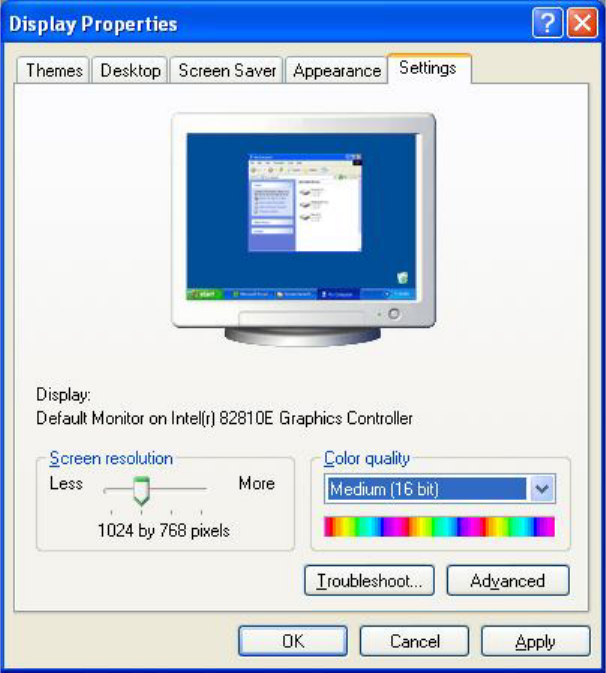
Installation Manual Station Software Version 408.01 4.1.1.1 Changing the screen settings → Select Start Æ Settings Æ Control Panel Æ Display . → Click the Settings tab. → Make the following settings here: Fig. 4-1: Scree…

Installation Manual, Station Software Version 408.01 Edition 03/2006
4 Installation instructions
4.1 Installing the SIPLACE software
4.1.1 Requirements
You must have installed the Windows XP Professional operating system with service pack 2
before installing the station computer version 408 (see section
3).
Caution:
When installing the RMOS operating system (see section
4.3.3), it is imperative that the
installation disks for Version 408 or higher are used. If any other disks are used, the
machine will not boot.
The default Windows display settings must be changed and the touchscreen must be calibrated.
You must be logged on as the
Administrator in order to be able to carry out this work.
13 of 104
Installation Manual Station Software Version 408.01
4.1.1.1 Changing the screen settings
→ Select Start Æ Settings Æ Control Panel Æ Display.
→ Click the Settings tab.
→ Make the following settings here:
Fig. 4-1: Screen settings
14 of 104
Installation Manual, Station Software Version 408.01 Edition 03/2006
4.1.1.2 Calibrating the touchscreen
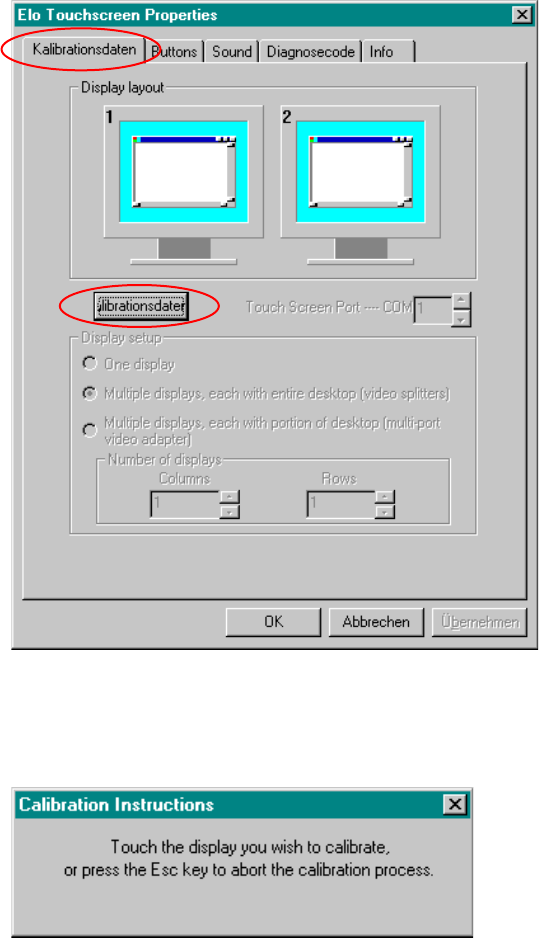
Select Start Æ Settings Æ Control Panel Æ Elo to go to EloTouchscreen Properties:
Fig. 4-2:Elo Touchscreen properties
→ Click the Kalibrationsdaten tab.
→ Then click the Kalibrationsdaten button. The following message then appears:
Fig. 4 -3 Selection window for the screen to be calibrated
→ Touch the display you wish to calibrate.
A new screen is displayed on which you can perform a calibration.
→ Repeat this procedure for the second screen (on HS and HF machines).
→ Click the OK button to accept the data.
15 of 104