00196497-07_SM_SXDX12_en.pdf - 第121页
Service Work Conveyor 3.5.1 Fast Head Exchange Placement heads Service Manual SIPLACE SX1/SX2/DX1/DX2 FS02 121 3.5.1.4 3 . 5 . 1 . 4 C o m p le t in g t h e F H E in t h e S o f t w a r e Completing the FHE in the Softwa…
Service Work Conveyor
Placement heads 3.5.1 Fast Head Exchange
120 Service Manual SIPLACE SX1/SX2/DX1/DX2 FS02
3.5.1.2
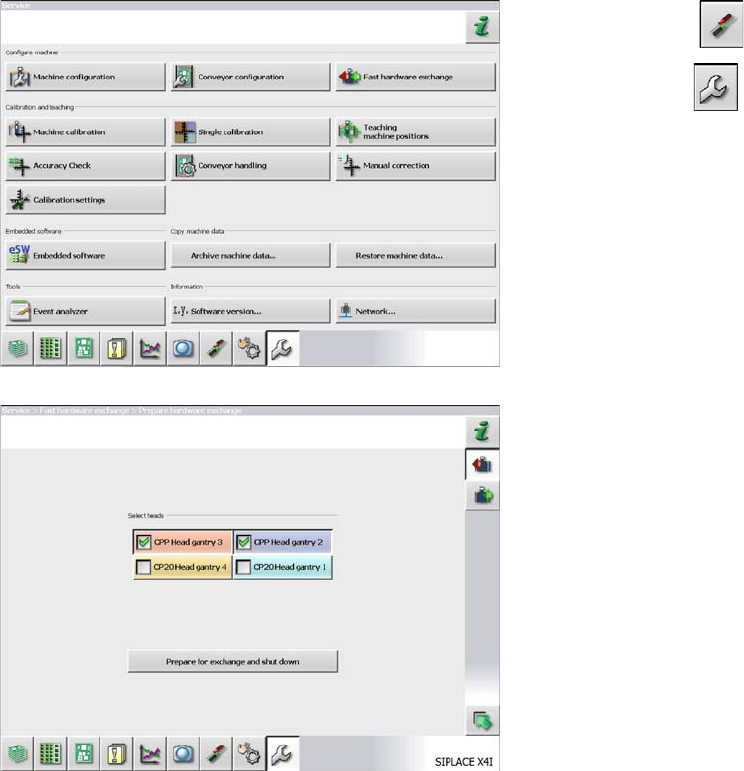
3.5.1.2 Preparing the FHE in the Software
Preparing the FHE in the Software
3.5.1.3
3.5.1.3 Removal/Installation
Removal/Installation
For actually removing and installing the head proceed as described in the relevant chapter.
See also
3.5.4 Replacing the CPP Head [ ➙ 128]
3.5.3 Replacing the C&P20/A/M Head [ ➙ 125]
► Click on Settings and log in as Service.
► Click on Service .
► Click on Fast hardware exchange.
► Highlight the heads to be replaced.
► Click on Prepare for exchange and shutdown.
The following actions will be carried out automatically:
▪ The current nozzles will be returned and calibration
nozzles will be picked up, if present.
▪ A nozzle and height reference run will be carried out.
▪ The machine will be shut down.
In a next step you can dismantle the heads.
Service Work Conveyor
3.5.1 Fast Head Exchange Placement heads
Service Manual SIPLACE SX1/SX2/DX1/DX2 FS02 121
3.5.1.4
3.5.1.4 Completing the FHE in the Software
Completing the FHE in the Software
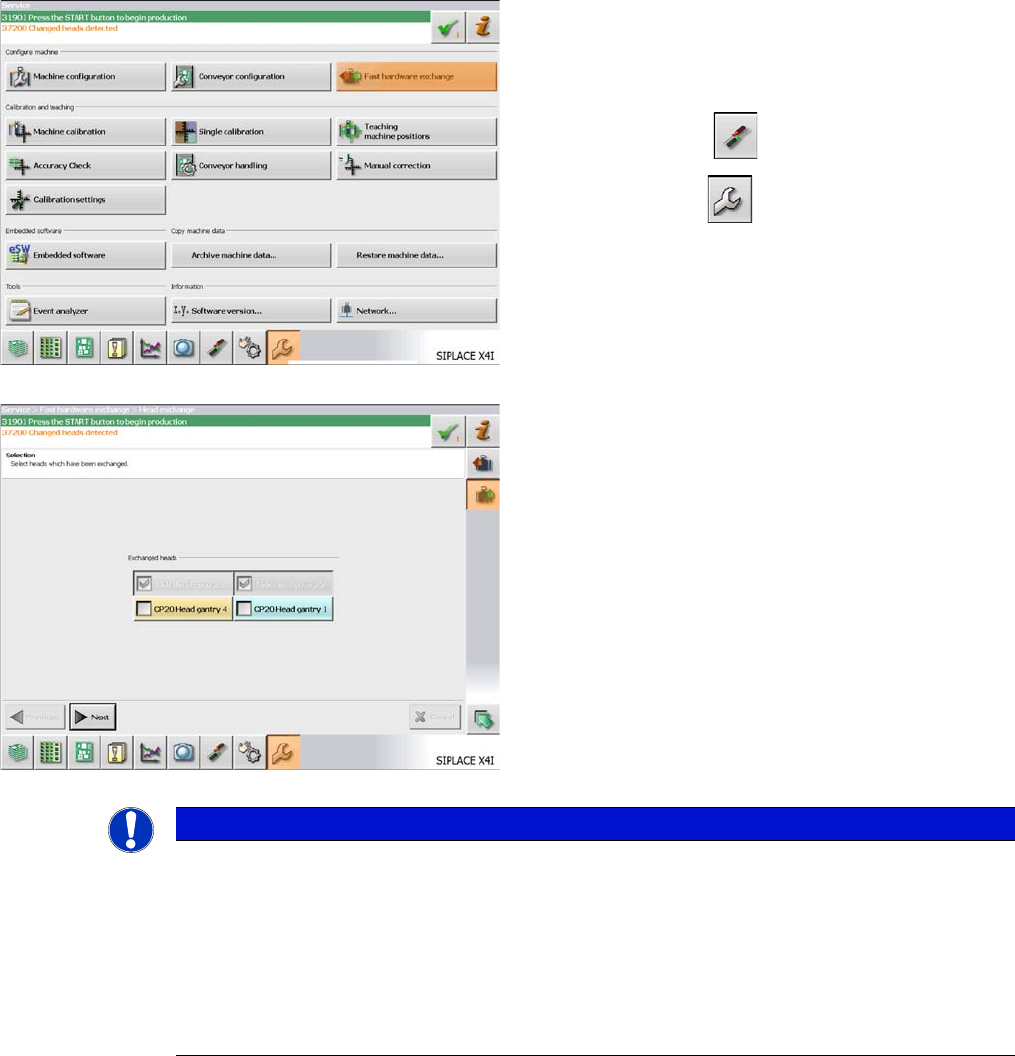
► Switch the machine on.
After being switched on again the machine issues the
message "Changed heads detected" and expects a cali-
bration.
► Click on "Settings" and log in as "Service".
► Click on "Service" .
► Click on "Fast hardware exchange".
The heads detected by the software are marked and
grayed out.
► If necessary, you can select further heads here.
► Click on "Next".
NOTICE
Nozzles
In the event of repairs, it is not possible to simply return the nozzles from a defective head to
the nozzle changer, in order to achieve a defined state. After the head exchange, the software
stores the nozzle configuration of the defective head and the nozzle changer. You can then refill
the garages to restore the same level as before the head failure.
If the newly fitted head is equipped with calibration nozzles, these will automatically be rejected
after the calibration. Depending on the job the required nozzles can the be picked up and the
production can be started.
Service Work Conveyor
Placement heads 3.5.1 Fast Head Exchange
122 Service Manual SIPLACE SX1/SX2/DX1/DX2 FS02
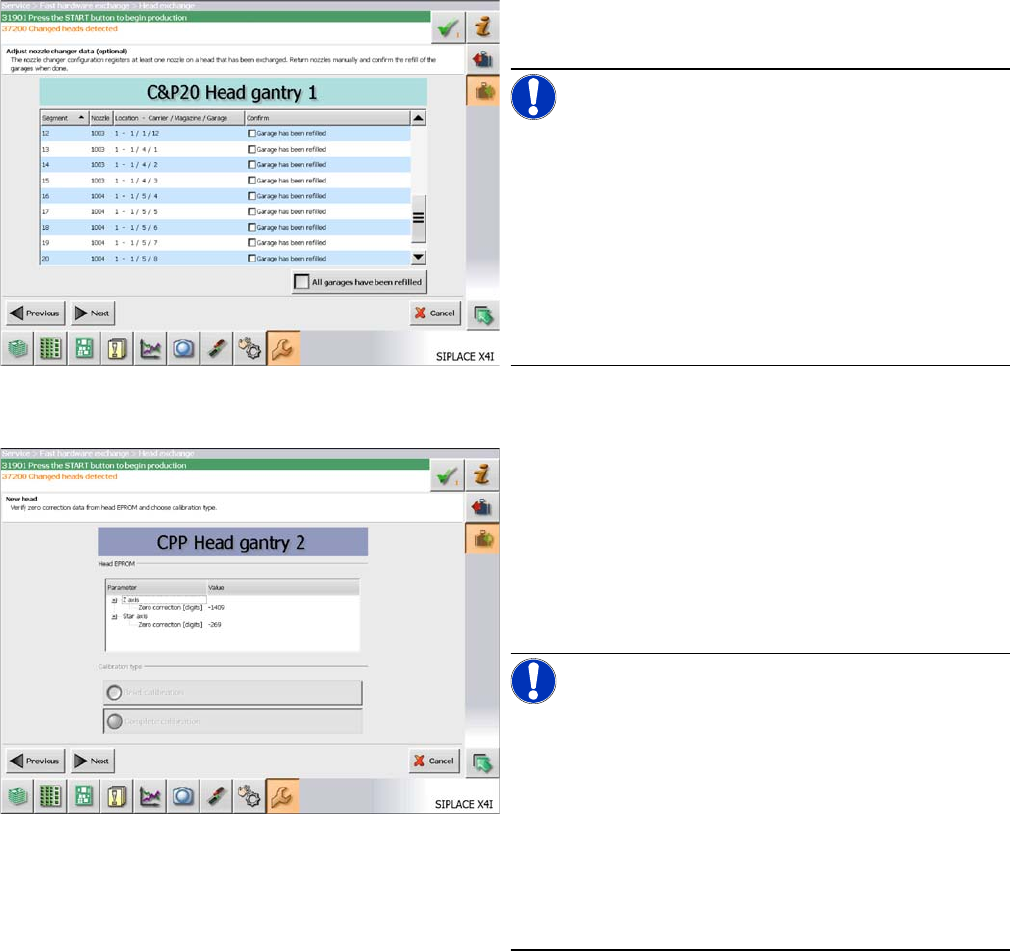
► Refill the nozzle changer garages of the nozzle
changer with the relevant nozzles.
NOTICE!
You can skip refilling the garages. In this case you have
to refill the nozzle changer before the start of the produc-
tion.
In the columns "Nozzle" and "Location - Magazine Carri-
er/Magazine/Garage" you see the nozzles that were pre-
sent on the removed head and that are now missing in
the nozzle changer.
If the garage has been refilled, confirm this in the "Con-
firm" column.
► Click on "Next".
The head specific data from the EEPROM are automati-
cally transferred to the machine data during the startup of
the machine.
► Check the values in the "Head EEPROM" section.
► In the "Calibration type" section select "Brief calibra-
tion" for precalibrated heads and "Complete calibra-
tion" for all other heads.
NOTICE!
This "Brief calibration" procedure covers the following
points:
The component camera at the head will be calibrated.
(Determination of the head rotation in relation to the com-
ponent camera)
The segment offset is detected using the reference seg-
ment. (Determination of the global segment offset (head
offset) in relation to the PCB camera and the positioning
of all stationary cameras)
► Click on "Next".
If several heads were exchanged, this dialog will be dis-
played for each head.