00196497-07_SM_SXDX12_en.pdf - 第151页
Service Work Conveyor 3.6.3 Conveyor Drive Conveyor Service Manual SIPLACE SX1/SX2/DX1/DX2 FS02 151 3.6.3 3 . 6 . 3 C o n v e y o r D r iv e Conveyor Drive 3.6.3.1 3 . 6 . 3 . 1 R e p la c in g t h e C o n v e y o r D r …
Service Work Conveyor
Conveyor 3.6.2 Lifting table
150 Service Manual SIPLACE SX1/SX2/DX1/DX2 FS02
3.6.2.2
3.6.2.2 Replacing the Lifting Table Motor [03064983-xx]
Replacing the Lifting Table Motor [03064983-xx]
Parts, equipment and tools
▪ BLDC (brushless DC) motor with PLG (planetary gear) and brake [03064983-xx]
Removal
Installation
► Follow the removal instructions in reverse order for installation. Also observe the following instruc-
tions:
See also
4.6.5 Calibrating the Motors in the Conveyor [ ➙ 287]
NOTICE
Lifting table plate guides
► Mark the positions of the lifting table plate guides.
If these are still mistakenly exchanged, you will need to reset the parallelism of the lifting
table plates after installation.
► Remove the lifting table from the machine (see
"3.6.2.1 Replacing the Lifting Table Unit" [ ➙ 148]).
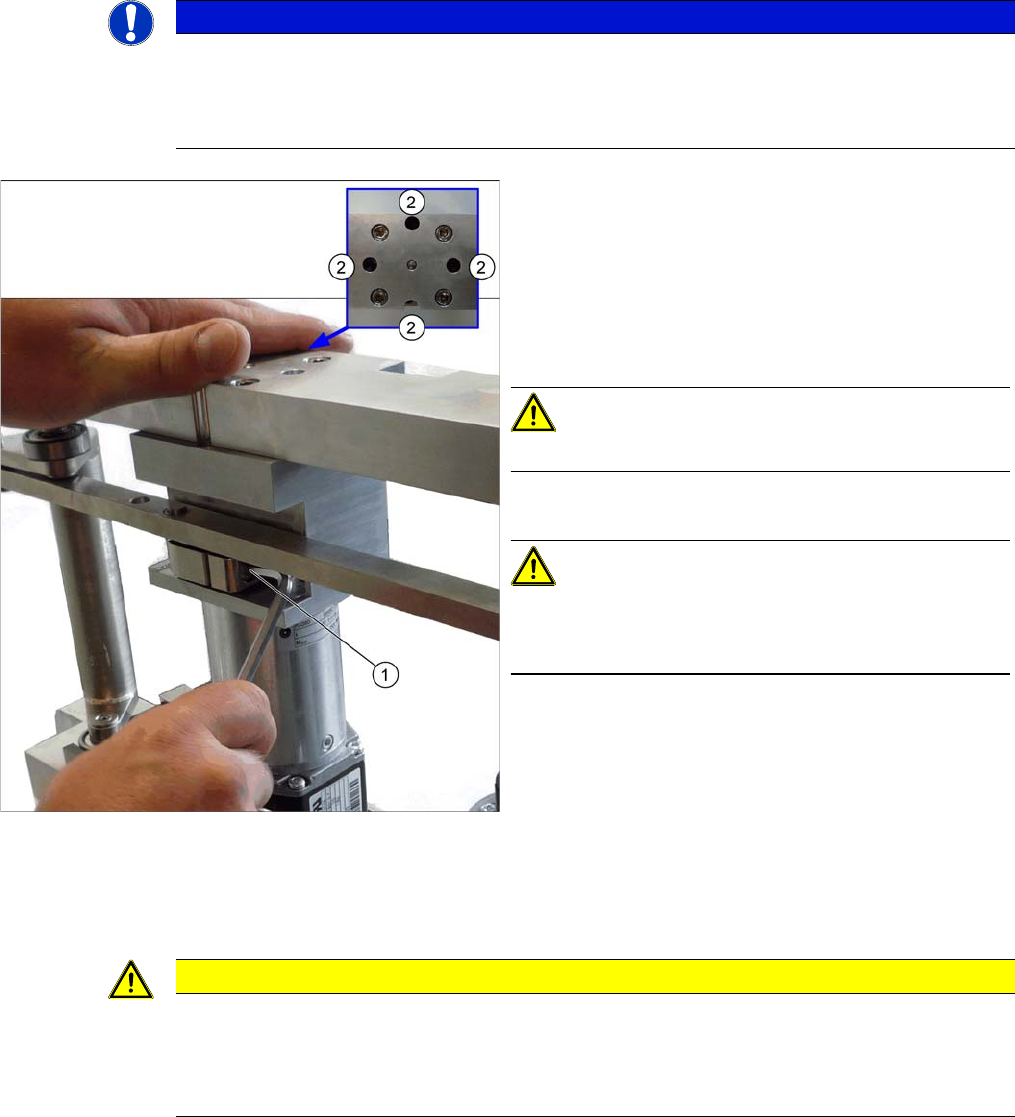
► Unplug the connection between the motor and the
rods (1).
► Loosen the screws (2) fastening the motor. Some of
these are only accessible if you move the rods up-
wards (thereby turning the gear shaft by 90 degrees).
CAUTION!
Make sure that you do not loosen the other four screws!
► Remove the motor.
CAUTION!
There are several shims on the gear shaft. These need to
be taken over to the new motor and fitted there in the
same positions and quantities.
CAUTION
Installation instructions
► Position the washers onto the motor axis in the exact places that they were removed from.
► Make sure that the motor connection cables do not rub against any parts. In particular,
make sure that they do not point upwards or downwards.
Service Work Conveyor
3.6.3 Conveyor Drive Conveyor
Service Manual SIPLACE SX1/SX2/DX1/DX2 FS02 151
3.6.3
3.6.3 Conveyor Drive
Conveyor Drive
3.6.3.1
3.6.3.1 Replacing the Conveyor Drive [03051225-xx]
Replacing the Conveyor Drive [03051225-xx]
Parts, equipment and tools
▪ Conveyor drive [03051225-xx]
▪ Flat spiral spring [03075316-xx] (This is included in the spare parts kit.)
Removal
► Use the software to move the conveyor sides into the position which allows you best access. Alter-
natively, you can also loosen the conveyor side clamps on the dual conveyor (see "3.6.1 Loosening
the Conveyor Side Clamps" [ ➙ 143]).
► Switch off the machine, disconnect it from the power supply and secure it to prevent unauthorized
reactivation. Observe the instructions in section "1.2 Preparatory Work..." [ ➙ 13].
Installation
► Follow the removal instructions in reverse order for installation. Also observe the following instruc-
tions:
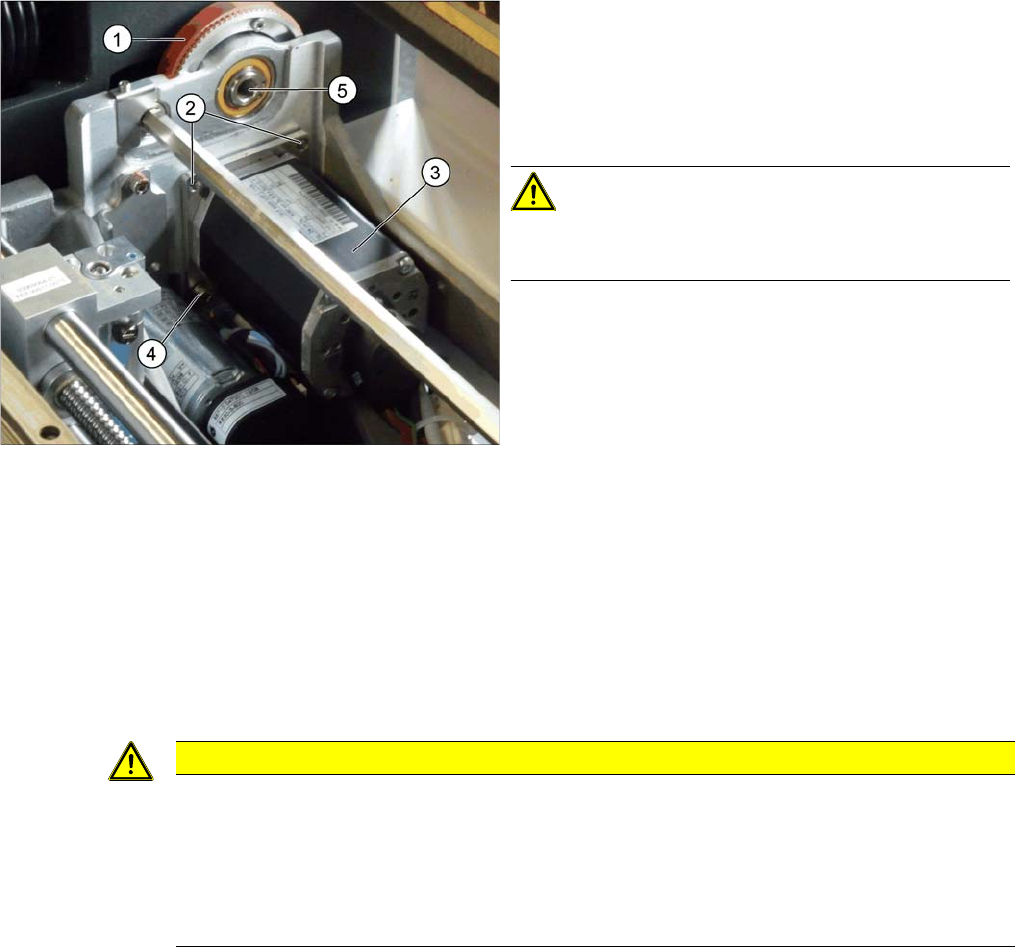
► Loosen the screws fixing the hexagonal shaft above
the conveyor drive and push this carefully into the
machine frame, as has already been done in the
diagram (5). This gives you more room for movement
(see also "3.6.5.3 Replacing the Hexagonal Shaft
[03057258-xx]" [ ➙ 167]).
CAUTION!
There are cables run inside the machine frame.
Make sure you do not damage these cables.
► Unplug the electrical connections to the conveyor
drive (3). Loosen the corresponding cable ties, if re-
quired.
► Fully unscrew the two top screws (2) fastening the
conveyor drive.
► Loosen the lower screw (4) fastening the conveyor
drive but do not full unscrew it.
► Lift the conveyor drive off the bottom screw. While do-
ing so, carefully unthread the conveyor drive from the
toothed belt (1) and remove the conveyor drive from
the machine.
CAUTION
Installation instructions
► Make sure that the toothed belt is positioned accurately in the guidance on the motor shaft
(see diagram below).
► While you tighten the screws fastening the conveyor drive, set the tension of the toothed
belt correctly (see "4.6.1.1 Setting the Tension of the Conveyor Drive Toothed Belt"
[ ➙ 274]).
Service Work Conveyor
Conveyor 3.6.3 Conveyor Drive
152 Service Manual SIPLACE SX1/SX2/DX1/DX2 FS02
3.6.3.2
3.6.3.2 Replacing the Conveyor Drive Toothed Belt [03047677-xx]
Replacing the Conveyor Drive Toothed Belt [03047677-xx]
Parts, equipment and tools
▪ Toothed belt Syncroflex 10 AT3/300 GEN III [03047677-xx]
▪ Flat spiral spring [03075316-xx] (This is included in the spare parts kit.)
Removal
► Dismantle the conveyor drive (see "3.6.3.1 Replacing the Conveyor Drive [03051225-xx]" [ ➙ 151]).
To replace the toothed belt, you do not need to unplug the electrical connections from the conveyor
drive.
Installation
► Follow the removal instructions in reverse order for installation. Also observe the following instruc-
tions:
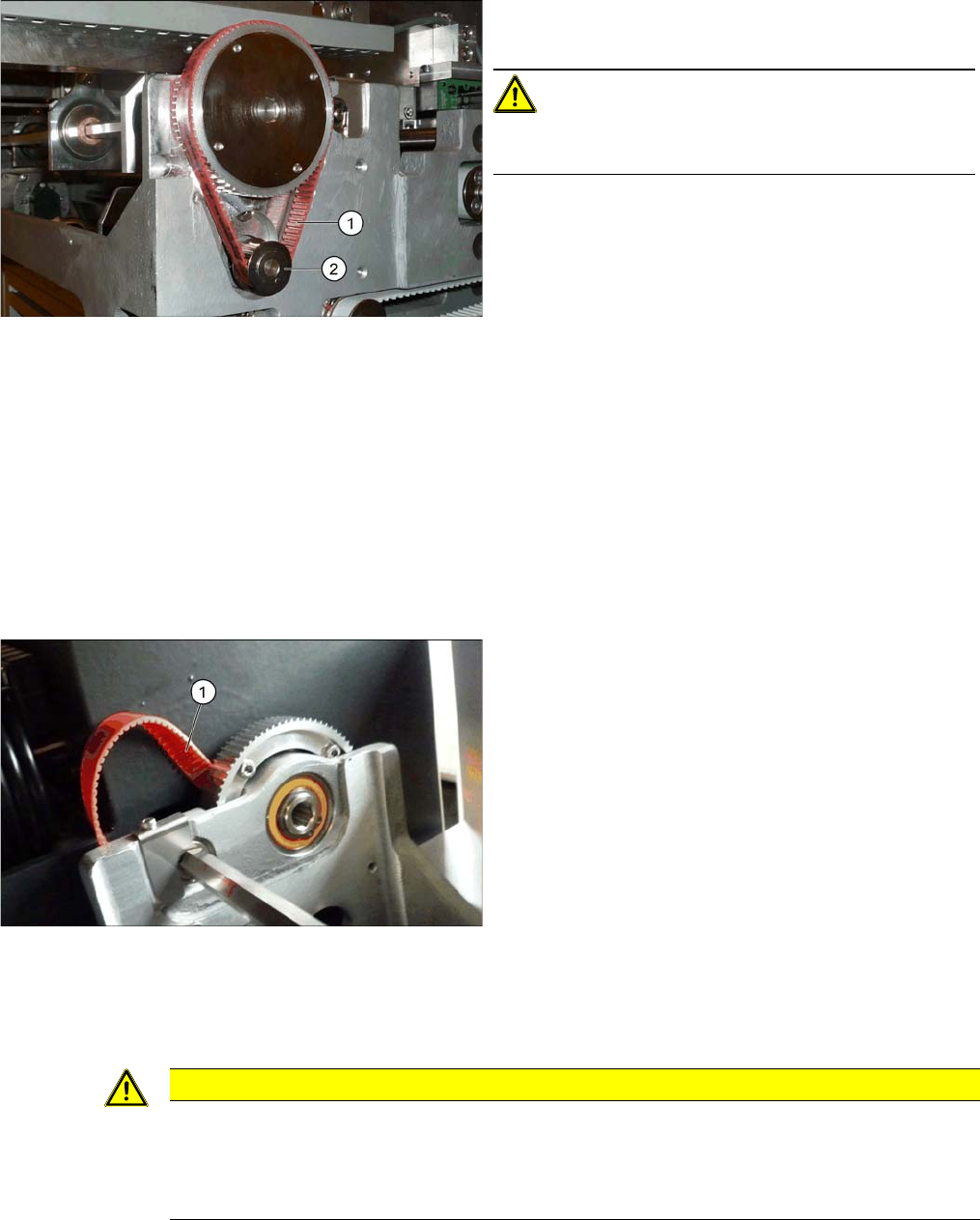
1. Toothed belt for conveyor drive
2. Motor shaft for conveyor drive
CAUTION!
Make sure that the toothed belt is positioned accurately
in the guidance on the motor shaft.
► Pull the conveyor belt (1) carefully out, between the
toothed disk and the machine base.
CAUTION
Installation instructions
► Make sure that the toothed belt is not folded or otherwise damaged.
► While you tighten the screws fastening the motor, set the tension of the toothed belt cor-
rectly (see "4.6.1.1 Setting the Tension of the Conveyor Drive Toothed Belt" [ ➙ 274]).