00196497-07_SM_SXDX12_en.pdf - 第165页
Service Work Conveyor 3.6.5 Conveyor Belt, Belt Drive and Hexagonal Shaft Conveyor Service Manual SIPLACE SX1/SX2/DX1/DX2 FS02 165 Installation ► Follow the removal in structions in reverse order for installati o n. Also…
Service Work Conveyor
Conveyor 3.6.5 Conveyor Belt, Belt Drive and Hexagonal Shaft
164 Service Manual SIPLACE SX1/SX2/DX1/DX2 FS02
3.6.5
3.6.5 Conveyor Belt, Belt Drive and Hexagonal Shaft
Conveyor Belt, Belt Drive and Hexagonal Shaft
3.6.5.1
3.6.5.1 Replacing the Tape Drive [03056923-xx]
Replacing the Tape Drive [03056923-xx]
Parts, Equipment and Tools
▪ Tape drive, decoupled [03096281-xx] (replaces[03056923-xx])
Overview
Removal
► Use the software to move the conveyor sides into the position which allows you best access. Alter-
natively, you can also loosen the conveyor side clamps on the dual conveyor (see "3.6.1 Loosening
the Conveyor Side Clamps" [ ➙ 143]).
► Switch off the machine, disconnect it from the power supply and secure it to prevent unauthorized
reactivation. Observe the instructions in section "1.2 Preparatory Work..." [ ➙ 13].
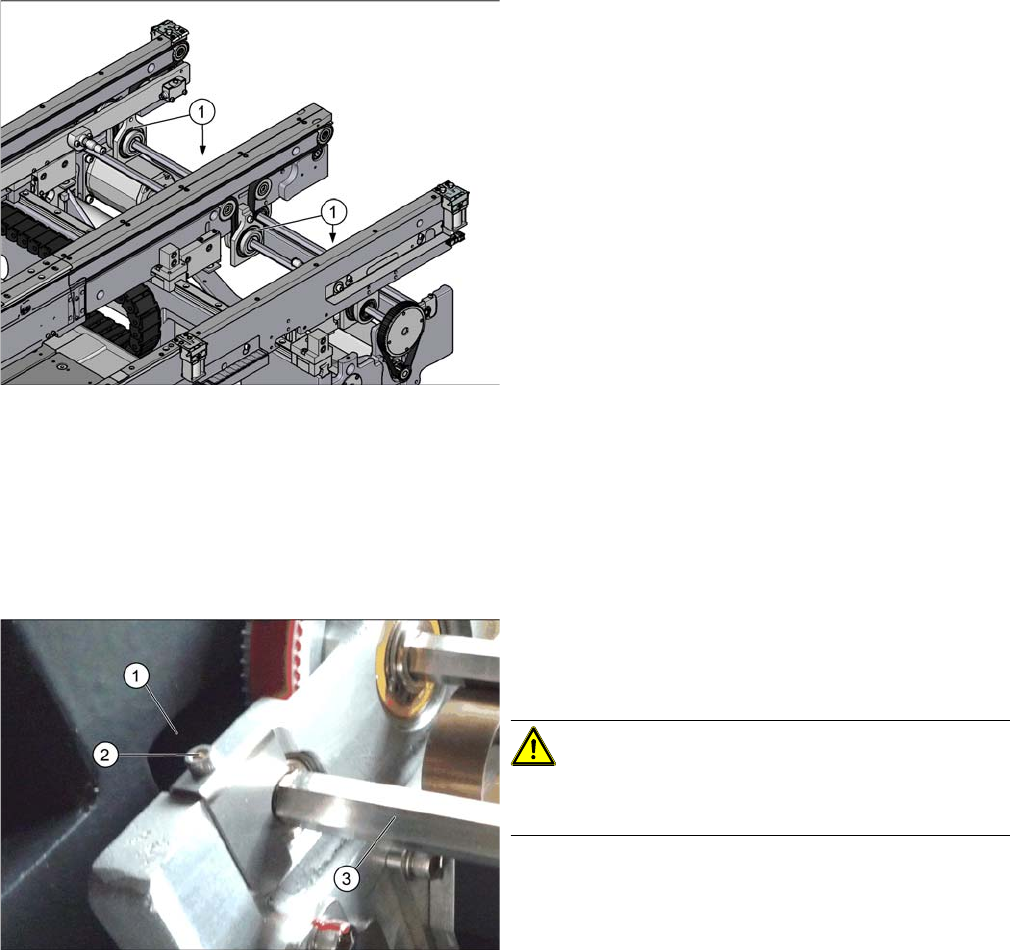
1. Tape drive (4x)
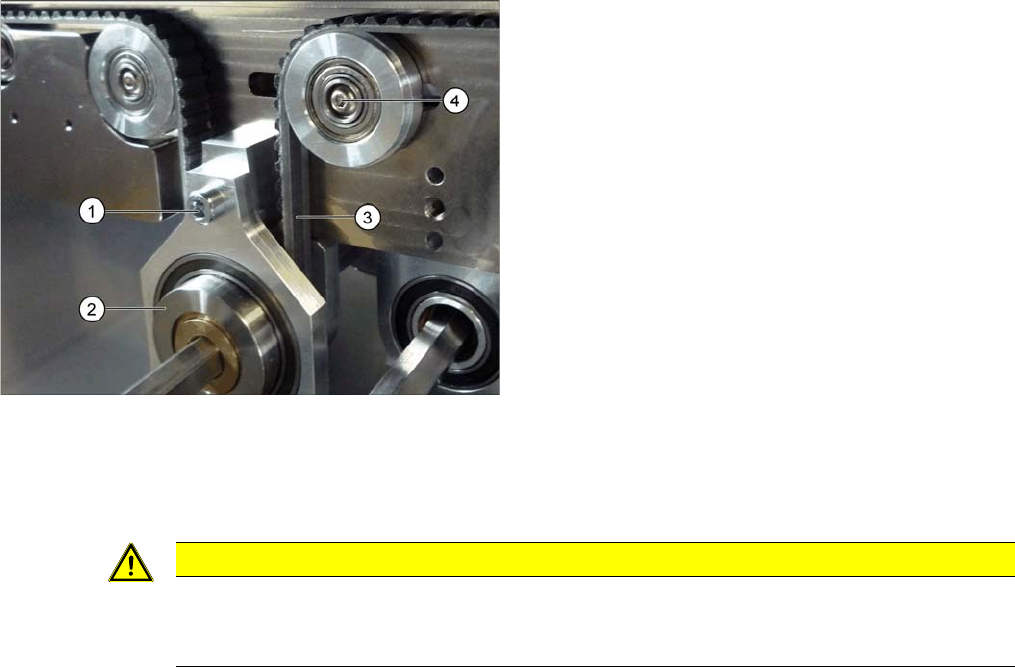
► Loosen the fastening (2) on the hexagonal shaft (3).
► Carefully push the hexagonal shaft into the machine
frame (1).
CAUTION!
There are cables run inside the machine frame.
Make sure you do not damage these cables.
Service Work Conveyor
3.6.5 Conveyor Belt, Belt Drive and Hexagonal Shaft Conveyor
Service Manual SIPLACE SX1/SX2/DX1/DX2 FS02 165
Installation
► Follow the removal instructions in reverse order for installation. Also observe the following instruc-
tions:
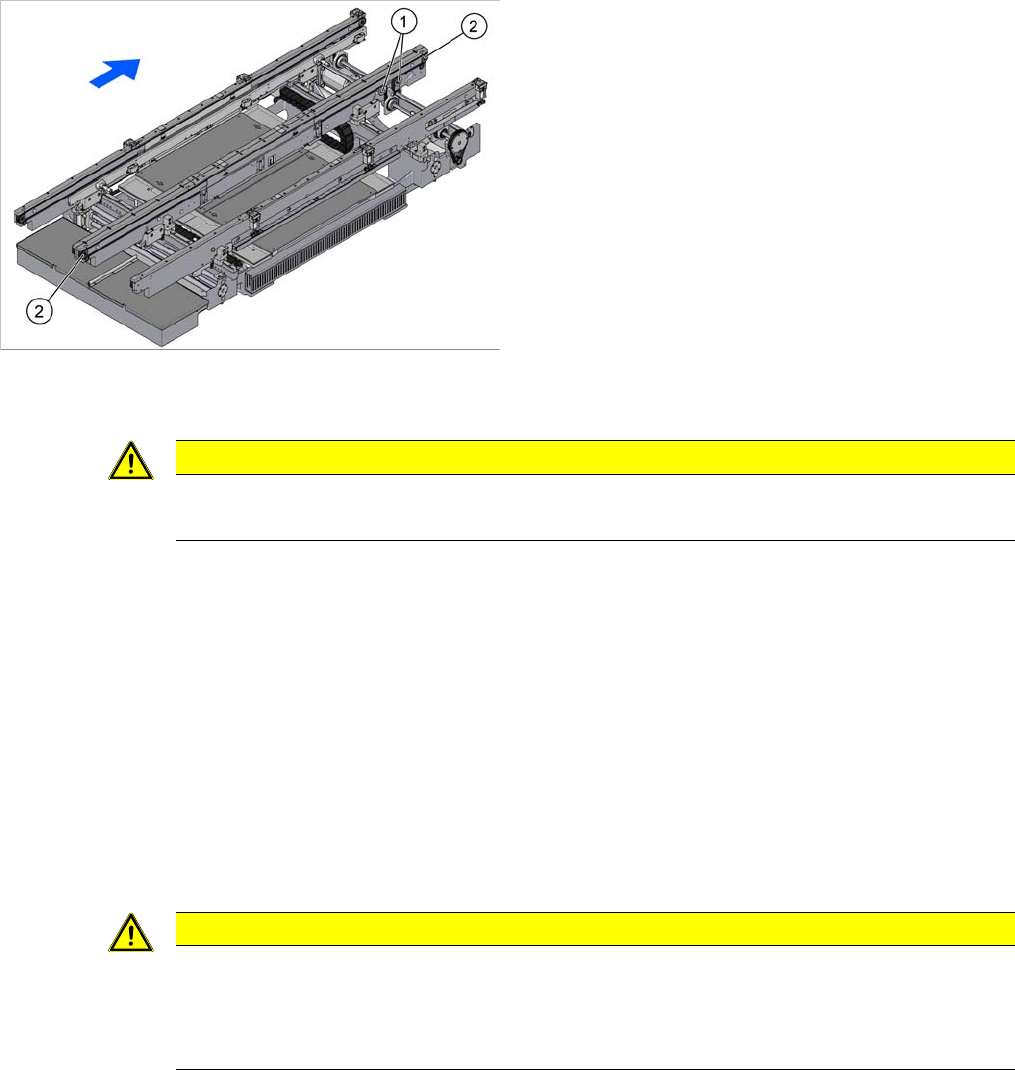
► Loosen the deflection pulley with slot (4) to relax the
conveyor belt (3).
► Loosen the screw (1) fastening the tape drive (2).
► Unthread the hexagonal shaft from the tape drive and
remove it from the machine.
CAUTION
Installation instructions
► After fitting all parts, set the toothed belt tension (see "4.6.1.2 Setting the Tension of the
Conveyor Toothed Belt" [ ➙ 275]).
Service Work Conveyor
Conveyor 3.6.5 Conveyor Belt, Belt Drive and Hexagonal Shaft
166 Service Manual SIPLACE SX1/SX2/DX1/DX2 FS02
3.6.5.2
3.6.5.2 Replacing the Deflection Pulley
Replacing the Deflection Pulley
Parts, equipment and tools
▪ Deflection pulley, geared [03063837-xx]
▪ Deflection pulley, ungeared [03063838-xx]
Overview
Removal
► Use the software to move the conveyor sides into the position which allows you best access. Alter-
natively, you can also loosen the conveyor side clamps on the dual conveyor (see "3.6.1 Loosening
the Conveyor Side Clamps" [ ➙ 143]).
► Switch off the machine, disconnect it from the power supply and secure it to prevent unauthorized
reactivation. Observe the instructions in section "1.2 Preparatory Work..." [ ➙ 13].
► Loosen the screw fastening the deflection pulley with slot.
► Loosen the fastening screw on the deflection pulley to be replaced.
► Unthread the deflection pulley from the conveyor toothed belt and remove it.
Installation
► Follow the removal instructions in reverse order for installation. Also observe the following instruc-
tions:
1. Deflection pulleys, ungeared
2. Deflection pulleys, geared
CAUTION
Toothed belt
► Make sure that the toothed belt is not folded or otherwise damaged.
CAUTION
Installation instructions
► Make sure that the toothed belt is not folded or otherwise damaged.
► After fitting all parts, set the toothed belt tension (see "4.6.1.2 Setting the Tension of the
Conveyor Toothed Belt" [ ➙ 275]).