00196497-07_SM_SXDX12_en.pdf - 第173页
Service Work Conveyor 3.6.6 Clamping plate Conveyor Service Manual SIPLACE SX1/SX2/DX1/DX2 FS02 173 3.6.6.4 3 . 6 . 6 . 4 R e p la c in g t h e C la m p in g P la t e G u id e s Replacing the Clamping Plate Guides Parts,…
Service Work Conveyor
Conveyor 3.6.6 Clamping plate
172 Service Manual SIPLACE SX1/SX2/DX1/DX2 FS02
Overview
Removal
► Use the software to move the conveyor sides into the position which allows you best access. Alter-
natively, you can also loosen the conveyor side clamps on the dual conveyor (see "3.6.1 Loosening
the Conveyor Side Clamps" [ ➙ 143]).
► Switch off the machine, disconnect it from the power supply and secure it to prevent unauthorized
reactivation. Observe the instructions in section "1.2 Preparatory Work..." [ ➙ 13].
► Dismantle the clamping plate (see "3.6.6.1 Replacing the Clamping Plate" [ ➙ 170]).
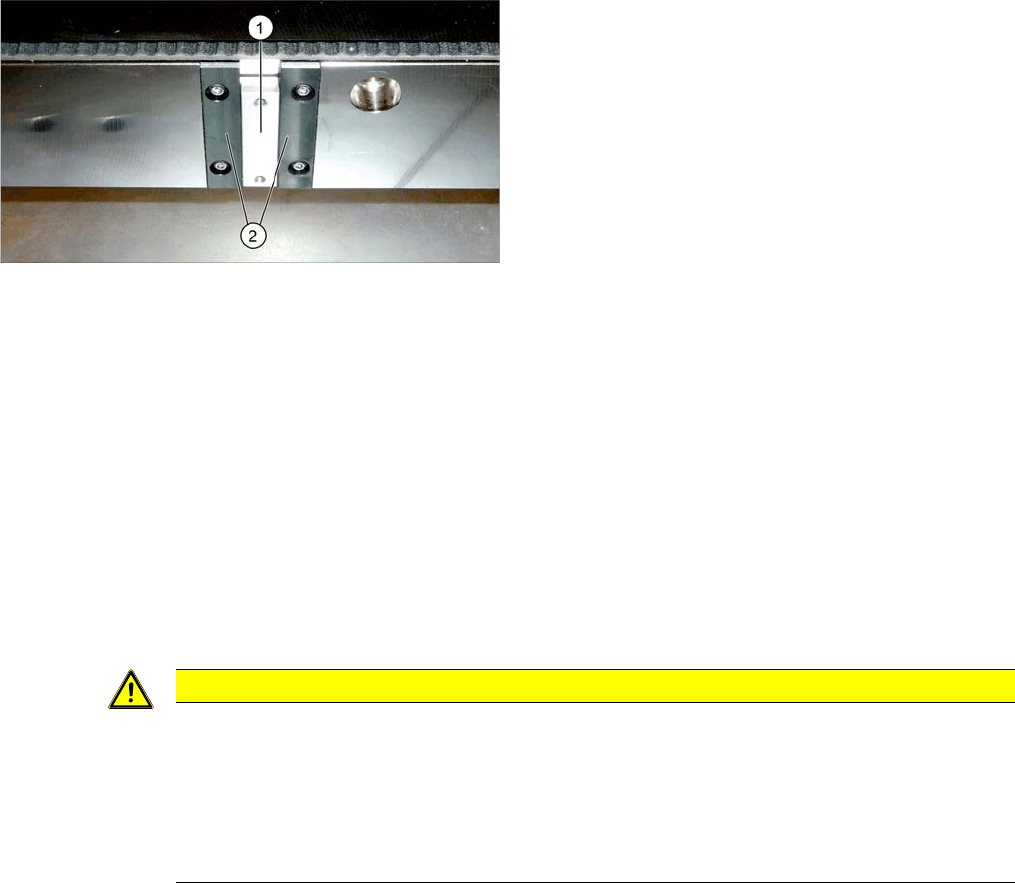
► Loosen the two screws fastening the sliding strip and remove the sliding strip.
Installation
► Follow the removal instructions in reverse order for installation. Also observe the following instruc-
tions:
See also
3.6.1 Loosening the Conveyor Side Clamps [ ➙ 143]
1. Sliding
2. Sliding strips
CAUTION
Installation instructions
► When screwing tight, press the sliding strips sideways, away from the sliding carriage, as
far as the stop.
► Secure the screws (DIN-EN-ISO7380-M3x8-A2-70 [03040338-xx]) fastening the sliding
strips with Loctite 241.
► Check the sliding carriage for ease of movement.
Service Work Conveyor
3.6.6 Clamping plate Conveyor
Service Manual SIPLACE SX1/SX2/DX1/DX2 FS02 173
3.6.6.4
3.6.6.4 Replacing the Clamping Plate Guides
Replacing the Clamping Plate Guides
Parts, equipment and tools
▪ FS01: Clamping plate guides, plastic [03066634-xx]
▪ FS02: Clamping plate guides, brass [03084490-xx]
Overview
Removal
► Use the software to move the conveyor sides into the position which allows you best access. Alter-
natively, you can also loosen the conveyor side clamps on the dual conveyor (see "3.6.1 Loosening
the Conveyor Side Clamps" [ ➙ 143]).
► Switch off the machine, disconnect it from the power supply and secure it to prevent unauthorized
reactivation. Observe the instructions in section "1.2 Preparatory Work..." [ ➙ 13].
► Dismantle the clamping plate (see "3.6.6.1 Replacing the Clamping Plate" [ ➙ 170]).
► Loosen the screws fastening the clamping plate guides and then remove these guides.
Installation
► Follow the removal instructions in reverse order for installation. Also observe the following instruc-
tions:
See also
3.6.1 Loosening the Conveyor Side Clamps [ ➙ 143]
3.6.6.1 Replacing the Clamping Plate [ ➙ 170]
NOTICE
Replace together
We recommend that you always replace all clamping plate guides for one clamping plate at the
same time.
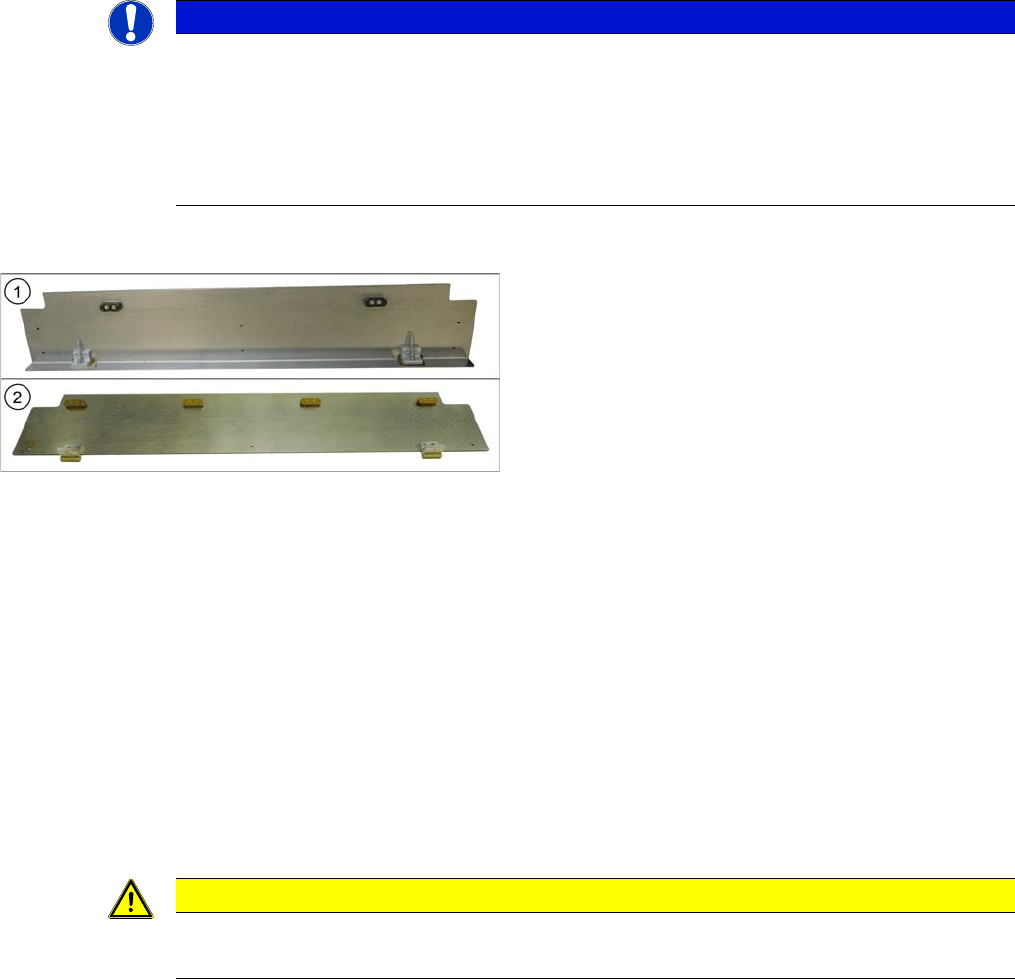
Each clamping plate has two guides for FS01 and four for FS02.
It is also advisable to replace the sliding strips and sliding carriage at the same time (see ). (see
"3.6.6.3 Replacing the Sliding Strips and Sliding Carriage" [ ➙ 171]).
1. Clamping plate assembly [03055141-xx] for FS01
with 2 plastic clamping plate guides [03066634-xx]
2. Clamping plate assembly [03084918-xx] for FS02
with 4 brass clamping plate guides [03084490-xx]
CAUTION
Installation instructions
► Check the clamping plate for ease of movement.
Service Work Conveyor
Conveyor 3.6.7 Stoppers and Sensors
174 Service Manual SIPLACE SX1/SX2/DX1/DX2 FS02
3.6.7
3.6.7 Stoppers and Sensors
Stoppers and Sensors
3.6.7.1
3.6.7.1 Replacing the Stopper (Stopper on the Conveyor Side) [03081405-xx] (FS01)
Replacing the Stopper (Stopper on the Conveyor Side) [03081405-xx] (FS01)
Parts, equipment and tools
▪ Stopper [03081405-xx] (without sensor)
Overview
Removal
► Use the software to move the conveyor sides into the position which allows you best access. Alter-
natively, you can also loosen the conveyor side clamps on the dual conveyor (see "3.6.1 Loosening
the Conveyor Side Clamps" [ ➙ 143]).
► Switch off the machine, disconnect it from the power supply and secure it to prevent unauthorized
reactivation. Observe the instructions in section "1.2 Preparatory Work..." [ ➙ 13].
► Unplug the electrical connections from the stopper
► Loosen the two screws fastening the stopper and remove the stopper.
CAUTION
Replacing an old stopper with sensor [03059129-xx]
If an old stopper with sensor is replaced with a new stopper without sensor, you need to observe
the following points:
► The station software must have at least version 703.02 HF4.
► The DIP switch on the conveyor control must be set so that the sensors at all stoppers are
no longer queried.
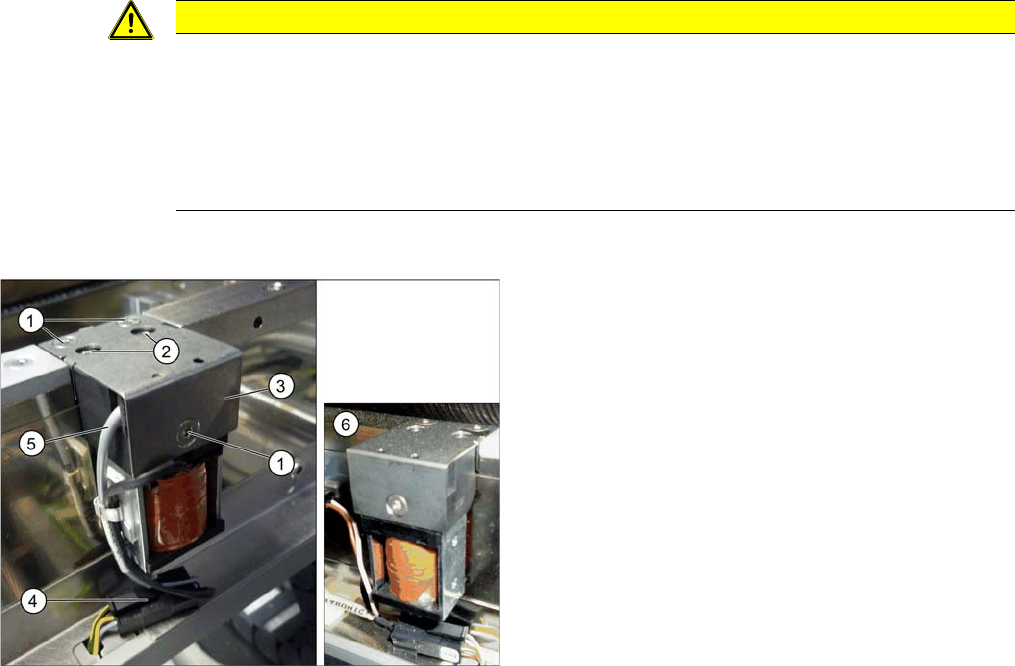
Side stopper with [03059129-xx] and without [03081405-
xx] sensor
1. Screws for fastening the cover plate
2. Screws for fastening the stopper
3. Cover plate
4. Electrical connections
5. Sensor cable (moved out of the stopper here, on the
left)
6. Side stopper without sensor