00196497-07_SM_SXDX12_en.pdf - 第190页
Service Work Conveyor Component Trolley SX 3.7.6 Replacing the Circuit Breaker Actu ato r (Schmersal) [03110183-xx] 190 Service Manual SIPLACE SX1/SX2/DX1/DX2 FS02 3.7.6 3 . 7 . 6 R e p la c in g t h e C ir c u it B r e …
Service Work Conveyor
3.7.5 Replacing the Centering Sleeves [03009987-xx] Component Trolley SX
Service Manual SIPLACE SX1/SX2/DX1/DX2 FS02 189
Installation
► Return the locking latches, including the new one, to the shaft.
► Fit the locking latches and shaft.
► During reassembly, take care to keep the pressure plates in their correct position. These are not
symmetrical and will not hold the shaft properly if placed in a certain (incorrect) position.
► When tightening the fastening screws, make sure that the pressure plates are not at an incorrect an-
gle and that the locking latches do not jam.
► Hook the tension springs back up.
► Refit the cover.
3.7.5
3.7.5 Replacing the Centering Sleeves [03009987-xx]
Replacing the Centering Sleeves [03009987-xx]
Parts, Equipment and Tools
▪ Centering sleeve [03009987-xx]
▪ Loctite 243 [00334892-xx]
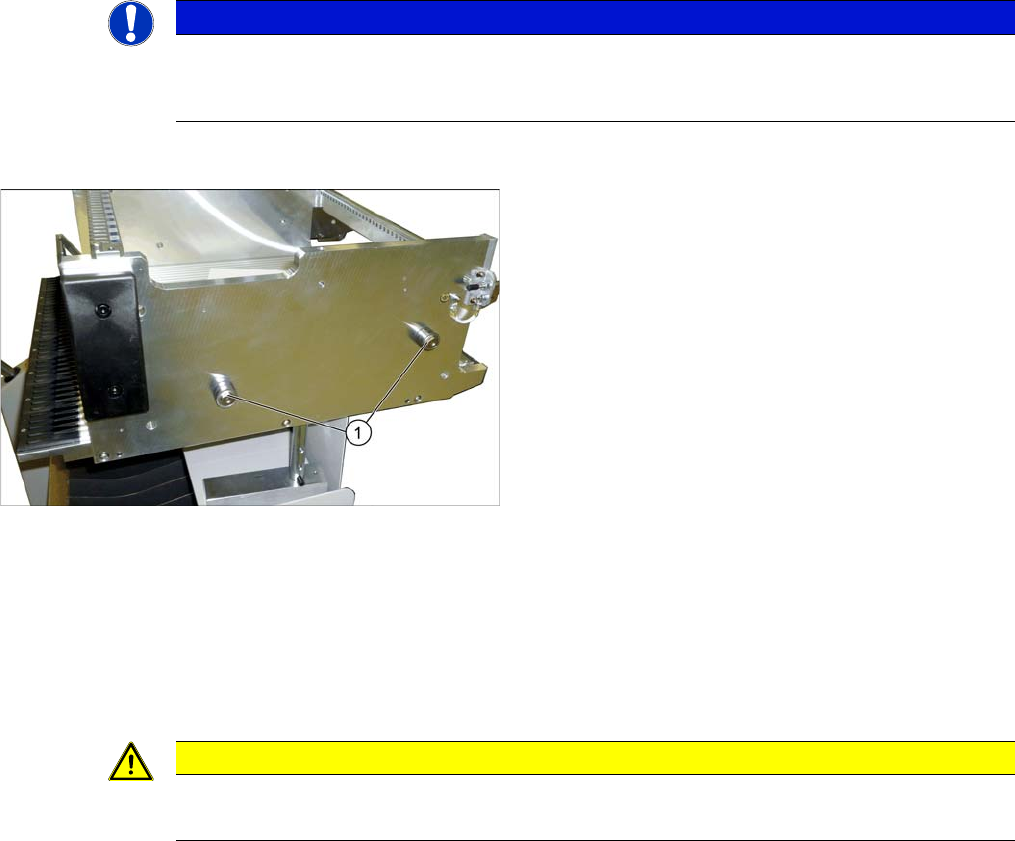
Overview
Removal
► Undo the screw fastening the centering sleeve and then remove the centering sleeve.
Installation
► Follow the removal instructions in reverse order for installation. Also observe the following instruc-
tions:
NOTICE
Replacing all sleeves.
We recommend that you always replace all sleeves belonging to a changeover table at the
same time.
1. Centering sleeves (4 per table)
CAUTION
Installation instructions
► Secure the screws with Loctite 243.
Service Work Conveyor
Component Trolley SX 3.7.6 Replacing the Circuit Breaker Actuator (Schmersal) [03110183-xx]
190 Service Manual SIPLACE SX1/SX2/DX1/DX2 FS02
3.7.6
3.7.6 Replacing the Circuit Breaker Actuator (Schmersal) [03110183-xx]
Replacing the Circuit Breaker Actuator (Schmersal) [03110183-xx]
Parts, Equipment and Tools
▪ SPP Circuit Breaker Actuator COT 60 [03110183-xx]
(including rubber straps and bushings)
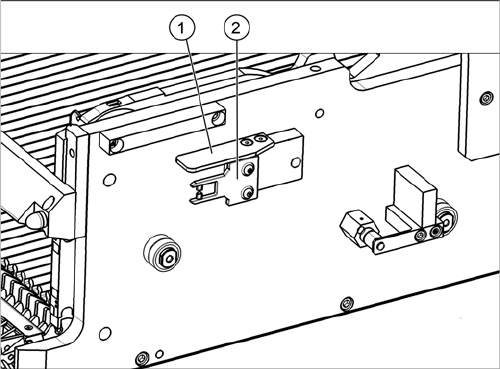
Overview
Removal/Installation
► Remove the fastening screws of the actuator and the protective plate and lift these off.
► Fit the new actuator together with the new rubber straps and bushings. Tighten the two fastening
screws hand-tight.
► Fix the protective cover with two fastening screws.
1. Protective plate
2. Actuator
Service Work Conveyor
3.8.1 Replacing the FCU Docking Station for SX Component Trolley
Service Manual SIPLACE SX1/SX2/DX1/DX2 FS02 191
3.8
3.8 Docking Station for SX Component Trolley
Docking Station for SX Component Trolley
3.8.1
3.8.1 Replacing the FCU
Replacing the FCU
Replacing the FCU follows the same procedure as replacing the FCU at the COT insert. For more infor-
mation about this, read section "3.10.5 Replacing the Feeder Control Unit (FCU) [03059666-xx]"
[ ➙ 217].
3.8.2
3.8.2 Replacing the Feeder Unlocking Device
Replacing the Feeder Unlocking Device
Replacing the feeder unlocking device follows the same procedure as replacing the feeder unlocking de-
vice at the COT insert. For more information about this, read section "3.10.3 Replacing the Feeder Un-
locking Device 60-fold [03057772-xx]" [ ➙ 215].
See also
3.10.1 Replacing the Unlocking Pins [03088220-xx] [ ➙ 206]
3.8.3
3.8.3 Replacing the Power Supply
Replacing the Power Supply
For replacing the power supply, read the Technical Information "Power supply for the docking station for
the SIPLACE X component cart [116933] and SIPLACE SX component cart [116965] has been with-
drawn" [DE: TI2015-04D07] [EN: TI2015-04E07].