00196497-07_SM_SXDX12_en.pdf - 第196页
Service Work Conveyor Manual table 3.9.4 Replacing the Locking La tch [03069205-xx] 196 Service Manual SIPLACE SX1/SX2/DX1/DX2 FS02 3.9.4 3 . 9 . 4 R e p la c in g t h e L o c k in g L a t c h [ 0 3 0 6 9 2 0 5 - x x ] R…
Service Work Conveyor
3.9.3 Removing the Front Section of the Manual Table Manual table
Service Manual SIPLACE SX1/SX2/DX1/DX2 FS02 195
Removal
► Dismantle the back section of the manual table. (See "3.9.2 Removing the Back Section of the Man-
ual Table" [ ➙ 193])
► Loosen the fastening screws of the feeder locking device and then remove the board.
► Loosen the 4 screws fastening the front section.
► Pull the module out of the locating pins. You may need to use a rubber mallet to help you.
Installation
► Follow the removal instructions in reverse order for installation.
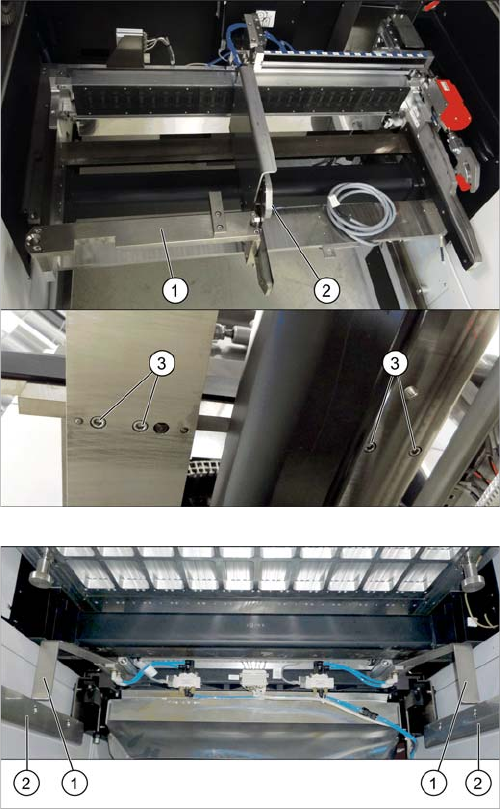
If there is a WPC at the same location, perform the follow-
ing two steps as well:
► Dismantle the WPC docking rail (1).
► Dismantle the left side of the insert mechanism (2).
Loosen the 4 fastening screws (3) on the underside
and the 2 fastening screws on the top of the empty
tape duct.
► Dismantle the stoppers (1).
You may need to lower the cutter onto the support
plates (2). (See "3.11.1 Replacing the Cutter
[03063781Sxx]" [ ➙ 223])
Service Work Conveyor
Manual table 3.9.4 Replacing the Locking Latch [03069205-xx]
196 Service Manual SIPLACE SX1/SX2/DX1/DX2 FS02
3.9.4
3.9.4 Replacing the Locking Latch [03069205-xx]
Replacing the Locking Latch [03069205-xx]
Please refer the instructions in section "3.7.4 Replacing the Locking Latch [03069205-xx]" [ ➙ 188].
See also
3.9.5.1 Operating the Unlocking Hook [ ➙ 198]
3.9.8 Replacing the Feeder Lock on the Manual Table [03082778-xx] [ ➙ 202]
3.9.5
3.9.5 Replacing the Feeder Control Unit (FCU)
Replacing the Feeder Control Unit (FCU)
Parts, equipment and tools
Select the correct spare part:
▪ Rubber mallet
Overview
NOTICE
Only every second location can be occupied.
We recommend that you use 2x8 mm feeders.
If you are using single 8 mm feeders, the location next to the feeder will be left empty.
NOTICE
Remove the feeder
Also observe section "3.9.5.1 Operating the Unlocking Hook" [ ➙ 198].
Machine type Designation Item No.
DX4 FCU 03082687-xx
DX1/DX2 FCU 03082605-xx
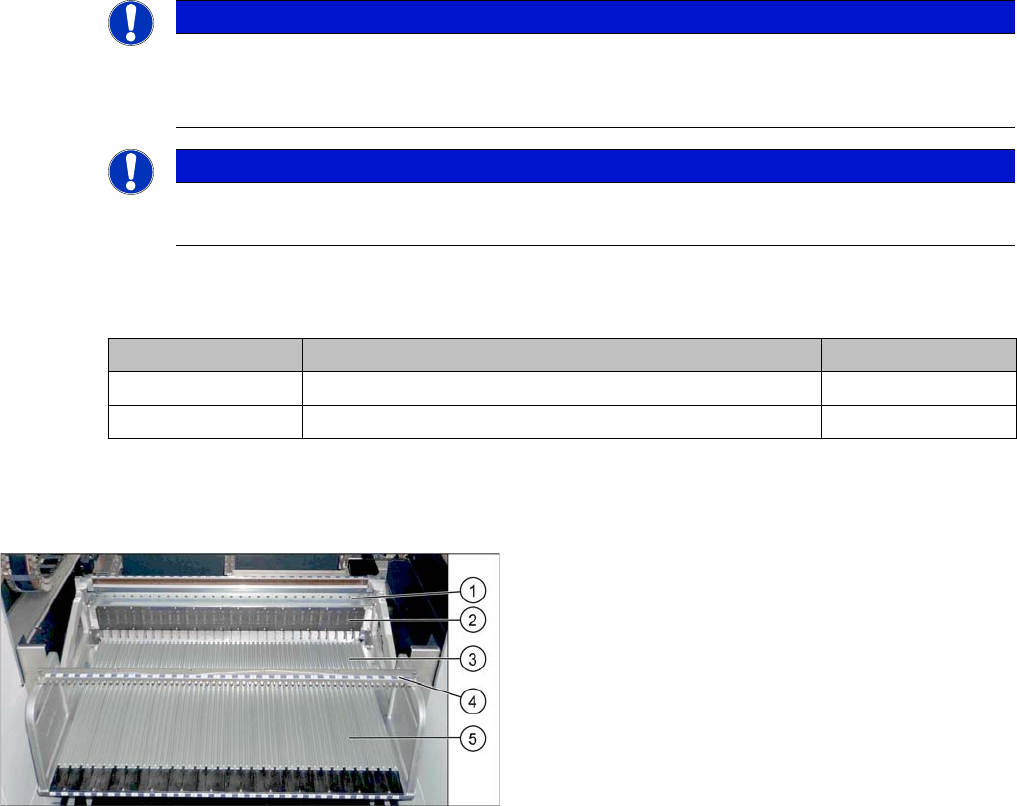
Manual table (using example of DX1/DX2)
1. Centering bar
2. FCU
3. Front part
4. Fixture bar
5. Back part
Service Work Conveyor
3.9.5 Replacing the Feeder Control Unit (FCU) Manual table
Service Manual SIPLACE SX1/SX2/DX1/DX2 FS02 197
Removal
► Dismantle the back section of the manual table (see "3.9.2 Removing the Back Section of the Manual
Table" [ ➙ 193]).
► Dismantle the front section of the manual table (see "3.9.3 Removing the Front Section of the Manual
Table" [ ➙ 194]).
► Dismantle the feeder unlocking device and the FCU (see section "COT insert").
Installation
► Follow the removal instructions in reverse order for installation.
See also
3.10.5 Replacing the Feeder Control Unit (FCU) [03059666-xx] [ ➙ 217]
3.10 COT insert [ ➙ 206]
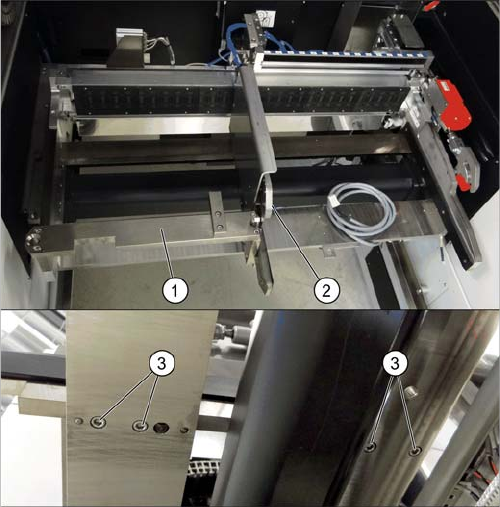
If there is a WPC at the same location, perform the follow-
ing two steps as well:
► Dismantle the WPC docking rail (1).
► Dismantle the left side of the insert mechanism (2).
Loosen the 4 fastening screws (3) on the underside
and the 2 fastening screws on the top of the empty
tape duct.