00196497-07_SM_SXDX12_en.pdf - 第216页
Service Work Conveyor COT inse rt 3.10.4 Replacing the Slotted Rail [03058008- xx] 216 Service Manual SIPLACE SX1/SX2/DX1/DX2 FS02 Installation ► Follow the removal in structions in reverse order for installati o n. Also…
Service Work Conveyor
3.10.3 Replacing the Feeder Unlocking Device 60-fold [03057772-xx] COT insert
Service Manual SIPLACE SX1/SX2/DX1/DX2 FS02 215
3.10.3
3.10.3 Replacing the Feeder Unlocking Device 60-fold [03057772-xx]
Replacing the Feeder Unlocking Device 60-fold [03057772-xx]
Parts, Equipment and Tools
▪ SX1/SX2: feeder unlocking device 60-fold [03057772-xx] or
DX1/DX2: feeder unlocking device 60/2-fold [03082610-xx]
Overview
Removal
► Switch off the machine and secure it to prevent unauthorized reactivation. Observe the instructions
in section "1.2 Preparatory Work..." [ ➙ 13].
► Disconnect all electrical and pneumatic connections. You may want to mark their positions, to make
clear assignment easier later on.
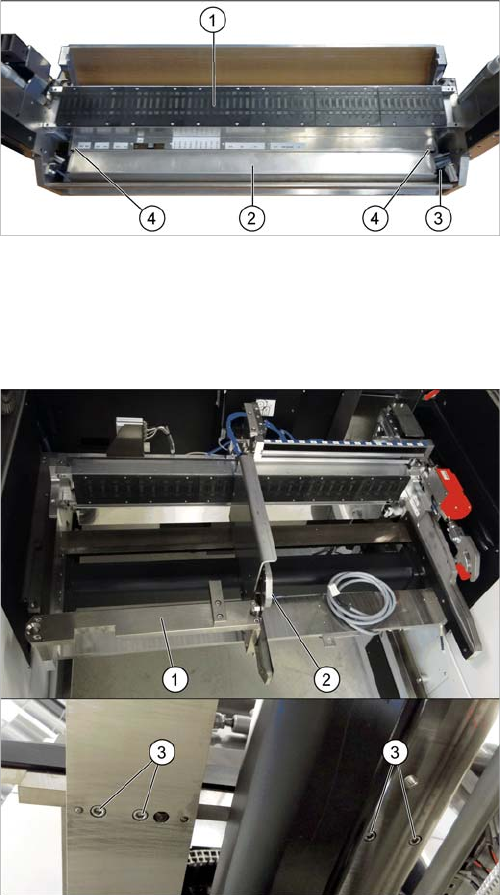
► Undo the two fastening screws and remove the feeder unlock device.
1. Feeder control unit (FCU)
2. Feeder unlock device (under the FCU)
3. Connector for flat ribbon cable
4. Fastening screws for feeder unlock device
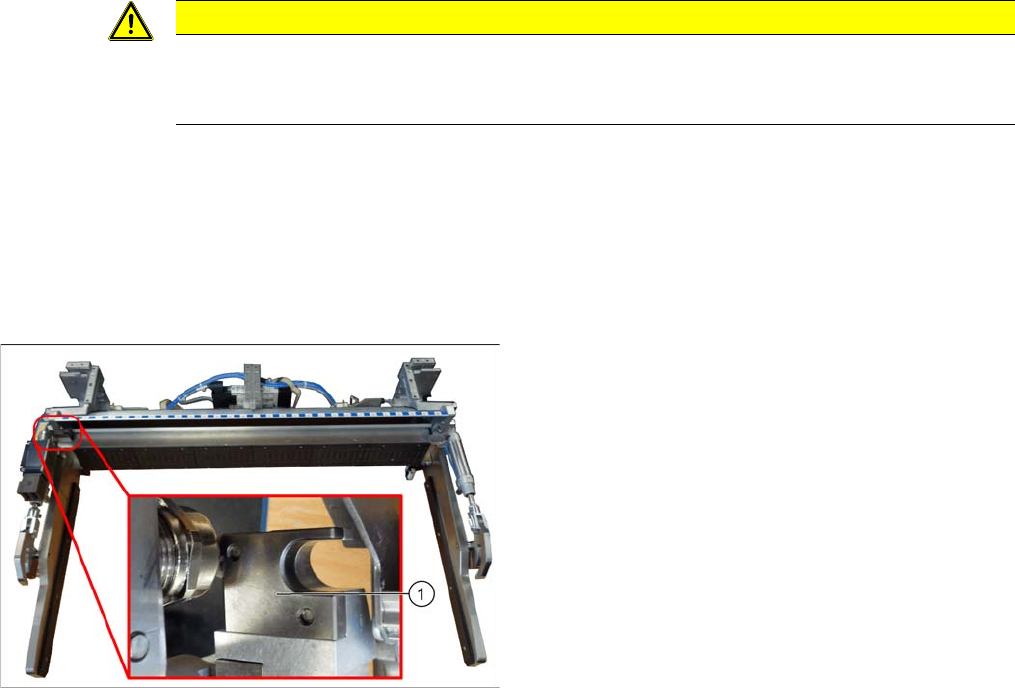
If there is a WPC at the same location, perform the follow-
ing two steps as well:
► Dismantle the WPC docking rail (1).
► Dismantle the left side of the insert mechanism (2).
Remove the four fastening screws (3) on the under-
side and the two fastening screws on the top of the
tape duct.
Service Work Conveyor
COT insert 3.10.4 Replacing the Slotted Rail [03058008-xx]
216 Service Manual SIPLACE SX1/SX2/DX1/DX2 FS02
Installation
► Follow the removal instructions in reverse order for installation. Also observe the following instruc-
tions:
3.10.4
3.10.4 Replacing the Slotted Rail [03058008-xx]
Replacing the Slotted Rail [03058008-xx]
Parts, Equipment and Tools
▪ Slotted rail [03058008-xx]
Overview
Removal
► Switch off the machine and secure it to prevent unauthorized reactivation. Observe the instructions
in section "1.2 Preparatory Work..." [ ➙ 13].
► Undo the two screws fastening the slotted rail and remove the slotted rail.
Installation
► Follow the removal instructions in reverse order for installation.
CAUTION
Installation instructions
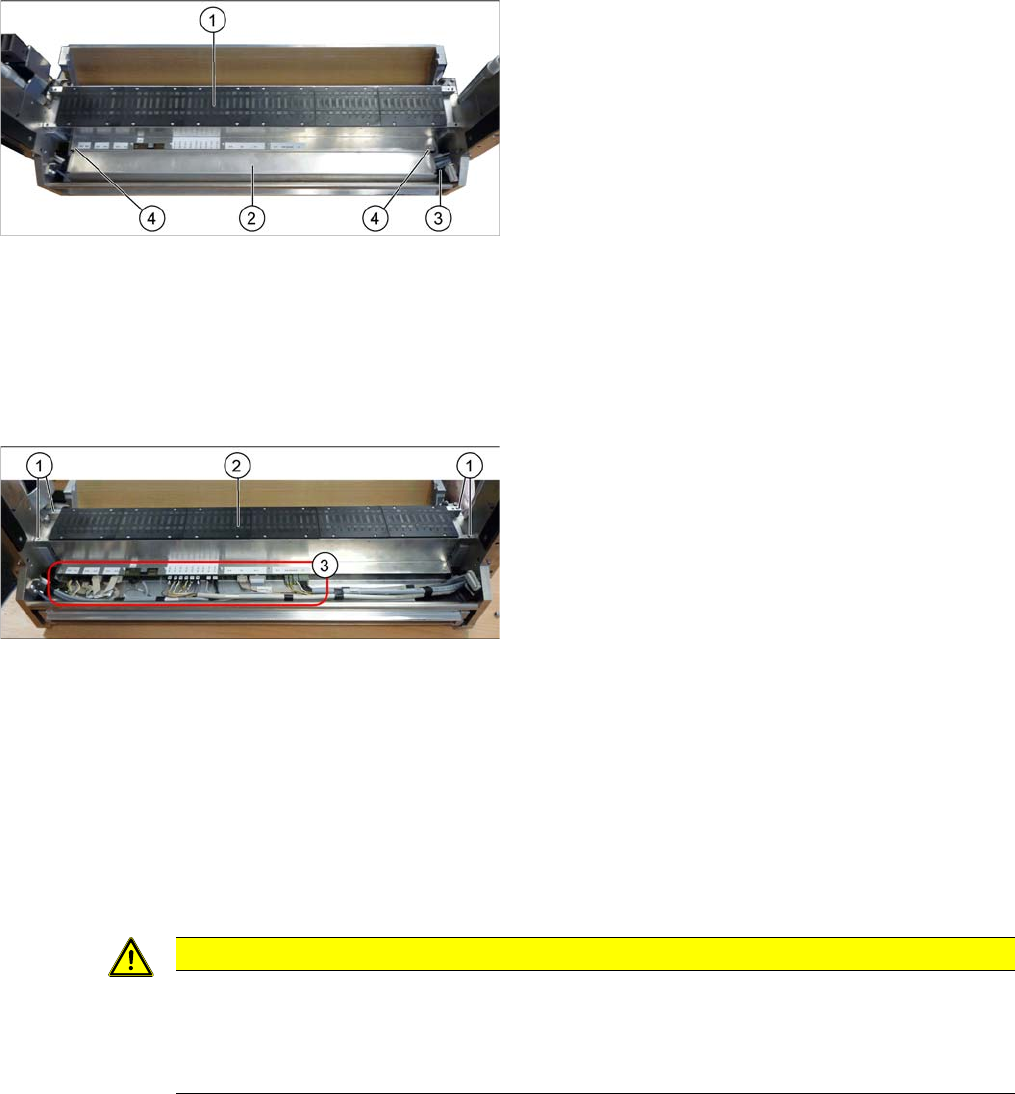
► Make sure that you do not pinch or damage the cables run at the back (connected to the
FCU).
1. Slotted rail
Service Work Conveyor
3.10.5 Replacing the Feeder Control Unit (FCU) [03059666-xx] COT insert
Service Manual SIPLACE SX1/SX2/DX1/DX2 FS02 217
3.10.5
3.10.5 Replacing the Feeder Control Unit (FCU) [03059666-xx]
Replacing the Feeder Control Unit (FCU) [03059666-xx]
Parts, Equipment and Tools
▪ SX1/SX2: B-FCU [03059666-xx] or
DX1/DX2: FCU [03082605-xx]
Overview
Removal
► Switch off the machine and secure it to prevent unauthorized reactivation. Observe the instructions
in section "1.2 Preparatory Work..." [ ➙ 13].
► Dismantle and remove the feeder unlock device. (See "3.10.3 Replacing the Feeder Unlocking De-
vice 60-fold [03057772-xx]" [ ➙ 215])
► Undo the two screws fastening the cover plate above the connectors of the FCU and remove the
cover plate.
► Unplug all cable connections for the FCU. You may want to mark their positions, to make clear as-
signment easier later on.
► Undo the four screws fastening the FCU and then remove the FCU.
Installation
► Follow the removal instructions in reverse order for installation. Also observe the following instruc-
tions:
1. Feeder control unit (FCU)
2. Feeder unlock device (under the FCU)
3. Connector for flat ribbon cable
4. Fastening screws for feeder unlock device
1. Fastening screws for FCU
2. FCU
3. Electrical connections on the FCU
CAUTION
Installation instructions
► Set the DIP switches on the FCU (see "5.4.2 Connecting assy FCU [03059783-xx]"
[ ➙ 326]).
► Perform a BIOS download, if needed. (See "4.9.1 Firmware Download (SW 70x)" [ ➙ 293])