00196497-07_SM_SXDX12_en.pdf - 第223页
Service Work Conveyor 3.11.1 Replacing the Cutter [03063781Sxx] Cutter Service Manual SIPLACE SX1/SX2/DX1/DX2 FS02 223 3.11 3 . 1 1 C u t t e r Cutter 3.11.1 3 . 1 1 . 1 R e p la c in g t h e C u t t e r [ 0 3 0 6 3 7 8 …
Service Work Conveyor
COT insert 3.10.10 Replacing the Waste Tape Chute
222 Service Manual SIPLACE SX1/SX2/DX1/DX2 FS02
Installation
► Hook the waste tape chute into place.
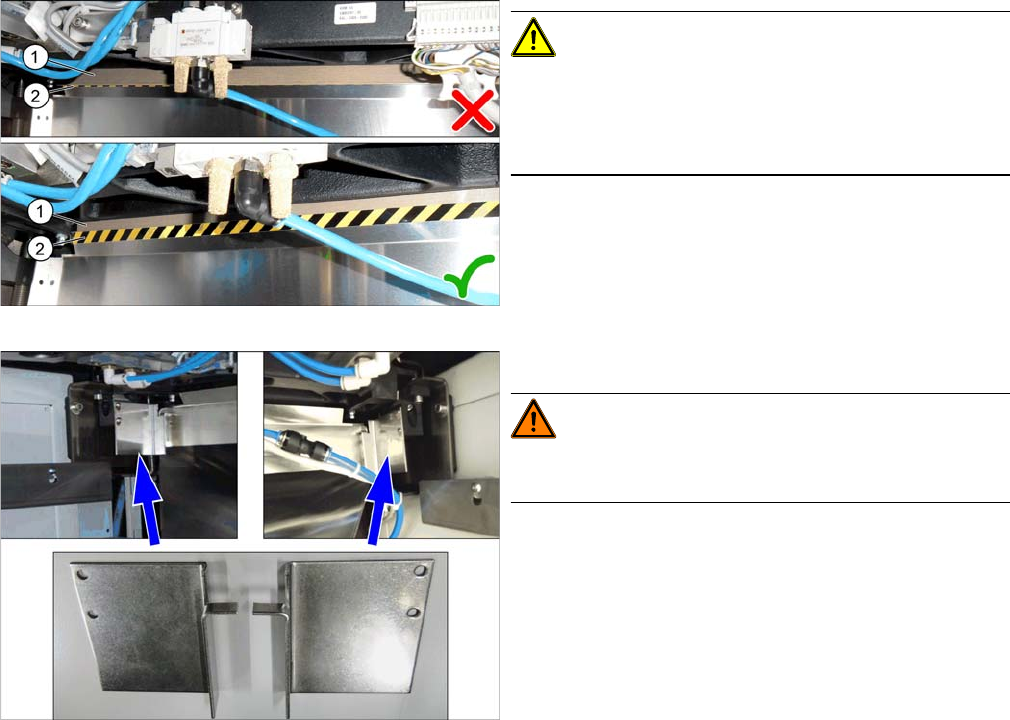
SXDX12V1V2 – Tape Cutter – Waste Tape Chute – Pay Attention to the Plastic Strips – Color Version
Compone nt Supply - Manual Tables - Fitting Pr otections - Color Version
CAUTION!
Make sure that the plastic strips (1) (if present) are locat-
ed behind the plate (2).
The black-yellow hatched label must be completely visi-
ble.
Manual tables only:
WARNING!
There is a risk of injury on manual tables without the two
protections.
► Fit the two protections:
– Protection waste chute DX1/2 left [03094519-xx]
– Protection waste chute DX1/2 right [03094522-
xx]
Service Work Conveyor
3.11.1 Replacing the Cutter [03063781Sxx] Cutter
Service Manual SIPLACE SX1/SX2/DX1/DX2 FS02 223
3.11
3.11 Cutter
Cutter
3.11.1
3.11.1 Replacing the Cutter [03063781Sxx]
Replacing the Cutter [03063781Sxx]
Parts, Equipment and Tools
▪ Cutter [03063781Sxx]
▪ Help of second person, if needed
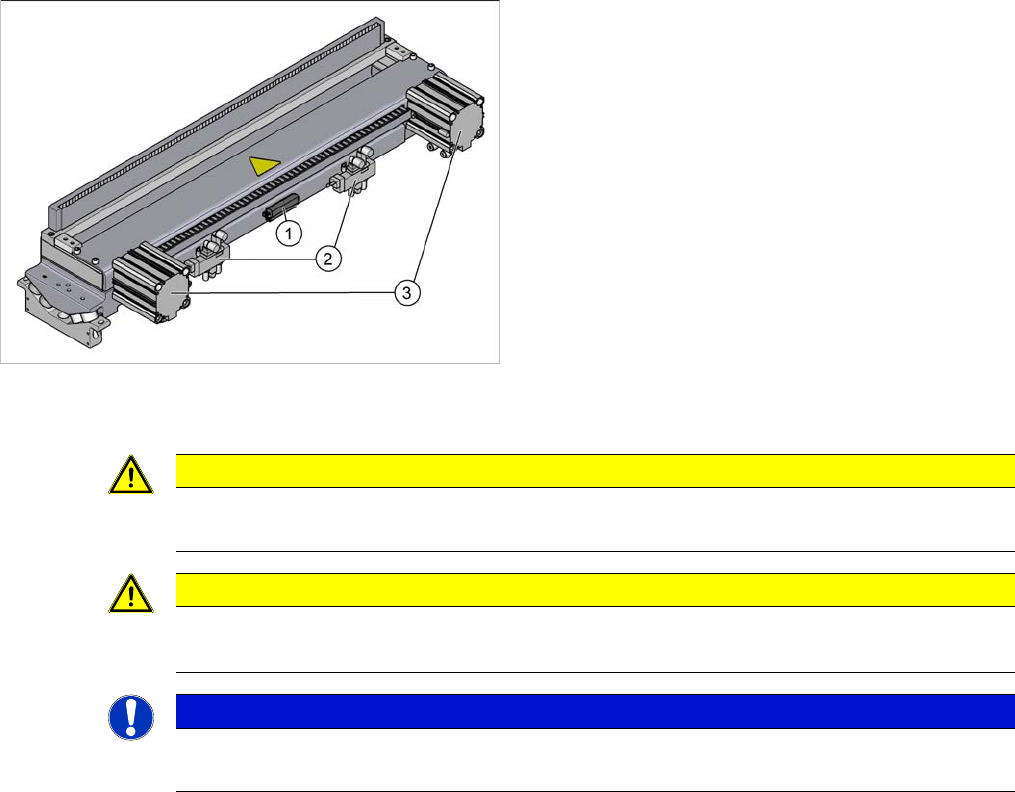
Overview
Removal
► Switch off the machine, disconnect it from the power supply and secure it to prevent unauthorized
reactivation. Observe the instructions in section "1.2 Preparatory Work..." [ ➙ 13].
► Unhook the waste tape chute. Please also observe section "3.10.10 Replacing the Waste Tape
Chute" [ ➙ 221].
► Unplug all electrical and pneumatic connections to the cutter. You may want to mark their positions,
to make clear assignment easier later on.
1. Connection for control system
2. Solenoid valves
3. Short-stroke cylinder
CAUTION
Switch off the compressed air supply!
When working on the pneumatic system, always switch off the compressed air supply.
CAUTION
There is a risk of injuring yourself on the cutting edge of the blades.
► Do not reach into the cutting area.
NOTICE
COT insert
The cutter can be removed without dismantling the COT insert.
Service Work Conveyor
Cutter 3.11.1 Replacing the Cutter [03063781Sxx]
224 Service Manual SIPLACE SX1/SX2/DX1/DX2 FS02
► Carefully lift the cutter out of the machine.
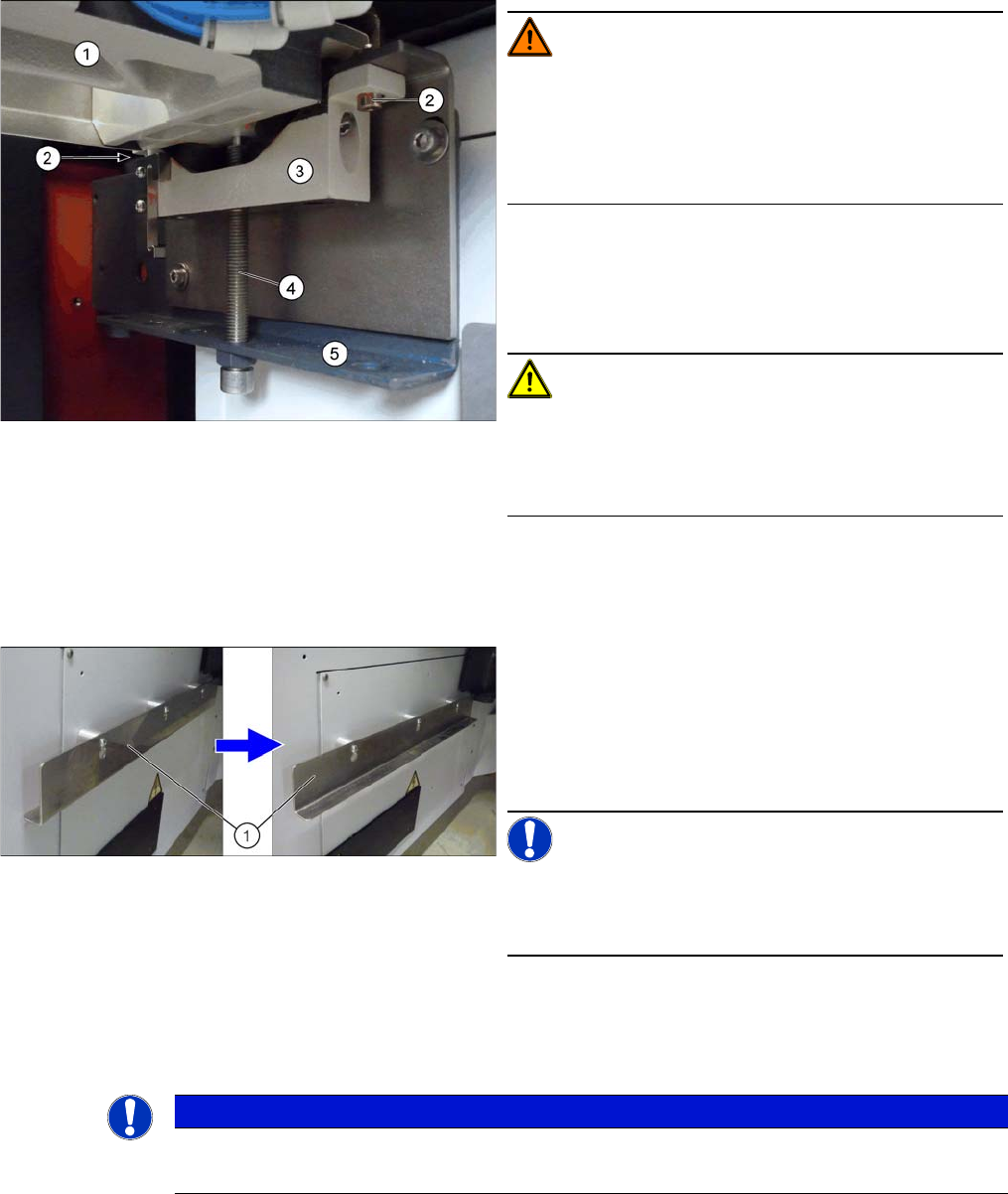
WARNING!
Risk of injury when releasing the fixtures!
The cutter (1) is only held by the fastening screws (2) and
is not supported by other parts.
If the 4 fastening screws are loosened without the cutter
being secured, this will fall down onto the bracket (5).
► Turn the two supporting screws (4) up to the top.
► Undo the 4 screws (2) fastening the brackets (3) of
the cutter and remove these brackets. The cutter is
now resting on the supporting screws.
CAUTION!
Only cutters with FS04:
There are small spacer disks on the top of the screw fix-
ture points for the mount (3). Make sure these are not
lost!
► Carefully lower the cutter onto the brackets by slowly
and evenly (right and left) lowering the supporting
screws.
► Turn the support plates (1) (angular plates) outwards
on the infrastructure cabinets.
To do this, loosen the screws fastening the support
plates.
Unhook the plates, rotate them and then retighten the
fastening screws.
NOTICE!
Support plates
You may need to fetch the support plates from another lo-
cation!
► The cutter can now be carefully pulled out towards
the front.
NOTICE
Heavy machine part!
► The cutter is heavy. You might need to enlist the help of a second person to prevent this.