00196497-07_SM_SXDX12_en.pdf - 第258页
Settings Electrical and Control Settings 4.3.4 Installing the CAN Card Driver 258 Service Manual SIPLACE SX1/SX2/DX1/DX2 FS02 4.3.4 4 . 3 . 4 I n s t a llin g t h e C A N C a r d D r iv e r Installing the CA N Card Drive…
Settings
4.3.3 CAN I/O Module Electrical and Control Settings
Service Manual SIPLACE SX1/SX2/DX1/DX2 FS02 257
From machine nos.: N001
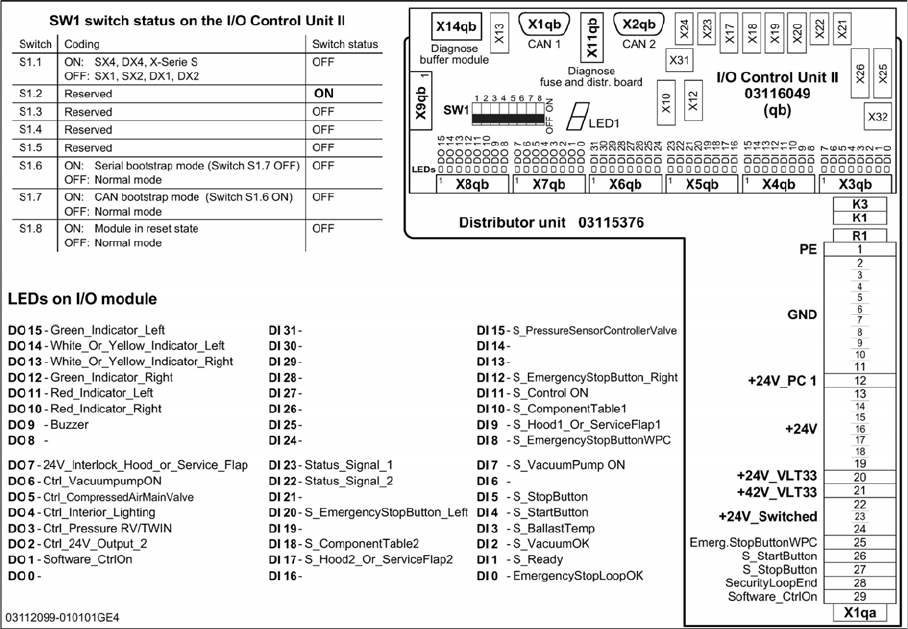
For I/O module [03116049-xx]
Settings
Electrical and Control Settings 4.3.4 Installing the CAN Card Driver
258 Service Manual SIPLACE SX1/SX2/DX1/DX2 FS02
4.3.4
4.3.4 Installing the CAN Card Driver
Installing the CAN Card Driver
The new V7.04.14.0 CAN driver needs to be installed manually. This applies to all SW platforms from
60x up to and including SW705.03. From SW705.04 onwards, this is done automatically.
4.3.4.1
4.3.4.1 Checking the Installed Driver Versions
Checking the Installed Driver Versions
► Switch over to the operating system level at the com-
puter on which the CAN card is installed.
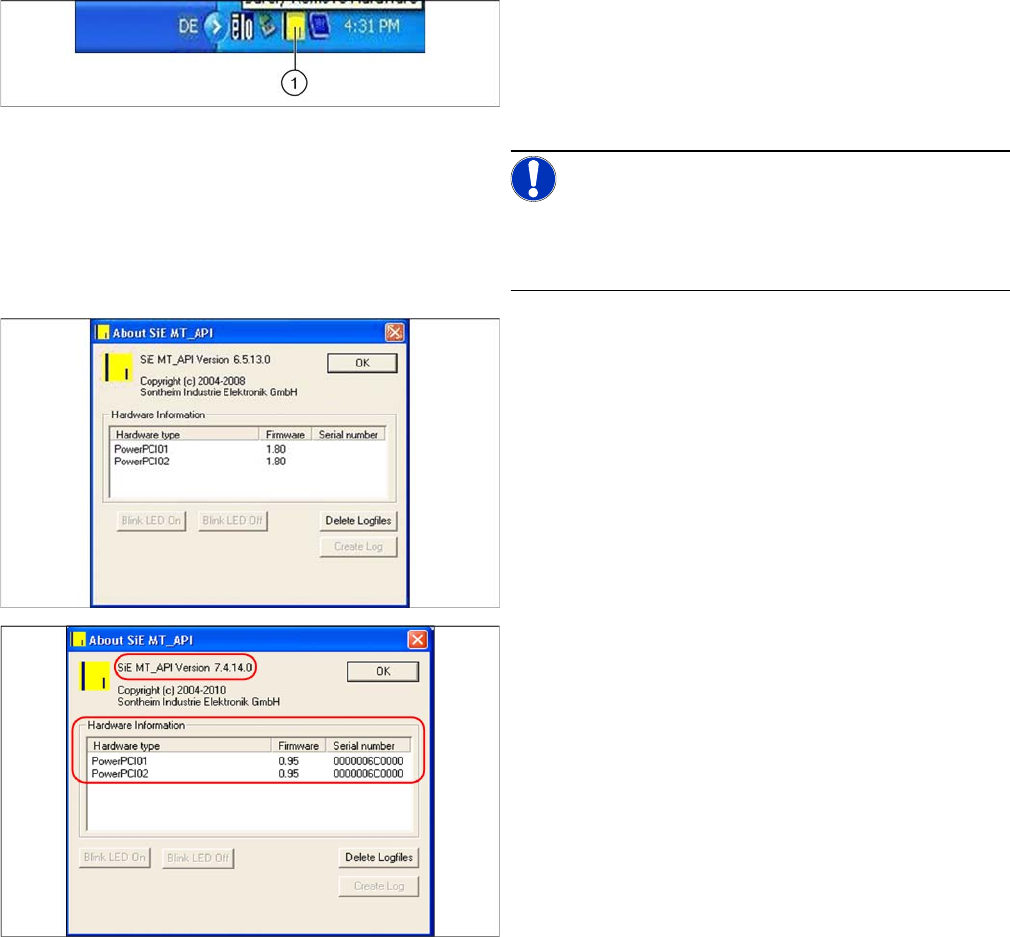
► The task bar shoes a yellow icon (over on the right).
Right-click on this to view more information about the
CAN card.
NOTICE!
The driver is not shown correctly in the Control Panel
Hardware Manager. Make sure you use the icon in the
task bar for this check.
The old CAN card "PowerCAN PCI“ [03052590-xx] is
shown there with the firmware 1.80, the new CAN card
"COM168V2-PCI“ [03079973-xx] is shown with the firm-
ware 0.95.
After replacing the CAN card and successfully installing
the new driver, a version equal to or higher than 7.4.14.0
should be shown.
► If this is not the case, you will need to install the new
driver.
Settings
4.3.4 Installing the CAN Card Driver Electrical and Control Settings
Service Manual SIPLACE SX1/SX2/DX1/DX2 FS02 259
4.3.4.2
4.3.4.2 Installing the New Driver
Installing the New Driver
► Log on as administrator.
► Deinstall the old driver. To do this, open the Control panel, select "Software" and click on the entry
“SIE MultiThread API SIECA 132 Real PowerPCI” - deinstall this.
► Reboot your PC and log on again as administrator.
When you log on, the operating system shows that new hardware has been installed. Terminate the driv-
er installation with the help of the Hardware Wizard. Proceed as follows instead:
► Copy and extract the "CAN driver_MT_API V7.04.1400" to a data carrier. You will find the driver in
the SW download center.
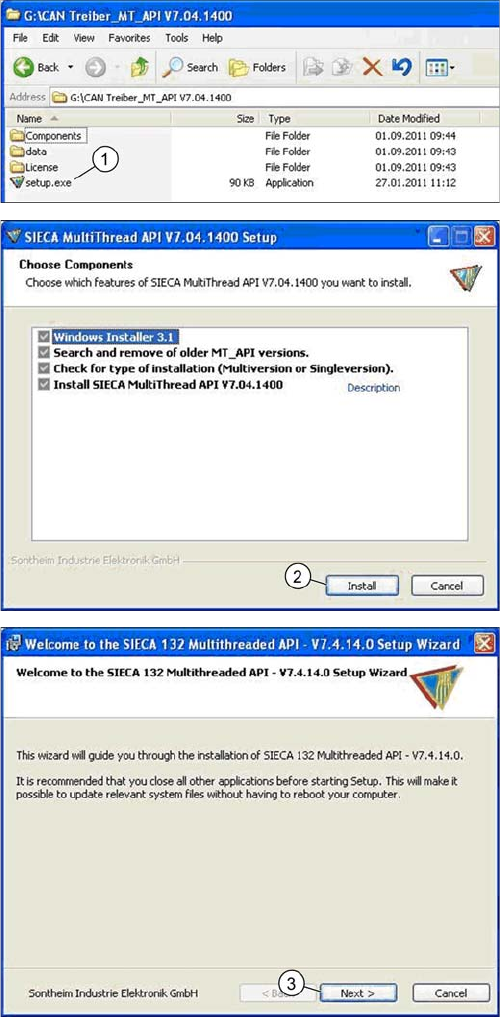
► Now start the Setup.exe on the station computer or machine controller for your machine.
► Acknowledge the following installation steps.
► Double click on the Setup.exe (1) file.
► Click on the "Install" (2) button.
► Click on the "Next" (3) button.