00196497-07_SM_SXDX12_en.pdf - 第261页
Settings 4.3.5 Setting the DIP Switch on the CAN Switch Electrical and Co ntrol Settings Service Manual SIPLACE SX1/SX2/DX1/DX2 FS02 261 ► Reboot your machine and check th e operating system to make s ure that the CAN dr…
Settings
Electrical and Control Settings 4.3.4 Installing the CAN Card Driver
260 Service Manual SIPLACE SX1/SX2/DX1/DX2 FS02
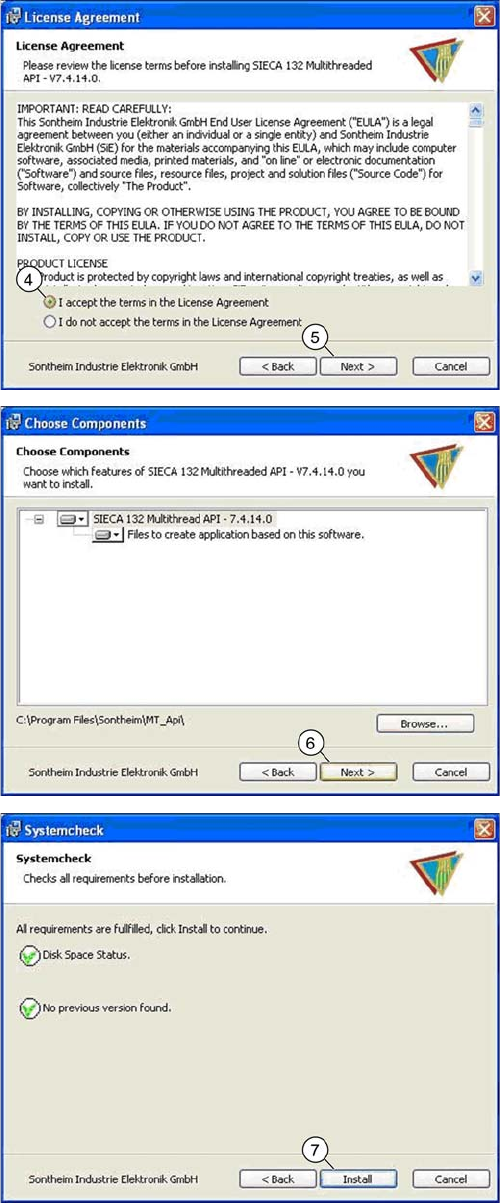
► Select the top option (4) and click on the "Next" (5)
button.
► Click on the "Next" (6) button.
► Click on the "Install" (7) button.
Settings
4.3.5 Setting the DIP Switch on the CAN Switch Electrical and Control Settings
Service Manual SIPLACE SX1/SX2/DX1/DX2 FS02 261
► Reboot your machine and check the operating system to make sure that the CAN driver has been
correctly installed or that the firmware and serial number are recognized correctly.
4.3.5
4.3.5 Setting the DIP Switch on the CAN Switch
Setting the DIP Switch on the CAN Switch
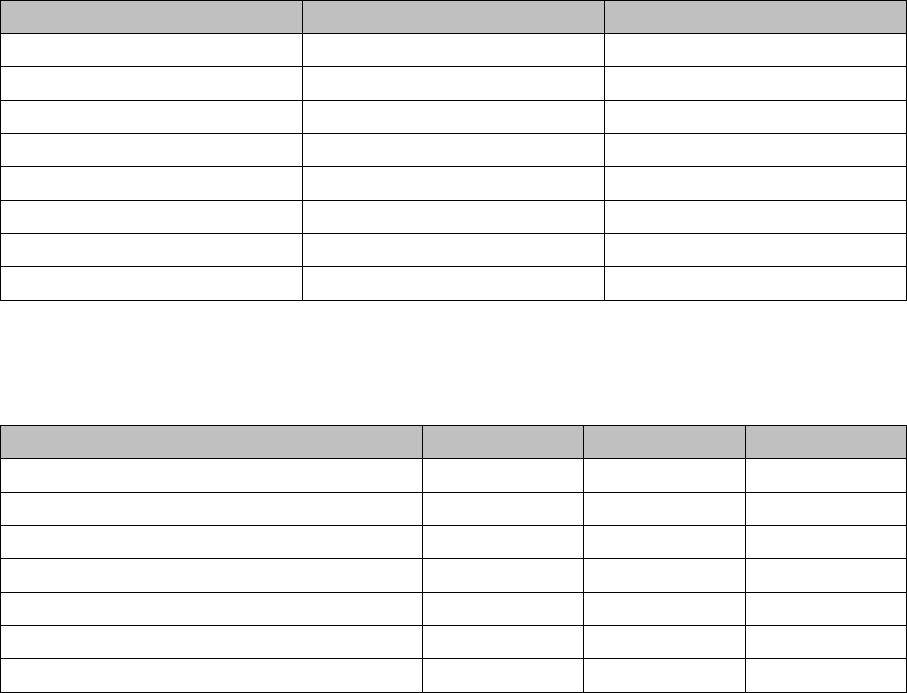
► Disconnect the CAN switch from the voltage supply.
► Loosen the two screws fastening the upper section (side with label) and remove it.
► Set the DIP switches:
Board in CAN switch [03083844-xx]
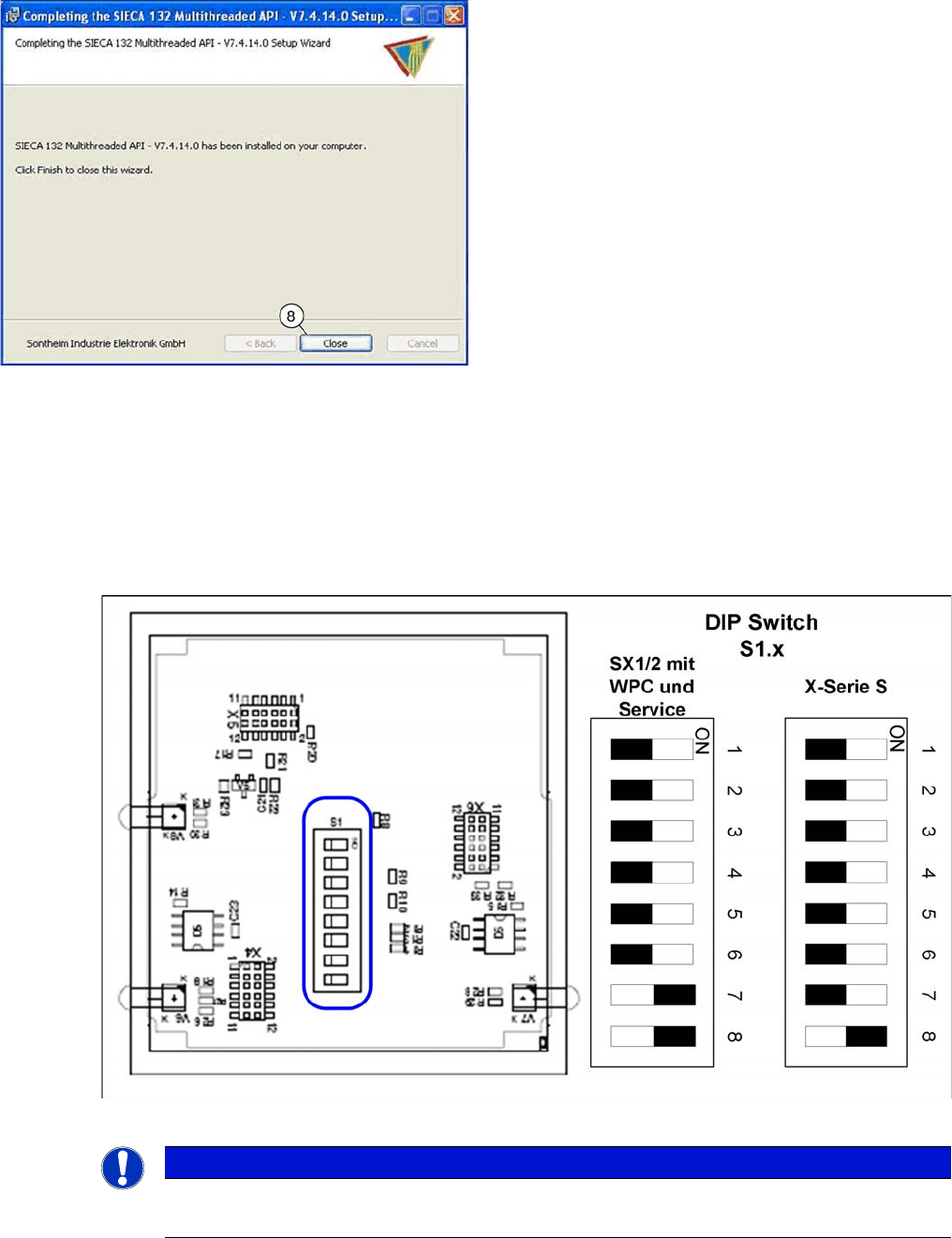
► Once the installation has finished, click on the "Close"
(8) button to close the installation wizard.
NOTICE
Default setting
The CAN switch is preset as a default for the X-Series S.
Settings
Electrical and Control Settings 4.3.5 Setting the DIP Switch on the CAN Switch
262 Service Manual SIPLACE SX1/SX2/DX1/DX2 FS02
DIP switch S1 in CAN switch [03083844-xx]
The DIP switch setting S1.3 to S1.5 is used to configure the display (LED) i.e the number of error frames
needed for the LED to change its status from green to red. The default setting is that the LED turns red
for each error frame received.
LED status error frames
DIP switch S1 ON OFF
S1.1 Test mode Normal mode
S1.2 500 kBaud 1 MBaud
S1.3 See table below See table below
S1.4 See table below See table below
S1.5 See table below See table below
S1.6 ASC Test ON ASC Test OFF
S1.7 120 Ohm CAN 1 No terminal resistor
S1.8 120 Ohm CAN 2 No terminal resistor
LED status S1.3 S1.4 S1.5
1 error frame OFF OFF OFF
5 Error frames/minute ON OFF OFF
10 Error frames/minute OFF ON OFF
10 Error frames/hour ON ON OFF
50 Error frames/hour OFF OFF ON
100 Error frames/hour ON OFF ON
500 Error frames/hour OFF ON ON