00196497-07_SM_SXDX12_en.pdf - 第68页
Service Work Conveyor Control 3.3.1 Replacing the Video Multiplexer Splitter / VGA Spl itter Cable (Machine Nos.: 68 Service Manual SIPLACE SX1/SX2/DX1/DX2 FS02 3.3 3 . 3 C o n t r o l Control See also 5 Description …
Service Work Conveyor
3.2.18 Indicator Lamp and Light Elements Electrical System
Service Manual SIPLACE SX1/SX2/DX1/DX2 FS02 67
Conversion 2-/3-Part Indicator Lamp
Parts, Equipment and Tools
▪ For converting a two-part lamp into a three-part one:
Light tower three colors [00519896Sxx]
▪ For converting a three-part lamp into a two-part one:
Light tower two colors [00519895Sx]
Procedure
► Switch off the machine, disconnect it from the power supply and secure it to prevent unauthorized
reactivation. Observe the instructions in section "1.2 Preparatory Work..." [ ➙ 13].
You can individually lift off each color segment (= base unit) of the indicator lamp.
► Lift off the white color segment with a short rotation.
► Insert the new color segments and new light elements, if necessary.
When inserting the light elements, observe the identification on the casing.
► Attach the yellow and the green color segment with a short rotation.
► Check the function of the indicator lamp.
3.2.18.3
3.2.18.3 Replacing the Light Elements in the Indicator Lamp
Replacing the Light Elements in the Indicator Lamp
SXDX12V1V2 - Note
Parts, Equipment and Tools
▪ Incandescent lamp BA15d 24V/5W [03005204-xx]
or
LED bulb socket B15d 24V AC/DC clear [03099236-xx]
Removal/Installation
► Switch off the machine, disconnect it from the power supply and secure it to prevent unauthorized
reactivation. Observe the instructions in section "1.2 Preparatory Work..." [ ➙ 13].
You can individually lift off each color segment (= base unit) of the indicator lamp.
► Lift off the relevant color segment with a short rotation.
► Remove the light element and insert a new one.
When inserting the light element, observe the identification on the casing.
► Re-attach the yellow and the green color segment with a short rotation.
► Check the function of the indicator lamp.
NOTICE
Description example
The following section describes the conversion of a two-part lamp into a three-part lamp. The
conversion of a three-part lamp into a two-part lamp is identical.
NOTICE
Variant 1 only
This section describes the replacement of light elements on indicator lamps of variant 1.
Service Work Conveyor
Control 3.3.1 Replacing the Video Multiplexer Splitter / VGA Splitter Cable (Machine Nos.:
68 Service Manual SIPLACE SX1/SX2/DX1/DX2 FS02
3.3
3.3 Control
Control
See also
5 Description of the Circuit Boards [ ➙ 299]
3.3.1
3.3.1 Replacing the Video Multiplexer Splitter / VGA Splitter Cable (Machine Nos.: Kxxx/Lxxx/Mxxx only)
Replacing the Video Multiplexer Splitter / VGA Splitter Cable (Machine Nos.: Kxxx/
Lxxx/Mxxx only)
Parts, Equipment and Tools
The video multiplexer splitter [03057965-xx] is replaced by a new video splitter. In case of replacement,
you need the following spare part kit:
▪ Spare Part Kit VGA Splitter Cable [03082983-xx]
Contents:
– 1x splitter cable VGA 2 port [03076910-xx]
– 1x mini gender changer HD15 Bu - HD15 Bu [03082986-xx]
– 1x USB extension cable A-St - A-Bu 1.5 m [03074536-xx]
– 20x cable tie (B = 3.6 mm, L = 140 mm) TY 24M [00805141-xx]
You need the following tools for this:
▪ Allen key, size 2.5
▪ Diagonal cutters
Removal
NOTICE
For machine nos.: Kxxx, Lxxx und Mxxx only
From machine no.: N001 upwards, the cables are plugged in directly into the BoxPC.
► Switch off the machine, disconnect it from the power
supply and secure it to prevent unauthorized reacti-
vation. Observe the instructions in section "1.2 Pre-
paratory Work..." [ ➙ 13].
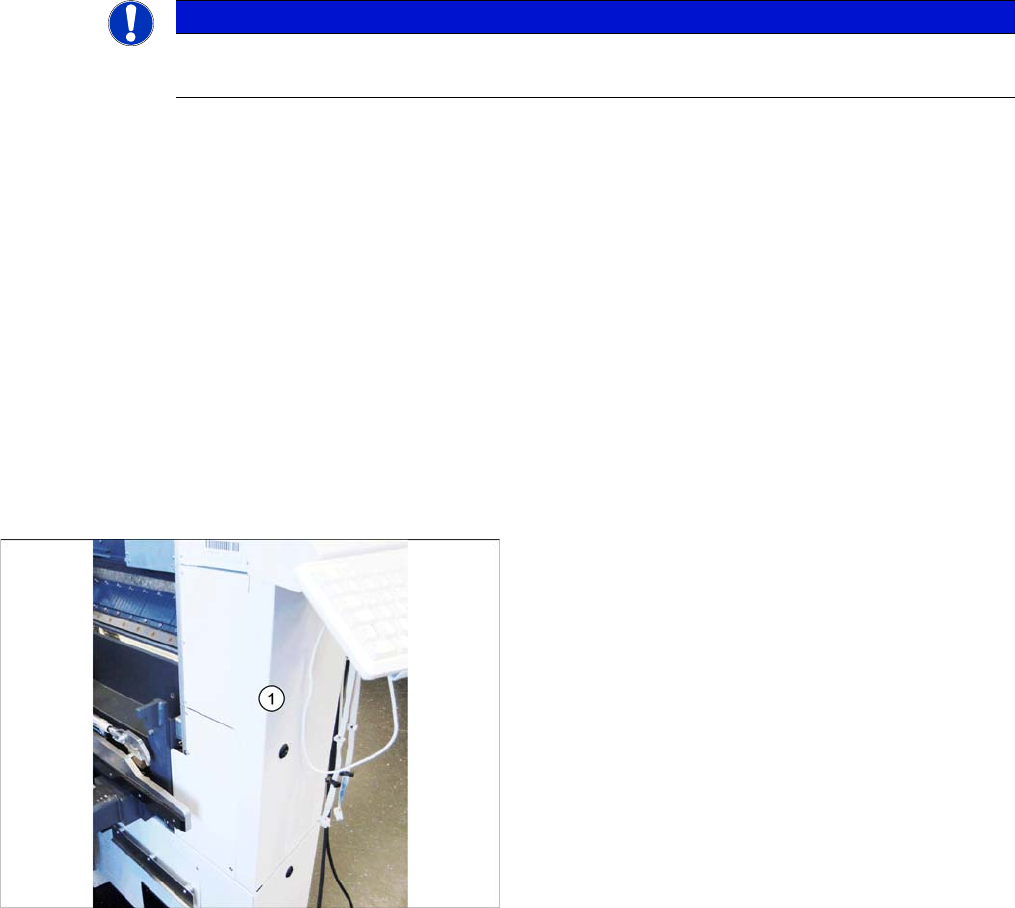
► At location 2, open the cover below the monitor.
Service Work Conveyor
3.3.1 Replacing the Video Multiplexer Splitter / VGA Splitter Cable (Machine Nos.: Kxxx/Lxxx/Mxxx only) Control
Service Manual SIPLACE SX1/SX2/DX1/DX2 FS02 69
Installation
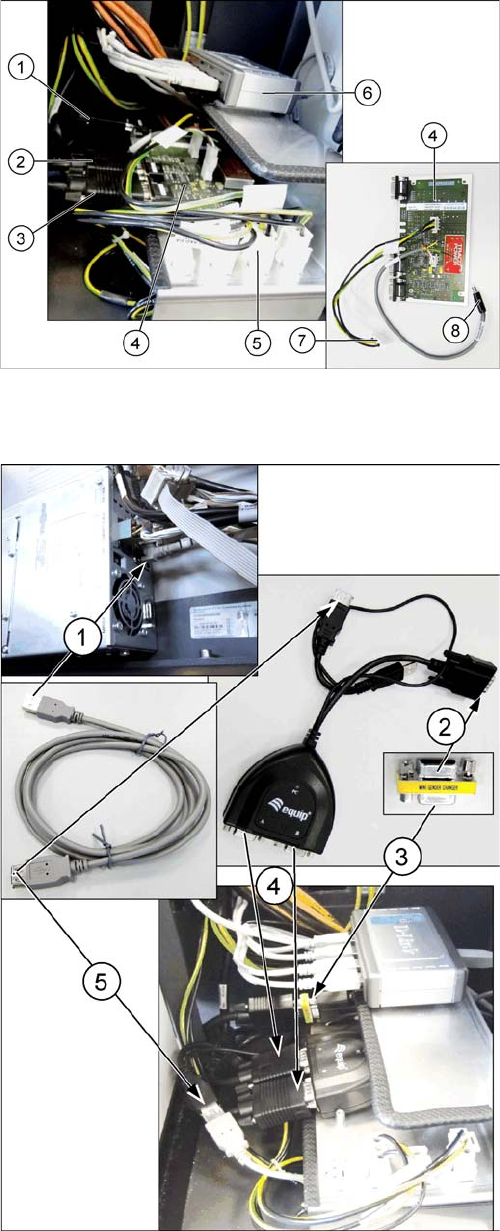
► Unplug all cables ((1), (2), (3)) from the defective vid-
eo multiplexer splitter (4).
► Remove the cable (7) from connection X2qv (5).
► Unplug the power supply cable (8) from the USB hub
(6). This cable will no longer be used. The line voltage
will be supplied via the existing USB cable from the
BoxPC in the future.
► Undo the four fastening screws (hexagon socket -
use Allen key) of the video multiplexer splitter and re-
move the splitter.
► Remove all cables which are not required.
► (1) Plug the USB extension cable into a free port of
the BoxPC and run the cable through the cable duct
to the installation position of the video splitter.
► (2) Connect the mini gender changer to the PC input
cable of the "Splitter cable VGA 2 port".
► (3) Then connect the cable "computer 1 – video mul-
tiplexer [03055251-xx]" to the other side of the mini
gender changer.
► (4) Connect the cables "monitor 1 – video multiplexer
[03055254-xx]" and "monitor 2 – video multiplexer
[03055253-xx]" to the inputs A and B of the "splitter
cable VGA 2 port".
► (5) Connect the USB cable to the USB connector of
the "splitter cable VGA 2 port". This is the power sup-
ply for "splitter cable VGA 2 port". When the machine
is switched on, the green LED indicates that voltage
is present.
► Follow the removal instructions in reverse order for
further installation.