00196497-07_SM_SXDX12_en.pdf - 第82页
Service Work Conveyor Control 3.3.8 Replacing the CAN Switch [03083844-xx] 82 Service Manual SIPLACE SX1/SX2/DX1/DX2 FS02 3.3.8 3 . 3 . 8 R e p la c in g t h e C A N S w it c h [ 0 3 0 8 3 8 4 4 - x x ] Replacing the CAN…

Service Work Conveyor
3.3.7 Replacing the RAM in the BoxPC Control
Service Manual SIPLACE SX1/SX2/DX1/DX2 FS02 81
Removal
► Switch off the machine, disconnect it from the power supply and secure it to prevent unauthorized
reactivation. Observe the instructions in section "1.2 Preparatory Work..." [ ➙ 13].
► Dismantle and remove the BoxPC from the machine (see "3.3.3 Replacing the Control Computer
BoxPC" [ ➙ 72]).
► Loosen the screws fastening the cover of the BoxPC and open the cover.
► Loosen the locks on both sides of the memory extension and remove the memory extension.
Installation
► Follow the removal instructions in reverse order for installation. Also observe the following instruc-
tions:
CAUTION
Installation instructions
► Make sure that you insert the memory extension the right way round. The new memory ex-
tension must audibly engage into its slot.
Service Work Conveyor
Control 3.3.8 Replacing the CAN Switch [03083844-xx]
82 Service Manual SIPLACE SX1/SX2/DX1/DX2 FS02
3.3.8
3.3.8 Replacing the CAN Switch [03083844-xx]
Replacing the CAN Switch [03083844-xx]
SXDX12V1V2
Parts, Equipment and Tools
▪ CAN switch [03083844-xx]
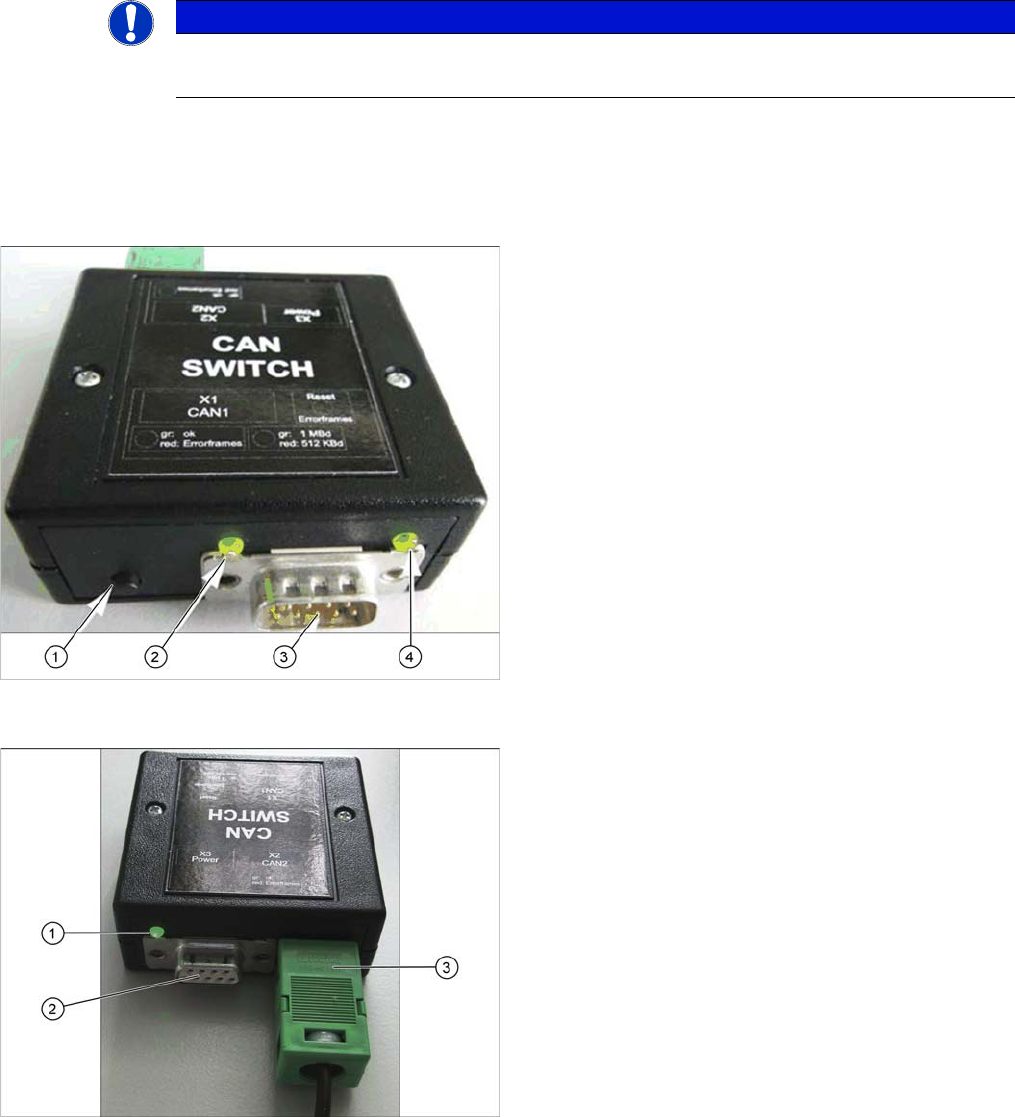
Overview
SXDX12V1 V2 – Installa tion Location
NOTICE
On machines up to no.: Mxxx only
The CAN switch is only used in machines up to serial nos.: Mxxx.
Description CAN 1
1. RESET – button
The button is used to reset the red LED on both sides,
CAN 1 and CAN 2.
2. LED green: setting 1Mbit
LED red: setting 500kBit
3. CAN bus cable connection CAN 1
4. LED green/red for CAN 1
Data transfer OK: green
Error frames received: red
Description CAN 2
1. LED green/red for CAN 2
Data transfer OK: green
Error frames received: red
2. CAN bus cable connection CAN 2
3. Voltage supply connection 24 V DC

Service Work Conveyor
3.3.8 Replacing the CAN Switch [03083844-xx] Control
Service Manual SIPLACE SX1/SX2/DX1/DX2 FS02 83
Removal
► Switch off the machine, disconnect it from the power supply and secure it to prevent unauthorized
reactivation. Observe the instructions in section "1.2 Preparatory Work..." [ ➙ 13].
► Unplug the electrical connections for the CAN switch. Mark their positions, to make clear assignment
easier later on.
Installation
► Follow the removal instructions in reverse order for installation. Also observe the following instruc-
tions:
CAUTION
Installation instructions
► Correct/check the DIP switch setting on the CAN switch (see "4.3.5 Setting the DIP Switch
on the CAN Switch" [ ➙ 261]) (default setting: X-Series S).