00196497-07_SM_SXDX12_en.pdf - 第89页
Service Work Conveyor 3.4.4 Replacing the Gantry Interface X [030 65078 - xx] Gantries Service Manual SIPLACE SX1/SX2/DX1/DX2 FS02 89 Installation Adhesive Tape for Gantry Interface ► Follow the removal in structions in …
Service Work Conveyor
Gantries 3.4.4 Replacing the Gantry Interface X [03065078-xx]
88 Service Manual SIPLACE SX1/SX2/DX1/DX2 FS02
3.4.4
3.4.4 Replacing the Gantry InterfaceX [03065078-xx]
Replacing the Gantry Interface X [03065078-xx]
Parts, equipment and tools
▪ Gantry interface X passive 1 [03065078-xx]
Overview
Removal
► Switch off the machine, disconnect it from the power supply and secure it to prevent unauthorized
reactivation. Observe the instructions in section "1.2 Preparatory Work..." [ ➙ 13].
► Remove the cover above the gantry interface. Depending on the version this is secured with press
studs or screws.
► Loosen the connections on the pneumatic hoses which lead away from the gantry interface.
► Unplug the electrical connections of the Y trailing cable on the top side of the gantry interface.
► Loosen the four screws fastening the gantry interface.
► Unplug the electrical connections on the underside of the gantry interface and remove the interface
from the machine.
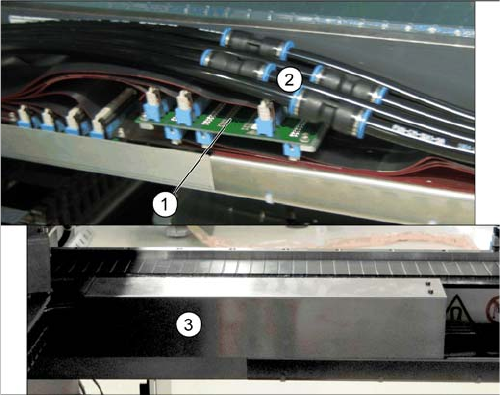
1. Gantry interface X (without cover)
2. Pneumatic hoses (without cover)
3. Cover above the gantry interface X
Service Work Conveyor
3.4.4 Replacing the Gantry Interface X [03065078-xx] Gantries
Service Manual SIPLACE SX1/SX2/DX1/DX2 FS02 89
Installation
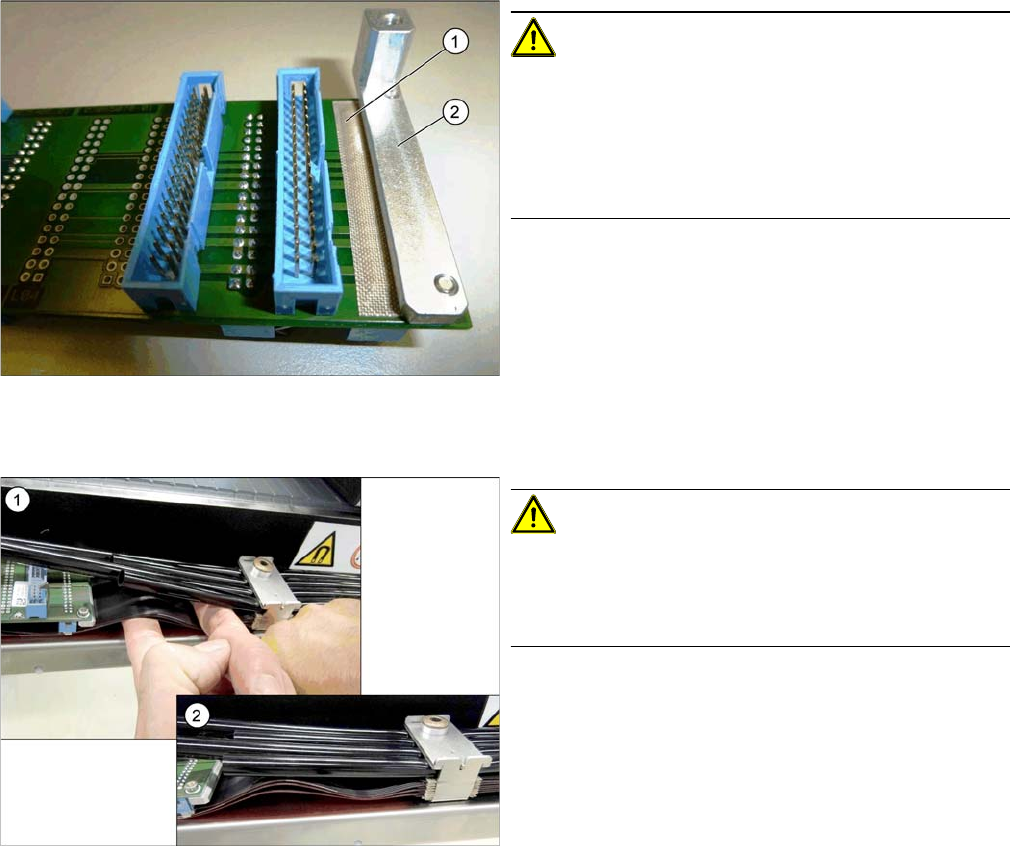
Adhesive Tape for Gantry Interface
► Follow the removal instructions in reverse order for installation. Also observe the following instruc-
tions:
CAUTION!
During assembly, make sure that the connection rail con-
tacts are insulated with adhesive tape (1) in the direction
of the aluminum holder (2). Do not use conductive tape,
recommendation [03000372-xx] "PTFE glass fiber mate-
rial, self-adhesive, width 20mm" for insulating the con-
tacts.
CAUTION!
During installation, lay the flat ribbon cables of the X trail-
ing cable in a slight S shape to prevent the hoses from
pressing against the flat ribbon cables and the connec-
tors.
1. Bend the flat ribbon cable on the trailing interface into
shape
2. Flat ribbon cable on the trailing interface
Service Work Conveyor
Gantries 3.4.5 Replacing the Gantry Interface Y [03065335-xx]
90 Service Manual SIPLACE SX1/SX2/DX1/DX2 FS02
3.4.5
3.4.5 Replacing the Gantry InterfaceY [03065335-xx]
Replacing the Gantry Interface Y [03065335-xx]
Parts, equipment and tools
▪ Gantry interface Y [03065335-xx]
Overview
Removal
► Switch off the machine, disconnect it from the power supply and secure it to prevent unauthorized
reactivation. Observe the instructions in section "1.2 Preparatory Work..." [ ➙ 13].
► Unplug the pneumatic hoses which lead away from the gantry interface.
► Remove the covers above the board. Depending on the version the top cover is secured with press
studs or screws.
► Unplug the electrical connections on the top of the gantry interface. You may want to mark their po-
sitions, to make clear assignment easier later on.
► Loosen the two screws fastening the cover under the gantry interface.
► Unplug the electrical connections on the underside of the gantry interface. You may want to mark
their positions, to make clear assignment easier later on.
► Loosen the two screws fastening the gantry interface and remove the interface from the machine.
Installation
► Follow the removal instructions in reverse order for installation.
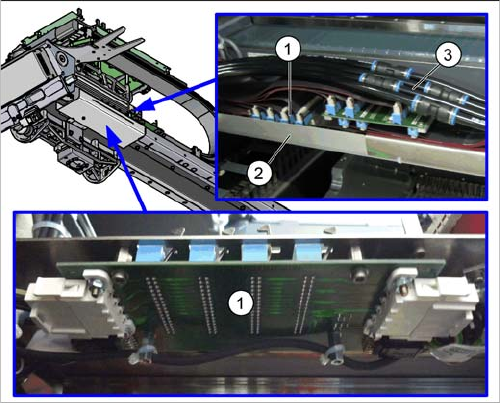
1. Gantry interface Y
2. Cover
3. Pneumatic hoses