00196497-07_SM_SXDX12_en.pdf - 第97页
Service Work Conveyor 3.4.11 Replacing the Trailing Cable Interf ace [03064127-xx] Gantries Service Manual SIPLACE SX1/SX2/DX1/DX2 FS02 97 3.4.11 3 . 4 . 1 1 R e p la c in g t h e T r a ilin g C a b le I n t e r f a c e …
Service Work Conveyor
Gantries 3.4.10 Replacing the Vision Hotlink Adapter [03050555-xx]
96 Service Manual SIPLACE SX1/SX2/DX1/DX2 FS02
Removal
► Switch off the machine, disconnect it from the power supply and secure it to prevent unauthorized
reactivation. Observe the instructions in section "1.2 Preparatory Work..." [ ➙ 13].
► Unplug the electrical connections to the trailing cable interface and the Vision hotlink adapter. Mark
their positions, to make clear assignment easier later on.
► Loosen the two screws fastening the mount. You can then push the mount backwards and lift it off
the fastening screws.
► Loosen the 4 screws fastening the Vision hotlink adapter and remove it from the mount.
Installation
► Follow the removal instructions in reverse order for installation.
See also
5.2.6 Vision hotlink adapter [03050555-xx] [ ➙ 320]
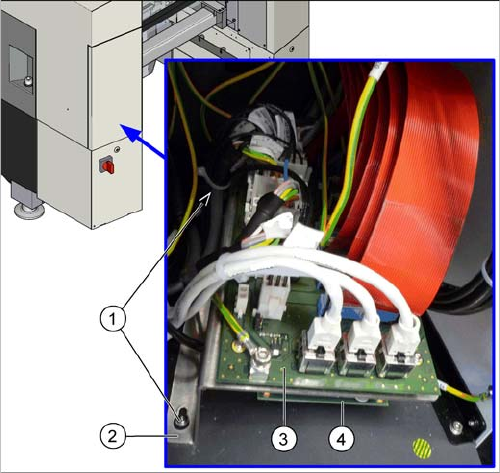
1. Screws fastening the mount
2. Mount
3. Trailing interface
4. Vision hotlink adapter
Service Work Conveyor
3.4.11 Replacing the Trailing Cable Interface [03064127-xx] Gantries
Service Manual SIPLACE SX1/SX2/DX1/DX2 FS02 97
3.4.11
3.4.11 Replacing the Trailing Cable Interface [03064127-xx]
Replacing the Trailing Cable Interface [03064127-xx]
Parts, equipment and tools
▪ Trailing cable interface [03064127-xx]
Overview
Removal
► Switch off the machine, disconnect it from the power supply and secure it to prevent unauthorized
reactivation. Observe the instructions in section "1.2 Preparatory Work..." [ ➙ 13].
► Unplug the electrical connections to the trailing cable interface and the Vision hotlink adapter. Mark
the positions of these connections, to make clear assignment easier later on.
► Loosen the two screws fastening the mount. You can then push the mount backwards and lift it off
the fastening screws.
► Loosen the six screws fastening the trailing cable interface and remove the trailing cable interface
from the mount.
Installation
► Follow the removal instructions in reverse order for installation.
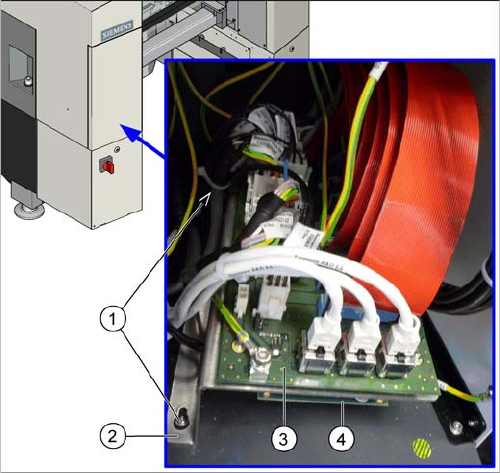
1. Screws fastening the mount
2. Mount
3. Trailing interface
4. Vision hotlink adapter (on the underside of the mount)
The trailing cable interface for gantry 1 is located in sector
1.
The trailing cable interface for gantry 2 ("SX 1 prepared"
and SX2) is located in sector 3.
Service Work Conveyor
Gantries 3.4.12 Replacing the X Axis Sensor Module [03068500-xx]
98 Service Manual SIPLACE SX1/SX2/DX1/DX2 FS02
3.4.12
3.4.12 Replacing the X Axis Sensor Module [03068500-xx]
Replacing the X Axis Sensor Module [03068500-xx]
Parts, Equipment and Tools
▪ Sensor module X axis [03068500-xx]
Overview
Removal
► Switch off the machine, disconnect it from the power supply and secure it to prevent unauthorized
reactivation. Observe the instructions in section "1.2 Preparatory Work..." [ ➙ 13].
► If there is a cover above the boards, dismantle it.
► Unplug all electrical connections to the X axis sensor module. You may want to mark their positions,
to make clear assignment easier later on.
► Undo the screws/bolts fastening the sensor module and then remove the sensor module.
Installation
► Follow the removal instructions in reverse order for installation. Also observe the following instruc-
tions:
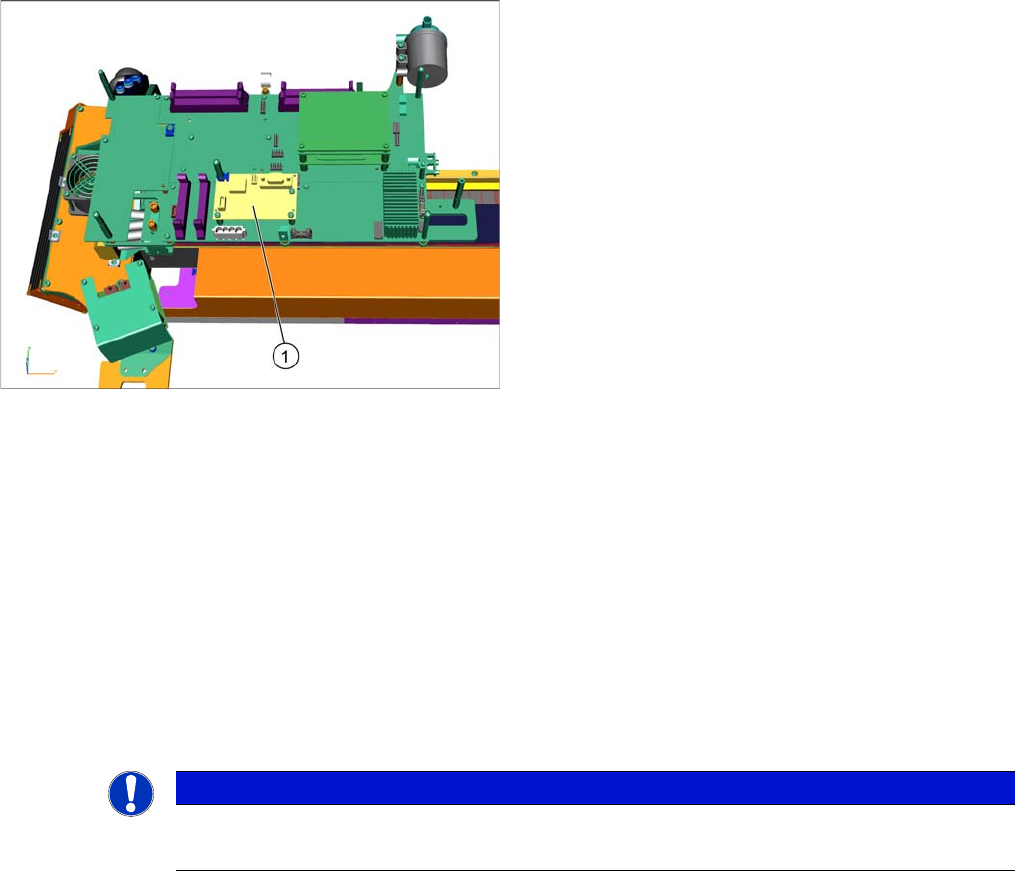
1. Sensor module X axis [03068500-xx]
NOTICE
Installation instructions
► Replace any opened cable ties, if needed.